
SQL Server has long been the reliable workhorse of enterprise IT. It stores the mission-critical data that keeps your business running. But in an era where data must be instantly available across cloud platforms, analytics engines, and AI models, it’s no longer strategically optimal to keep that data locked in a single database.
That’s where data replication comes in.
When you need to migrate workloads to the cloud, offload heavy reporting queries, or ensure high availability during an outage, replication is the engine that makes it happen. As data volumes scale and the architecture grows more complex, how you replicate matters just as much as why.
If you’re navigating the complexities of data replication for SQL Server, you’re likely facing a practical set of challenges: which native replication method should you use? How do you avoid crippling performance bottlenecks? And how do you reliably move SQL Server data to modern cloud platforms without taking your systems offline? In this guide, we’ll break down exactly how SQL Server replication works, explore the limitations of its native tools, and show you why modern, log-based Change Data Capture (CDC) is the fastest, safest path to modern database replication.
Key Takeaways
- Replication is an enterprise enabler: SQL Server data replication underpins business continuity, advanced analytics, and cloud modernization strategies.
- Native tools have trade-offs: SQL Server offers four built-in replication types (Snapshot, Transactional, Merge, and Peer-to-Peer), each with unique strengths and inherent limitations.
- Scale breaks native approaches: Native replication introduces challenges—like latency, schema changes, limited cloud support, and complex monitoring—that compound at enterprise scale.
- CDC is the modern standard for data replication: Log-based Change Data Capture (CDC) enables real-time, cloud-ready replication with far less overhead than traditional native methods.
- Best practices mitigate risk: Success requires aligning your replication strategy with business outcomes, proactively monitoring pipeline health, securing endpoints, and planning migrations to minimize downtime.
- Striim bridges the gap: Modern platforms like Striim extend replication beyond SQL Server’s native limits. With real-time CDC, diverse cloud-native targets, built-in monitoring, and enterprise-grade security, Striim reduces total cost of ownership (TCO) and accelerates modernization.
What Is Data Replication in SQL Server?
Data replication in SQL Server is the process of copying and distributing data and database objects from one database to another, and then synchronizing them to maintain consistency.
But when data leaders talk about “data replication for SQL Server,” they aren’t just talking about Microsoft’s built-in features. Today, the term encompasses both native SQL Server Replication and modern, third-party approaches like log-based Change Data Capture (CDC) streaming.
Whether you’re relying on the native tools out of the box or upgrading to a modern streaming platform, the underlying goal is the same. To move data securely and accurately where it needs to go to support high availability, operational performance, and advanced analytics.
How Data Replication Works for SQL Server
To appreciate why many enterprises are eventually forced to move toward modern CDC platforms, you first need a baseline understanding of how native SQL Server replication operates under the hood.
Native replication is built around a publishing industry metaphor: Publishers, Distributors, and Subscribers.

Here’s how the native workflow looks, broken down step-by-step:
Step 1: Define the Publisher and Articles to Replicate
The Publisher is your source database. You don’t have to replicate the entire database; instead, you start by defining “Articles”, i.e. the specific tables, views, or stored procedures you want to share. Grouping these articles together creates a “Publication.”
Step 2: Configure the Distributor to Manage Replication
The Distributor is the middleman. It stores the distribution database, which holds metadata, history data, and (in transactional replication) the actual transactions waiting to be moved. It acts as the routing engine, taking the load off the Publisher.
Step 3: Set up Subscribers to Receive Data
Subscribers are your destination databases. A Subscriber requests or receives the Publication from the Distributor. You can have multiple Subscribers receiving the same data, and they can be located on the same server or across the globe.
Step 4: Run Replication Agents to Move and Apply Changes
SQL Server relies on dedicated background programs called Replication Agents to do the heavy lifting. The Snapshot Agent creates the initial baseline of your data, the Log Reader Agent scans the transaction log for new changes, and the Distribution Agent moves those changes to the Subscribers.
Step 5: Monitor Replication Status and Performance
Once running, Database Administrators (DBAs) must continuously monitor the health of these agents. This involves tracking latency, checking for failed transactions, and ensuring the Distributor doesn’t become a bottleneck as transaction volumes spike.
Types of SQL Server Replication
SQL Server offers four primary native replication models, and choosing the right one is critical to the health of your infrastructure. Pick the wrong method, and you’ll quickly introduce crippling latency, data conflicts, or massive operational overhead.
Here is a breakdown of the four native types:
Type |
How it works |
Pros |
Cons |
Ideal scenarios |
Notes/limits |
| Snapshot | Copies the entire dataset at a specific moment in time. | Simple to configure; no continuous overhead. | Resource-intensive; data is instantly stale; high network cost. | Small databases; read-only reporting; baseline syncing. | Rarely used for continuous enterprise replication. |
| Transactional | Reads the transaction log and streams inserts, updates, and deletes. | Lower latency; highly consistent; supports high volumes. | Schema changes can break pipelines; large transactions cause bottlenecks. | Offloading read-heavy queries; populating data warehouses. | The workhorse of native SQL Server replication. |
| Merge | Allows changes at both Publisher and Subscriber, merging them later. | Supports offline work; allows multi-directional updates. | High CPU usage; complex conflict resolution rules. | Point-of-sale (POS) systems; mobile applications. | Relies heavily on database triggers, increasing overhead. |
| Peer-to-Peer | Multi-node transactional replication where all nodes read and write. | Excellent high availability; scales read/write workloads globally. | Extremely complex to manage; strict identical schema requirements. | Distributed web applications requiring global read/write access. | Requires SQL Server Enterprise Edition. |
Snapshot Replication You can think of snapshot replication like taking a photograph of your database. It copies the entire dataset—schema and data—and drops it onto the Subscriber. It is straightforward, but it is heavy. Because it moves the whole dataset every time, it’s typically only used for very small databases, or as the initial step to seed a database before turning on another, more dynamic replication method.
Transactional Replication
This is the most common native approach. Instead of copying everything over and over, the Log Reader Agent scans the SQL Server transaction log and continuously moves individual inserts, updates, and deletes to the Subscriber. It’s designed for low-latency environments. However, it requires a pristine network connection, and any structural changes to your tables (DDL changes) can easily break the pipeline and force a painful restart.
Merge Replication
Merge replication allows both the Publisher and the Subscriber to make changes to the data independently. When the systems finally connect, they merge their updates. If two users change the same row, SQL Server uses predefined rules to resolve the conflict. It is highly flexible for offline scenarios—like remote retail stores or mobile apps—but it demands significant CPU resources and constant operational oversight to untangle inevitable data conflicts.
Peer-to-Peer Replication
Built on the foundation of transactional replication, peer-to-peer allows multiple SQL Server nodes to act as both Publishers and Subscribers simultaneously. It is designed to scale out read and write operations globally, offering excellent high availability. But it comes with a steep cost in complexity. Managing conflicts across a multi-node, active-active architecture requires intense DBA attention.
Common Use Cases for Data Replication in SQL Server
Why go through the effort of replicating data in the first place? In an enterprise environment, replication is the engine behind several mission-critical initiatives.
While native SQL Server tools can handle basic SQL-to-SQL setups, many of these use cases eventually push organizations toward modern, log-based CDC streaming platforms—especially when the destination is a cloud environment or a modern analytics engine.
Disaster Recovery and High Availability
When your primary system goes down, your business stops. Every minute of downtime costs revenue and erodes customer trust. Replication ensures that a standby database is always ready to take over. By keeping a secondary replica continuously synchronized, you can failover instantly during an outage, minimizing data loss and keeping mission-critical applications online.
Offload Reporting and Analytics Workloads
Running heavy analytical queries on your production SQL Server is a recipe for disaster. It drains compute resources, slows down operational performance, and frustrates your end-users. Replication solves this by moving operational data to a secondary system or a dedicated data warehouse. While native transactional replication can do this for SQL-to-SQL environments, modern CDC platforms excel here by streaming that data directly into platforms like Snowflake or BigQuery for real-time analytics.
Support Cloud Migration and Hybrid Architectures
Enterprises are rapidly migrating workloads to Azure, AWS, and Google Cloud. However, taking a massive production database offline for an extended migration window is rarely feasible. Replication bridges the gap. By continuously syncing your on-premises SQL Server to your new cloud environment, you can migrate seamlessly and perform a zero-downtime cutover. When you’re dealing with heterogeneous cloud targets, modern streaming platforms are the only viable path forward.
Enable Geo-Replication and Distributed Applications
If your users are in London, but your database is in New York, latency is somewhat inevitable. Replication allows you to distribute data geographically, placing read-replicas closer to the end-users. This drastically improves application response times and ensures a smooth, localized experience for a global user base.
Challenges with Native SQL Server Replication
Native SQL Server replication can work well for basic, homogenous environments. But as enterprise data architectures scale, these built-in tools often lead to significant risks. Here’s where native approaches typically fall short.
Latency and Performance Trade-Offs
In high-transaction environments, the Log Reader and Distribution Agents can quickly become bottlenecks. Wide Area Network (WAN) constraints or high-churn tables often lead to severe lag. DBAs are left constantly measuring “undistributed commands” and troubleshooting end-to-end latency. Furthermore, the cost of over-replication—replicating too many tables or unnecessary columns—severely taxes the source system’s CPU and memory.
Schema Changes and Conflict Resolution
Data structures are rarely static. With native transactional replication, executing Data Definition Language (DDL) changes—like adding a column or modifying a data type—can easily break the replication pipeline. Handling identity columns and strict Primary Key (PK) requirements also introduces friction. In the worst-case scenarios, a schema mismatch forces a complete reinitialization of the database, leading to hours of downtime. For Merge or Peer-to-Peer replication, designing and managing conflict resolution policies demands immense operational overhead.
Limited Hybrid and Cloud Support
Native replication was designed for SQL-to-SQL ecosystems. When you need to move data to heterogeneous targets—like Snowflake, BigQuery, Kafka, or a distinct cloud provider—native tools fall flat. Creating workarounds involves overcoming significant network hurdles, security complexities, and tooling gaps. Modern cloud architectures require platforms built specifically for cross-platform, multi-cloud topologies.
Complexity of Monitoring and Maintenance
Managing native replication requires a heavy administrative lift. Daily and weekly tasks include monitoring agent jobs, triaging cryptic error logs, and making tough calls on whether to reinitialize failing subscriptions. Because there is no unified observability layer, it is difficult to establish and adhere to clear Service Level Objectives (SLOs) around maximum lag or Mean Time to Recovery (MTTR).
Best Practices for SQL Server Data Replication
Whether you are trying to optimize your current native setup or transitioning to a modern streaming architecture, adhering to best practices is essential. These field-tested lessons reduce risk, improve reliability, and support broader modernization strategies.
Define Replication Strategy Based on Business Needs
Technology should always follow business drivers. Start by defining your required outcomes—whether that is high availability, offloading analytics, or executing a cloud migration—before selecting a data replication strategy. To reduce overhead and limit the blast radius of failures, strictly scope your replication down to the necessary tables, columns, and filters.
How Striim helps: Striim simplifies strategic planning by supporting log-based CDC for heterogeneous targets right out of the box. This makes it significantly easier to align your replication setup directly with your modernization and analytics goals, without being constrained by native SQL Server limits.
Monitor and Validate Replication Health
Replication blind spots are dangerous. It’s best to be proactive from the offset: tracking latency, backlog sizes, agent status, and errors. Set up proactive alerting thresholds and regularly validate data parity using row counts or checksums. Crucially, establish a clear incident response plan to reduce MTTR when replication inevitably hits a snag.
How Striim helps: Striim provides built-in dashboards and real-time monitoring capabilities. It gives you a unified view of pipeline health, making it far easier to detect issues early, troubleshoot efficiently, and ensure continuous data flow across SQL Server and your cloud systems.
Secure Replication Endpoints and Credentials
Data in motion is highly vulnerable. Secure your pipelines by enforcing least-privilege access, encrypting data in transit, and securing snapshot folders. Avoid common security pitfalls, like embedding plaintext credentials in agent jobs or deployment scripts. Always rotate secrets regularly and audit access to maintain compliance with mandates like SOX, HIPAA, and GDPR.
How Striim helps: Striim natively integrates with enterprise-grade security controls. With support for TLS encryption, Role-Based Access Control (RBAC), and comprehensive audit logs, Striim drastically reduces your manual security burden and compliance risk compared to piecing together native replication security.
Minimize Downtime During Migrations
When migrating databases, downtime is the enemy. A safe migration strategy involves seeding the target database via a backup and restore process, and then using replication to synchronize the ongoing deltas. Always run dry-run cutovers to test your process, and define strict rollback criteria before touching production. For large, high-churn tables, carefully plan for phased or parallel migrations to minimize impact. How Striim helps: Striim is built for zero-downtime migrations. By leveraging log-based CDC to capture and stream changes in real-time, Striim allows you to move SQL Server workloads to modern cloud targets continuously, ensuring you can modernize your infrastructure without ever disrupting live applications.
What Makes Striim the Data Replication Solution of Choice for SQL Server
Native SQL Server replication often creates pain around latency, schema changes, and cross-platform targets. To truly modernize, you need a platform built for the speed and scale of the cloud.
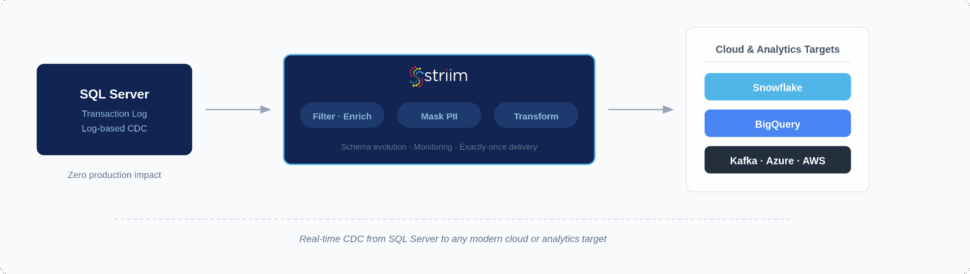
Striim is the enterprise-ready, log-based CDC platform designed to overcome the limitations of native replication. By unifying real-time data movement, in-flight transformation, and governance, Striim ensures your data gets where it needs to be—accurately, securely, and in sub-second latency.
Here is how Striim specifically solves SQL Server replication challenges (for deeper technical details, refer to our SQL Server documentation):
- Log-based Change Data Capture (CDC) with minimal latency: Using our Microsoft SQL Server connector, Striim reads directly from the SQL Server transaction log, keeping your production databases unburdened while ensuring real-time data freshness for analytics, reporting, and operational decision-making.
- Continuous replication to modern cloud platforms: Moving to Azure, AWS, GCP, Snowflake, Kafka, or BigQuery? Striim supports continuous replication to heterogeneous targets, accelerating cloud adoption and enabling multi-cloud strategies without friction.
- Low-code interface with drag-and-drop pipeline design: Avoid complex scripting. Striim’s intuitive interface shortens project timelines and reduces engineering effort, helping your data teams deliver results in weeks instead of months.
- Built-in monitoring dashboards and alerts: Stop flying blind. Striim lowers DBA overhead and improves reliability by actively monitoring pipeline health, surfacing errors, and catching latency issues before they impact the business.
- Enterprise-grade security: Striim reduces compliance risk and ensures your replication meets regulatory standards (like HIPAA, SOX, and GDPR) with native TLS encryption, role-based access control, and comprehensive audit trails.
- Schema evolution handling: Don’t let a simple DDL change break your pipeline. Striim seamlessly handles schema evolution, simplifying ongoing operations by avoiding painful database re-initializations and minimizing disruption.
- Zero-downtime cloud migration workflows: Moving massive SQL Server databases to the cloud doesn’t have to require planned outages. Striim supports phased modernization without ever interrupting your live applications or customer experiences.
- Horizontal scalability: Built to process over 100 billion events daily, Striim ensures your replication infrastructure easily keeps pace as data volumes and business demands grow.
FAQs
What are the biggest challenges with data replication for SQL Server in large enterprises?
The biggest challenges revolve around scale, system performance, and architectural rigidity. Native tools can heavily tax source databases, creating crippling latency during high-transaction periods. Furthermore, native methods struggle with Data Definition Language (DDL) changes, which frequently break pipelines, and lack native support for streaming data to modern, non-Microsoft cloud environments.
How does log-based CDC improve SQL Server replication compared to native methods?
Log-based CDC is drastically more efficient because it reads the database transaction log asynchronously, rather than running resource-heavy queries against the active tables. This prevents performance degradation on your primary SQL Server instance. It also provides sub-second latency and handles structural schema changes far more gracefully than native transactional replication.
Can SQL Server data replication support cloud migration without downtime?
Yes, but doing it safely requires modern CDC tools. You begin by executing an initial data load (seeding) to the new cloud target while the primary SQL Server remains online. Simultaneously, log-based CDC captures any changes happening in real time and streams those deltas to the cloud, allowing you to synchronize the systems and cut over with zero downtime.
What’s the difference between SQL Server replication and third-party replication tools like Striim?
SQL Server’s built-in replication is primarily designed for homogenous, SQL-to-SQL environments and relies heavily on complex agent management. Striim, conversely, is an enterprise-grade platform built for heterogeneous architectures. It captures data from SQL Server and streams it in real-time to almost any target—including Snowflake, Kafka, and BigQuery—while offering in-flight transformations and unified observability.
How do I monitor and troubleshoot SQL Server replication at scale?
At an enterprise scale, you must move away from manually checking agent logs. Best practices dictate establishing Service Level Objectives (SLOs) around acceptable lag and implementing centralized monitoring dashboards. Platforms like Striim automate this by providing real-time visibility into pipeline health, proactive alerting for bottlenecks, and automated error handling to reduce mean time to recovery (MTTR).
Is data replication for SQL Server secure enough for compliance-driven industries (HIPAA, SOX, GDPR)?
Native SQL Server replication can be secured, but it requires meticulous manual configuration to ensure snapshot folders and credentials aren’t exposed. For compliance-driven industries, utilizing a platform like Striim is far safer. It embeds security directly into the pipeline with end-to-end TLS encryption, role-based access control (RBAC), and rigorous audit trails that easily satisfy regulatory audits.
How do I choose the best data replication strategy for SQL Server in a hybrid cloud environment?
Always start by mapping your business requirements: acceptable latency, source system impact, and target destinations. If you are moving data across a hybrid cloud topology (e.g., from an on-premises SQL Server to a cloud data warehouse), native tools will likely introduce too much friction. In these scenarios, a modern log-based CDC and streaming strategy is the undisputed best practice.
What’s the ROI of using Striim for SQL Server data replication versus managing native replication in-house?
The ROI of Striim is driven by massive reductions in engineering and administrative overhead, as DBAs no longer spend hours troubleshooting broken native pipelines. It accelerates time-to-market for AI and analytics initiatives by delivering real-time, context-rich data continuously. Most importantly, it protects revenue by enabling zero-downtime migrations and guaranteeing high availability for mission-critical applications.
Ready to modernize your SQL Server data architecture? Don’t let legacy replication tools hold back your digital transformation. Integration isn’t just about moving data. It’s about breaking down silos and building a unified, intelligent architecture.
Curious to learn more? Book a demo today to explore how Striim helps enterprises break free from native limitations, operationalize AI, and power real-time intelligence—already in production at the world’s most advanced companies.