
This post walks through a complete Oracle-to-ClickHouse CDC pipeline using Striim’s ClickHouseWriter. It covers the Oracle source prerequisites, how to pick the right MergeTree engine for your workload, what the writer does internally with each batch, and how to tune the pipeline for sustained production throughput.
The running example is an Oracle TPCH.ORDERS table being replicated into ClickHouse via real-time CDC.
While this post focuses on Oracle, ClickHouseWriter receives CDC events from any Striim source — Oracle, SQL Server, Snowflake, Kafka, MongoDB, Salesforce, and more. Every source lands on the same write path: data streamed directly over JDBC into ClickHouse, with no intermediate object store.
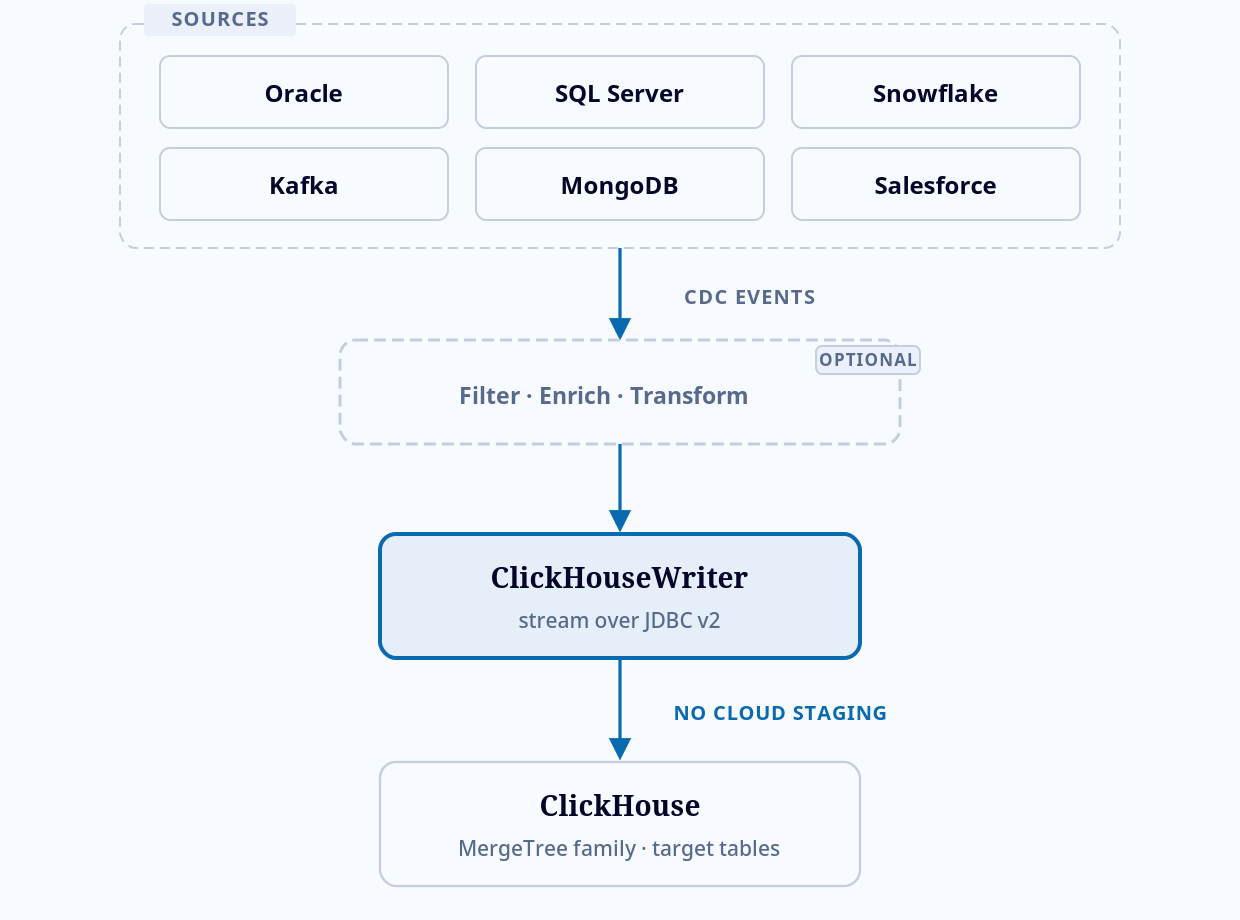
Fig. 1 — Every supported source lands on one write path: stream directly over JDBC into ClickHouse, no intermediate object store.
1. Oracle Source Setup
ClickHouseWriter receives CDC events from any Striim source, but Oracle has specific prerequisites that determine what data the writer can work with.
Supplemental Logging
Oracle’s redo log only records changed columns by default. For CDC replication, the writer needs full row images. Enable supplemental logging at the table level:
ALTER DATABASE ADD SUPPLEMENTAL LOG DATA;

ALTER TABLE TPCH.ORDERS ADD SUPPLEMENTAL LOG DATA (ALL) COLUMNS;
SUPPLEMENTAL LOG DATA (ALL) COLUMNS writes every column value to the redo log on every change, not just the modified columns. This is required for:
- Before-images:
optimizedMergerequires full row images to fill unchanged columns on UPDATE. WithoutALL COLUMNSsupplemental logging, before-images may be incomplete — only the modified columns and primary key are captured in the redo log. - Partition/sorting key pruning:
The writer collects distinct partitions and sorts key values from each batch to narrow DELETE scope. If those column values are missing from the redo log, the optimization is silently disabled for that batch.
Gotcha:
If you enable supplemental logging at the database level (
ALTER DATABASE ADD SUPPLEMENTAL LOG DATA (ALL) COLUMNS), it applies to every table. For large databases, prefer table-level logging on only the tables being replicated.
Note:
Striim does not mandate the
SUPPLEMENTAL LOG DATA (ALL) COLUMNS. PK column or minimal supplemental logging is also fine. Please use the OptimizedMerge feature of the ClickHouseWriter. See Striim documentation.
OracleReader Configuration
The source side of the pipeline:
CREATE OR REPLACE SOURCE OracleSource USING Global.OracleReader (
  Tables:                '"TPCH"."ORDERS"',
  connectionProfileName: 'admin.Oracle_CP',
  SendBeforeImage:       true,
  DictionaryMode:        'OnlineCatalog',
  FetchSize:             1000,
)
OUTPUT TO CDCStream;
The properties that matter for ClickHouse:
| Property | Value | Why it matters for ClickHouse |
|---|---|---|
SendBeforeImage |
true |
Required for MergeTree + optimizedMerge (fills unchanged columns from before-image) and partition/sorting key pruning (uses before-image values for UPDATE/DELETE events). |
DictionaryMode |
OnlineCatalog |
Reads the Oracle data dictionary from the online catalog. |
FetchSize |
1000 |
Rows per initial-load fetch. |
OracleReader emits a Striim specific event (WAEvent) that tracks the data and metadata of the per DML operation. Each event carries the table name, operation type (INSERT/UPDATE/DELETE/PKUPDATE), table metadata via a typeUUID, and the row data as Object[] arrays (after-image and, when SendBeforeImage is enabled, before-image).
2. Choosing Your Engine
The TableEngine property on ClickHouseWriter determines how INSERT, UPDATE, and DELETE operations physically land in ClickHouse. This is the highest-leverage decision in the pipeline.
- MergeTree (MERGE mode): Merging the CDC operation is handled by Striim’s internal algorithm. Every Update is handled as delete followed by insert. Supports
optimizedMergefor source partial row images. (Replay of DML Events) - ReplacingMergeTree: Every CDC operation becomes an INSERT with a monotonic
__STRIIM_VERSIONand an__STRIIM_ISDELETEDflag. ClickHouse’s background merge keeps only the highest-version row per ORDER BY key. Deletes are tombstones (ISDELETED=1). (Replay of DML Events; Versioned Rows) - CollapsingMergeTree: Every CDC operation becomes an INSERT. Signed rows:
__STRIIM_SIGN = +1(state) or-1(cancellation). ClickHouse cancels matched pairs during background merge. Requires before-images from the source. Order-sensitive. (Replay of DML Events; Signed Rows) - CoalescingMergeTree: ClickHouse 25.6+. Partial-image updates: NULL means “column unchanged.” The writer inserts only changed columns; ClickHouse coalesces during background merges. No DELETE/cancellation overhead. (Replay of DML Events)
- SummingMergeTree: Numeric columns are summed on merge. Append-only: no UPDATE/DELETE semantics. Suited for pre-aggregated rollup targets. (Append-only)
- AggregatingMergeTree: Pre-aggregated analytical targets using
SimpleAggregateFunctioncolumns. Append-only, no CDC mutation support. (Append-only)
Which engine for Oracle CDC?
For a general Oracle OLTP table with mixed INSERT/UPDATE/DELETE traffic:
- MergeTree + MERGE:
Use when you need the target table to always reflect current state withoutFINAL, or when downstream consumers (BI tools, dashboards) cannot filter onISDELETED. Higher write cost due to per-batch DELETE mutations (supportsLightweightDeletefor fast soft-deletes orMutationDeletefor immediate physical removal). EnableoptimizedMergewhen the Oracle source sends partial row images to fill unchanged columns from the before-image before compaction. - ReplacingMergeTree:
Start here. All operations become INSERTs, so write throughput is high and there are no mutation-based DELETEs. Query withSELECT ... FINAL WHERE __STRIIM_ISDELETED = 0to get current state. The trade-off: queries withoutFINALsee stale/duplicate rows until background merge runs. - CoalescingMergeTree:
Use for partial-image workloads (ClickHouse 25.6+) where most UPDATEs touch only a few columns. The writer inserts only changed columns; NULL means “column unchanged” and ClickHouse coalesces during background merges, avoiding full-row writes. NULL caveat: if your Oracle source has legitimate NULL values (e.g., a nullableSHIP_DATEset to NULL on cancellation), those NULLs are silently dropped during coalescing — use MergeTree + MERGE withoptimizedMergeinstead for tables where NULL is a meaningful data value. CoalescingMergeTree has no built-in compaction pass for DELETEs, but the writer handles them via a configurable delete strategy —LightweightDelete(default, fast soft-delete; physical removal deferred to background merge) orMutationDelete(immediate physical removal, higher write I/O).
Oracle to ClickHouse Data Type Mapping
The writer handles type conversion automatically. Key mappings for Oracle types:
| Oracle Type | ClickHouse Type | Notes |
|---|---|---|
NUMBER(p,0) where p ≤ 18 |
Int64 |
Integer-range numbers. NUMBER(p,0) with p ≤ 9 maps to Int32. |
NUMBER(p,s) where s > 0 |
Decimal(p,s) |
Fixed-point. ClickHouse Decimal supports up to Decimal128(38,s). |
FLOAT, BINARY_DOUBLE |
Float64 |
|
VARCHAR2(n), CHAR(n) |
String |
ClickHouse String is unbounded; no length constraint carried over. |
CLOB, NCLOB |
String |
Large text. Ensure UploadPolicy batch sizes account for payload size. |
DATE |
DateTime |
Oracle DATE includes time; ClickHouse DateTime is second-precision. |
TIMESTAMP |
DateTime64(6) |
Microsecond precision. Oracle TIMESTAMP(9) is truncated to 6. |
RAW, BLOB |
String |
Hex-encoded. Binary columns are not natively supported in ClickHouse ingest. |
3. The Write Path
ClickHouseWriter streams data directly to ClickHouse over the JDBC v2 client. There is no intermediate object store (no S3, GCS, or ADLS staging). Batches are serialized in memory and sent over the JDBC connection.
Batch Lifecycle
Events accumulate in a buffer until the UploadPolicy threshold is reached (event count or time interval, whichever fires first). At rollover, the writer processes the batch.
For MergeTree, when Mode is set to MERGE, multiple change records with the same ORDER BY value are compacted and the latest snapshot of a record is applied to the target table. This applies for optimizedMerge too. By default, with APPEND_ONLY mode all events are inserted, so an audit log of all changes is preserved.
For ReplacingMergeTree, every CDC operation is transformed into an INSERT with a monotonically increasing __STRIIM_VERSION and sent directly.
The engine-specific transformation per operation:
| CDC Operation | MergeTree (MERGE) | ReplacingMergeTree | CoalescingMergeTree |
|---|---|---|---|
| INSERT | Staged, compacted, then INSERT | 1 INSERT (ISDELETED=0) | INSERT of all columns (no NULL coalescing needed) |
| UPDATE | Staged, compacted, then DELETE old + INSERT new | 1 INSERT (new values, higher version deduplicates old) | INSERT of changed columns only; NULL = unchanged; ClickHouse coalesces at merge |
| DELETE | Staged, DELETE from target | 1 INSERT (tombstone, ISDELETED=1) | Executed via configurable delete strategy: LightweightDelete (default) or MutationDelete |
| PK UPDATE | DELETE old key + INSERT new key (special path) | 2 INSERTs (old-key tombstone + new-key insert) | DELETE old key + INSERT new key with changed columns |
Partition and Sorting Key Pruning
In the MergeTree engine with MERGE mode, the DELETE query that removes superseded keys from the target needs to scan for matching rows. Without optimization, this scans the entire table. The Striim ClickHouseWriter automatically narrows the scan.
Per batch, the writer collects every distinct value of each partition key column and each sorting key column from the event data. It appends these as IN-list filters to the DELETE statement. The IN (...) clause lets the sparse index skip granules within the partition. Together, these reduce the mutation from a full-table scan to a narrow range.
Before-image correctness:
For UPDATE and PKUPDATE events, the pruning filter uses the before-image column values (the old row), because the DELETE targets the row that currently exists in the target. For INSERT and DELETE events, it uses the after-image. If any partition/sorting key column is missing from the event (supplemental logging not enabled for that column), pruning is disabled for the entire batch.
Delete Strategies
MergeTree MERGE mode supports two delete mechanisms, controlled by the DeleteStrategy property:
DELETE FROM <target_table>
WHERE <pk_columns> IN ( SELECT DISTINCT <pk_columns> FROM <stage> )
ALTER TABLE <target_table> DELETE
WHERE <pk_columns> IN ( SELECT DISTINCT <pk_columns> FROM <stage> )LightweightDelete marks rows as deleted; physical removal happens during ClickHouse’s background merge. Writes are fast, but deleted rows are briefly visible to concurrent readers (filtered by a hidden mask column). MutationDelete rewrites the affected data parts immediately. Higher write I/O, but deleted rows are physically gone after the statement completes. Use MutationDelete when compliance requirements (GDPR right-to-erasure) demand immediate physical removal.
Primary Key Updates
ClickHouse has no native UPDATE on ORDER BY key columns. The writer handles an update to the ORDER BY keys as a DELETE-then-INSERT pair, coalescing unchanged column data also.
Retry Handling
When a batch write fails due to a transient error — authentication failures, SSL/TLS issues, or connection drops — ClickHouseWriter automatically retries with exponential backoff (2s → 32s, with jitter) before halting the application.
On authentication failures, the writer fetches fresh credentials before reconnecting, making it resilient to credential rotation. The writer also cleans up any partial state before each retry, so a failed batch does not leave inconsistent data in the target.
Connection-level retries for individual SQL statements are governed separately by the ConnectionRetryPolicy property, which controls the number of attempts, backoff delays, and total timeout before the application halts.
When all retries are exhausted, the writer surfaces a clear halt message with remediation guidance — for example, authentication failures prompt a credentials check, and SSL errors prompt certificate verification.
4. The Complete Pipeline
Putting it together: an end-to-end Oracle CDC pipeline targeting ReplacingMergeTree in ClickHouse.
CREATE OR REPLACE APPLICATION Oracle_To_ClickHouse
  RECOVERY 30 SECOND INTERVAL
  USE EXCEPTIONSTORE TTL : '7d';

CREATE FLOW SourceFlow;

CREATE OR REPLACE SOURCE OracleSource USING Global.OracleReader (
  Tables:                '"TPCH"."ORDERS"',
  connectionProfileName: 'admin.Oracle_CP',
  SendBeforeImage:       true,
  DictionaryMode:        'OnlineCatalog',
  FetchSize:             1000,
  CDDLAction:            'Process'
)
OUTPUT TO CDCStream;

END FLOW SourceFlow;

CREATE OR REPLACE TARGET ClickHouseTarget USING Global.ClickHouseWriter (
  connectionProfileName: 'admin.ClickHouse_CP',
  Tables:                '"TPCH"."ORDERS",tgt.orders_rmt',
  TableEngine:           'ReplacingMergeTree',
  UploadPolicy:          'eventcount:10000,interval:30s',
  DeleteStrategy:        'LightweightDelete',
  CDDLAction:            'Process',
  TargetTableDefinition: '{"tgt.orders_rmt": {"Order By": "(order_id)"}}'
)
INPUT FROM CDCStream;

END APPLICATION Oracle_To_ClickHouse;
Key points in the TQL above:
- Tables mapping:
"TPCH"."ORDERS",tgt.orders_rmtmaps the source Oracle table to the target ClickHouse table. Source uses Oracle’s quoted-identifier syntax; target uses ClickHouse’sdatabase.tableformat. - Recovery:
RECOVERY 30 SECOND INTERVALcheckpoints every 30 seconds. Checkpoints advance only after ClickHouse acknowledges the batch, so recovery replays from the last acknowledged position. With ReplacingMergeTree, replayed events are idempotent — the version-based deduplication discards duplicates. - CDDLAction:
Controls how Oracle DDL events (table creation, column additions, drops, or modifications) are handled at the target.Processauto-translates them to ClickHouseALTER TABLEorCREATE TABLEstatements.Ignoreskips DDL and continues processing DML.Haltflushes pending events and stops the application.
Target Table Definition
When ClickHouseWriter creates the target table, you control the physical layout via the TargetTableDefinition property. At minimum, specify the ORDER BY clause — this is the deduplication key for ReplacingMergeTree and the sort key for MergeTree:
{
  "tgt.orders_rmt": {
    "Order By": "(order_id)"
  }
}
Additional keys like Partition BY, Primary Key, and Settings can be added to control partitioning, sparse index granularity, and other engine-level options.
Querying the Target
With ReplacingMergeTree, the target contains multiple versions of each row until background merge runs. Two query patterns:
-- Option 1: FINAL keyword (forces merge at query time, slower)
SELECT * FROM tgt.orders_rmt FINAL
WHERE __STRIIM_ISDELETED = 0;

-- Option 2: Subquery with max version (faster for large tables)
SELECT * FROM tgt.orders_rmt
WHERE __STRIIM_VERSION = (
  SELECT MAX(__STRIIM_VERSION) FROM tgt.orders_rmt o2
  WHERE o2.order_id = tgt.orders_rmt.order_id
)
AND __STRIIM_ISDELETED = 0;
Monitoring the Application Progress
Striim provides two ways to monitor a running pipeline: the web UI flow view and the mon command in the Striim console. The UI shows live throughput rates and event counts at a glance; the console gives a full breakdown of per-table batch statistics.
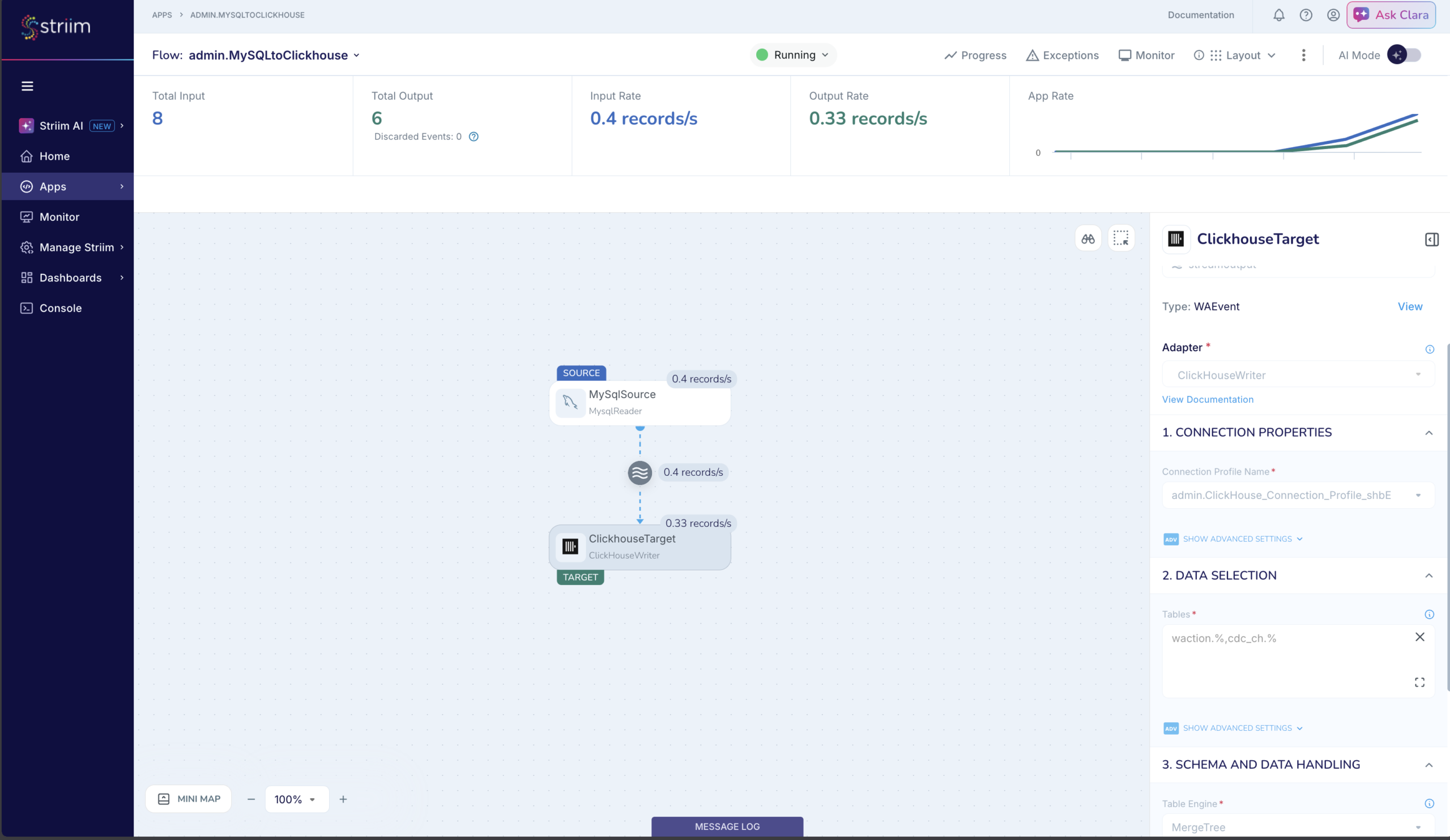
For detailed per-target metrics, use mon -v <AppName> in the Striim console. The Table Write Information field reports last-batch and cumulative event counts, upload and merge timing, and batch size — useful for diagnosing throughput bottlenecks:
-- Elapsed time: 81 ms
-- Processing - mon -v ClickhouseTarget
╒══════════════════════════════════════════════════════════════════════════════════════════════════════════╕
│ TARGET admin.ClickhouseTarget │
├───────────────────────────────┬───────────────────────────────────────────────────────────────────────────┤
│ Property │ Value │
├───────────────────────────────┼───────────────────────────────────────────────────────────────────────────┤
│ Accepted │ 29 │
│ No.of events accepted per │ 0 │
│ interval │ │
│ Accepted Rate │ 0 │
│ CPU │ 0.00067 │
│ CPU Rate Per Node │ 0.005% │
│ CPU Rate │ 0.067% │
│ Discarded Event Count │ 0 │
│ Number of events seen per │ 0 │
│ monitor snapshot interval │ │
│ Ignored Tables List │ │
│ Input │ 29 │
│ Input Rate │ 0 │
│ Latest Activity │ 2026-09-21 10:54:57 │
│ Num Servers │ 1 │
│ Output │ 29 │
│ Rate │ 0 │
│ Table Write Information │ [ { │
│ │ "cdc_ch.src_CH_AddAdditionalColumns11" : { │
│ │ "Mapped Source Table" : "waction.src_CH_AddAdditionalColumns11", │
│ │ "Last batch info" : { │
│ │ "No of inserts" : 1, │
│ │ "No of updates" : 0, │
│ │ "No of deletes" : 1, │
│ │ "No of pkupdates" : 1, │
│ │ "No of DDLs" : 0, │
│ │ "Total events merged" : 3, │
│ │ "Batch Sequence Number" : 6, │
│ │ "Batch Event Count" : 3, │
│ │ "Batch Size in bytes" : 564, │
│ │ "Max Record Size in batch" : 282, │
│ │ "Batch Accumulation Time in ms" : 30001, │
│ │ "Micro Batch Count" : 0, │
│ │ "Integration Task Time" : { │
│ │ "Upload Time in ms" : 6, │
│ │ "Compaction Time in ms" : 0, │
│ │ "Merge Time in ms" : 0, │
│ │ "In-Memory Compaction Time in ms" : 0, │
│ │ "Stage Resources Management Time in ms" : 0, │
│ │ "pk Update Time in ms" : 0, │
│ │ "DDL Execution Time in ms" : 0, │
│ │ "Total Integration Time in ms" : 6 │
│ │ } │
│ │ }, │
│ │ "Last successful merge time" : "Mon Sep 21 10:55:16 PDT 2026", │
│ │ "Total Batches Created" : 7, │
│ │ "Total Batches Uploaded" : 7, │
│ │ "Total Batches Ignored" : 0, │
│ │ "Total Batches Queued" : 0, │
│ │ "Total event info" : { │
│ │ "No of inserts" : 3, │
│ │ "No of updates" : 0, │
│ │ "No of deletes" : 9, │
│ │ "No of pkupdates" : 17, │
│ │ "No of DDLs" : 0, │
│ │ "Total events merged" : 29 │
│ │ }, │
│ │ "Avg Upload Time in ms" : 9, │
│ │ "Avg Compaction Time in ms" : 0, │
│ │ "Avg In-Mem Compaction Time in ms" : 0, │
│ │ "Avg Merge Time in ms" : 0, │
│ │ "Avg Waiting Time in Queue in ms" : 3, │
│ │ "Avg Event Count Per Batch" : 4, │
│ │ "Avg Batch Size in bytes" : 934, │
│ │ "Avg Stage Resources Management Time in ms" : 0, │
│ │ "Avg Integration Time in ms" : 10, │
│ │ "Avg Micro Batch Count Per Batch" : 0, │
│ │ "Min Integration Time in ms" : 2, │
│ │ "Max Integration Time in ms" : 23 │
│ │ } │
│ │ } ] │
│ Target Acked │ 29 │
│ Target Freshness │ 55s:071ms │
│ Target Output │ 29 │
│ Target Rate │ 0 │
│ Timestamp │ 2026-09-21 10:56:11 │
│ Write Timestamp │ 2026-09-21 10:55:16 │
└───────────────────────────────┴───────────────────────────────────────────────────────────────────────────┘
-- -> SUCCESS
-- Elapsed time: 496 msRecovery Semantics
Striim checkpoints are transactional with the batch write. A checkpoint advances only after ClickHouse acknowledges the INSERT (for insert-only engines) or the full DELETE+INSERT cycle (for MergeTree MERGE). On failure:
- The application restarts from the last acknowledged checkpoint position.
- Events between the last checkpoint and the failure are replayed.
- For ReplacingMergeTree, replayed events have the same or lower version — background merge deduplicates them.
- For MergeTree MERGE, replayed events are re-compacted and re-applied. The DELETE+INSERT cycle is idempotent as long as the staging tables are cleaned up (they are dropped at the end of each batch).
This gives you at-least-once delivery with effective exact-once semantics when using version-based engines (ReplacingMergeTree) or idempotent compaction (MergeTree MERGE).
5. Production Tuning
A pipeline that works in dev can fail under production load. These are the properties that matter for sustained throughput.
- UploadPolicy —
eventcount:10000, interval:30s: Flush on whichever threshold hits first. Too-frequent flushes create many small parts; ClickHouse will throwTOO_MANY_PARTS(default limit: 300 active parts per partition). Raiseeventcountbefore adjusting ClickHouse’sparts_to_throw_insertsetting. - ParallelThreads —
default: 1: Spins up multiple writer instances, sharded by target table name. Each table is always handled by the same instance, preserving event order. A single table never splits across instances — for single-table throughput, use a ROUTER to hash-partition events by sorting key across N writer instances. - ConnectionRetryPolicy —
exponential backoff → HALT:'initialRetryDelay=10s, retryDelayMultiplier=2, maxRetryDelay=1m, maxAttempts=10, totalTimeout=10m'. Exponential backoff on transient connection loss. AftertotalTimeout, the application halts. - CDDLAction —
Process | Ignore | Halt:Process: auto-translate Oracle DDL (ADD/DROP/MODIFY COLUMN) to ClickHouse ALTER TABLE.Ignore: skip DDL, keep processing DML.Halt: flush pending events and stop the application. UseHaltwhen schemas are managed by external tools (dbt, Terraform). - IgnorableExceptionCode —
'TABLE_NOT_FOUND': Discards events for an unmapped target table instead of halting. The only accepted value. Use when the source captures tables that don’t exist on the ClickHouse side.
Key things to watch in production:
- Too Many Parts:
ClickHouse’ssystem.partstable shows active parts per partition. If writes outpace merges, the part count climbs toward the 300-part limit. First response: increaseUploadPolicyevent count to produce fewer, larger batches. - Mutation lag:
For MergeTree mode,system.mutationsshows queued and running mutations. A growing queue means DELETE mutations are not completed before the next batch arrives. Consider switching to ReplacingMergeTree if mutation lag is chronic. - Replication lag:
Striim’s built-in lag monitoring shows the time delta between the source commit timestamp and the target write acknowledgment. A sustained increase in lag indicates the writer cannot keep up with source throughput — either increase batch size, add ParallelThreads (for multi-table pipelines), or deploy a ROUTER-based fan-out for a single hot table.
TQL and property behavior based on Striim 5.4.2 ClickHouseWriter specification. ClickHouse engine behavior based on ClickHouse 24.x/25.x documentation.
Ready to stream Oracle CDC into ClickHouse? See how Striim delivers real-time data directly to ClickHouse via a demo, or try Striim for yourself.