
SQL Server has developed a reputation as the backbone of enterprise operational data. But when it comes to analytics, operational systems weren’t designed for complex queries or transformations. To build advanced analytics and AI applications, enterprises are increasingly turning to Google BigQuery.
Ripping and replacing your legacy operational databases isn’t just risky; it’s highly disruptive. Instead of migrating away from SQL Server entirely, data leaders increasingly want ongoing, continuous integration between their operational stores and their cloud analytics environments.
The future of analytics and machine learning hinges on fresh, low-latency data. If your BigQuery dashboards and AI models rely on data that was batched overnight, you aren’t making proactive decisions, you’re just documenting history. To power modern, event-driven applications, enterprises need real-time, cloud-native pipelines.
This guide covers the why, the how, and the essential best practices of replicating data from SQL Server to BigQuery without disrupting your production systems.
Key Takeaways
- Integrate, don’t just migrate: Enterprises choose to integrate SQL Server with BigQuery to extend the life of their operational systems while unlocking cloud-scale analytics, AI, and machine learning.
- Real-time is the modern standard: While there are multiple ways to move data into BigQuery—from manual exports to scheduled ETL—real-time replication using Change Data Capture (CDC) is the most effective approach for enterprises demanding low latency and high resilience.
- Architecture matters: Following established best practices and leveraging enterprise-grade platforms ensures your SQL Server to BigQuery pipelines remain reliable, secure, and scalable as your data volumes grow.
Why Integrate SQL Server with BigQuery
Modernizing your enterprise data architecture doesn’t have to mean tearing down the foundation. For many organizations, SQL Server is deeply embedded in daily operations, powering ERPs, CRMs, and custom applications consistently for years.
Integrating SQL Server with BigQuery is an ideal way to extend the life and value of your database while simultaneously unlocking BigQuery’s massive scale for analytics, AI, and machine learning.
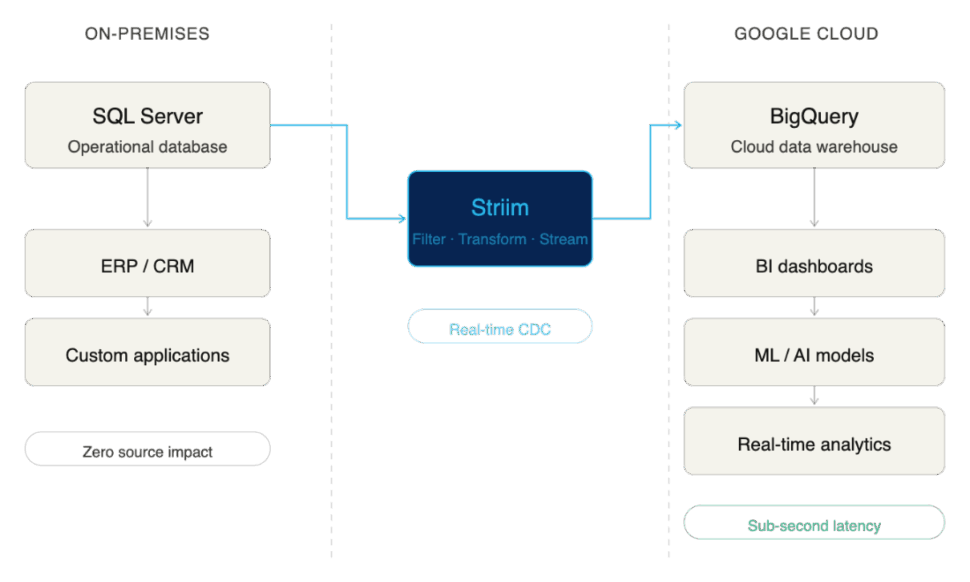
Here are the primary business drivers compelling enterprises to integrate SQL Server with BigQuery:
Unlock Real-Time Analytics Without Replacing SQL Server
Migrating away from a legacy operational database is often a multi-year, high-risk endeavor. By choosing integration over migration, enterprises get the “reward” of modern analytics in a fraction of the time, without disrupting the business. You land with the best of both worlds: the operational stability of SQL Server and the elastic, real-time analytical power of BigQuery.
Support Business Intelligence and Machine Learning in BigQuery
SQL Server is adept at handling high-volume transactional workloads (OLTP). However, it wasn’t built to train AI models or run complex, historical business intelligence queries (OLAP) without severe performance degradation. BigQuery is purpose-built for this exact scale. By replicating your SQL Server data to BigQuery, you give your data science and BI teams the context-rich, unified environment they need to do their best work without bogging down your production databases.
Reduce Reliance on Batch ETL Jobs
Historically, moving data from SQL Server to a data warehouse meant relying on scheduled, batch ETL (Extract, Transform, Load) jobs that ran overnight. But a fast-paced enterprise can’t rely on stale data. Integrating these systems modernizes your pipeline, allowing you to move away from rigid batch windows and toward continuous, real-time data flows.
Common Approaches to SQL Server-BigQuery Integration
Moving data from SQL Server to BigQuery is not a one-size-fits-all endeavor. The method you choose fundamentally impacts the freshness of your data, the strain on your source systems, and the ongoing operational overhead for your data engineering team.
While there are multiple ways to connect the two systems, they generally fall into three categories. Here is a quick comparison:
| Integration Method | Integration Method | Integration Method | Integration Method | Integration Method | Integration Method | Integration Method |
| Batch / Manual | Days / Hours | Low | High (Manual intervention) | Very Low | Low upfront, high hidden costs | Poor. Best for one-off ad-hoc exports. |
| ETL / ELT | Hours / Minutes | Medium | Medium (Managing schedules/scripts) | Medium | Moderate | Fair. Good for legacy reporting, bad for real-time AI. |
| Real-Time CDC | Sub-second | Medium to High (Depending on tool) | Low (Fully automated, continuous) | Very High | Highly efficient at scale | Excellent. The gold standard for modern data architectures. |
Let’s break down these approaches and explore their pros and cons.
Batch Exports and Manual Jobs
The most basic method of integration is the manual export. This usually involves running a query on SQL Server, dumping the results into a flat file (like a CSV or JSON), moving that file to Google Cloud Storage, and finally loading it into BigQuery using the bq command-line tool or console.
- Pros: It’s incredibly simple to understand and requires virtually no specialized infrastructure.
- Cons: Painfully slow, highly prone to human error, and completely unscalable for enterprise workloads. This method can’t handle schema changes, and by the time the data lands in BigQuery, it is already stale.
ETL and ELT Pipelines
Extract, Transform, Load (ETL) and Extract, Load, Transform (ELT) have been the industry standard for decades. Using custom scripts or platforms like Google Cloud Data Fusion or SQL Server Integration Services (SSIS), data engineers automate the extraction of data from SQL Server, apply necessary transformations, and load it into BigQuery.
- Pros: Highly automated and capable of handling complex data transformations before or after the data hits BigQuery.
- Cons: ETL and ELT pipelines traditionally run on schedules (e.g., nightly or hourly). These frequent, heavy queries can put significant performance strain on the source SQL Server database. More importantly, because they rely on batch windows, they cannot deliver the true real-time data required for modern, event-driven business operations.
Real-Time Replication with Change Data Capture (CDC)
For modern enterprises, real-time replication powered by Change Data Capture (CDC) has emerged as the clear gold standard.
Instead of querying the database directly for changes, CDC works by reading SQL Server’s transaction logs. As inserts, updates, and deletes happen in the source system, CDC captures those discrete events and streams them continuously into BigQuery.
- Pros: CDC delivers sub-second latency, ensuring BigQuery is an always-accurate reflection of your operational data. Because it reads logs rather than querying tables, it exerts almost zero impact on SQL Server’s production performance. It is continuous, resilient, and built to scale alongside your business.
- Cons: Building a CDC pipeline from scratch is highly complex and requires deep engineering expertise to maintain transaction consistency and handle schema evolution. (This is why enterprises typically rely on purpose-built CDC integration platforms rather than DIY solutions).
Challenges of SQL Server to BigQuery Replication
While continuous CDC replication is the gold standard, executing it across enterprise environments comes with its own set of complexities.
Here are some of the primary challenges enterprises face when connecting SQL Server to BigQuery, and the risks associated with failing to address them.
Managing Schema and Data Type Differences
SQL Server and Google BigQuery use fundamentally different architectures and data types. For example, SQL Server’s DATETIME2 or UNIQUEIDENTIFIER types do not have exact 1:1 equivalents in BigQuery without transformation.
If your replication method doesn’t carefully map and convert these schema differences on the fly, you risk severe business consequences. Data can be truncated, rounding errors can occur in financial figures, or records might be rejected by BigQuery entirely. Furthermore, when upstream SQL Server schemas change (e.g., a developer adds a new column to a production table), fragile pipelines break, causing damaging downtime.
Handling High-Volume Transactions at Scale
Enterprise operational databases process millions of rows an hour, often experiencing massive spikes in volume during peak business hours.
Your replication pipeline must be able to handle this throughput using high parallelism without overwhelming the network or suffocating BigQuery’s ingestion APIs. If your architecture bottlenecks during a traffic spike, latency increases exponentially. What should have been real-time analytics suddenly becomes hours old, resulting in stale insights exactly when the business needs them most.
Ensuring Consistency and Accuracy Across Systems
Yes, replication is about moving new data (INSERT statements). But beyond that, to maintain an accurate analytical environment, your pipeline must capture and precisely replicate every UPDATE and DELETE exactly as they occurred in the source database.
Transaction boundaries must be respected so that partial transactions aren’t analyzed before they are complete. If your pipeline drops events, applies them out of order, or fails to properly hard-delete removed records, your target database will drift from your source. Enterprises require exact match confidence between SQL Server and BigQuery; without it, analytical models fail and compliance audits become a nightmare.
Balancing Latency, Performance, and Cost
Achieving true, sub-second latency is immensely powerful, but if managed poorly, it can cause your cloud costs to spiral. For example, streaming every single micro-transaction individually into BigQuery can trigger higher ingestion fees compared to micro-batching.
Enterprises need to balance speed with efficiency. They need the flexibility to stream critical operational events in real-time, while smartly batching less time-sensitive data to optimize Google Cloud costs.
Because of the deep complexity of schema evolution, transaction consistency, and cost-optimization at scale, relying on basic scripts or generic ETL tools often leads to failure. Not every tool is built to solve these specific challenges, which is why enterprises must carefully evaluate their replication architecture.
Best Practices for Enterprise-Grade Replication
Building a custom DIY pipeline might work for a single, low-volume table. But enterprise replication is a different beast entirely. Many organizations learn the hard way that missing key architectural elements leads to failed projects, spiraling cloud costs, or broken dashboards.
To ensure success, your replication strategy should be built on proven best practices. These also serve as excellent criteria when evaluating an enterprise-grade integration platform.
Start With Initial Load, Then Enable Continuous Replication
The standard architectural pattern for replication requires two phases: first, you must perform a bulk initial load of all historical data. Once the target table is seeded, the pipeline must seamlessly transition to CDC to keep the target synced with new transactions. Doing this manually is notoriously difficult and often results in downtime or lost data during the cutover.
- How Striim helps: Striim supports this exact pattern out of the box. It handles the heavy lifting of the one-time historical load and seamlessly transitions into real-time CDC replication, ensuring zero downtime and zero data loss.
Design for High Availability and Failover
Enterprises cannot afford replication downtime. If a network connection blips or a server restarts, your pipeline shouldn’t crash and require a data engineer to manually intervene at 2:00 AM. Your architecture requires built-in fault tolerance, strict checkpoints, and automated retries to keep pipelines inherently resilient.
- How Striim helps: Striim pipelines are architected for high availability. With features like exactly-once processing (E1P) and automatic state recovery, Striim ensures your pipelines meet rigorous business continuity needs without requiring custom engineering.
Secure Pipelines to Meet Compliance Standards
Moving operational data means you are inevitably moving sensitive information. Whether it’s PII, financial records, or healthcare data, regulatory expectations like HIPAA, GDPR, and SOC2 are non-negotiable. Your replication architecture must guarantee end-to-end encryption, granular access controls, and strict auditability.
- How Striim helps: Striim provides enterprise-grade security features by default, so compliance isn’t an afterthought. Data is encrypted in flight, and built-in governance features ensure that sensitive customer data can be detected and masked before it ever enters BigQuery.
Monitor, Alert, and Tune for Performance
“Set and forget” is a dangerous mentality for enterprise data infrastructure. To guarantee service-level agreements (SLAs) and maintain operational efficiency, you need continuous observability. This means actively tracking metrics, retaining logs, and configuring alerts so your team is proactively notified of latency spikes or throughput drops.
- How Striim helps: Striim features a comprehensive, real-time monitoring dashboard. It makes it effortless for engineering teams to track pipeline health, monitor sub-second latency, and visualize throughput in one centralized place.
Optimize BigQuery Usage for Cost Efficiency
Real-time replication is valuable, but inefficient streaming can drive up BigQuery compute and ingestion costs unnecessarily. To maintain cost efficiency, data engineering teams should leverage BigQuery best practices like table partitioning and clustering, while intelligently tuning batch sizes based on the urgency of the data.
- How Striim helps: Striim’s pre-built BigQuery writer includes highly configurable write strategies. Teams can easily toggle between continuous streaming and micro-batching, helping enterprises perfectly balance high-performance requirements with cloud cost efficiency.
Why Enterprises Choose Striim for SQL Server to BigQuery Integration
Striim is purpose-built to solve the complexities of enterprise data integration. By leveraging Striim, organizations can reliably replicate SQL Server data into Google BigQuery in real time, securely, and at scale. This allows data leaders to confidently modernize their analytics stack without disrupting the critical operational systems their business relies on.
Striim delivers on this promise through a robust, enterprise-grade feature set:
- Log-Based CDC for SQL Server: Striim reads directly from SQL Server transaction logs, capturing inserts, updates, and deletes with sub-second latency while exerting virtually zero impact on your production database performance.
- Configurable BigQuery Writer: Optimize for both speed and cost. Striim’s pre-built BigQuery target allows teams to configure precise batching or streaming modes, ensuring efficient resource utilization in Google Cloud.
- Inherent High Availability: Designed for mission-critical workloads, Striim includes automated failover, exactly-once processing (E1P), and state recovery to ensure absolute business continuity during replication.
- Enterprise-Grade Security: Compliance is built-in, not bolted on. Striim ensures data is protected with end-to-end encryption, granular role-based access controls, and features designed to meet strict HIPAA, GDPR, and SOC2 standards.
- Comprehensive Real-Time Monitoring: Data engineering teams are empowered by unified dashboards that track replication health, monitor latency metrics, aggregate logs, and trigger alerts to ensure you consistently meet stringent internal SLAs.
- Accessible Yet Advanced Configuration: Striim pairs a rapid, no-code, drag-and-drop user interface for quick pipeline creation with advanced, code-level configuration options to solve the most complex enterprise data transformation use cases.
Ready to break down your data silos? Try Striim for free or book a demo today to see real-time replication in action.
FAQs
What are the cost considerations when replicating SQL Server data into BigQuery?
The primary costs involve the compute resources required for extraction (usually minimal with log-based CDC) and the ingestion/storage fees on the BigQuery side. Streaming data record-by-record into BigQuery can trigger higher streaming insert fees. To optimize costs, enterprises should use a replication tool that allows for intelligent micro-batching and leverages BigQuery partitioning strategies.
How do enterprises keep replication secure and compliant?
To maintain compliance with frameworks like SOC2 or HIPAA, enterprises must ensure data is encrypted both in transit and at rest during the replication process. It is also critical to use platforms that offer role-based access control (RBAC) and data masking capabilities, ensuring sensitive PII is obscured before it ever lands in the cloud data warehouse.
How does replication impact day-to-day operations in SQL Server?
If you use traditional query-based ETL methods, replication can cause significant performance degradation on the SQL Server, slowing down the applications that rely on it. However, modern Change Data Capture (CDC) replication reads the database’s transaction logs rather than querying the tables directly. This approach exerts virtually zero impact on the source database, keeping day-to-day operations running smoothly.
What is the best way to scale SQL Server to BigQuery replication as data volumes grow?
The most effective way to scale is by utilizing a distributed, cloud-native integration platform designed for high parallelism. As transaction volumes from SQL Server spike, the replication architecture must be able to dynamically allocate compute resources to process the stream without bottlenecking. Ensuring your target writer is optimized for BigQuery’s bulk ingestion APIs is also crucial for handling massive growth.
How do I replicate SQL Server to BigQuery using Striim?
Replicating data with Striim is designed to be straightforward. You start by configuring SQL Server as your source using Striim’s CDC reader, which manages the initial historical load. Next, you select BigQuery as your target, mapping your schemas and applying any necessary in-flight transformations via the drag-and-drop UI. Finally, you deploy the pipeline, and Striim seamlessly transitions from the initial load into continuous, real-time replication.
What makes Striim different from other SQL Server to BigQuery replication tools?
Unlike basic data movement scripts or legacy batch ETL tools, Striim is a unified integration and intelligence platform built specifically for real-time, enterprise-grade workloads. It goes beyond simple replication by offering in-flight data processing, exactly-once processing (E1P) guarantees, and built-in AI governance capabilities. This ensures data isn’t just moved, but arrives in BigQuery validated, secure, and ready for immediate analytical use.
How can I test Striim for SQL Server to BigQuery replication before rolling it out company-wide?
The best approach is to start with a targeted pilot project. Identify a single, high-value SQL Server database and set up a Striim pipeline to replicate a subset of non-sensitive data into a sandbox BigQuery environment. You can leverage Striim’s free trial to validate the sub-second latency, test the monitoring dashboards, and confirm the platform meets your specific enterprise requirements before a full-scale rollout.