For most of the last decade, “where does the data live” and “which engine can query it” were the same question. A warehouse’s proprietary format meant that once a CDC pipeline landed rows there, only that warehouse’s compute could read them efficiently. A different BI tool or data science team required a second pipeline, a second copy, another place for data to drift out of sync.
Apache Iceberg is the industry’s answer to that problem. Striim 5.4.2 changes how much of the infrastructure underneath an Iceberg table you have to run yourself.
Iceberg in Three Layers
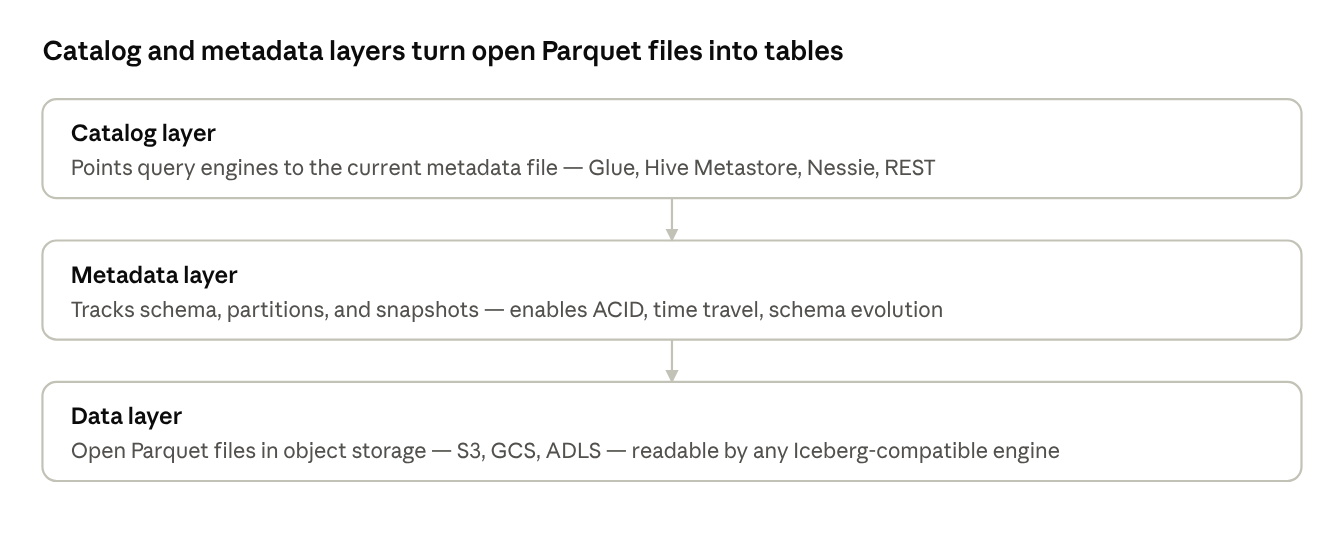
Iceberg is best understood as three layers stacked on top of each other. The data layer is actual Parquet files in object storage — any engine can read them directly. The metadata layer above it tracks schema, partition layout, and snapshot history: it’s what turns a folder of files into a table with ACID guarantees, time travel, and schema evolution. The catalog layer is a pointer telling an engine which metadata file is current right now.
Spark, Flink, Trino, BigQuery, Snowflake, and Databricks all implement the same spec — any of them can read or write the same table without an export step. When choosing an Iceberg writer, the most important question is: which of these three layers does it manage for you — and which ones do you still have to operate yourself?
Three properties matter more under continuous CDC load than periodic batch: partition pruning — tracked in metadata rather than directory layout, so a query engine skips irrelevant files without listing storage first — and schema evolution, where adding or widening a column is a metadata operation, not a data rewrite. The third is table maintenance: a live streaming pipeline continuously adds small files and accumulates orphan files and metadata snapshots, requiring ongoing compaction and cleanup that a nightly batch job never has to deal with. Whether your pipeline gets these benefits automatically depends entirely on which side of the metadata layer your writer sits — and which engine is managing the table underneath.
What Striim 5.2.0 Introduced
In Striim 5.2.0, we brought native Iceberg support to GCS with the IcebergWriter — giving teams a path to build open Iceberg pipelines without being locked into a managed catalog service.
- IcebergWriter (GCS): Writes Iceberg tables to Google Cloud Storage using open, self-managed catalog options: Nessie, Polaris, Hadoop, and the GCP Lakehouse Runtime Catalog (formerly BigLake Metastore). Table maintenance and compaction are the operator’s responsibility — giving full control to teams who want to run their own catalog stack.
What Striim 5.4.2 Brings
All Iceberg writers support both initial load and ongoing CDC. Configure Mode: APPENDONLY for initial load and MERGE for CDC. Set OptimizedMerge: true when your source sends partial-image updates — missing columns are handled seamlessly during the merge without affecting performance.
- S3 Tables Writer (new): Writes to Amazon S3 Tables, an AWS-managed bucket type with an embedded catalog plus automatic metadata compaction and unreferenced-file cleanup. Striim uses Amazon EMR as the compute engine. The writer supports two catalog options: the S3 Tables embedded catalog (default, fully managed) or AWS Glue Catalog for teams already using Glue as their central metastore. No separate catalog to operate; no compaction job to schedule.
- GCP Lakehouse Writer (new): A new writer that streams data into the GCP Lakehouse ecosystem end to end: the catalog is the GCP Lakehouse Runtime Catalog (formerly BigLake Metastore), the data lake is Google Cloud Storage, and the compute engine is GCP Managed Apache Spark (formerly Dataproc). The writer supports two catalog modes — REST catalog mode (built on the Apache Iceberg REST API, with credential vending for short-lived, scoped storage credentials) and custom catalog mode for teams already using BigQuery. Tables written by GCP Lakehouse Writer are immediately queryable in BigQuery without any additional setup, and equally accessible to open-source engines — Spark, Flink, Trino — through the same Iceberg catalog.
- Snowflake, Databricks, BigQuery, and Fabric Iceberg: Striim 5.4.2 delivers full pipeline support for Snowflake Iceberg tables, Databricks Unity Catalog Managed Iceberg tables, BigQuery managed Iceberg tables, and Microsoft Fabric Iceberg tables — through the existing adapters, with no new connector required. MERGE and APPENDONLY modes are both supported, with partition pruning and Optimized Merge for efficient partial-image CDC. Each target benefits from the same production-ready feature set available across all Striim writers.
What Striim Solves for Iceberg Data Pipelines
Getting data into Iceberg is one problem. Keeping the pipeline production-ready — schema changes, file accumulation, source diversity — is another. Here’s what Striim handles for you.
Schema Evolution
Striim IcebergWriter captures DDL changes at the source and propagates them to the Iceberg target automatically — no pipeline restart required. Supported operations include ADD COLUMN, compatible DROP COLUMN, and ALTER COLUMN, delivered via CDDLAction. Type-compatible alterations land without disrupting downstream readers, and the Iceberg schema version history reflects every change.
Managed Infrastructure
Striim uses the Spark jobs on customer-provisioned Dataproc or EMR clusters — handling job lifecycle, failovers, retries, and recovery — so you don’t have to manage the compute layer to keep a pipeline alive. Monitor the status of Managed Apache Spark (formerly Dataproc) jobs directly via Striim’s SHOW command — a single interface to inspect job state without switching to the cloud provider’s console.
Automated Table Services
An Iceberg table fed by a live streaming pipeline accumulates small files, orphan files, and a growing chain of metadata snapshots. Every major target Striim writes to handles this automatically:
- S3 Tables: Compaction and unreferenced-file removal are built into the bucket type itself.
- GCP Lakehouse: Table maintenance runs through GCP Managed Apache Spark, independent of the write pipeline.
- Databricks, BigQuery, Snowflake, and Fabric: Each manages compaction, cleanup, and storage optimization natively through its own runtime — no external jobs to schedule.
Configurable Batch Policy
Streaming pipelines are small-file factories by nature. UploadPolicy controls when a batch is flushed — by event count or time interval, whichever comes first (GCP Lakehouse defaults to 100,000 events or 60 seconds). Tuning this directly controls small-file generation and trades batch overhead against end-to-end latency.
Resilience and Recovery
All writers operate with resilient recovery when processing streaming CDC workloads and initial load — a table that completed its snapshot load before a restart isn’t reprocessed from scratch.
Beyond restarts, Striim handles runtime exceptions automatically: transient network or service errors trigger configurable retries, and ignorable exceptions can be classified and skipped rather than halting the entire application. The result is a pipeline that keeps running through the kinds of noise that would otherwise page an on-call engineer.
Monitoring and Troubleshooting
All writers expose metrics — write timestamp, target freshness, discarded events, and queued batch size — giving you real-time visibility into pipeline health. When something goes wrong, Striim’s built-in dashboards and event logs let you pinpoint whether a slowdown is in the source read, the transformation layer, or the Iceberg write itself.
Discarded events are captured with context so you can inspect exactly what failed and why, without digging through raw logs. A stalled or throttled pipeline surfaces as an observable signal before it becomes a support ticket.
Schema and Datatype Compatibility
Striim’s Auto Schema Conversion features automatically map source types to the closest compatible Iceberg equivalents before the first row moves — for example, Oracle NUMBER to Iceberg decimal, MySQL TINYINT(1) to boolean. This catches type mismatches at design time and ensures data lands in the right shape without manual column-by-column mapping.
Multi-Source Convergence
Fan in from Oracle, MySQL, PostgreSQL, SQL Server, Salesforce, Kafka, and cloud object stores simultaneously — including data lake files in JSON, Parquet, Avro, and other formats — merging OLTP, OLAP, SaaS, and data lake sources into a unified Iceberg table with consistent CDC ordering.
Striim AI Agents With Iceberg Targets
Striim’s AI agents act on data while it’s still in motion — before it’s committed to Iceberg tables:
- Sherlock AI: Discovers and classifies sensitive fields at the source, so you know what’s about to land in Iceberg before the first commit. Catching PII upstream avoids the far costlier path of finding it later in Parquet files and snapshot history.
- Sentinel AI: Masks and encrypts sensitive values in flight, so they never reach an Iceberg data file at all.
- Foreseer: Applies time series forecasting and anomaly detection to the live stream, surfacing volume spikes, drops, and outliers before they’re written. Catching them upstream means fewer bad snapshots to roll back and fewer surprise ingestion patterns hitting your Iceberg tables.
- Euclid: Generates vector embeddings in-stream, so they land as columns in the Iceberg table alongside the source data. Your lakehouse becomes directly usable for semantic search and RAG, with no second embedding pipeline and no separate vector store to keep in sync.
- Striim Clara: Build, run, and monitor Iceberg pipelines through natural language, with answers drawn straight from Striim’s documentation.
What Stays Constant
Regardless of target, data is stored in the Apache Iceberg table format spec in object storage — readable by any Iceberg-compatible engine without an export step. That consistency is what makes catalog and metadata-layer decisions safe to make independently of which engine eventually queries the data.
Choosing an Iceberg Target
| Target | Catalog Layer | Compute | Table Maintenance | Best Fit |
| S3 Tables Writer | S3 Tables / AWS Glue | Amazon EMR | Automatic | AWS-native, minimal ops |
| GCP Lakehouse Writer | GCP Lakehouse Runtime Catalog (REST mode or custom mode) | GCP Managed Spark | Automatic | GCP-native lakehouse pipelines |
| Snowflake Iceberg | Snowflake-owned | Snowflake | Automatic | Primary engine is Snowflake |
| Databricks | Unity Catalog | Databricks | Automatic | Primary engine is Databricks |
| BigQuery Iceberg | BigQuery-owned | BigQuery | Automatic | Primary engine is BigQuery |
| IcebergWriter (GCS) | Nessie / Polaris / Hadoop | GCP Managed Spark | Self-managed | GCS + self-managed catalog |
| Microsoft Fabric | OneLake | Microsoft Fabric | Automatic | Iceberg tables in OneLake |
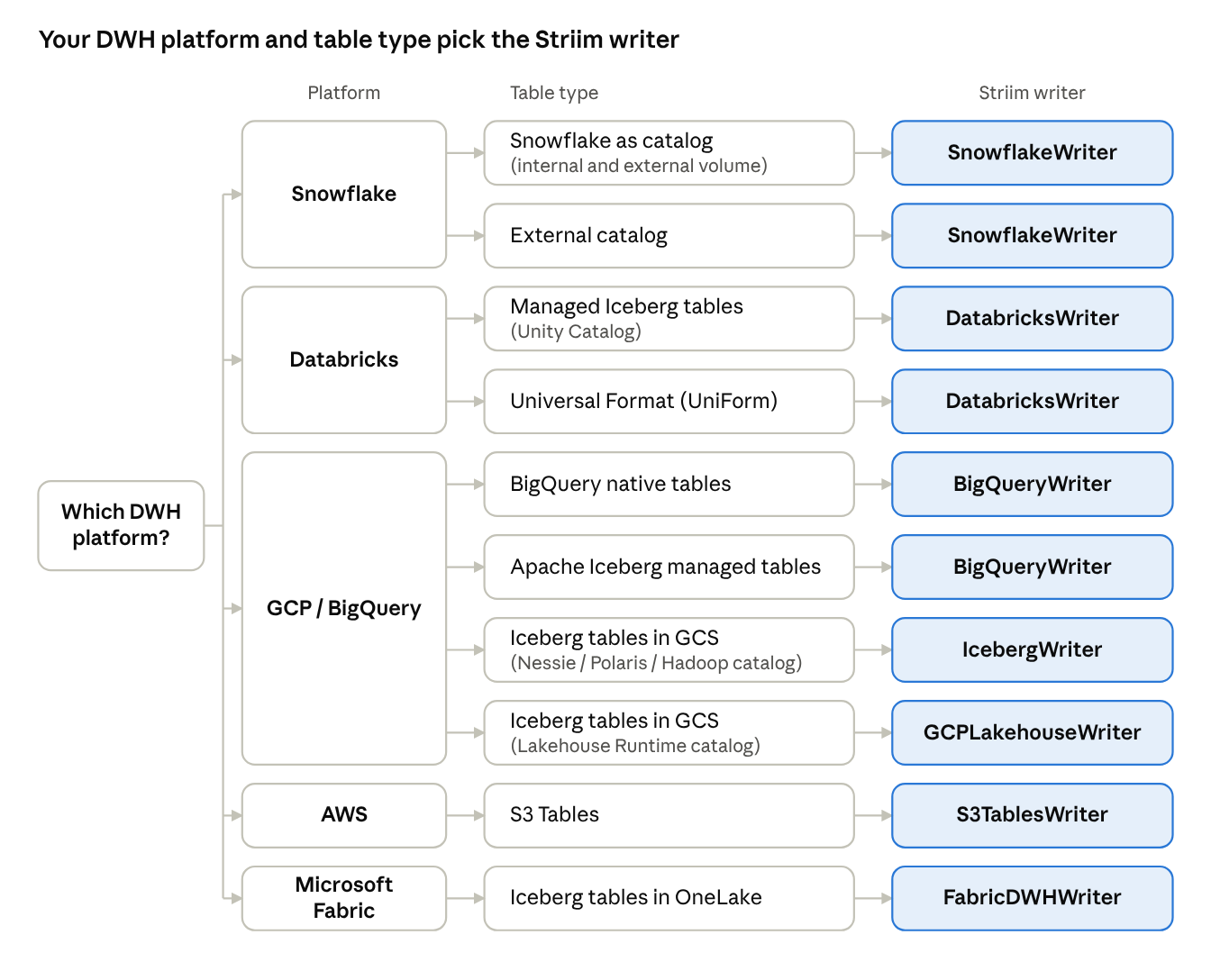
Writer Selection Decision Flowchart
Start from your DWH platform and follow the branches to the right Striim writer.
Writer Setup and Documentation
Work backward from where your team actually runs queries, not from where data happens to sit. Each writer has its own setup guide in the Striim documentation.
S3 Tables Writer (AWS)
Configure four connection profiles: EMR (compute), S3Tables or Glue (catalog), S3 (staging). Auth uses the IAM role on the EMR instance profile. Start with APPENDONLY for the initial load, then switch to MERGE for ongoing CDC. S3 Tables Writer docs
GCP Lakehouse Writer (GCP)
Choose REST or custom catalog mode before provisioning — you can’t switch an existing table’s catalog later. For REST, match CredentialVending to your catalog’s configuration. IcebergTablesLocation must be a bucket-root path in REST mode. GCP Lakehouse Writer docs
IcebergWriter (GCS)
For Iceberg on GCS with a self-managed open catalog (Nessie, Polaris, or Hadoop). Table maintenance and compaction are your responsibility — plan for this before committing a long-running pipeline. IcebergWriter docs
Snowflake Writer
Create the Iceberg target table with CREATE ICEBERG TABLE … CATALOG = ‘SNOWFLAKE’ first, then start the Striim application. Schema evolution is on the roadmap — plan a manual ALTER process for source DDL changes. Snowflake Writer docs
Databricks Writer
Create the target table with CREATE TABLE … USING iceberg (Managed Iceberg) or enable UniForm (delta.enableIcebergCompatV2 = true) before starting the pipeline. Unity Catalog manages the metadata layer. Databricks Writer docs
BigQuery Writer (Google Cloud)
Create the target with CREATE TABLE … OPTIONS (table_format = ‘ICEBERG’) before starting the pipeline. Tables are immediately queryable in BigQuery and open-source engines. Schema evolution is on the roadmap. BigQuery Writer docs
Fabric DWH Writer (Microsoft Azure)
Writes Iceberg tables into OneLake. Schema evolution is supported in 5.4.2. OneLake handles table maintenance automatically — no compaction jobs to schedule. Fabric DWH Writer docs
Get Started
Have questions about your pipeline or need help getting started? Reach out to Striim support.