Most enterprise data pipelines were built to answer questions someone asks the next morning. They refresh the warehouse overnight, feed the dashboards, and give leadership a reliable view of yesterday. That design served traditional reporting paradigms well, but it wasn’t built for an AI system that has to decide, right now, whether an order can ship or a payment looks fraudulent.
An AI data pipeline is the system that captures, prepares, governs, and delivers data to AI models and applications for both training and inference. The training side is well understood: collect historical data, clean it, engineer features, and hand it to the model. The less-discussed challenge sits at inference, when a model or agent needs current, governed business context at the moment it reasons or acts.
That gap is where many enterprise AI initiatives stall between pilot and production. Gartner predicted that through 2026, organizations will abandon 60% of AI projects unsupported by AI-ready data. The model is rarely the bottleneck. The data architecture behind it usually is.
In this guide, we’ll define an AI data pipeline, walk through its stages, and draw the line between training pipelines and context pipelines. We’ll also introduce the four C’s of agent-ready data, cover the most common pipeline challenges and use cases, and look at how AI is changing the way pipelines themselves are built and run.
Key Takeaways
- Training and context pipelines solve different problems. Training pipelines prepare historical data on a defined cadence, while context pipelines deliver current business data to models and agents at the moment of inference.
- Every AI data pipeline shares the same core stages. Data is captured, transformed and governed, delivered, and served, with monitoring and validation running across every stage.
- Agent-ready data passes four tests. It needs to be Current, Consistent, Consumable, and Contextual before you can trust a model or agent to act on it.
- Governance has to happen in motion. Once sensitive data reaches a prompt, a retrieval index, or an AI environment, it’s far harder to pull back, so detect and mask it before delivery.
- AI is now an interface to the pipeline, not just its consumer. Natural language pipeline building and the Model Context Protocol (MCP) let engineers and agents build, inspect, and operate pipelines, under the same permissions and review as human users.
What Is an AI Data Pipeline?
An AI data pipeline is the system that captures, transforms, governs, and delivers data to AI models and applications, both to train them and to give them context when they run. It sits between your systems of record and the AI workloads that depend on them, making sure those workloads see data that’s complete, correct, and current enough for the job.
These architectures cover a broader remit than most analytics pipelines. Structured records from operational databases, semi-structured events from applications and event streams, and unstructured text from logs, tickets, documents, and call transcripts can all end up feeding AI systems.
Where AI pipelines are designed to send that data is broader too. An AI data pipeline might feed a cloud warehouse or lakehouse for training and analytics, a streaming topic that downstream applications subscribe to, a retrieval system that powers Retrieval-Augmented Generation (RAG), or a model or agent directly.
AI Data Pipelines vs. Traditional ETL Pipelines
Traditional Extract, Transform, Load (ETL) pipelines are far from obsolete. They remain important for scheduled analytics and for many training workloads, where a nightly or weekly refresh is enough for the job at hand. The real difference isn’t batch versus real time. It’s what the downstream workload requires.
Inventory is one example. A nightly inventory report can tolerate a delay, because no decision changes when the numbers are eight hours old. An AI system answering whether a customer’s order can be fulfilled can’t. It needs the inventory state as it stands now, or it will promise stock that’s already gone.
| Traditional ETL Pipeline | AI Data Pipeline | |
|---|---|---|
| Workflow | Extract, transform, and load on a schedule, typically into one analytics destination. | Capture, transform and govern, deliver, and serve, often continuously and to several destinations. |
| Supported data | Mostly structured data from databases and business applications. | Structured, semi-structured, and unstructured data, including events, logs, documents, and free text. |
| Freshness requirements | Set by the reporting cycle: hourly, nightly, or weekly. | Set by the workload: scheduled for training, seconds or less for inference-time context. |
| Destinations | Data warehouses and data marts. | Warehouses, lakehouses, streaming topics, retrieval systems, models, and agents. |
| Monitoring | Job success, run duration, and row counts. | Continuous lag, throughput, schema changes, and source-to-target consistency. |
| End consumers | Analysts, dashboards, and reports. | Models, AI applications, and agents, alongside analysts. |
In practice, most enterprises run both. The question is which path each workload belongs on.
Training Pipelines vs. Context Pipelines
A training pipeline prepares historical datasets and features for model development. It runs on a defined cadence, typically pulls from a warehouse or lakehouse, and optimizes for completeness and quality over speed. If the training set is a day old, the model is rarely worse off.
Where a context pipeline differs is in how it delivers current business data to a model or agent at the moment it reasons or acts. That includes the records and documents retrieved for RAG, the data returned when an agent makes a tool call, and live lookups against operational data. Here, the age of the data matters a great deal.
Take a global retailer’s customer service agent answering the question “Where is my order?” Working from last night’s warehouse snapshot, the agent tells the customer their order is still being packed. Working from an order record updated 30 seconds ago, it tells them the parcel left the distribution center this morning and shares the tracking link. Same model, same prompt. The only difference is the pipeline behind it.
The Stages of an AI Data Pipeline
An AI data pipeline runs through five stages: capture, transform and govern, deliver, serve, and monitor and validate. The first four happen in sequence. Monitoring and validation isn’t a final step, though. It runs across all of them, because a problem introduced at capture can surface anywhere downstream.
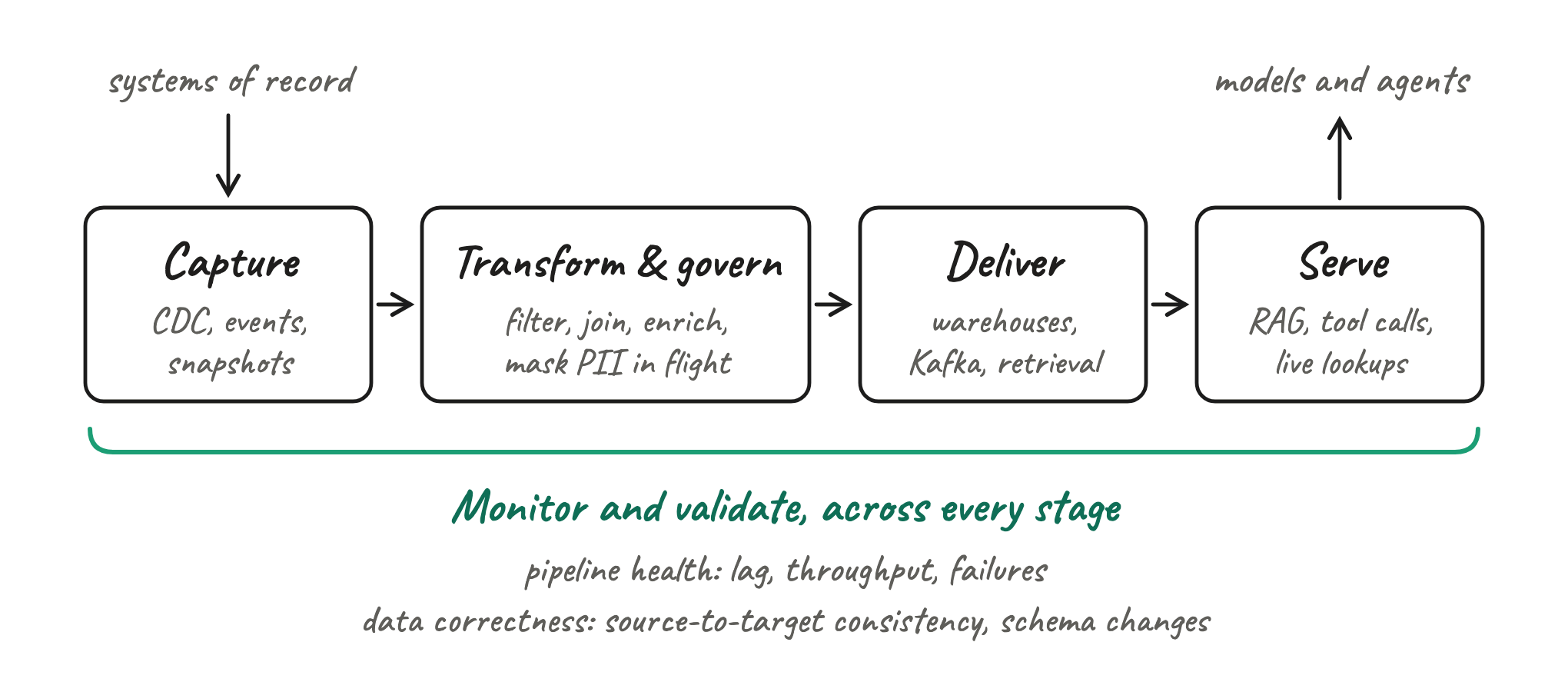
Capture
Capture is where data leaves the systems of record and enters the pipeline. For an AI workload, that usually means three things: an initial snapshot or backfill of historical data, continuous capture of changes as they happen, and events from streams that are already in motion.
Change Data Capture (CDC) is the standard approach for operational databases. Log-based CDC reads inserts, updates, and deletes directly from the database’s transaction log, so you capture every change without repeatedly querying full source tables or adding load to production systems. Striim provides log-based CDC for sources including Oracle, SQL Server, PostgreSQL, and MongoDB.
The common failure here is the cold start. Before a live stream is useful, a new AI workload typically needs the historical record loaded first, and a slow initial load can hold a project back by days. Striim’s Fast Snapshot Load uses multi-query reads and partition-aware parallelism to make initial loads up to 5x faster, according to Striim, then hands over to CDC for ongoing changes.
Transform and Govern in Motion
Raw operational data rarely arrives in a shape an AI system can use. Transforming in motion means filtering out noise, joining related records, enriching events with reference data, deduplicating, and masking sensitive values while data is still moving, before it lands anywhere downstream.
Timing matters more for AI than for analytics. Once sensitive or incorrect data has reached a prompt, a retrieval index, or a downstream AI environment, remediation gets much harder. It’s difficult to trace which outputs drew on it, and removing it can mean rebuilding the index.
Striim uses streaming SQL to apply these transformations in flight, so teams can express filters, joins, and enrichment in a language they already know. For governance, PII DeepScan detects sensitive values such as Social Security numbers, email addresses, and phone numbers inside free-text fields, including notes, tickets, comments, and transcripts, and masks them before delivery. That matters because an enterprise’s most exposed personal data often isn’t in a column labeled “SSN.” It’s buried in a service agent’s notes.
Deliver to AI Destinations
Delivery puts prepared data where AI workloads can consume it. Depending on the use case, that could be a cloud warehouse, a lakehouse, a real-time analytics engine, a Kafka topic, or a retrieval system that serves RAG applications.
Schema evolution is the quiet risk at this stage. Source systems change all the time: a column is added, a data type shifts, a table is restructured. If the pipeline can’t carry those changes through, downstream AI consumers either break or keep reading an outdated structure. Striim handles schema evolution so source changes can flow downstream without cutting off the consumers that depend on them.
For streaming architectures, Striim’s SmartMap maps individual source tables to individual Kafka topics, so downstream consumers can subscribe only to the streams they need. Striim delivers to destinations including Google BigQuery, Snowflake, Databricks, Microsoft Fabric, ClickHouse, and Amazon S3 Tables.
Serve Context to Models and Agents
Serving is the inference side of the pipeline, where data meets the model at the moment it’s needed. It covers retrieval for RAG, the data returned when an agent makes a tool call, and live lookups against operational records.
The core point is simple: the context available to a model or agent is only as current as the data pipeline behind it. A retrieval index refreshed nightly gives an agent yesterday’s answers, however capable the model.
Serving current context doesn’t require agents to query production databases directly. Governed downstream stores or synchronized replicas, kept current through CDC, can give agents fresh data without adding query load to the systems that run the enterprise. It’s an architectural option rather than a requirement, but a valuable one where production systems are sensitive to load.
Increasingly, agents reach that data through the Model Context Protocol (MCP). MCP is an open standard for connecting AI applications to external tools and data sources, giving agents a consistent way to discover and call the enterprise systems they need.
Monitor and Validate
Monitoring an AI data pipeline works on two layers:
- Pipeline health. Track lag, throughput, failures, and problematic source transactions, so you know when data is arriving late or not at all.
- Data correctness. Continuously check source-to-target consistency and detect schema changes, so you know when the data your AI systems see has diverged from the source.
You need both, because a pipeline can be perfectly healthy and still deliver the wrong data. On the operational side, Striim raises alerts on long-running or high-volume transactions in Oracle and SQL Server, the kind of source activity that can quietly build lag before anyone notices downstream.
Model performance and drift monitoring sit downstream of all this. The data pipeline’s job is to provide reliable inputs. It doesn’t replace model observability.
What Agent-Ready Data Requires: The Four C’s
The stages describe how data moves through an AI data pipeline, but what they don’t tell you is whether the data arriving at the end is fit for a model or agent to act on.
At Striim, we evaluate data as “AI-ready” through four key criteria: Current, Consistent, Consumable, and Contextual. Each one works as a checklist item you can hold your own architecture against.
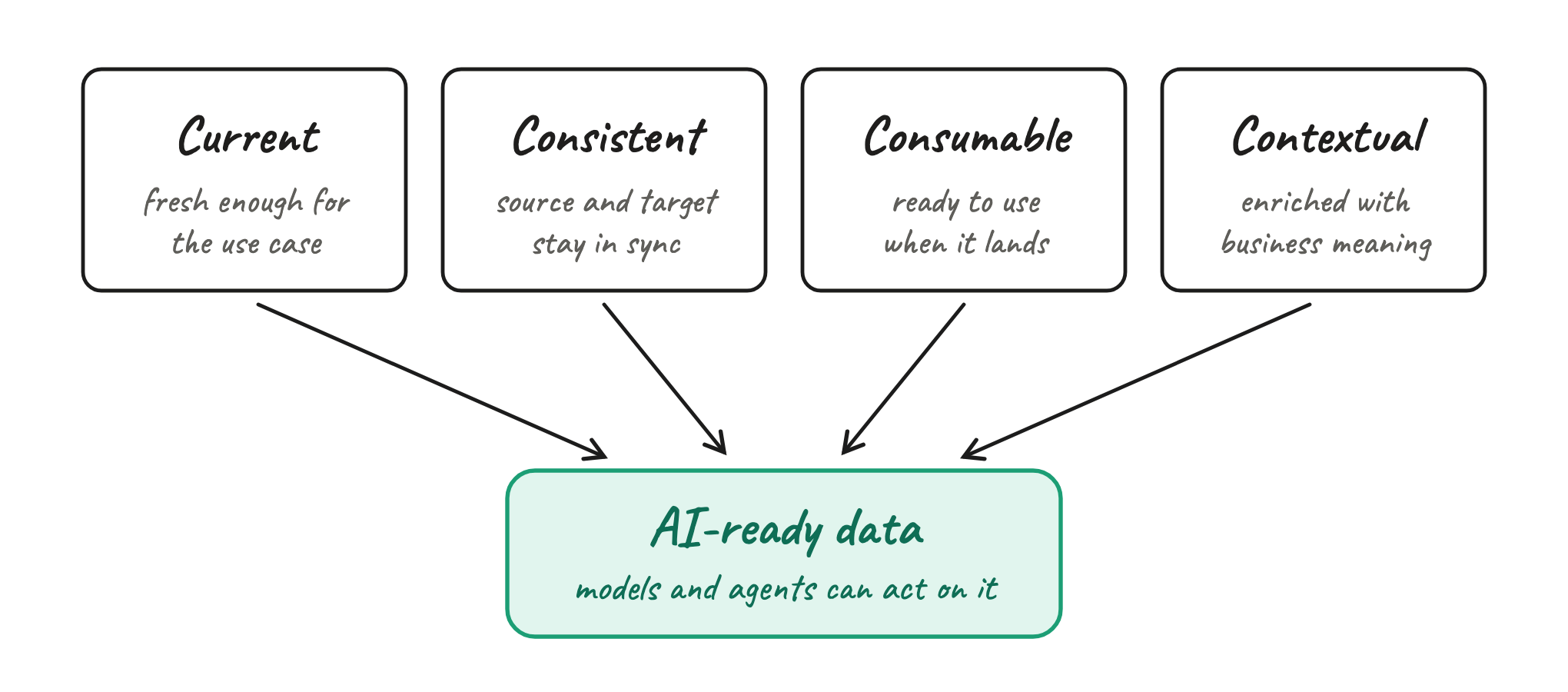
Current
Current data meets the freshness requirement of the use case it serves, and that requirement varies. Real time is a spectrum: a demand forecasting model retrained weekly can work from yesterday’s data, while an agent confirming stock levels or an order’s status needs data that’s seconds old.
Ask your team: How old can this data be before the AI output becomes wrong or unusable?
Consistent
Consistent data stays synchronized between source and target. Records agree across systems, and schema changes in the source don’t silently break the consumers downstream.
This guards against quiet failures in an AI data pipeline that nobody notices.
Ask your team: Can we tell when the data available to AI has diverged from the source?
Consumable
Consumable data arrives in a form the downstream model or agent can use directly. Data from databases, applications, and cloud environments is filtered, joined, and shaped before it lands, not after.
Without it, every new AI workload starts with another round of manual preparation.
Ask your team: How much processing still has to happen after the data reaches its destination?
Contextual
Contextual data is integrated, governed, and enriched enough for an AI system to interpret it in the right business context. A transaction amount means little on its own. Joined with the customer’s account history, the merchant category, and the order it belongs to, it becomes something a model can reason about.
This prevents outputs that are technically accurate but wrong for the situation, because the model only saw a fragment of the picture.
Ask your team: Does the model or agent have enough context to use this data correctly, or would a human still need to reconcile the inputs first?
Common AI Data Pipeline Challenges and How to Address Them
From our experience, the same five challenges tend to come up when enterprises move AI from pilot to production.
Stale Context at Inference
Many enterprises feed AI systems from the same periodic refreshes that serve their reporting. An hourly or nightly load leaves models and agents reasoning from operational data that’s hours old, and nothing in the output signals it.
The fix: Define freshness requirements workload by workload, then use CDC and streaming for the context paths that need them. Keep batch where it still fits, such as model training and historical analytics. Not every pipeline needs to be real time, but the ones feeding inference often do.
Sensitive Data Reaching Models
Personally identifiable information (PII) rarely sits neatly in columns where masking rules can find it. It’s buried in free text: a customer’s phone number in a support ticket, an email address in a call transcript, a Social Security number pasted into a case note. Column-level policies miss it, and once that text is embedded in a retrieval index or passed into a prompt, it can surface in an AI response.
The fix: Detect and mask sensitive values while data is moving, before it reaches any downstream AI environment. Striim’s PII DeepScan, for example, scans free-text fields for values such as Social Security numbers, email addresses, and phone numbers, and masks them before delivery.
Schema Drift and Source-Target Mismatch
Source systems evolve. A column is added, a field changes type, a table is split in two. Downstream tables, retrieval systems, features, and applications can break, or keep running on an incomplete version of the data without any obvious pipeline failure. The AI system will continue providing answers, just based on false information.
The fix: Use a pipeline that supports schema evolution, so structural changes flow downstream in a controlled way. Then validate source-to-target consistency continuously, not in periodic audits.
Slow Backfills and Cold Starts
A new AI workload rarely starts from zero. Let’s say a fraud model needs transaction history, and a service agent needs past orders and cases before live changes are useful. If the initial load takes days, the project stalls, and teams end up feeling they have to choose between historical data and real-time data.
The fix: Run a fast initial snapshot, then hand over to CDC for ongoing changes. The workload gets both the history and the live stream, with no gap between them.
Pipeline Sprawl and Operational Overhead
AI initiatives often inherit a patchwork of tools and data sources: one product for CDC, another for streaming, scripts for transformation, a separate layer for masking, and something else again for monitoring. Every handoff adds latency, another point of failure, and another team that has to wrap their heads around it. When an agent gives a wrong answer, finding the cause can involve looking for a needle across five haystacks.
The fix: Reduce unnecessary handoffs and consolidate pipeline functions where it makes architectural and operational sense. Fewer moving parts leave fewer places for latency, errors, and ungoverned data to creep in. It also raises a new question: if AI is now consuming the pipeline, can it help build and run it too?
How AI Is Changing How Pipelines Are Built and Run
AI isn’t only the consumer at the end of the pipeline. It’s changing the methodology around how the pipeline itself is built: enabling data teams with new ways to build data flows and letting agents handle the ones already running.
Building Pipelines in Natural Language
Today, an engineer can describe what they need in plain language: the source, the target, and how data should flow between them. The system translates that request into a pipeline configuration or plan, which the engineer reviews before anything runs.
The value is a faster path to a first working pipeline, and a lower barrier for teams who know what they need but not every connector’s settings. The review step isn’t optional. A generated pipeline is still a change to production infrastructure, and it should go through the same approval as one written by hand.
Striim’s Clara follows this pattern. Clara can build pipelines such as an Oracle-to-Snowflake flow, answer questions about connectors, inspect cluster health, and help diagnose failed applications. Rather than deploying whatever a user asks for, Clara generates a plan in Tungsten Query Language (TQL), Striim’s pipeline definition language, for the engineer to review first.
Letting Agents Query and Operate Pipelines Through MCP
When pipeline operations are exposed through MCP, a compatible agent can work with data infrastructure directly from the AI applications where people already work. An engineer can ask an assistant why a pipeline is lagging and get an answer drawn from the live system, without switching consoles. An operations agent can check pipeline health as one step in a wider workflow.
Striim MCP Server is one example. In Striim 5.4.2, it exposes 50 tools across read and write operations, covering tasks such as inspecting pipeline health, querying live streams, deploying applications, and monitoring the cluster. It starts with the Striim instance, so there’s no separate service to deploy and manage.
Write access is where governance has to be explicit. An agent that can deploy or change a pipeline should operate under the same permissions, controls, review, and audit expectations as a human engineer, never with unrestricted production control. Start agents with read access, expand write access deliberately, and log every action they take.
AI Data Pipeline Use Cases
Fraud Detection and Risk Scoring
Streaming transactions, account activity, and other risk signals into models as they happen lets enterprises act while an event is still unfolding, not after the next batch. UPS Capital, for example, uses Striim to stream data from multiple sources into Google BigQuery, powering DeliveryDefense Address Confidence, which assigns confidence scores to delivery locations to help predict and mitigate package theft.
Customer Support and Service Agents
A service agent combines current order, account, ticket, and delivery data to answer a customer or decide the next action. That answer has to reflect the status now: whether the refund has been issued, whether the replacement has shipped, whether the delivery exception was resolved an hour ago. An agent working from the last warehouse refresh will answer confidently and get it wrong.
Retail Inventory and Personalization
A recommendation is only useful if the customer can actually buy it. Combining current stock levels, transaction data, and behavioral signals keeps recommendations, availability answers, and substitutions aligned with what’s on the shelf and in the distribution center right now.
Operational Monitoring and Predictive Maintenance
Sensor readings, equipment telemetry, and operational data stream into models that flag abnormal behavior or likely failures. How early a model can catch a problem depends on how quickly those readings reach it. A vibration spike that arrives hours late is a record of a failure, not a warning of one on its way.
How Striim Supports AI Data Pipelines
Striim is the real-time data layer between enterprise systems of record and the AI workloads that depend on them. It doesn’t train or host models. It makes sure the models and agents you already run get current, governed data, continuously.
| Pipeline stage | How Striim supports it |
|---|---|
| Capture | Log-based CDC from sources such as Oracle, SQL Server, PostgreSQL, and MongoDB, plus Fast Snapshot Load for initial loads. |
| Transform and govern | Streaming SQL for in-flight transformation, and PII DeepScan to detect and mask sensitive values in free text. |
| Deliver | 100+ connectors, SmartMap for table-to-topic Kafka delivery, and schema evolution. |
| Build and operate | Clara for building and troubleshooting pipelines in natural language, and Striim MCP Server for agent access. |
Enterprises can run Striim in two ways. Striim Platform is self-managed, for enterprises that need greater control over their infrastructure. Striim Cloud is fully managed, so teams can run the same pipelines without operating the platform underneath.
American Airlines is one example in production. The airline used Striim to build a real-time data hub with MongoDB, Azure, and Databricks, and reached global production deployment in 12 weeks.
Striim is the right fit when you need to continuously move operational data into AI or analytics environments. If your team is doing purely offline model training on static historical files, you may not need streaming at all.
The training side of AI is largely a solved problem. Whether your AI initiatives make it to production depends on the context side: the data your models and agents see at the moment they act. Build that path well, and AI stops being a pilot.
Try Striim Developer for free or book a demo to see how Striim keeps your models and agents working from data that’s current, consistent, consumable, and contextual.
FAQs
Do You Need a Vector Database for an AI Data Pipeline?
Not always. You need vector search when your AI system retrieves unstructured content by meaning, such as RAG over documents, tickets, or knowledge bases. Many agent workloads rely on structured lookups instead: an order status or an inventory level is better served by a query against a governed table than by similarity search. Platforms such as BigQuery, Snowflake, Databricks, and MongoDB now offer vector search, so you may not need a separate system. Either way, a vector index is just another destination, and it’s only as current as the pipeline that keeps its embeddings in sync with the source.
Can You Build an AI Data Pipeline on Your Existing Warehouse or Lakehouse?
In most cases, yes. Your warehouse or lakehouse remains the natural home for training data, features, and historical analytics, and the major cloud platforms increasingly support AI workloads directly. What usually needs to change is how data gets there. If it lands through a nightly batch load, it will serve training well and inference poorly. Replacing that load with CDC-based streaming keeps the same destination current without rebuilding the architecture around it.
How Do You Move a Batch Pipeline to Real-Time Without Rebuilding It?
Start with ingestion, not the whole stack. Replace scheduled extracts from your source databases with log-based CDC: run an initial snapshot to load the history, then let CDC carry ongoing changes into the same targets your batch jobs already write to. Downstream tables, dashboards, and models keep working, because the destination doesn’t change, only how quickly data arrives. Prioritize the workloads where freshness matters most, such as agent context, and leave batch in place where it still does the job.
Who Should Own the AI Data Pipeline: Data Engineering or AI Teams?
In most enterprises, data engineering owns the pipeline and AI teams own the requirements. Data engineering brings the expertise in source systems, CDC, governance, and reliability. AI teams define what the model or agent needs: which data, how fresh, and in what shape. The arrangement to avoid is AI teams building shadow pipelines to move faster, bypassing the governance controls everyone else depends on. Agreeing on requirements per workload, using a shared framework such as the four C’s, keeps both teams accountable to the same standard.
How Do You Measure Whether an AI Data Pipeline Is Working?
Measure the pipeline against what the AI workload needs, not just whether jobs succeed. Track end-to-end latency from a source change to its availability for the model, source-to-target consistency, schema change incidents, and how much sensitive data is caught before delivery. Then connect those measures to outcomes, such as whether agent answers match the system of record. The stakes are real: Gartner predicts that through 2026, organizations will abandon 60% of AI projects unsupported by AI-ready data.