
For decades, Oracle has been the system of record for the world’s largest enterprises. In many ways, it still is. But the workloads enterprises want to run on top of that data, real-time analytics, machine learning, AI-driven personalization, are no longer a strong fit for Oracle’s licensing model, its rigid coupling of compute and storage, or the contention created when analysts hammer production systems with complex queries.
That’s why moving Oracle data into Snowflake has become one of the defining infrastructure decisions of the cloud data warehouse era. Snowflake’s data cloud separates compute from storage, runs natively on AWS, Azure, and GCP, and lets you spin up dedicated virtual warehouses for analytics without impacting operational databases. The shift to an ELT architecture means raw Oracle data lands in Snowflake first, then gets transformed where storage and compute scale independently.
Yet getting Oracle data into Snowflake reliably, continuously, and without breaking the source comes with its own unique challenges. Bulk export and import jobs create maintenance windows your business can’t afford. Day-old data undermines the very analytics and AI workloads you moved to Snowflake to enable. And every schema change in Oracle threatens to break the pipeline you just stood up.
This guide walks through how to implement smooth transition, using Change Data Capture (CDC) to keep Snowflake continuously in sync with Oracle in real time. You’ll learn:
- Why enterprises are moving Oracle data into Snowflake, and the business drivers behind the decision.
- The use cases that become possible once Oracle data is streaming into Snowflake.
- How to build a reliable Oracle-to-Snowflake streaming architecture, including optimizing storage integrations, automating schema mapping, and minimizing latency.
- The risks of getting the migration wrong, and how to avoid them.
- How Striim for Snowflake simplifies the entire pipeline with native Oracle CDC and Snowflake connectors.
Why Migrate Oracle Data Into Snowflake?
Migrating Oracle data into Snowflake is rarely a like-for-like database migration. For most enterprises, it is a deliberate architectural shift, one that reflects how analytics, AI, and cloud economics have evolved over the past decade. Oracle remains a capable transactional system, but the demands placed on enterprise data, particularly real-time analytics, model training, and cross-cloud collaboration, increasingly sit outside the boundaries of what a traditional on-premises database was designed for.
The decision to replicate Oracle data into Snowflake is therefore best understood as a strategic infrastructure choice rather than a tactical data move. The drivers fall into five recurring categories.
Decoupling Compute and Storage Costs
Oracle’s licensing model bundles compute and storage together at a fixed and often substantial cost. Snowflake’s consumption-based pricing model lets enterprises scale Snowflake virtual warehouses independently of storage, paying only for the compute time they use. For organizations with seasonal demand, irregular reporting cycles, or bursty analytical workloads, this shift can translate into a meaningful reduction in total infrastructure spend.
Eliminating Analytics Bottlenecks on Production Systems
Running complex analytical queries directly against Oracle production databases creates contention with transactional workloads. This leads to degraded application performance, longer query times, and a constant tension between OLTP and reporting needs. Replicating Oracle data into Snowflake offloads analytics entirely, leaving Oracle to do what it was engineered for, transactional processing, while Snowflake handles the analytical workload in a dedicated, elastic environment.
Enabling Cloud-Native and Multi-Cloud Architectures
Most enterprises now operate across multiple clouds. Snowflake runs natively on AWS, Azure, and Google Cloud Platform, which makes it a natural analytics layer for organizations that need flexibility across providers, or that maintain different cloud strategies across business units. Oracle’s on-premises heritage, by contrast, often introduces friction in hybrid and multi-cloud environments, particularly where modern analytics and AI workloads are concerned.
Supporting Real-Time Data Sharing and Collaboration
Snowflake’s Secure Data Sharing and the Snowflake Marketplace allow enterprises to share live data with partners, suppliers, and other business units without copying or transferring files. This capability has no direct equivalent in Oracle. Once Oracle data is replicated into Snowflake, it becomes available to a broader ecosystem of consumers, internal and external, under governed, real-time access controls.
Future-Proofing for AI and Machine Learning Workloads
AI and machine learning pipelines depend on fresh, well-structured data. Snowflake’s native integrations with Snowpark, Cortex AI, and external ML platforms mean that data replicated from Oracle is immediately accessible for model training, feature engineering, and inference, without the need to build separate pipelines for each workload. For enterprises serious about embedding AI into core operations, that consolidation matters.
Taken together, these factors have combined to make the move from Oracle-to-Snowflake replication from a niche technical project to a foundational requirement for enterprise data platforms. The question, in most cases, is no longer whether to do it, but how to do it without disrupting the business.
Use Cases and Benefits of Replicating Data from Oracle to Snowflake
Once continuous replication is in place, the value extends beyond simply having a cloud copy of an on-premises database. Teams can get access to near-real-time data across functions that were previously constrained by Oracle’s analytical limitations or the lag inherent in nightly batch loads.
The table below summarizes the most common Oracle-to-Snowflake use cases observed in enterprise deployments.
| Use Case | Business Benefit | Type of Data |
| Real-time operational dashboards | Faster operational and executive decision-making | Transactional, status updates |
| Fraud detection and transaction monitoring | Reduced fraud losses, improved customer trust | Transactional, event-based |
| Inventory and supply chain optimization | Lower carrying costs, fewer stockouts | Transactional, IoT, event-based |
| Customer analytics and personalization | Higher conversion, stronger retention | Transactional, behavioral |
| Machine learning and AI data readiness | More accurate models, faster iteration | Transactional, historical, feature data |
Real-Time Operational Dashboards
Streaming replication from Oracle into Snowflake supports continuously updated dashboards for operations, finance, and executive teams. Consider a logistics enterprise tracking shipment status across thousands of routes. With overnight batch loads, dashboards reflect yesterday’s reality, but with CDC-based replication into Snowflake, the same dashboards reflect the current state of the network within seconds. Snowflake virtual warehouses provide the compute layer for these queries without affecting other workloads, so dashboard refreshes do not compete with model training jobs or finance close reporting.
Fraud Detection and Transaction Monitoring
Latency is the determining factor in fraud detection. A pattern flagged six hours after a transaction is too late: it’s documenting rather than preventing fraudulant activity. By continuously streaming Oracle transactions into Snowflake enables anomaly detection and pattern analysis on data that reflects the live state of the business, rather than a stale snapshot.
Inventory and Supply Chain Optimization
Manufacturers and retailers rely on Oracle ERP and SCM systems for inventory, order, and shipment data. Replicating that data continuously into Snowflake enables cross-functional visibility across procurement, fulfillment, and finance, and allows teams to combine internal operational data with external feeds, such as weather, demand signals, and supplier reliability metrics. The result is predictive inventory management, where reorder points and replenishment decisions are informed by current conditions rather than last week’s report.
Customer Analytics and Personalization
Customer experience increasingly depends on the ability to combine transactional history from Oracle, purchases, account activity, payment events, with behavioral and engagement data from web, mobile, and CRM systems.
Snowflake provides a logical home for this unified view, but it depends on Oracle data being current. Real-time replication ensures that personalization engines and customer analytics dashboards operate on a complete picture of the customer, rather than a fragmented or delayed one. Platforms that can stream from multiple sources, not only Oracle, allow Snowflake to serve as the genuine system of record for customer intelligence.
Machine Learning and AI Data Readiness
Machine learning models and AI pipelines, whether built on Snowpark, Cortex AI, or external frameworks, require fresh, clean, well-structured input data. Stale batch data degrades model accuracy and introduces drift between training and production conditions. CDC-based replication ensures that Snowflake remains continuously synchronized with Oracle, making it a reliable feature store and training data source for enterprise ML and AI workloads. As enterprises move from experimental AI projects to production deployments, the cost of stale data compounds drastically, and the value of continuous replication becomes harder to ignore.
These use cases share a common assumption: that Oracle data in Snowflake is current, complete, and consistent. That assumption only holds if the underlying replication mechanism is built for the demands of real-time enterprise data. The next sections examine why Change Data Capture is the foundation for that mechanism, and how a reliable Oracle-to-Snowflake streaming architecture is designed.
Migrate Data from Oracle to Snowflake with Striim’s Free Trial on Partner Connect
At Striim, we value building real-time data integration solutions for cloud data warehouses. Snowflake has become a leading Cloud Data Platform by making it easy to address some of the key challenges in modern data management such as:
- Building a 360 view of the customer.
- Combining historical and real-time data.
- Handling large scale IoT device data.
- Aggregating data for machine learning purposes.
It only took you minutes to get up and running with Snowflake. So, it should be just as easy to move your data into Snowflake with an intuitive cloud-based data integration service.
Step-by-Step: Building a Real-Time Data Pipeline from Oracle to Snowflake
We’ll dive into a tutorial on how you can use Striim on Partner Connect to create schemas and move data into Snowflake in minutes. We’ll cover the following in the tutorial:
- Launch Striim’s cloud service directly from the Snowflake UI.
- Migrate data and schemas from Oracle to Snowflake.
- Perform initial load: move millions of rows in minutes all during a free trial.
- Kick off a real-time replication pipeline using change data capture from Oracle to Snowflake.
- Monitoring your data integration pipelines with real-time dashboards and rule-based alerts.
But first a little background.
What Is Striim?
At a high level, Striim is a real-time data integration and streaming platform that offers change data capture (CDC) enabling real-time data integration from popular databases such as Oracle, SQL Server, PostgreSQL, and many others.
In addition to CDC connectors, Striim has hundreds of automated adapters for file-based data (logs, XML, CSV), IoT data (OPCUA, MQTT), and applications such as Salesforce and SAP. Our SQL-based stream processing engine makes it easy to enrich and normalize data before it’s written to Snowflake.
Our focus on usability and scalability has driven adoption from customers like Attentia, the Belgium-based HR and well-being company, and Inspyrus, a Silicon Valley-based invoice processing company, that chose Striim for data integration to Snowflake.
Why Change Data Capture (CDC) Is Critical for Oracle Migrations
The way Oracle data gets into Snowflake matters. Most enterprises start with the obvious approach: a bulk export from Oracle, a load into Snowflake, and a scheduled refresh on whatever cadence the business can tolerate. It’s a pattern that’s worked for decades in batch ETL, and on paper it looks straightforward. In practice, it strains under modern requirements almost immediately.
- The first issue is operational. Bulk export and import jobs create heavy read traffic on the Oracle source, often during the only window when production load is low enough to absorb it. As data volumes grow and the business runs closer to 24/7, those maintenance windows shrink, and the export job that used to finish overnight starts running into morning trading hours. The pipeline becomes a recurring negotiation between the data team and whoever owns the source system.
- The second issue is freshness. If Snowflake is meant to be the enterprise source of truth, day-old data is a liability rather than an asset. Real-time analytics, customer experience workflows, fraud detection, and AI inference all assume the data they’re reading reflects the current state of the business. The moment the gap between Oracle and Snowflake stretches into hours, every downstream decision is being made on a stale picture, and the cost of that staleness compounds invisibly across the business.
- The third issue is cost. Snowflake’s consumption model rewards efficiency. Bulk reloads, where entire datasets are repeatedly written into Snowflake, consume far more compute credits than they need to. Change Data Capture (CDC) addresses this by streaming only the deltas, the inserts, updates, and deletes as they happen, into Snowflake virtual warehouses. Smaller, incremental writes mean lower compute consumption, fewer credit spikes, and a more predictable Snowflake bill at the end of the month.
CDC also fits neatly with the way Snowflake itself is engineered to ingest data. A well-built CDC pipeline feeds changes into Snowflake internal stages and storage integrations in a continuous, low-overhead flow, similar in spirit to how Snowpipe automates ingestion from object storage, but with the added control of a transformation engine sitting in front of the load. That control becomes crucial as soon as schemas, data types, or business logic need to be reshaped on the way through.
Then there’s the question of how to start. Most Oracle-to-Snowflake initiatives don’t begin with a clean slate; they begin with terabytes of historical data already sitting in Oracle. A reliable CDC pipeline handles both phases of that journey, an initial historical load that brings Snowflake up to parity with the source, followed by a continuous CDC stream that keeps it in sync from that point forward. The handoff between the two phases needs to be seamless, with no missing rows and no double-counted ones, which is non-trivial to engineer from scratch.
The hardest part, and the part most often underestimated, is transactional integrity. Oracle commits changes in a specific order. If those changes arrive in Snowflake out of order, or if a network blip causes a partial transaction to land while the remainder is dropped, the result is corrupted state in the target tables. A managed CDC platform like the Striim platform preserves commit ordering, applies changes with exactly-once delivery guarantees, and recovers cleanly from interruptions, three things that are difficult to achieve with a hand-rolled LogMiner script and a custom load process.
CDC, in short, is what turns Oracle-to-Snowflake replication from a periodic data movement exercise into a continuous, governed data flow. Everything that depends on Snowflake being current, every dashboard, model, and customer-facing experience, depends on getting CDC right. The next section walks through what that looks like architecturally.
How to Build a Reliable Oracle to Snowflake Streaming Architecture
The wizard-driven setup most CDC platforms expose is only the visible tip of a much larger pipeline. Behind the click-through experience sits an end-to-end flow that captures changes from Oracle’s redo logs, transports them safely across the network, transforms them in motion, and delivers them into Snowflake in a way the data warehouse can ingest efficiently.
Understanding that flow matters, both because it builds confidence in the pipeline and because it surfaces the points at which a poorly engineered architecture is most likely to fail.
A typical Oracle-to-Snowflake streaming architecture moves through four stages: log-based capture at the source, ordered and fault-tolerant streaming, in-flight transformation and schema mapping, and continuous delivery into Snowflake. The diagram below traces that flow.
[Insert diagram: Oracle → Log Capture → Stream Processing → Transformation → Snowflake Delivery]
Each stage carries its own design considerations, and its own failure modes. The sections that follow take them in turn.
Step 1: Capture Changes Via Log-Based CDC
Log-based CDC reads Oracle’s redo logs (or archive logs) directly, capturing every insert, update, and delete the moment the transaction is committed. Because the capture happens at the log level rather than at the table level, there’s no need to query production tables, no triggers to install, and no measurable load added to the source database. For enterprises running mission-critical Oracle workloads, that distinction is the difference between a CDC pipeline that’s safe to run in production and one that quietly competes with the application it’s meant to support.
It’s also one of the clearest separators between modern CDC platforms and older approaches. Trigger-based CDC introduces overhead on every write to the source. Query-based CDC scans tables on a schedule, which both increases load and misses any change that occurred and was overwritten between scans. Log-based CDC sidesteps both problems by reading the same change record that Oracle itself uses for replication and recovery.
Striim’s Oracle CDC reader supports Oracle 11g through 19c, including RAC, Exadata, and PDB/CDB configurations, which covers the majority of enterprise Oracle deployments. The result, regardless of source topology, is a clean, ordered stream of change events ready for the next stage of the pipeline.
Step 2: Stream Data With Ordering and Fault Tolerance
Capturing changes is only useful if they reach Snowflake in the right order, and without loss. This is where most hand-built CDC pipelines run into trouble. Oracle commits transactions in a specific sequence, and the relationships between rows depend on that sequence holding all the way through to the target. If an update arrives in Snowflake before the corresponding insert, or if a delete is applied before the row that follows it, the result is a target table that is technically populated but logically incoherent.
A reliable streaming layer preserves commit ordering across the wire, even when traffic spikes or the network is unreliable. It buffers when downstream throughput is constrained, applies backpressure when needed, and resumes cleanly from the exact point of interruption when something goes wrong. None of that is trivial to build from scratch, and most teams underestimate the engineering effort until they are already six months into a homegrown project.
Striim’s checkpointing and exactly-once processing (E1P) guarantees handling this layer of the pipeline by default. Network blips, source failovers, and Snowflake maintenance windows are absorbed without data loss or duplication, which is what allows the rest of the architecture to be trusted.
Step 3: Transform and Map for Snowflake Schema Compatibility
Oracle and Snowflake are different databases with different type systems, and bridging them requires more than a one-to-one column copy. Oracle’s NUMBER, DATE, CLOB, and RAW types each need to be mapped to their Snowflake equivalents (NUMBER, TIMESTAMP_NTZ, VARCHAR, BINARY), with attention to precision, scale, and timezone handling. Mishandle the mapping, and Snowflake quietly stores incorrect values, the kind of error that surfaces months later in a finance audit or a downstream model.
The bigger problem, though, is schema drift. Oracle source tables are not static. Columns get added, types get widened, tables get renamed, and any one of those changes can break a pipeline that wasn’t designed to accommodate them. A reliable architecture detects schema changes at the source and applies them to Snowflake automatically, without requiring a pipeline restart or a manual DDL update at three in the morning.
In-flight transformation also belongs at this stage. Filtering, enrichment, masking, and aggregation are all dramatically more efficient when applied as the data moves, rather than after it has landed and consumed Snowflake compute credits to be reprocessed. A pipeline that delivers analytics-ready data into Snowflake, rather than raw replication, is one that pays back its engineering investment with every downstream query.
Step 4: Deliver to Snowflake for Immediate Availability
The final stage is the load itself. Streaming CDC events into Snowflake takes advantage of internal stages and storage integrations to write data efficiently, in continuous micro-batches rather than large periodic dumps. The result is similar in spirit to Snowpipe’s automated ingestion model, but with the added control of a transformation and delivery engine sitting in front of the load, applying business logic and routing rules in real time.
Properly architected, this stage delivers data into Snowflake within seconds of the change occurring in Oracle. Dashboards, models, and customer-facing applications see the new row almost as soon as it commits, and the gap between operational truth and analytical truth, the gap that justified the migration in the first place, effectively disappears.
That is what a robust Oracle-to-Snowflake streaming architecture looks like end to end. It’s also what separates a pipeline that holds up in production from one that runs in a demo and breaks in week three.
How to Migrate Data to Snowflake in Minutes with Striim’s Cloud Service
Let’s dive into how you can start moving data into Snowflake in minutes using our platform. In a few simple steps, this example shows how you can move transactional data from Oracle to Snowflake.
Here are the simple high level steps to move data from Oracle to Snowflake:
- Connect to Oracle database.
- Connect to your Snowflake environment, this step is done automatically in Striim for Snowflake Partner Connect.
- Map data types from Oracle to Snowflake, this step is also done automatically in Striim’s wizards.
- Start data migration with Oracle change data capture to Snowflake.
- Monitor and validate your data pipeline from Oracle to Snowflake.
Let’s get started.
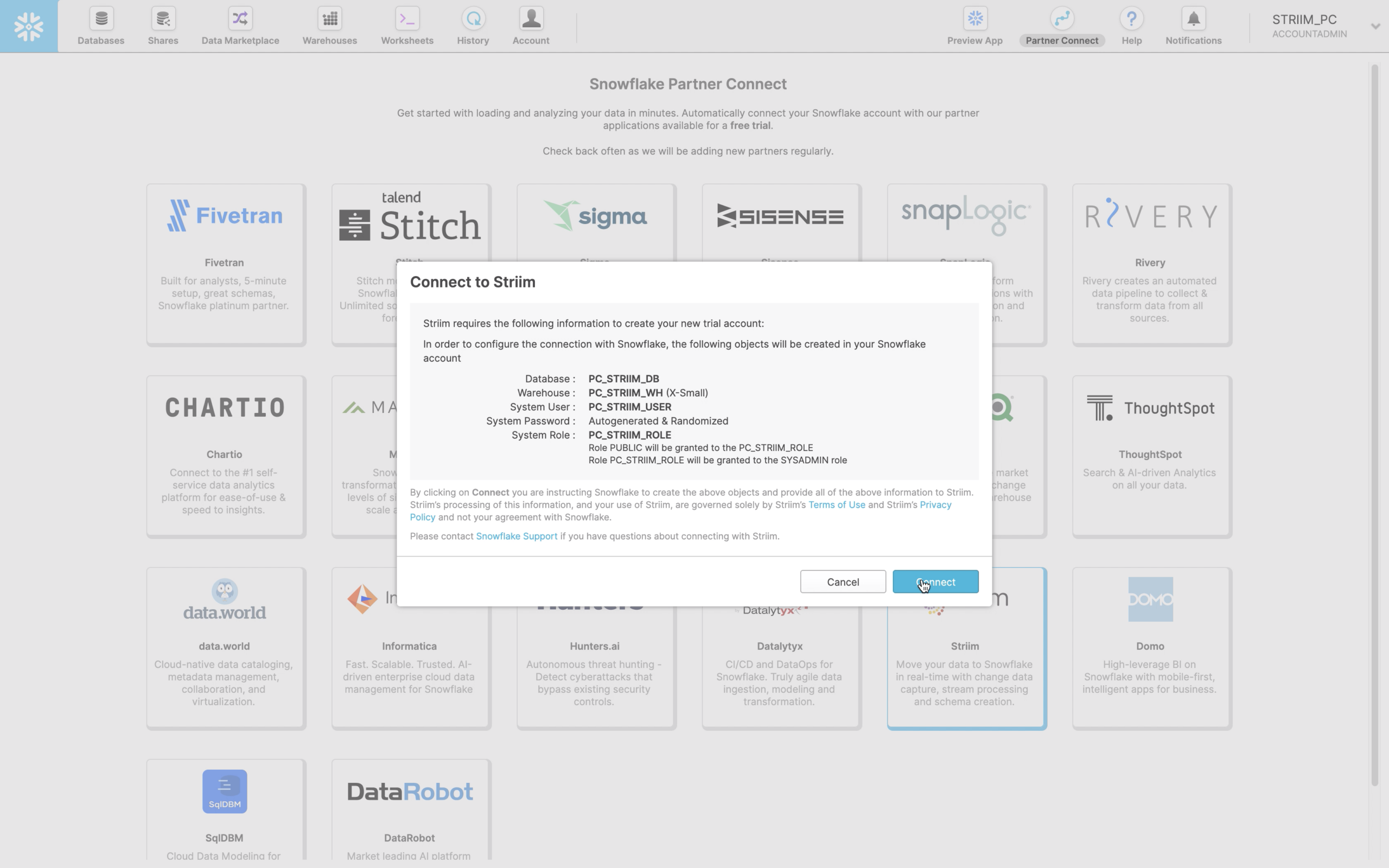
- Launch Striim in Snowflake Partner Connect
In your Snowflake UI, navigate to “Partner Connect” by clicking the link in the top right corner of the navigation bar. There you can find and launch Striim.
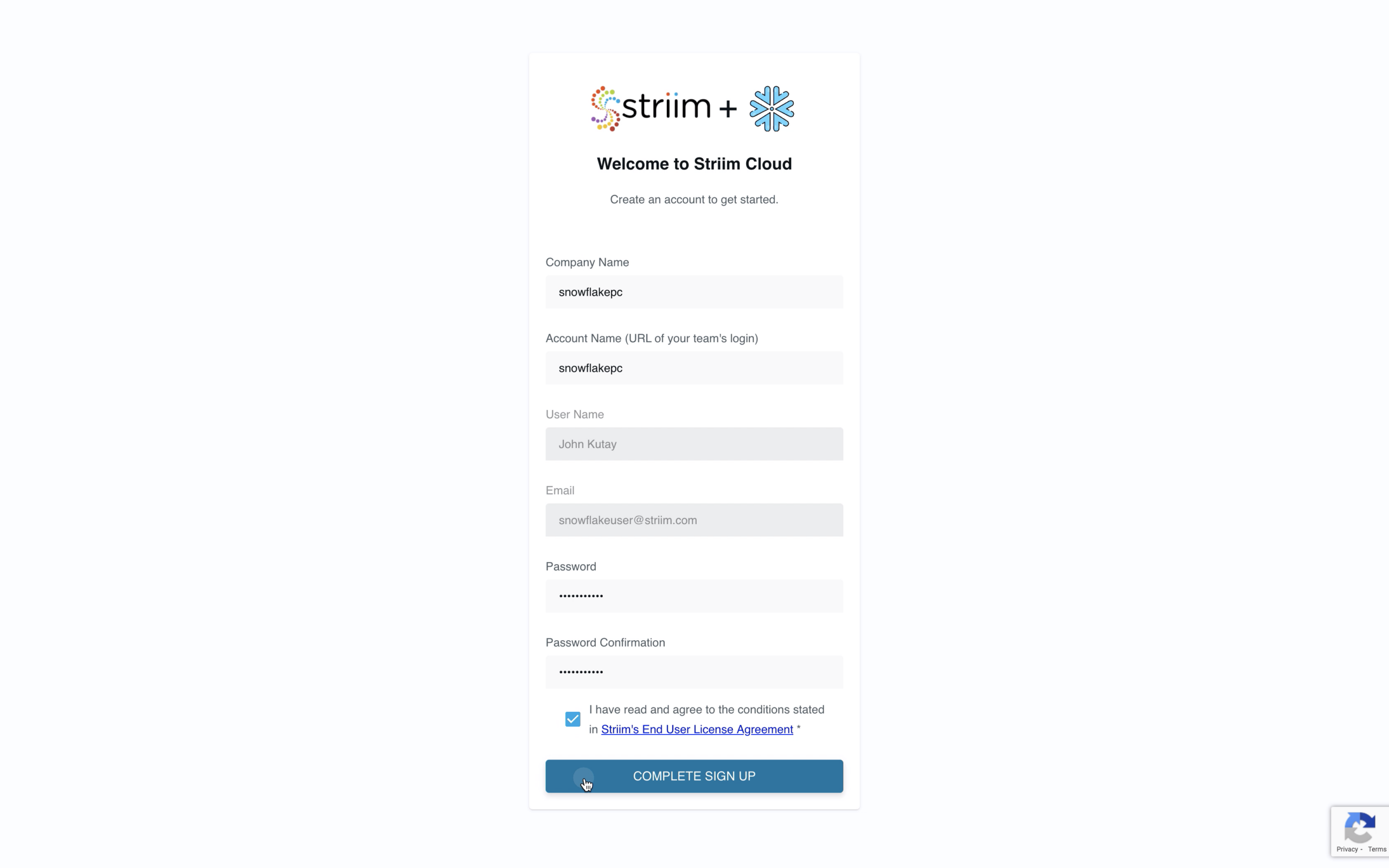
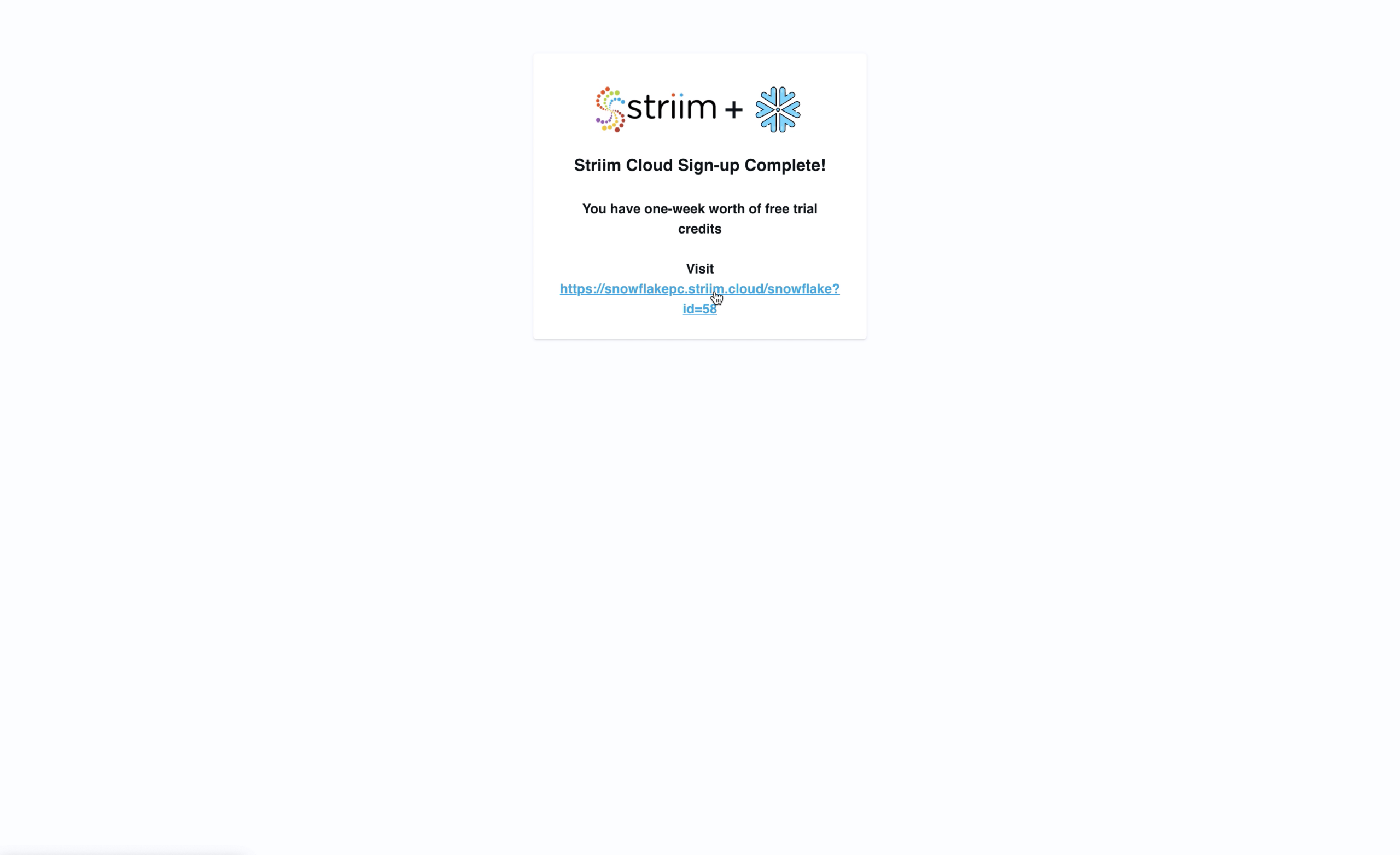
- Sign Up For a Striim Free Trial
Striim’s free trial gives you seven calendar days of the full product offering to get started. But we’ll get you up and running with schema migration and database replication in a matter of minutes.
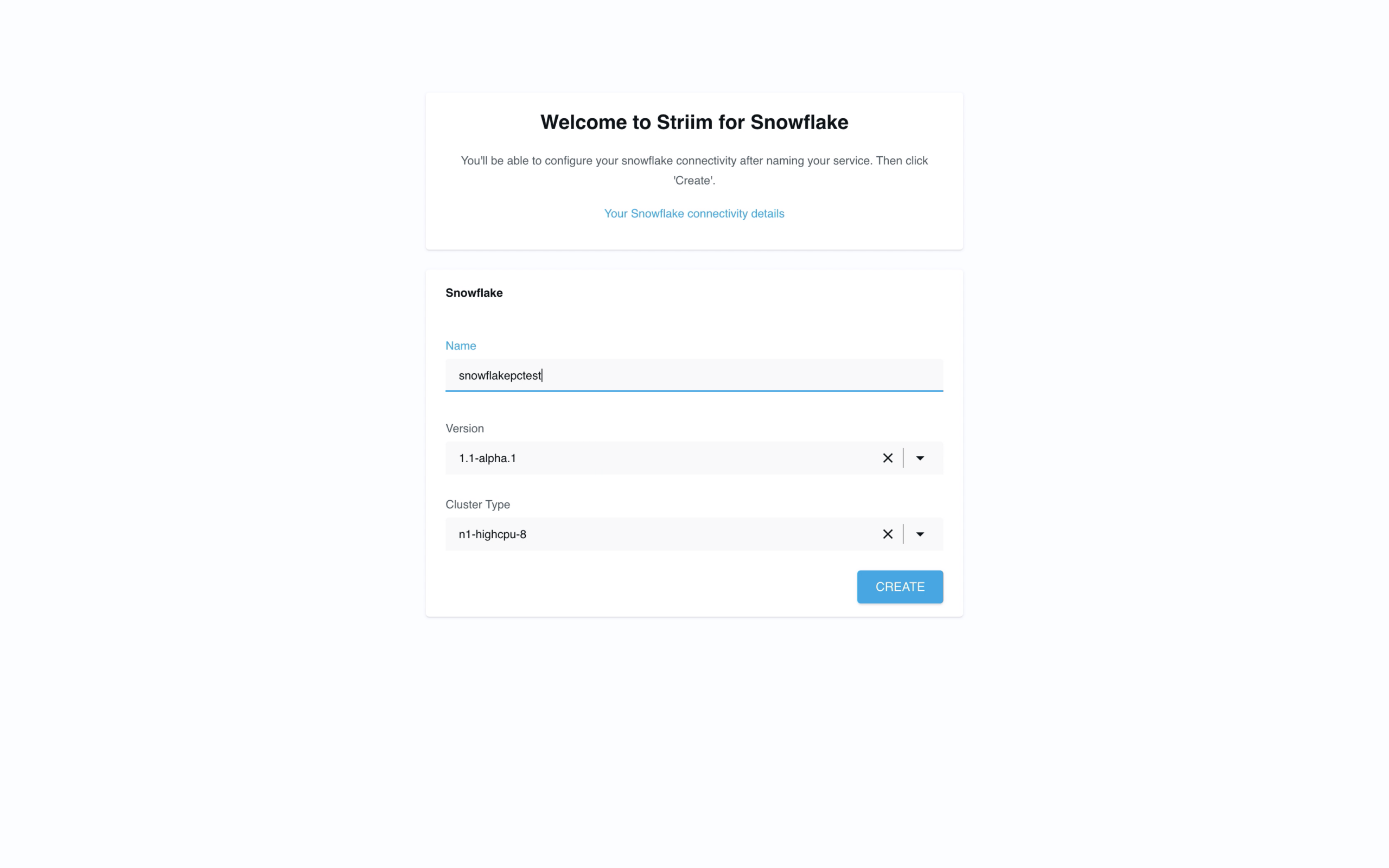
- Create your first Striim Service
A Striim Service is an encapsulated SaaS application that dedicates the software and fully managed compute resources you need to accomplish a specific workload; in this case we’re creating a service to help you move data to Snowflake. We’re also available to assist you via chat in the bottom right corner of your screen.
- Start migrating data with Striim’s step-by-step wizards
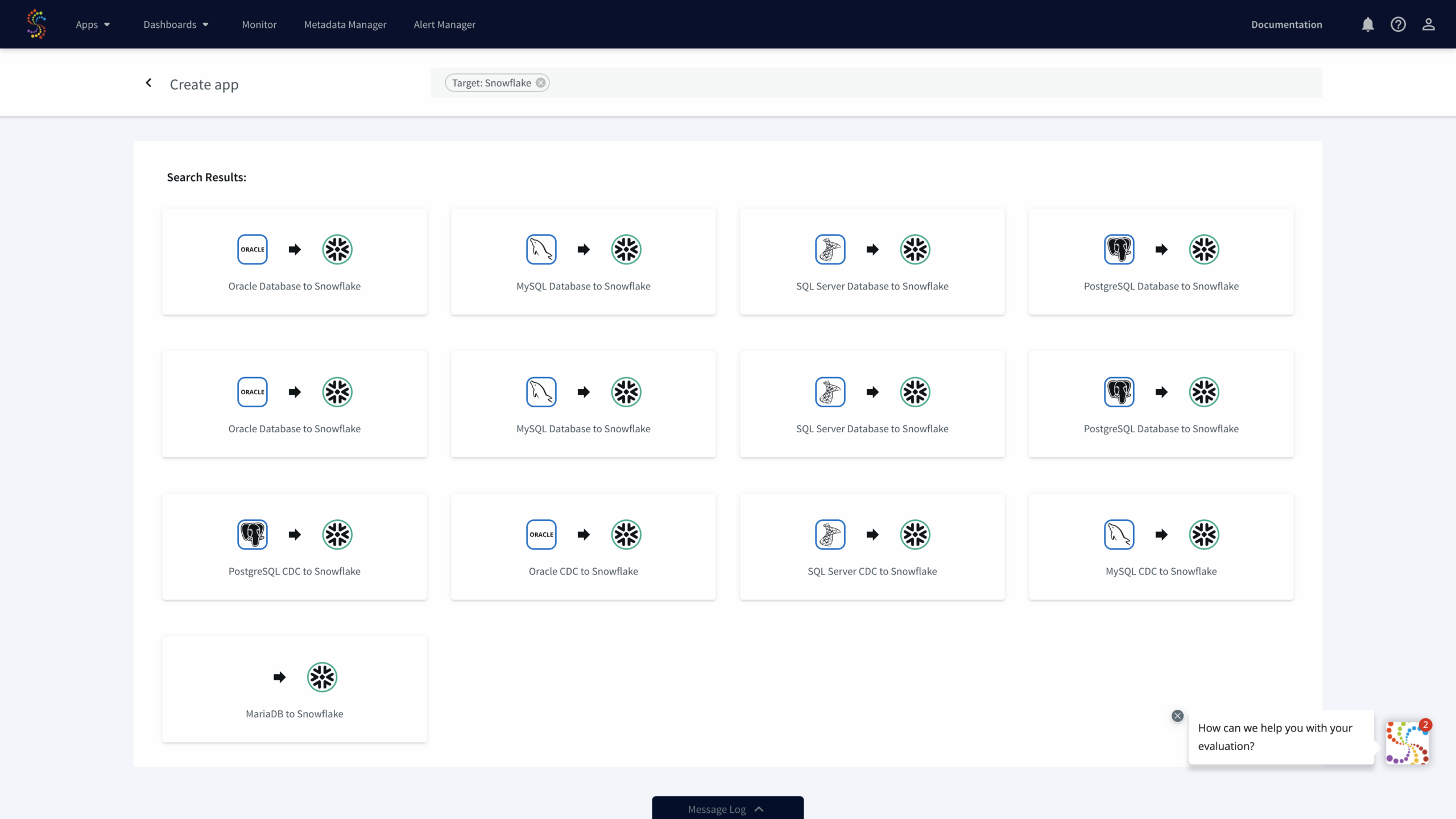
To backfill and/or migrate your historical data set from your database to Snowflake, choose one of the “Database” wizards. For instance, select the wizard with “Oracle Database” as a source to perform an initial migration of schemas and data. For pure replication with no schema or historical data migration, choose the “CDC” wizards. In this case, we will use the Oracle Database to Snowflake wizard.
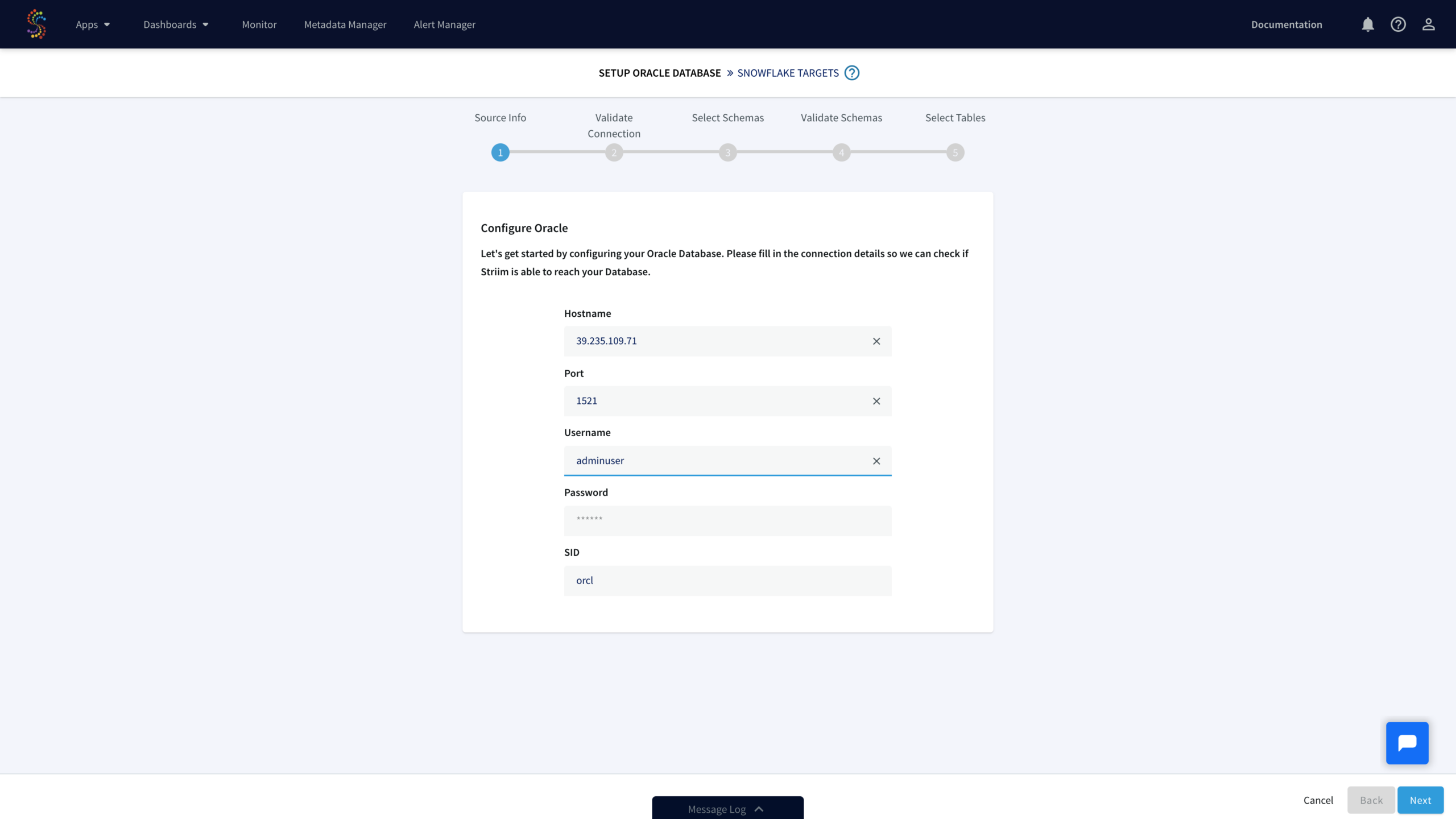
- Select your schemas and tables from your source database

- Start migrating your schemas and data
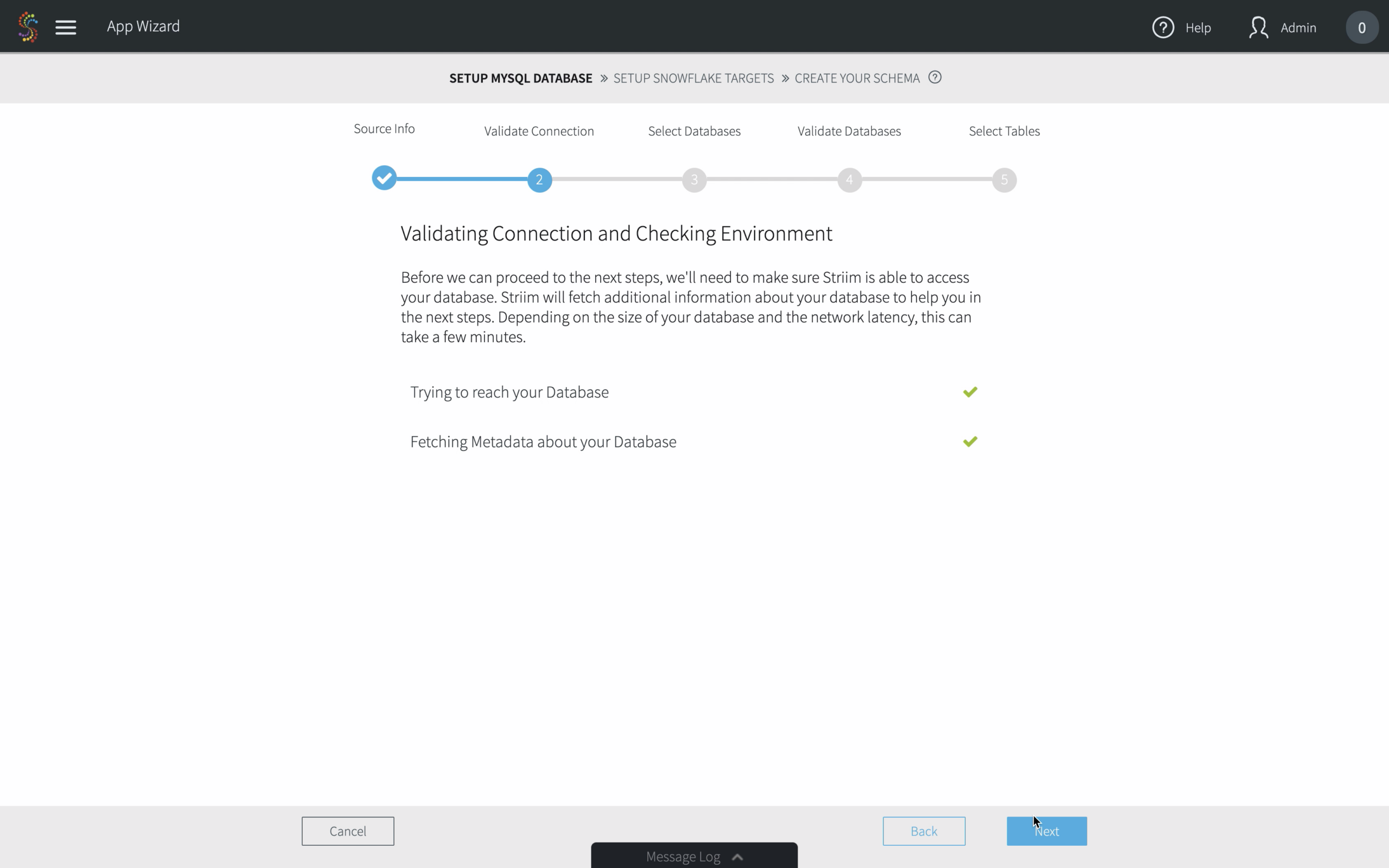
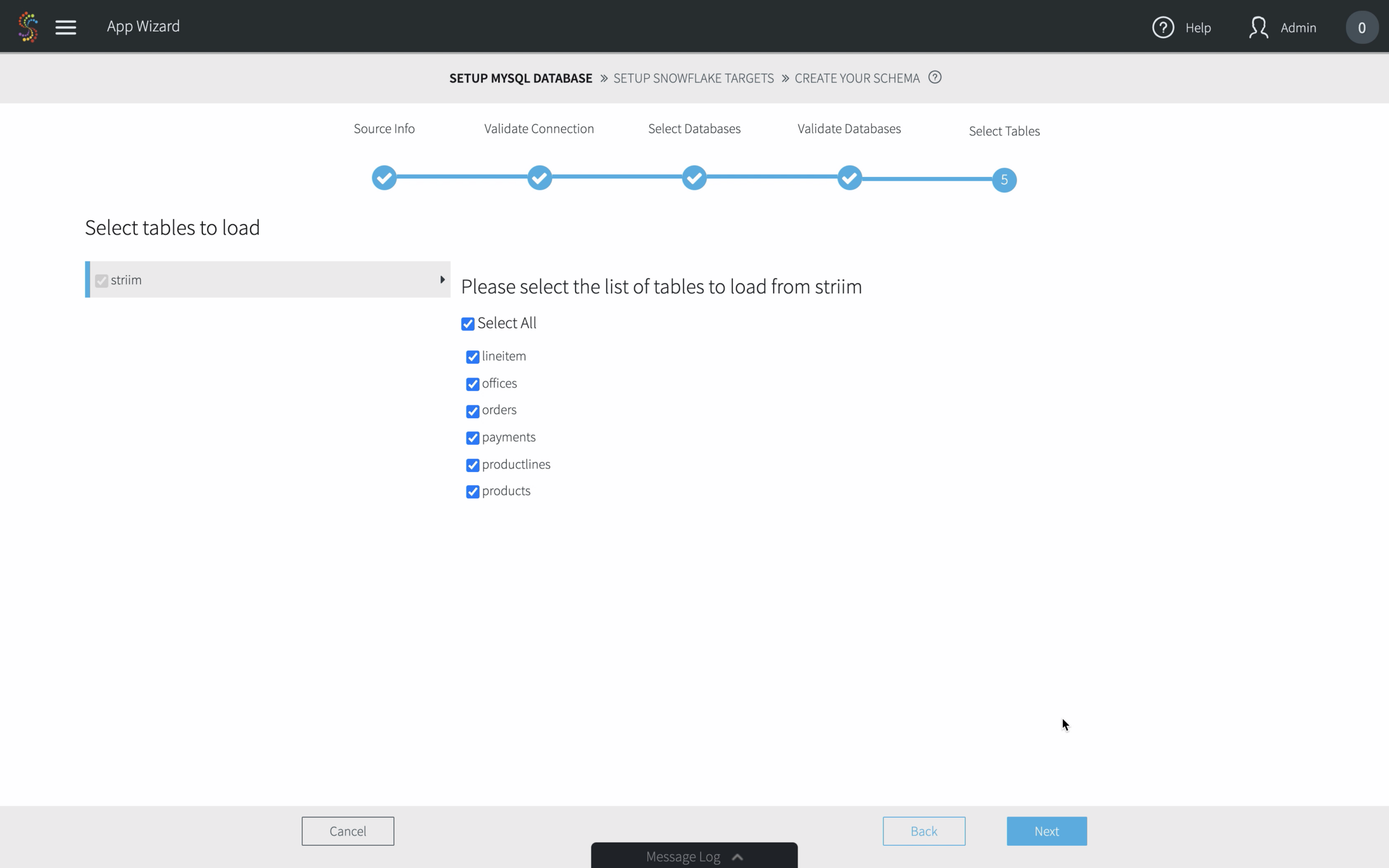
After selecting your tables, simply click “Next” and your data migration pipeline will begin.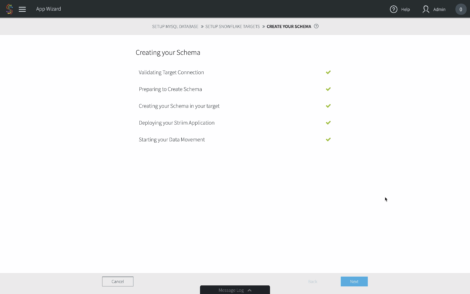
- Monitor your data pipelines in the Flow Designer
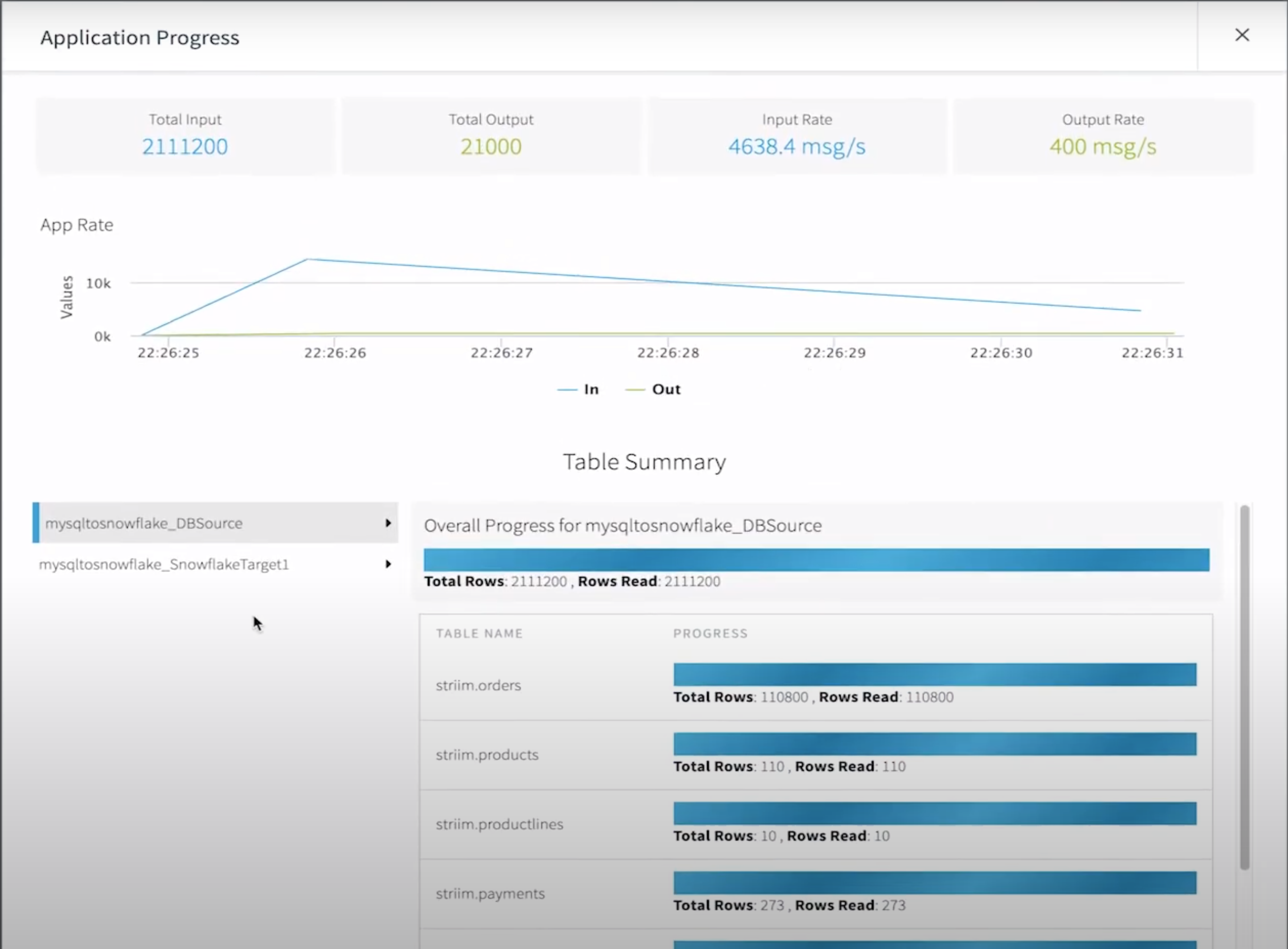
As your data starts moving, you’ll have a full view into the amount of data being ingested and written into Snowflake including the distribution of inserts, updates, deletes, primary key changes, and more.
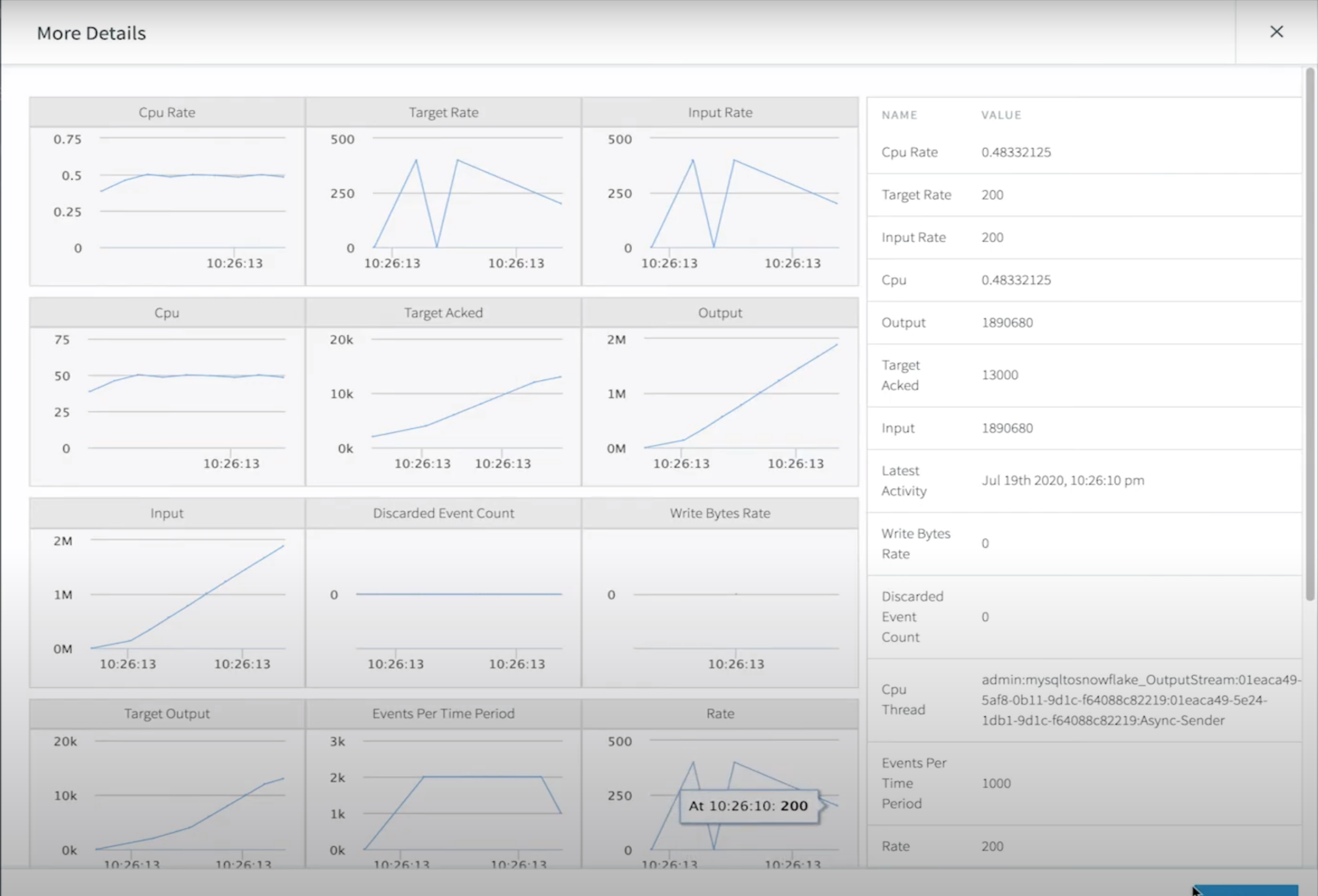
For a deeper drill down, our application monitor gives even more insights into low-level compute metrics that impact your integration latency.
Real-Time Database Replication with Oracle Change Data Capture to Snowflake
Striim makes it easy to sync your schema migration and CDC applications.
While Striim makes it just as easy to build these pipelines, there are some prerequisites to configuring CDC from most databases that are outside the scope of Striim.
To perform change data capture an administrator with the necessary privileges must create a user for use by the adapter and assign it the necessary privileges:
If using Oracle 11g, 12c, 18c, or 19c without CDB, enter the following commands:
| SQL
create role striim_privs; |
If using Database Vault, omit execute_catalog_role, and also enter the following commands:
| SQL
grant execute on SYS.DBMS_LOGMNR to striim_privs; |
For Oracle 12c only, also enter the following command:
| SQL grant LOGMINING to striim_privs; |
If using Oracle 12c, 18c, or 19c with PDB, enter the following commands. Replace <PDB name> with the name of your PDB:
| SQL create role c##striim_privs; grant create session, execute_catalog_role, select any transaction, select any dictionary, logmining to c##striim_privs; grant select on SYSTEM.LOGMNR_COL$ to c##striim_privs; grant select on SYSTEM.LOGMNR_OBJ$ to c##striim_privs; grant select on SYSTEM.LOGMNR_USER$ to c##striim_privs; grant select on SYSTEM.LOGMNR_UID$ to c##striim_privs; create user c##striim identified by ******* container=all; grant c##striim_privs to c##striim container=all; alter user c##striim set container_data = (cdb$root, ) container=current; |
If using Database Vault, omit execute_catalog_role, and also enter the following commands:
| grant execute on SYS.DBMS_LOGMNR to c##striim_privs; grant execute on SYS.DBMS_LOGMNR_D to c##striim_privs; grant execute on SYS.DBMS_LOGMNR_LOGREP_DICT to c##striim_privs; grant execute on SYS.DBMS_LOGMNR_SESSION to c##striim_privs; |
Maximum Uptime with Guaranteed Delivery, Monitoring, and Alerts
Striim gives your team full visibility into your data pipelines with the following monitoring capabilities:
- Rule-based, real-time alerts where you can define your custom alert criteria.
- Real-time monitoring tailored to your metrics.
- Exactly-once processing (E1P) guarantees.
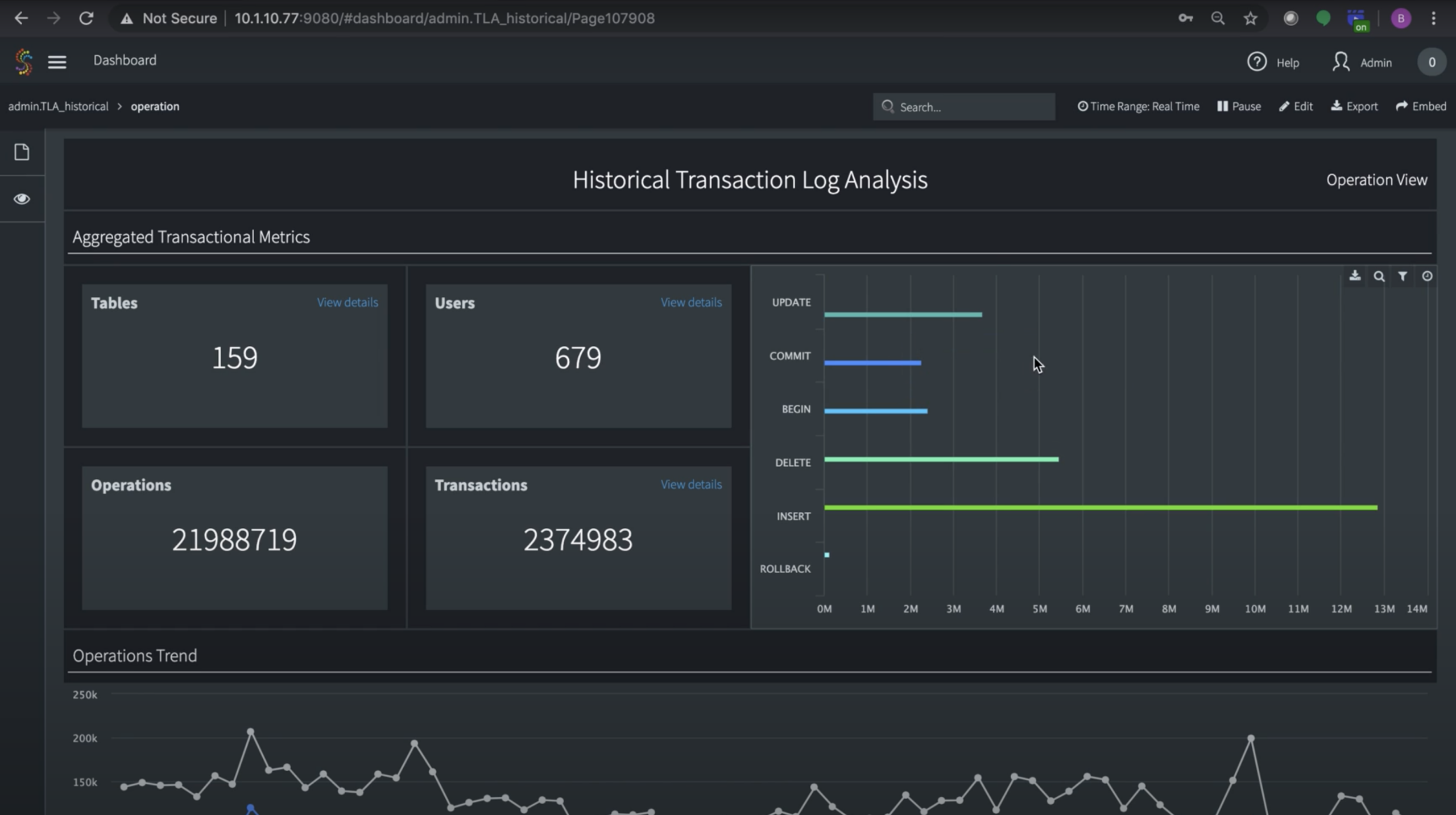
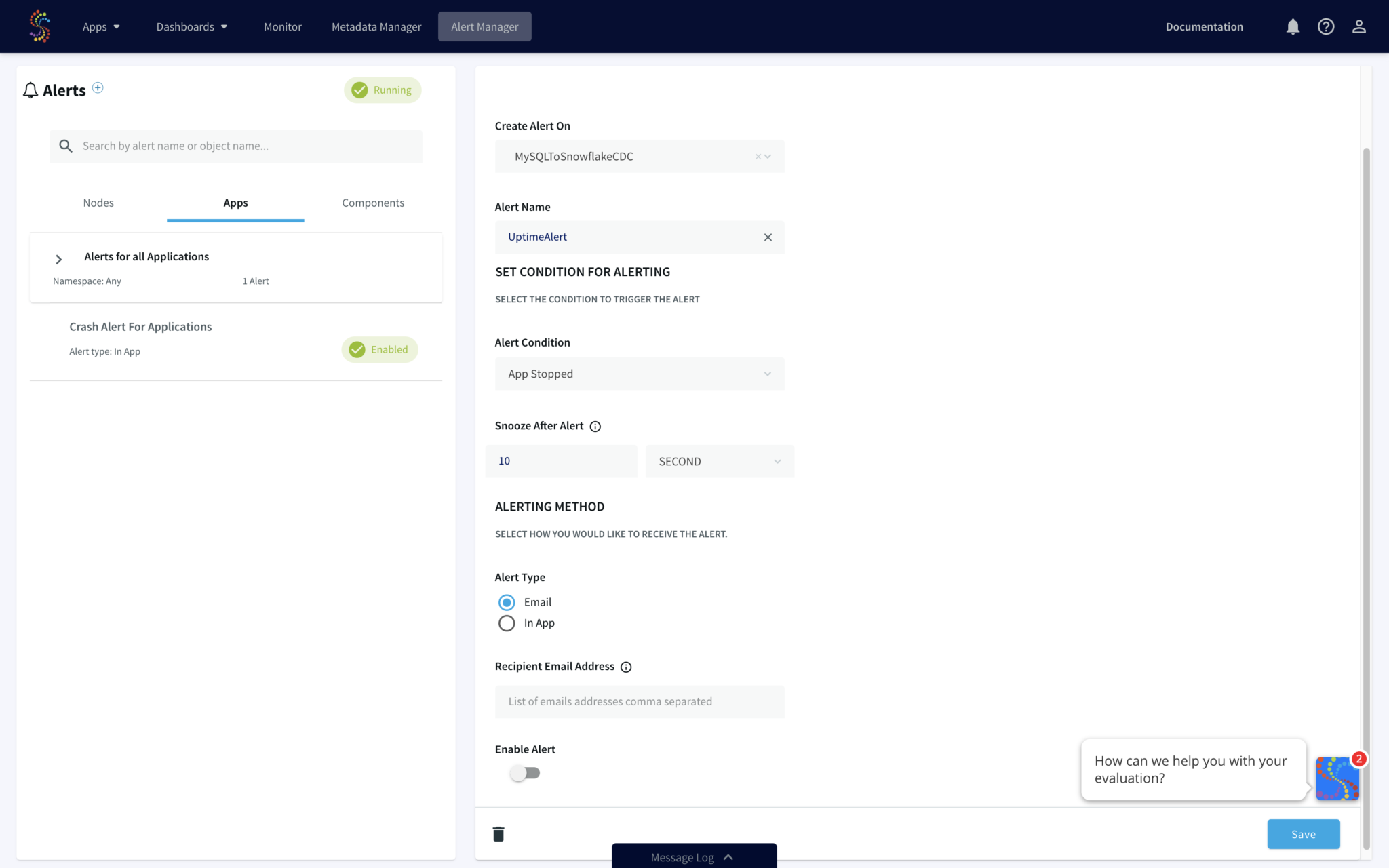
Striim uses a built-in stream processing engine that allows high volume data ingest and processing for Snowflake ETL purposes.
Risks of Transitioning from Oracle to Snowflake
The migration from Oracle data to Snowflake is more than movement: it’s fundamentally a change of state. Even when the migration is staged carefully and the technology is sound, shifting workloads from one database to another introduces risks that have to be managed deliberately. Glossed over, they show up later as silent data loss, blown budgets, or compliance gaps that take months to unwind. Most enterprises that have lived through an Oracle-to-Snowflake migration would name a similar set of pitfalls.
The five most common risks, and the ones worth budgeting for from day one, are these.
1. Data Type Mismatches
Oracle and Snowflake share many type names, but the semantics behind them are not identical. Oracle’s NUMBER type, for instance, supports a level of precision that Snowflake’s NUMBER and FLOAT types cannot always represent without truncation. Date and timestamp handling differ in subtle ways around timezones, fractional seconds, and storage formats. CLOB and RAW need careful mapping to VARCHAR and BINARY, with size and encoding considered.
The risk is that they succeed quietly, with values silently truncated, rounded, or coerced into an inexact equivalent. Errors of that kind tend to surface only when finance reconciles a quarter, or when a downstream model produces output that no one can quite explain. The mitigation is a CDC platform that handles type mapping deterministically, and a validation step that compares row-level values across source and target during the initial load.
2. PL/SQL and Logic Conversion
Most production Oracle environments hold business logic such as stored procedures, triggers, packages, and complex PL/SQL workflows often encode rules that have accumulated over decades. None of that comes across in a data replication job. Each piece of logic has to be reviewed, decided on, and either rewritten in Snowflake Scripting (SnowSQL), Python, or Java, or replatformed entirely as part of an upstream application or transformation layer.
This is consistently the most time-consuming part of an Oracle-to-Snowflake migration, and the part most often underestimated in the original project plan. Pragmatic teams treat the data move and the logic move as separate workstreams, with their own owners and timelines, rather than assuming both will land together.
3. Credit Consumption Spikes
Snowflake’s pricing model is its strength and its curse. Consumption-based billing means costs scale with how the platform is used, which is a benefit when use is efficient and a serious problem when it’s not. Inefficient queries, oversized virtual warehouses, or pipelines that reload entire datasets where deltas would do can drive credit burn far above expectation. The classic failure mode is a team going live with a generously sized warehouse and a permissive auto-suspend policy, then opening a finance ticket six weeks later to ask why the bill tripled.
CDC-based replication directly addresses one source of that spike by moving only what’s changed. Beyond that, governance practices around warehouse sizing, query review, and cost monitoring matter from day one. Treat Snowflake credits the way you’d treat any consumption resource: with a budget, an alert threshold, and someone accountable for staying inside the line.
4. Downtime During Cutover
A traditional cutover, where Oracle is stopped, data is exported, Snowflake is loaded, and applications are repointed, carries operational risk that’s hard to underwrite. If validation fails, the rollback path is slow. If the cutover takes longer than planned, business processes stop. If subtle inconsistencies appear after go-live, the team is in the worst possible position: production traffic running on a target whose fidelity is now in question.
CDC sidesteps the worst of this by allowing both systems to run in parallel. Oracle continues to serve production while Snowflake is brought online and kept current with continuous replication. Validation can happen on real data over real time, against a live source. Cutover, when it happens, is a routing decision rather than a high-risk migration event. For mission-critical systems, the difference between those two cutover models is the difference between a confident project and a fraught one.
5. Role-Based Access Control (RBAC) Drift
Oracle’s security model is often built up over years, with row-level, column-level, and procedure-level permissions tuned to specific business needs. Snowflake’s RBAC is powerful, but it isn’t a one-to-one analogue, and replicating Oracle’s permission graph into Snowflake usually means a deliberate redesign rather than a copy.
The risk in that redesign is what gets missed. Sensitive columns that were masked in Oracle but accessible by default in Snowflake. Service accounts inheriting broader access than they had on the source. Audit logging that doesn’t carry over cleanly. Without a deliberate review, these gaps appear as compliance findings or, worse, as incidents. Treat the security model as a first-class deliverable of the migration, with the same rigor as the data itself.
None of these risks are reasons to avoid the migration; the business case for Oracle-to-Snowflake replication is well established. They are reasons to plan for the move with eyes open, and to choose tooling and partners that have absorbed these lessons already. Next, let’s look at how Striim addresses each of them in practice.
Simplify Oracle to Snowflake Replication With Striim
Each of the risks in the previous section, type fidelity, schema drift, cost control, cutover safety, governance, has the same root cause: the gap between Oracle’s operational reality and Snowflake’s analytical reality is wider than it looks, and bridging it reliably is engineering work most data teams shouldn’t have to do from scratch.
Striim closes that gap in a single platform, combining real-time CDC, in-flight transformation, and end-to-end observability so enterprises can move from Oracle to Snowflake without standing up custom pipelines, and without the operational overhead of maintaining them.
The capabilities below are deliberately framed against business outcomes rather than feature names, because the value of the platform is what it makes possible, not what it ships with.
- Native Oracle CDC and Snowflake connectors. Capture every change from Oracle redo logs and stream it directly into Snowflake with sub-second latency. Supports Oracle 11g through 19c, including RAC, Exadata, and PDB/CDB configurations, out of the box. Snowflake delivery uses internal stages and storage integrations for efficient, continuous ingestion.
- Automatic schema evolution and type mapping. Keep Oracle source and Snowflake destination in sync as table structures change. No manual DDL updates, no broken pipelines, no overnight fire drills the morning after a source release.
- In-flight transformations. Clean, filter, mask, enrich, and restructure data before it lands in Snowflake. Data arrives analytics-ready, which avoids the credit cost of re-processing it inside Snowflake virtual warehouses after the fact.
- Exactly-once delivery and fault tolerance. Prevent duplicates, preserve transactional consistency, and maintain pipeline uptime through network interruptions, Oracle failovers, and Snowflake maintenance windows. Checkpointing and recovery are handled by the platform.
- Built-in monitoring and observability. Track replication lag, throughput, error rates, and pipeline health in real time through Striim’s unified dashboard. No bespoke Grafana stacks, no log-scraping scripts, no waiting for a downstream consumer to notice the data is stale.
- Enterprise-grade security and compliance. End-to-end encryption (TLS 1.2+), role-based access controls, data masking, and audit logging that meet HIPAA, GDPR, SOC 2, and PCI-DSS requirements. Sensitive Oracle data stays governed in transit, not just at rest.
The cumulative effect is the part that matters most to the teams doing this work. Striim removes weeks of pipeline engineering and the longer tail of pipeline maintenance, eliminates the risk of stale or inconsistent data feeding analytics and AI workloads, and shortens the time-to-value for an Oracle-to-Snowflake migration from months to minutes.
For enterprises modernizing decades of Oracle estate, that compression is the difference between a project that delivers and one that drifts.
Ready to see it in action? Start a free trial via Snowflake Partner Connect or book a demo with the Striim team.
FAQs: Oracle to Snowflake Migration
Does Striim Support Oracle to Snowflake Schema Conversion Automatically?
Yes. Striim’s wizard-driven setup detects Oracle source schemas, maps each table and column to its Snowflake equivalent, and creates the target tables on the fly during initial load. Type mapping is deterministic, so Oracle NUMBER, DATE, CLOB, and RAW types land in Snowflake as the right combination of NUMBER, TIMESTAMP_NTZ, VARCHAR, and BINARY. Once the pipeline is running, Striim’s automatic schema evolution detects DDL changes at the source, such as added columns or widened types, and applies them in Snowflake without requiring a pipeline restart or manual intervention.
How Does This Approach Compare to Using Snowflake Snowpipe?
Snowpipe is excellent at what it’s designed for: continuous, automated ingestion from object storage like Amazon S3, Azure Blob, or Google Cloud Storage. It assumes data has already been extracted from the source and staged as files. Striim handles the part that comes before that, capturing changes from Oracle in real time, applying transformations and governance in motion, and delivering the result into Snowflake via internal stages and storage integrations. The two are complementary, but Striim provides the source-side capture and in-flight processing that Snowpipe doesn’t, while delivering Oracle changes to Snowflake within seconds of commit.
How Does Striim Compare to Other Oracle-to-Snowflake Migration Tools?
Most Oracle-to-Snowflake tools fall into one of three camps: lightweight ELT services that batch-load data on a schedule, custom-coded pipelines built around open-source CDC libraries, or generic data integration platforms that bolt on Oracle and Snowflake connectors. Striim is purpose-built for real-time CDC, with native Oracle log-based capture, exactly-once delivery, automatic schema evolution, and in-flight transformation in a single platform. The team behind Striim came out of GoldenGate, so the engineering pedigree on Oracle CDC specifically is decades deep. For enterprises that need sub-second latency, multi-source coverage, and operational reliability rather than a periodic batch refresh, Striim sits in a different category.
Can Striim Replicate Oracle Data to Destinations Beyond Snowflake?
Yes. Snowflake is one of many supported targets. Striim can stream Oracle data to BigQuery, Databricks, Microsoft Fabric, Azure Synapse, Amazon Redshift, Postgres, SQL Server, and a long list of other databases, warehouses, and messaging systems. The same pipeline can also fan out to multiple targets simultaneously, which is useful for enterprises running parallel analytics, machine learning, and operational systems that each need a fresh copy of Oracle data shaped for their specific use case.
Can I Use Striim To Migrate From Oracle RAC or Exadata to Snowflake?
Yes. Striim’s Oracle Exadata to Snowflake connector supports Real Application Clusters (RAC) and Exadata configurations natively, in addition to single-instance deployments and PDB/CDB architectures across Oracle 11g, 12c, 18c, and 19c. The reader handles the additional complexity of multi-instance log capture, instance failover, and cluster-level recovery without requiring custom configuration on the part of the data team. For most enterprise Oracle estates, this means the production source topology, however complex, doesn’t dictate or constrain the replication design.
What Happens to the Data Pipeline if the Network Connection Drops?
Striim’s pipelines are engineered for unreliable networks, which is the realistic operating condition for any cross-region or hybrid deployment. The platform checkpoints pipeline state continuously, so when a network interruption occurs, replication pauses cleanly, buffers any in-flight changes, and resumes from the exact point of failure once connectivity is restored. Combined with Striim’s exactly-once processing (E1P) guarantees, this means Snowflake never sees duplicate rows or missing transactions, even after extended outages or Oracle-side failovers.
How Long Does the Initial Historical Load Take Before Switching to CDC?
It depends on the volume of source data, the configured Snowflake warehouse size, and the network bandwidth available between source and target, but Striim is engineered to move millions of rows in minutes. For most enterprise workloads, the initial load completes in hours, not days. The handoff to ongoing CDC happens automatically: Striim records the Oracle log position at the start of the historical load, finishes the bulk transfer, and then resumes streaming from that exact position, so there’s no gap and no overlap between the two phases. The result is a clean transition from initial load to continuous replication without manual coordination.
What Encryption Protocol Does Striim Provide for Data in Transit Between Oracle and Snowflake?
Striim encrypts all data in transit using TLS 1.2 or higher, both for the connection between Oracle and the Striim platform and for the connection between Striim and Snowflake. Authentication uses certificate-based or token-based mechanisms depending on the source and target configuration, and sensitive credentials are stored in a managed secrets layer rather than in pipeline definitions. Combined with role-based access controls, data masking, and audit logging, this allows Oracle data to flow into Snowflake under HIPAA, GDPR, SOC 2, and PCI-DSS-compliant conditions, regardless of whether the deployment is fully cloud-hosted or hybrid.