Validata AI
Validata AI is an AI-powered assistant integrated into the Validata platform. Validata AI helps you answer context-specific questions and perform actions directly within the Validata UI, enhancing your productivity and reducing manual effort.
With Validata AI, you can:
Ask context-aware questions about your Validata environment using natural language.
Create, list, describe, and run validation jobs.
View validation status, job runs, and historical run data for specified time periods.
Create and retrieve connection profiles.
Get validation pairs and validation pair details.
Get guidance on Validata features and workflows.
Validata AI runs locally and supports two AI processing options: cloud LLM (OpenAI or Google Gemini) or Ollama (local or remote server). For configuration instructions, see Configuring Validata AI.
Note
Since Validata AI uses AI, it may occasionally generate incorrect responses.
Prerequisites
Before using Validata AI, ensure the following requirements are met:
Validata AI must be configured and launched by an administrator. See Configuring Validata AI.
You must have appropriate permissions to perform the actions you want Validata AI to execute on your behalf.
Note
Validata AI executes actions using your existing user session and permissions. You can only perform actions through Validata AI that you are authorized to perform directly in the Validata UI.
Accessing Validata AI
To access Validata AI:
Log in to Validata.
Select Get Started with Validata AI, or select the Validata AI button in the upper right corner of the interface.
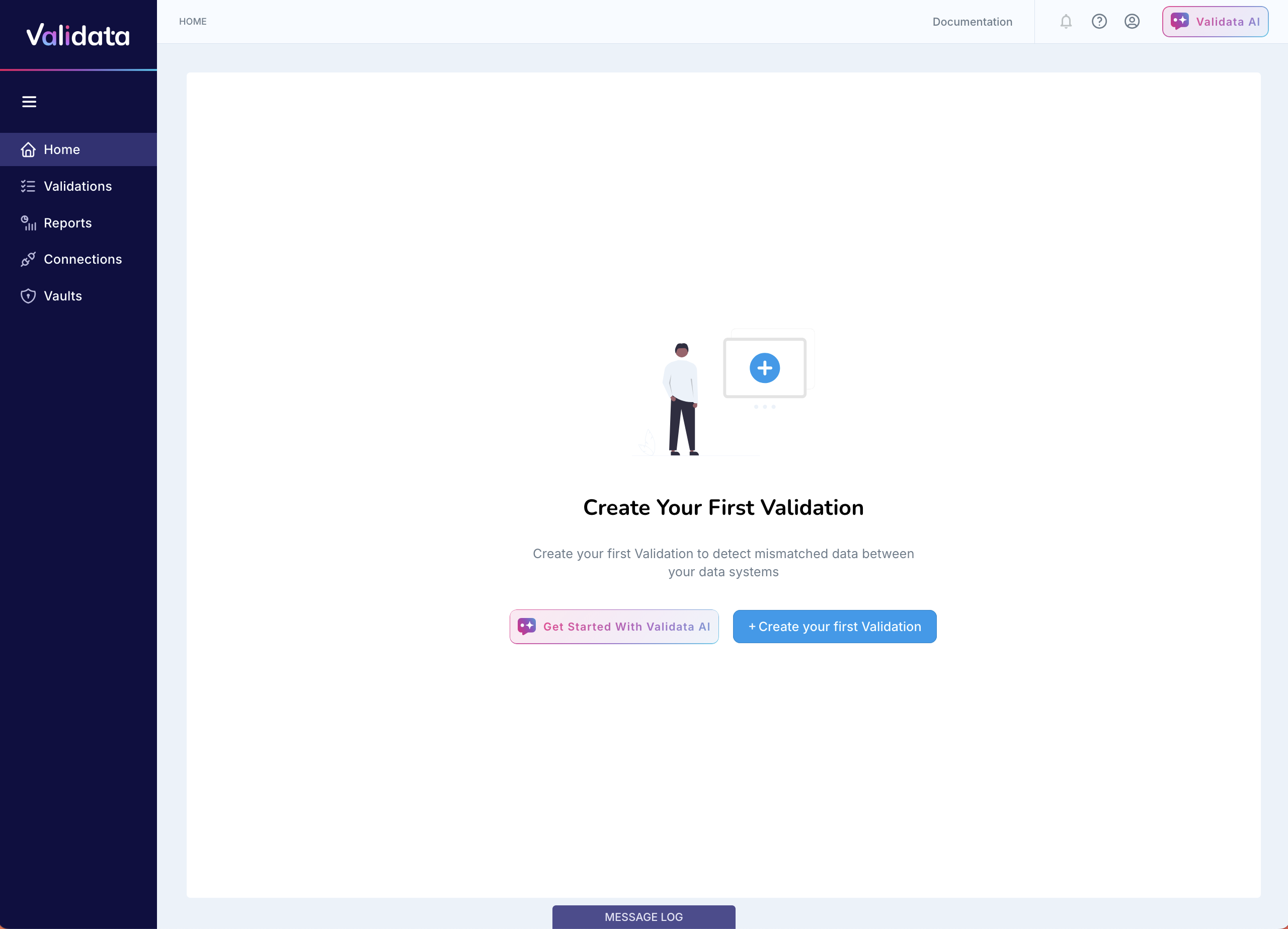
Enter your question or command in the chat interface.
Supported commands
Validata AI understands natural language queries and commands. The following sections describe the types of operations you can perform.
General queries
Use these commands to get an overview of your Validata environment or learn about Validata features.
Operation | Example prompt | Description |
|---|---|---|
Show all validations | "Show me all the validations" | Lists all validations available in the system. |
Get help with validations | "How do I create a validation in Validata?" or "What is a validation?" | Provides guidance on validation creation or definition. |
Show validation status | "Show me the status of validation X" | Displays the current status of a specific validation. |
Overview of Validata | "Give me an overview of Validata" | Provides a general system overview including main features. |
Connection profile commands
Use these commands to manage connection profiles.
Operation | Example prompt | Description |
|---|---|---|
Create a connection profile | "Create a new connection profile named X" | Opens the connection profile creation workflow in the UI. |
List connection profiles | "Give me a list of all connection profiles" | Returns all saved connection profiles. |
Get connection profile | "Get the connection profile named X" | Retrieves details for a specific connection profile. |
Validation job commands
Use these commands to create, configure, and run validation jobs.
Operation | Example prompt | Description |
|---|---|---|
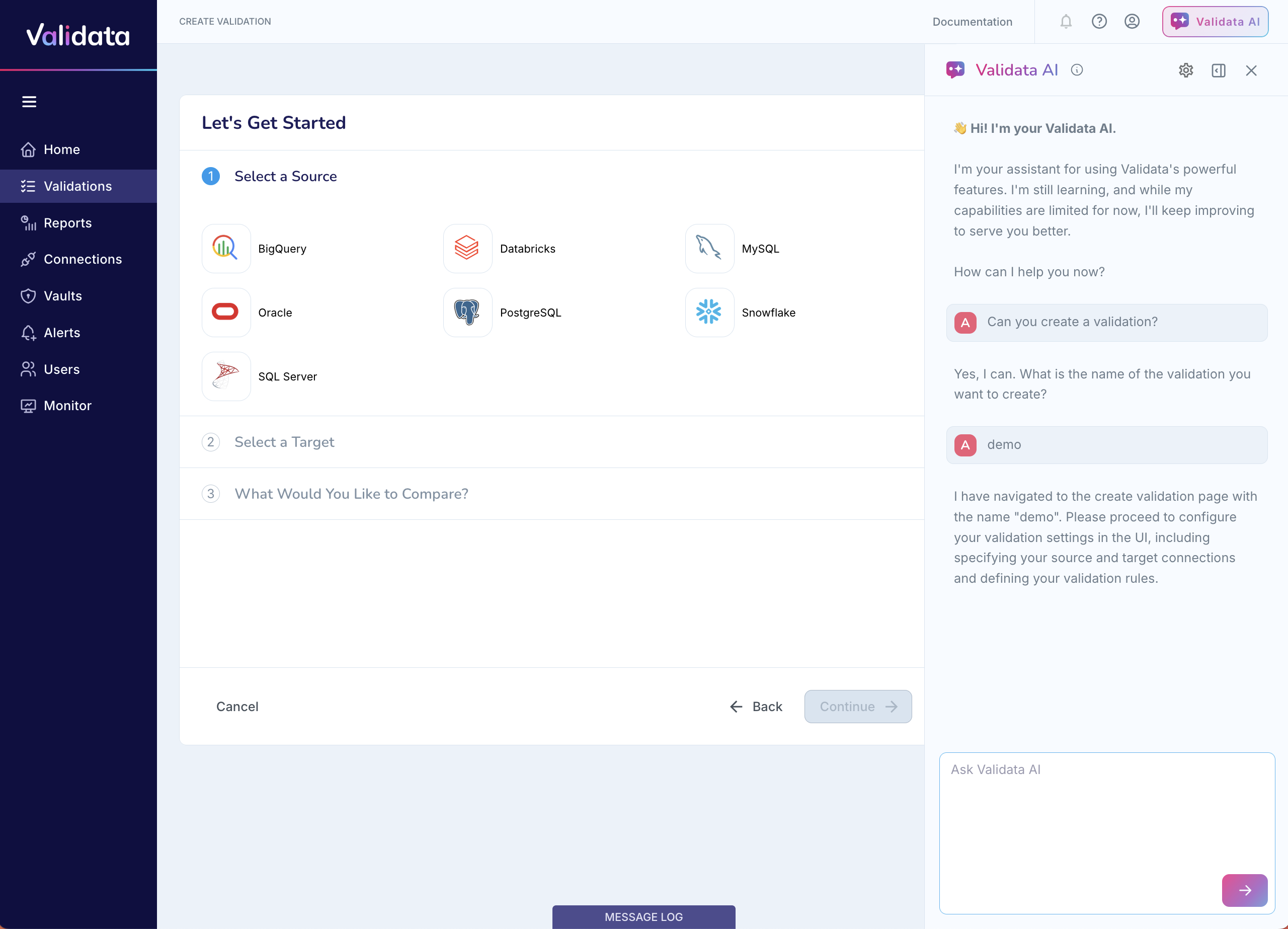
Create a validation job | "Create a validation job named X" | Initiates a new validation job. |
List jobs | "List all validation jobs" | Returns all validation jobs configured in the system. |
Describe job | "Describe the validation job X" | Provides detailed information about a specific validation job. |
Run job | "Run validation job X now" | Triggers an on-demand validation run. |
Get job runs | "Get all runs for validation job X" | Returns the run history for a specific validation job. |
List jobs run within time period | "List all jobs that ran in the last 24 hours" | Returns validation jobs that executed within the specified time period. |
Get job runs within time period | "Get all job runs from the last 7 days" | Returns job run details for the specified time period. |
Get validation pairs | "Get the validation pairs for job X" | Returns the source-target table pairs configured in a validation job. |
Get validation pair details | "Get details for the validation pair of table A and table B" | Returns detailed comparison information for a specific validation pair. |
Show validation status | "Show me the status of validation X" | Displays the current status of a specific validation. |
The following image shows entering a command to create a validation and Validata responding with a guided wizard to help you configure it:
Reporting commands
Use these commands to view validation results and generate reports.
Operation | Example prompt | Description |
|---|---|---|
Show validation status | "Show me the status of validation X" | Quick status check of a specific validation. |
Show validation summary | "Show me the summary of validation X" | Provides a detailed summary including mismatch counts. |
Show historical summary | "Show me the summary of validation X for the last 7 days" | Displays trend analysis over time. |
Show table comparison status | "Show me the status of comparison of table X and Y" | Shows the latest comparison result between two tables. |
Show historical table comparison | "Show me the status of comparison of table X and Y over the last 7 days" | Displays comparison results for historical periods. |
Count out-of-sync rows | "Show me the count of out of sync rows for comparison of table X and Y" | Returns the number of mismatched rows. |
Show out-of-sync rows | "Show me the out of sync rows for comparison of table X and Y" | Lists the specific rows that differ between tables. |
Download out-of-sync report | "Download the out of sync table report for table X and Y" | Generates a report file for offline review. |
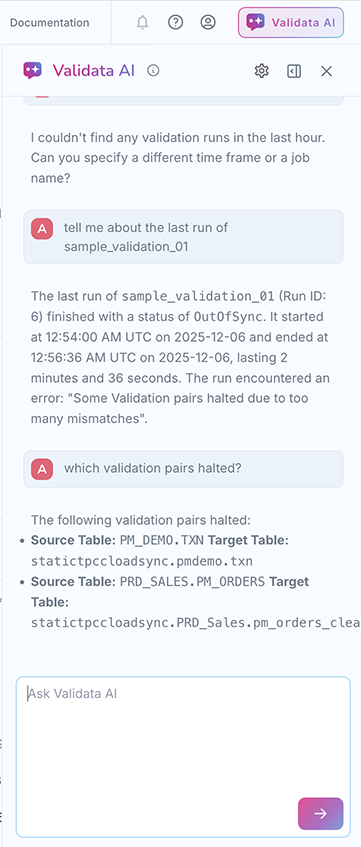
The following image shows using Validata AI to request information about a validation run and its results, and to investigate a specific error.
 |
Security and data handling
Validata AI is built with security and compliance in mind. This section describes how Validata AI handles your data.
Data sent to AI providers
When using cloud LLM providers (OpenAI or Google Gemini), Validata AI sends data to the AI provider to generate natural language responses to your queries. This may include metadata about your Validata environment and validation results needed to answer your specific question.
The following information is never sent to AI providers:
Connection credentials and passwords.
Connection strings and JDBC URLs.
API keys and authentication tokens.
All data sent to AI providers is logged in audit logs. You can review these logs to understand exactly what information is being transmitted.
For organizations that require complete data isolation, use the Ollama configuration option. When using Ollama, all AI processing occurs within your controlled environment and no data is sent to external services.
Session security
Validata AI executes entirely within your browser session and inherits your existing user permissions. Actions performed through Validata AI are subject to the same authorization controls as actions performed directly in the Validata UI.
Auditability
All data that leaves the browser is saved in audit logs, providing full transparency and traceability for compliance requirements. Review these logs to understand what information Validata AI transmits to AI providers.
Best practices
Follow these recommendations to get the best results from Validata AI:
Be specific in your prompts. Include the names of validations, tables, or connection profiles when asking about specific objects.
Use natural language. Validata AI understands conversational queries. You do not need to use specific command syntax.
Review actions before confirming. When Validata AI performs actions such as creating or running validations, review the details before confirming.
Start with questions. If you are unsure how to perform a task, ask Validata AI for guidance before requesting an action.
Limitations
Be aware of the following limitations when using Validata AI:
Validata AI can only perform actions that your user account is authorized to perform.
Complex multi-step workflows may require multiple prompts or manual intervention.
Response times may vary depending on the LLM provider and query complexity.
Since Validata AI uses AI, it may occasionally generate incorrect responses.