Pausing and resuming scheduled executions
Validata allows you to temporarily suspend a validation's recurring schedule—for example, during maintenance windows, data refreshes, or while investigating unexpected results. Pausing affects only future scheduled runs; it does not interrupt any run already in progress.
Pausing a scheduled validation
Complete the following steps to pause a validation schedule.
Open the validation home page.
Select the options menu (⋯) in the upper-right corner.
Choose Pause Recurring Run.
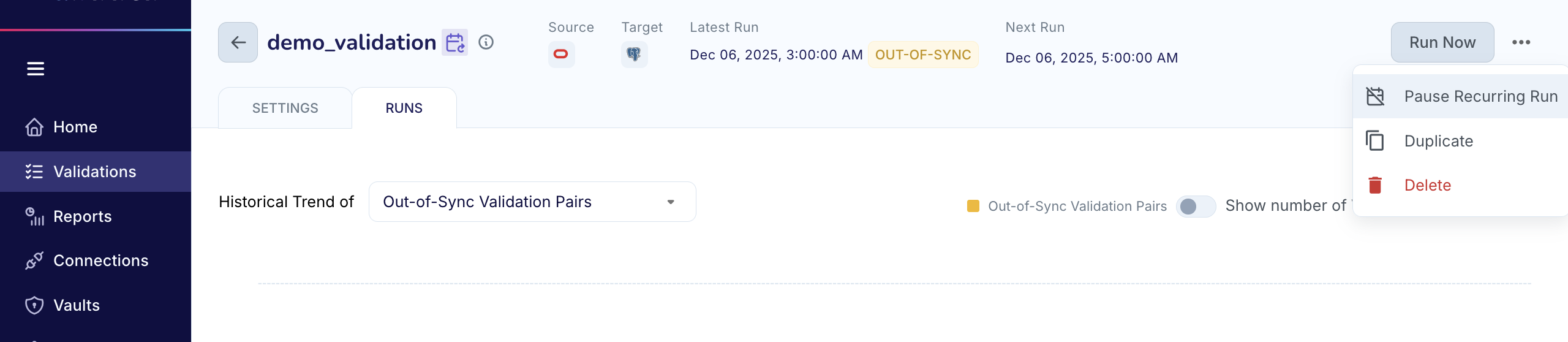
Confirm by selecting Pause Schedule in the dialog.
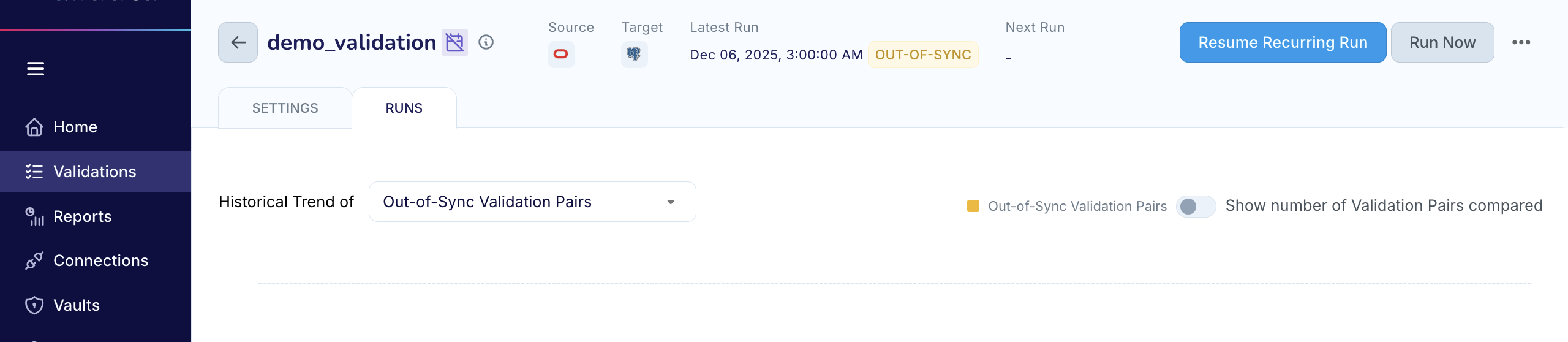
Once paused:
All future scheduled runs are immediately disabled.
The icon next to the validation name indicates that the recurring schedule has been disabled.
The Next Run indicator is cleared from the UI.
Run Now remains available for on-demand execution.
A Resume Recurring Run button appears, indicating that the schedule is inactive.
Pausing the schedule does not stop a run that is already executing. Any active run continues to completion.
Resuming a paused schedule
Complete the following steps to reactivate a paused schedule.
On the validation page, select Resume Recurring Run.
Validata restores the previously configured schedule and recalculates the Next Run timestamp based on the original frequency.
From this point forward, the validation resumes running at its normal intervals. You may still click Run Now at any time to trigger an immediate execution without affecting the reinstated schedule.
Cancelling an active run
If you need to stop a run that is currently in progress, it must be explicitly cancelled. This is in contrast to pausing, which affects only upcoming scheduled runs and does not terminate an ongoing execution.