Understanding the validation process
At a high level, Validata's validation process can be understood in the following phases:
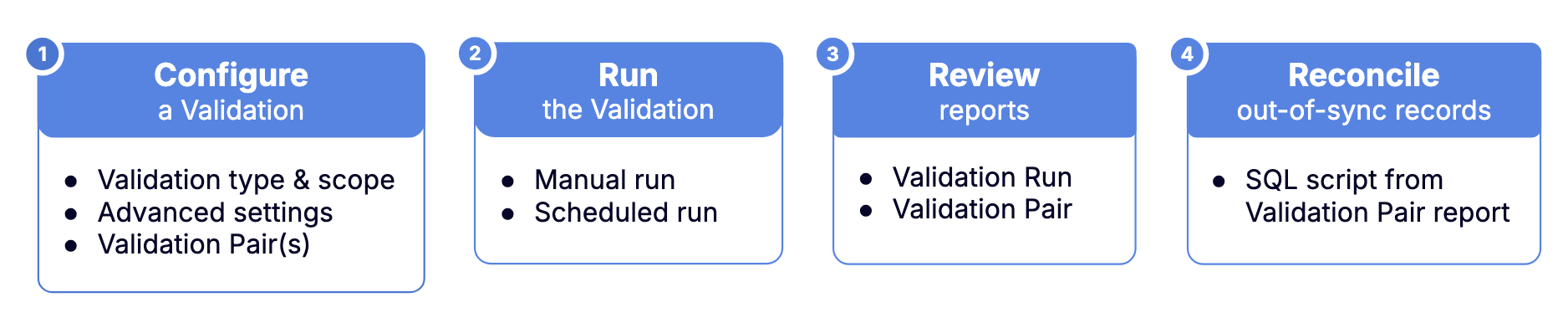
Configure a Validation
Create a validation.
Select a validation scope and method.
Validata supports two validation scopes: comparing a singleton Validation Pair or a Validation Set (multiple Validation Pairs).
Validata supports six validation methods:
Full-dataset Validation—use methods such as Vector, Fast Record, or Full Record Validation to compare entire datasets.
Partial-dataset Validation—use methods such as Interval Validation to validate records updated within a time interval, or Key Validation to confirm the presence or absence of records.
Custom Validation—use this method to compare a specific pair of tables using your own custom SQL query (available for comparing singleton Validation Pairs only).
Connect securely to your Source and Target data systems using Connection Profiles.
Complete the Advanced Settings:
Configure Halt Threshold.
Set the Revalidation interval.
Set up the schedule.
Create Validation Pair(s) by mapping the Source and Target tables and columns for comparison.
Validata intelligently automaps the Source and Target tables and columns to build an initial mapping. You can review Validata's automapping and, where needed, map tables and columns differently. Validata will attempt to select a comparison key for every Validation Pair; you can choose to retain or modify the selected comparison key.
Finally, you can also include or exclude tables or columns for comparison based on your business requirements.
Run the Validation
Manually run the Validation, or
Set up a recurring schedule on a weekly, daily, or hourly cadence.
Review Validation reports
Review the results of the comparison. If Validata determines that a pair of corresponding Source-Target tables are out-of-sync based on the Validation configuration, it generates a SQL script that you can execute on the Target data system to resolve the identified discrepancies.
Reconcile out-of-sync records
If there are out-of-sync records, reconcile the out-of-sync Target table(s) by executing the SQL-based reconciliation script. You can download the script from the Validation Pair Report to resolve the identified discrepancies.
Key concepts
Validata uses consistent terminology throughout the UI. The following concepts appear throughout this guide and in the console.
Validation: A validation represents a comparison between two datasets.
Source: The source is the dataset designated as the trusted reference or source of truth for the validation process. Generally, this is the upstream dataset in a replication pipeline, or the dataset you consider as the reference for any comparison.
Target: The target is the dataset compared against the trusted source dataset to identify discrepancies. Typically, this is the downstream dataset in a replication pipeline that is being validated for accuracy against the source.
Connection profile: A connection profile is a reusable configuration object that securely stores the authentication and connection attributes required to access an external system from within Validata.
Validation pair: A validation pair is the fundamental mapping relationship established between a source table and its corresponding target table.
Validation set: A validation set is a collection of one or more validation pairs that are validated together under a single validation configuration.
Validation type: Validata supports the following validation methods: Vector Validation, Fast Record Validation, Full Record Validation, Interval Validation, Key Validation, and Custom Validation.
Validation run: A validation run is a single execution of a validation. During each run, Validata compares the source and target datasets specified in the validation configuration.
For a detailed explanation of these and other concepts, see Concepts.