Snowflake
Snowflake is a cloud-based data warehousing and analytics platform.
Coverage for Snowflake
Category | Details |
|---|---|
Supported versions |
|
Supported validation methods |
|
Note
When replication to Snowflake uses APPEND mode to create and populate tables, you should use Custom Validation with SQL queries that produce a deduplicated, latest-record snapshot view of the source and/or Target tables. Custom Validation supports validation between a database table and a warehouse table populated in APPEND mode, as well as between two warehouse tables when one or both use APPEND-mode replication.
Supported data types in Snowflake
Character | Datatypes | Exclusions |
|---|---|---|
Character |
| |
Numeric |
| Unsupported for vector validation and fast-record validation:
|
Date & Time |
| |
Boolean |
|
Connecting Validata to Snowflake
Validata connects to Snowflake using a connection profile that specifies your Snowflake account endpoint and authentication credentials. For information about connection profiles, see Managing connection profiles.
Validata supports four authentication methods for Snowflake:
Password — Uses username and password credentials. This is the simplest method and is suitable for manual connections or environments without SSO.
Key pair — Uses an RSA private key for secure, passwordless authentication. This method is recommended for service accounts and automated environments.
Manual OAuth — Uses Snowflake OAuth client credentials and refresh tokens for delegated access. This method is ideal for recurring or long-running jobs where persistent sessions are needed.
Automated OAuth — Uses enterprise-managed SSO with identity providers such as Okta, Azure AD, or Ping Identity. This method is recommended for SSO users and federated identity environments.
Prerequisites
Before creating a Snowflake connection profile, ensure the following requirements are met:
A Snowflake account with an accessible regional endpoint.
A Snowflake warehouse available for query execution.
Network connectivity from Validata to your Snowflake regional endpoint.
A Snowflake user account with appropriate permissions.
The Snowflake user account must have the following privileges on the databases, schemas, and tables being validated:
USAGE — Allows access to databases, schemas, and warehouses.
SELECT — Allows read access to table data.
DESCRIBE — Allows access to table metadata and schema information.
Snowflake connection profile parameters
When you create a connection profile for Snowflake, you configure the parameters described in this section. Some parameters are required for all authentication methods, while others apply only to specific methods.
The following image shows the connection profile configuration for Snowflake:
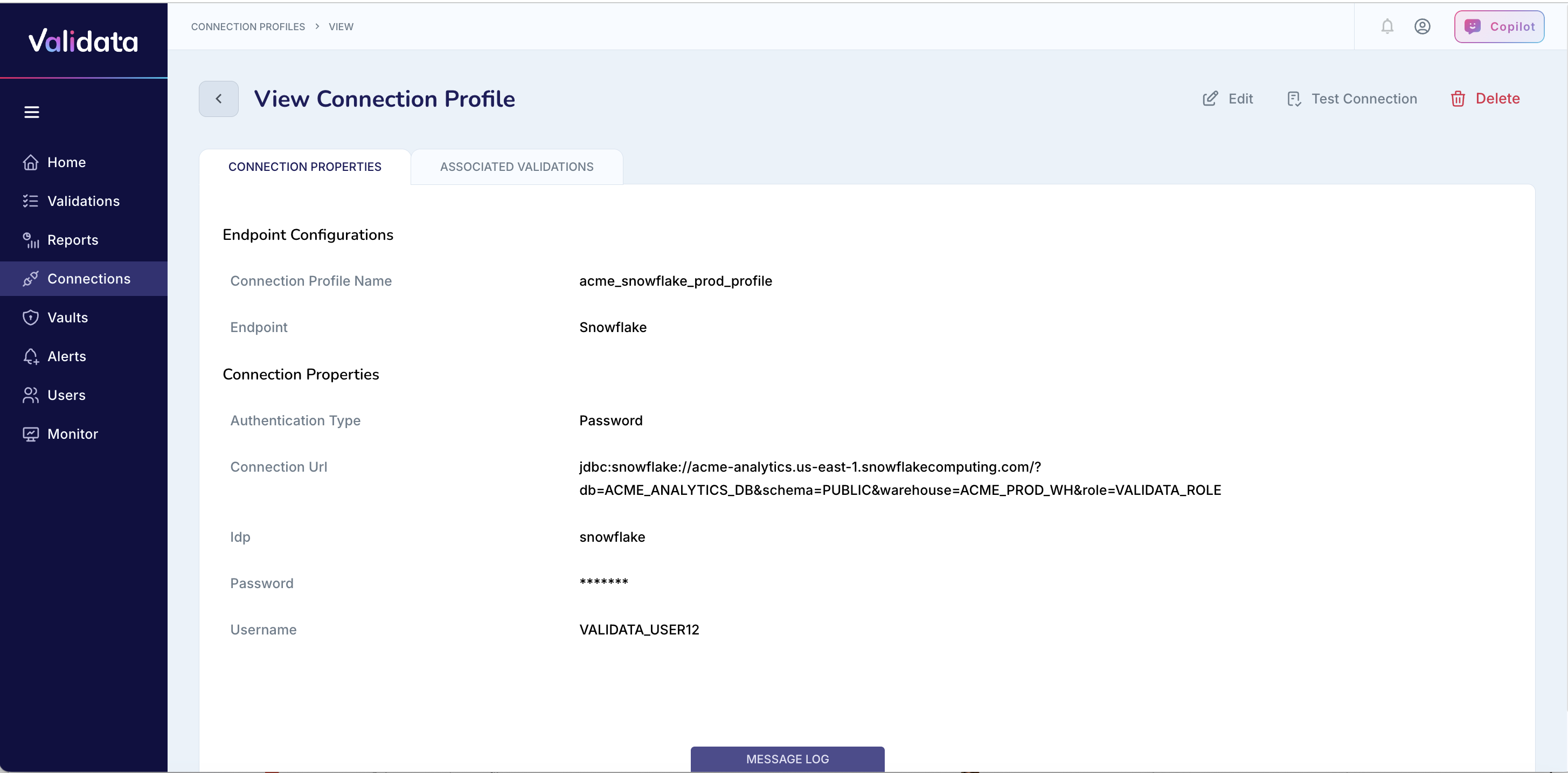
The following table describes each connection profile parameter for Snowflake:
Parameter | Required | Description | Example value |
|---|---|---|---|
Connection Profile Name | Yes | A unique name that identifies this connection profile. | acme_snowflake_prod_profile |
Endpoint | Yes | The external data system type. Select | Snowflake |
Database Name | Yes | The target Snowflake database containing the datasets that Validata validates. | ACME_ANALYTICS_DB |
Warehouse Name | Yes | The Snowflake warehouse used for query execution. | ACME_PROD_WH |
Username | Yes | The Snowflake user that Validata uses to authenticate. The user must have USAGE, SELECT, and DESCRIBE privileges on the required objects. | VALIDATA_USER12 |
Password | Password only | The password for the Snowflake user. Validata stores this value encrypted. Required only when using password authentication. | (stored securely) |
Private Key | Key pair only | The RSA private key used for key pair authentication. The key can be unencrypted or encrypted with a passphrase. | acme-validata-snowflake-key.p8 |
Private Key Passphrase | No | The passphrase for an encrypted private key. Required only if the private key is encrypted. | acme-key-passphrase |
Client ID | OAuth only | The OAuth client ID registered in Snowflake. Required for Manual OAuth and Automated OAuth authentication. | acme-snowflake-oauth-client |
Client Secret | OAuth only | The secret key created for the OAuth client. Required for Manual OAuth and Automated OAuth authentication. | acme-snowflake-oauth-secret |
Refresh Token | Manual OAuth only | The token used to renew access without re-authentication. Required only for Manual OAuth authentication. | 1.ABCDEF1234567890abcdefg... |
Connection URL (JDBC) | Yes | The JDBC connection URL specifying the Snowflake account, warehouse, database, schema, and optional parameters. | jdbc:snowflake://acme-analytics.us-east-1.snowflakecomputing.com/?db=ACME_ANALYTICS_DB&schema=PUBLIC&warehouse=ACME_PROD_WH& |
Authenticating with password
Password authentication uses username and password credentials to authenticate Validata with Snowflake. This is the simplest authentication method and is suitable for manual connections or environments without SSO.
To configure password authentication:
Set Endpoint to
Snowflake.Enter your Database Name and Warehouse Name.
Enter your Username and Password.
Enter the Connection URL (JDBC) with appropriate parameters.
The following table shows an example configuration:
Parameter | Example value |
|---|---|
Connection Profile Name | acme_snowflake_password |
Endpoint | Snowflake |
Database Name | VALIDATA_DB |
Warehouse Name | VALIDATA_WH |
Username | VALIDATA_USER |
Password | MySecurePassword123! |
Connection URL (JDBC) | jdbc:snowflake://acme_org.us-east-1.snowflakecomputing.com/?db=VALIDATA_DB |
Authenticating with key pair
Key pair authentication uses an RSA private key for secure, passwordless access to Snowflake. This method is recommended for service accounts and automated or scheduled validations.
To configure key pair authentication:
Generate an RSA key pair using openssl or another trusted tool.
Register the public key in Snowflake using the following command:
ALTER USER VALIDATA_USER SET RSA_PUBLIC_KEY='<public_key_value>';
Set Endpoint to
Snowflake.Enter your Database Name and Warehouse Name.
Enter your Username.
Upload or enter your Private Key.
If the private key is encrypted, enter the Private Key Passphrase.
Enter the Connection URL (JDBC) with appropriate parameters.
The following table shows an example configuration:
Parameter | Example value |
|---|---|
Connection Profile Name | acme_snowflake_keypair |
Endpoint | Snowflake |
Database Name | VALIDATA_DB |
Warehouse Name | VALIDATA_WH |
Username | VALIDATA_USER |
Private Key | MIIEvQIBADANBgkqhkiG9w0BAQEFAASC... |
Private Key Passphrase | (not required for unencrypted keys) |
Connection URL (JDBC) | jdbc:snowflake://acme_org.us-east-1.snowflakecomputing.com/?db=VALIDATA_DB |
Note
Keep private keys in a secure location and never commit them to source control. Use a secrets manager or vault to store and manage private keys.
Authenticating with manual OAuth
Manual OAuth authentication uses Snowflake OAuth client credentials and refresh tokens for delegated access. This method is ideal for recurring or long-running jobs where persistent sessions are needed.
To configure manual OAuth authentication:
Set Endpoint to
Snowflake.Enter your Database Name and Warehouse Name.
Enter your Username.
Enter your OAuth credentials: Client ID, Client Secret, and Refresh Token.
Enter the Connection URL (JDBC) with appropriate parameters.
The following table shows an example configuration:
Parameter | Example value |
|---|---|
Connection Profile Name | acme_snowflake_oauth |
Endpoint | Snowflake |
Database Name | VALIDATA_DB |
Warehouse Name | VALIDATA_WH |
Username | VALIDATA_USER |
Client ID | abcd1234efgh5678ijkl9012mnop3456 |
Client Secret | XYZabcdEFGHIJKLmnop123456 |
Refresh Token | 1.ABCDEF1234567890abcdefg... |
Connection URL (JDBC) | jdbc:snowflake://acme_org.us-east-1.snowflakecomputing.com/?db=VALIDATA_DB |
Note
Ensure the refresh token is associated with the same client ID and user. Store secrets securely in a vault, AWS Secrets Manager, or Azure Key Vault.
Authenticating with automated OAuth
Automated OAuth authentication is designed for enterprise-managed SSO environments using identity providers such as Okta, Azure AD, or Ping Identity. Tokens are automatically issued and refreshed according to enterprise SSO policy.
To configure automated OAuth authentication:
Work with your corporate IT team to configure the enterprise OAuth application and obtain the Client ID and Client Secret.
Set Endpoint to
Snowflake.Enter your Database Name and Warehouse Name.
Enter the Client ID and Client Secret provided by your IT team.
Enter the Connection URL (JDBC) with appropriate parameters.
The following table shows an example configuration:
Parameter | Example value |
|---|---|
Connection Profile Name | acme_snowflake_sso |
Endpoint | Snowflake |
Database Name | VALIDATA_DB |
Warehouse Name | VALIDATA_WH |
Client ID | auto-client-123xyz |
Client Secret | SecretValueFromIdP |
Connection URL (JDBC) | jdbc:snowflake://acme_org.us-east-1.snowflakecomputing.com/?db=VALIDATA_DB |
Note
Automated OAuth is typically configured by your corporate IT team. This method is recommended for SSO users and federated identity environments.
Selecting an authentication method
The following table provides guidance on selecting the appropriate authentication method for your use case:
Use case | Recommended method |
|---|---|
Ad-hoc or manual testing | Password authentication |
Service accounts or automation | Key pair authentication |
Delegated or long-running sessions | Manual OAuth |
Enterprise SSO users | Automated OAuth |
Best practices
Follow these recommendations when configuring Snowflake connection profiles:
Use key pair or OAuth authentication for automated or scheduled validations. Avoid using password authentication for unattended jobs.
Restrict user privileges to USAGE, SELECT, and DESCRIBE on the required objects. Avoid granting broader permissions than necessary.
Store all credentials (passwords, private keys, and tokens) in a secrets manager such as Vault, AWS Secrets Manager, or Azure Key Vault.
Rotate credentials periodically and review key registrations in Snowflake.
Confirm network connectivity from Validata to your Snowflake regional endpoint before creating connection profiles.
For key pair authentication, generate RSA keys using openssl or another trusted tool and never commit private keys to source control.
Use a dedicated Snowflake role for Validata connections to simplify permission management and auditing.
Operational considerations for Snowflake
This section describes operational considerations that affect how Validata compares datasets in Snowflake.
Validating tables replicated with APPEND mode
When replication to Snowflake uses APPEND mode to create and populate tables, you should use Custom Validation with SQL queries that produce a deduplicated, latest-record snapshot view of the source and/or target tables.
Custom Validation supports validation in the following scenarios:
Between a database table and a warehouse table populated in APPEND mode.
Between two warehouse tables when one or both use APPEND-mode replication.