MySQL
MySQL is an open-source relational database.
Coverage for MySQL
Category | Details |
|---|---|
Supported versions |
|
Supported validation methods |
|
Supported data types in MySQL
Character | Datatypes | Exclusions |
|---|---|---|
Character |
| |
Numeric |
| Unsupported for vector and fast-record validations:
|
Date & Time |
| |
User-defined |
|
Connecting Validata to MySQL
Validata connects to MySQL databases using a connection profile that specifies your MySQL server endpoint and authentication credentials. For information about connection profiles, see Managing connection profiles.
Validata uses standard JDBC connectivity to connect to MySQL and supports username and password authentication.
Prerequisites
Before creating a MySQL connection profile, ensure the following requirements are met:
The MySQL driver is installed as described in Install the MySQL JDBC driver in Validata.
A MySQL server instance accessible from the Validata server.
Network connectivity to the MySQL server on the configured port (default 3306).
A MySQL user account with appropriate database permissions.
The MySQL user account must have the following privileges on the databases and tables being validated:
SELECT — Allows read access to table data.
DESCRIBE — Allows access to table metadata and schema information.
Ensure the MySQL server allows inbound connections from the Validata server's IP address. You may need to update the bind-address setting in mysqld.cnf or my.cnf and configure appropriate GRANT statements.
MySQL connection profile parameters
When you create a connection profile for MySQL, you configure the parameters described in this section.
The following image shows the connection profile configuration for MySQL:
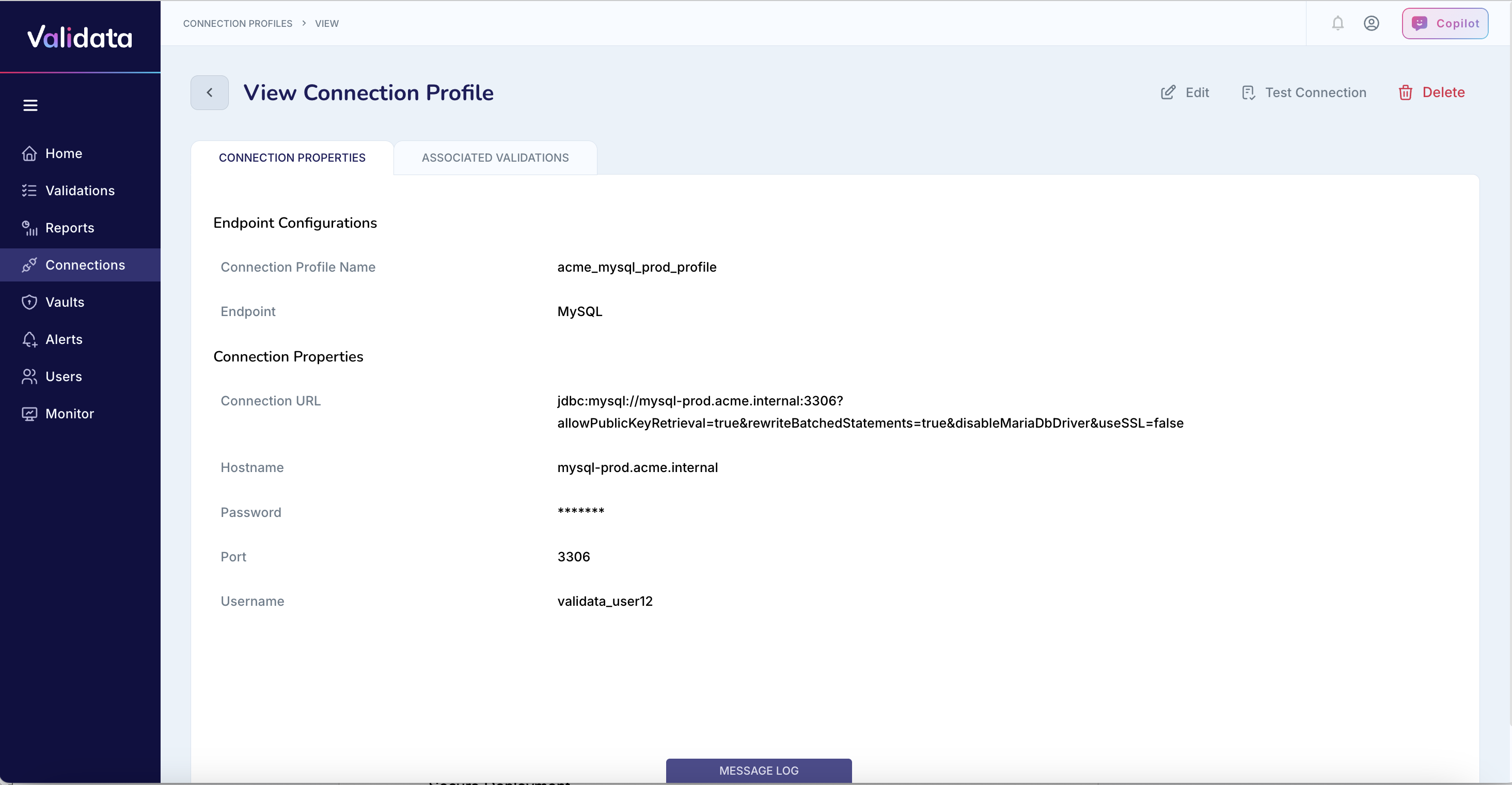
The following table describes each connection profile parameter for MySQL:
Parameter | Required | Description | Example value |
|---|---|---|---|
Connection Profile Name | Yes | A unique name that identifies this connection profile. | acme_mysql_prod_profile |
Endpoint | Yes | The external data system type. Select | MySQL |
Hostname | Yes | The hostname or IP address of the MySQL server. | mysql-prod.acme.internal |
Port | Yes | The TCP port for MySQL connections. The default MySQL port is 3306. | 3306 |
Database Name | Yes | The MySQL database that Validata should connect to. | ACME_ANALYTICS_DB |
Username | Yes | The MySQL username with SELECT and DESCRIBE privileges on the target database. | validata_user12 |
Password | Yes | The password for the MySQL user. Validata stores this value encrypted. | (stored securely) |
Connection URL (JDBC) | Yes | The JDBC connection URL for MySQL. You can include additional parameters for SSL, timezone, and other connection settings. | jdbc:mysql://mysql-prod.acme.internal:3306/ACME_ANALYTICS_DB |
Configuring a MySQL connection profile
To configure a MySQL connection profile:
Set Endpoint to
MySQL.Enter the Hostname or IP address of your MySQL server.
Enter the Port number (default is 3306).
Enter the Database Name to connect to.
Enter the Username and Password for authentication.
Enter the Connection URL (JDBC) with appropriate parameters.
JDBC connection URL formats
The JDBC connection URL specifies how Validata connects to the MySQL server. You can use different URL formats depending on your security and configuration requirements.
The following table describes the available JDBC connection URL formats:
Connection type | URL format | Example |
|---|---|---|
Standard | jdbc:mysql://<HOST>:<PORT>/<DATABASE_NAME> | jdbc:mysql://192.168.1.150:3306/VALIDATA_DB |
The following table describes common JDBC connection URL parameters:
Parameter | Description |
|---|---|
allowPublicKeyRetrieval=true | Allows the client to retrieve the server's public key for authentication. Required for some MySQL configurations using caching_sha2_password authentication. |
serverTimezone=UTC | Sets the server timezone for date and time operations. Use this parameter to avoid timezone-related errors. |
Best practices
Follow these recommendations when configuring MySQL connection profiles:
Assign read-only privileges (SELECT, DESCRIBE) to the MySQL user account used for Validata validation. Avoid granting broader permissions than necessary.
Store credentials securely in a vault or secrets manager. Do not hardcode credentials in configuration files or scripts.
Regularly rotate credentials and enforce strong password policies for MySQL user accounts.
Ensure the MySQL server allows inbound connections from the Validata server's IP address. Update the
bind-addresssetting andGRANTstatements as needed.Use the
serverTimezoneparameter to explicitly set the timezone and avoid timezone-related errors during validation.