Understanding usage metering
Striim for ClickHouse measures your usage in Striim Credits. The Metering page shows the Striim Credits consumed by your service. The Billing pages show the corresponding charges in US dollars (USD). For Striim for ClickHouse the conversion rate is:
1 Striim Credit = USD 1.00
You are metered in Striim Credits for your usage of compute infrastructure, event processing by adapters and AI agents, and private connectivity. Each type of usage is measured separately.
Metered item | Unit of measure | Rate in Striim Credits |
|---|---|---|
Compute | One vCPU-hour | 0.60 (for AWS Regions hosted in USA) |
Events processed by Standard adapters | One million events | 0.50 |
Events processed by Premium adapters | One million events | 1.00 |
Events processed by AI agents | One million events | 1.00 |
Private connectivity | One private-connectivity-hour | 0.00 (currently) |
Note
All metering and billing times use UTC. Your service's AWS region does not change the billing clock.
See the Striim for ClickHouse addendum for the Striim terms of service agreement.
Compute infrastructure billing
Compute is the processing capacity of your Striim service, expressed in virtual CPUs, or vCPUs. Your plan determines the number of vCPUs.
Plan | Service capacity | Striim Credits per billable service-hour (for AWS Regions in USA) |
|---|---|---|
Standard | 4 vCPUs | 4 × 0.60 = 2.40 |
Premium | 8 vCPUs | 8 × 0.60 = 4.80 |
A service-hour window is a fixed one-hour period based on UTC. All times use the 24-hour clock. Each window begins at the top of the hour (HH:00:00) and ends at HH:59:59.
For example:
11:00:00 UTC – 11:59:59 UTC is one service-hour window.
12:00:00 UTC – 12:59:59 UTC is the next service-hour window.
13:00:00 UTC begins the following window.
A service-hour window does not depend on when the service starts or stops or on the AWS Region where your Striim for ClickHouse service is hosted.
A billable service-hour is a service-hour window in which your service is running. Striim calculates billable service-hours on an ongoing basis.
If your Striim for ClickHouse service runs for any amount of time during a service-hour window, the entire window counts as one billable service-hour. Multiple starts and stops within the same window still count as one billable service-hour. A window in which your service does not run is not billable.
Billable service-hours are based on whether your service is running, regardless of whether any pipelines are running. To stop incurring compute charges, you must stop the service itself.
Compute Striim Credits are calculated as: Compute Striim Credits = billable service-hours × plan vCPUs × compute rate
Example: Billing for compute infrastructure when you start-stop-start your service
You have subscribed to the Standard plan, and set up your service in US East (N. Virginia) (us-east-1). On September 01, you run the Striim for ClickHouse service during the following periods. All times are in Eastern Daylight Time (EDT):
7:30 AM–8:10 AM
8:30 AM–8:50 AM
10:10 AM–10:55 AM
We will calculate your billable service hours as shown below.
Service activity at AWS US East (N. Virginia) | Service-hour window | Billable service hours |
|---|---|---|
Sep 01: 7:30 AM–8:00 AM EDT | Sep 01: 11:00–12:00 UTC | 1 |
Sep 01: 8:00 AM–8:10 AM EDT | Sep 01: 12:00–13:00 UTC | 1 |
Sep 01: 8:30 AM–8:50 AM EDT | ||
Service runs for 0 minutes | Sep 01: 13:00–14:00 UTC | 0 |
Sep 01: 10:10 AM–10:55 AM EDT | Sep 01: 14:00–15:00 UTC | 1 |
Total | 3 |
The Standard plan includes a 4-vCPU instance. Therefore, you are billed for compute as: 4 service-hours × 4 vCPUs × 0.60 credits per vCPU-hour (US East) = 9.60 Striim Credits
Event processing billing
An event is a set of one or more data elements that is read from an external source or written to an external target, and that corresponds to a Striim event type. Examples of events include, but are not limited to, database logical change records, database table rows, log file entries, delimiter-separated values in text files, JSON objects, MongoDB documents, and Kafka messages.
Striim measures the events processed by each source adapter (Reader), each target adapter (Writer), and each AI agent separately. For example,
You use Database Reader to read existing data from 10 Oracle Database tables. When the Striim application begins reading, the tables contain a combined total of 1,000,000 rows. If Database Reader reads all rows successfully, it processes 1,000,000 events. The number of columns and the size of each row do not affect the event count.
You use File Reader to read two files: a CSV file containing 200,000 records and a JSON file containing 30,000 records. If File Reader reads all records successfully, it processes 230,000 events. If you configure a Sentinel AI agent to process only the events from the JSON file, Sentinel processes 30,000 events.
You use Database Writer to write the data read from the Oracle tables and the CSV file to an external database. Database Writer processes 1,200,000 events: 1,000,00 read from the Oracle tables by Database Reader and 200,000 read from the CSV file by File Reader.
Striim classifies metered components as Standard adapters, Premium adapters, and AI agents. See Pipelines for a list of supported Standard adapters, Premium adapters, and AI agents.
Type of metered component | Included components and examples | Rate (Striim Credits per million events) |
|---|---|---|
Standard adapters | Standard adapters include:
| 0.50 |
Premium adapters | Supported Premium adapters are:
| 1.00 |
AI agents | Supported AI Agents are:
| 1.00 |
The following example illustrates how these rates apply to metered events. Event billing is separate from compute infrastructure billing.
Example: Aggregated event processing billing
You subscribe to the Premium plan and build two applications that write data to ClickHouse, as shown below. In App 1, a continuous query (CQ) cleanses the data, and a Foreseer AI agent identifies and masks sensitive data before the data is written to ClickHouse. App 2 writes the data directly to ClickHouse without transforming it.
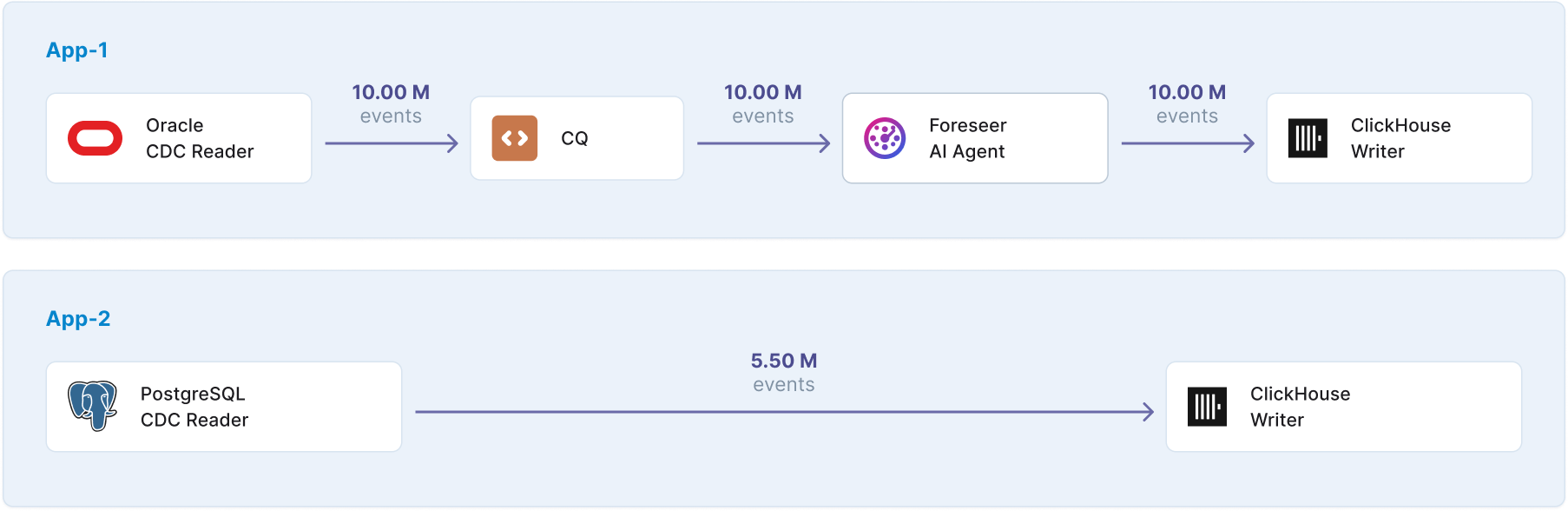
Component | Component type | Rate (Striim Credits per million events) | Events processed (million) | Striim Credits billed |
|---|---|---|---|---|
Oracle CDC Reader | Premium Adapter | 1.00 | 10.00 | 10.00 |
PostgreSQL Reader | Standard Adapter | 0.50 | 5.50 | 2.75 |
Foreseer AI Agent | AI Agent | 1.00 | 10.00 | 10.00 |
ClickHouse Writer | Standard Adapter | 0.50 | 15.50 ( = 10.00 + 5.50) | 7.75 |
Total | 30.50 |
Private connectivity billing
Striim meters private connectivity separately for each supported component, including private endpoints and PrivateLink components. Each component is metered independently, even when multiple components are active during the same service-hour window. Private connectivity usage can continue to accumulate while the service compute infrastructure is stopped.
Note
Striim currently does not charge for an metered private connectivity usage. Striim will introduce private connectivity charges in the future and will provide at least 30 days' advance notice before the new rate takes effect.
Plan changes
When you change plans, your Striim for ClickHouse service automatically restarts to apply the new plan. Striim separates your usage into plan periods. Each plan period contains the usage recorded while a specific plan is in effect.
Compute infrastructure billing aligns with UTC service-hour windows. You are billed once for each service-hour window and never at both plan levels. If you change plans during a service-hour window, Striim bills the compute infrastructure for that service-hour window using the higher plan rate.
Plan change | Compute infrastructure billing for the service-hour window | After the service restarts |
|---|---|---|
Standard to Premium | You are billed at the Premium plan rate for the entire service-hour window in which the change of plan occurs. | Premium adapters become available when the service finishes restarting on the Premium plan. |
Premium to Standard | You are billed at the Premium plan rate for the current service-hour window, and at the Standard plan rate from the next service-hour window. | Premium adapters are no longer available after the service finishes restarting on the Standard plan. Applications that use Premium adapters are stopped. |
Example: Changing plans within a service window
You are currently subscribed to the Standard plan. You initiate the change to the Premium plan at 17:15 UTC, and the plan change completes at 17:30 UTC.
What happens?
When you initiate the plan change, Striim stops your pipelines and begins switching your plan and associated compute infrastructure to the Premium plan.
At 17:30 UTC, the plan change is complete. You can now launch your Striim for ClickHouse service and build pipelines using the additional adapters available with the Premium plan.
Compute infrastructure billing:
You are billed at the Premium plan rate for the entire 17:00–18:00 UTC window because it is the higher plan rate.
Example: Changing plans across a service window
You are currently subscribed to the Premium plan. You initiate the change to the Standard plan at 10:45 UTC, and the plan change completes at 11:15 UTC.
What happens?
When you initiate the plan change, Striim stops your pipelines and begins switching your plan and associated compute infrastructure to the Standard plan.
At 11:15 UTC, the plan change is complete. You can now launch your Striim for ClickHouse service and build pipelines using the adapters and AI agents available with the Standard plan.
After switching to the Standard plan, any Striim application that uses a Premium adapter remains stopped because Premium adapters are supported only with the Premium plan. You can run the application after replacing the Premium adapter with a Standard adapter, which is supported with both plans.
Compute infrastructure billing:
You are billed at the Premium plan rate for the entire 10:00–11:00 UTC window, and at the Standard plan rate for the 11:00-12:00 UTC window
Note
Billing details show plan periods for service-hour windows, such as 14:00–15:00 UTC. To see the exact time a plan change was requested, check the service activity log
Service deletion and replacement
Deleting a Striim for ClickHouse service is permanent. Striim stops all pipelines associated with the service and deletes the service, its pipeline configurations, and related service configuration. The deleted service and its configurations cannot be recovered.
You are billed for all usage recorded by the deleted service during the current billing period, including compute infrastructure and event processing. For compute infrastructure, if the service ran at any time during the service-hour window in which it was deleted, that service-hour window is billable. No compute infrastructure or event-processing usage is recorded for the deleted service after deletion.
If you create a new service after deleting the previous one, the new service receives a new service ID. Billing details list the deleted service and the new service separately. A Striim Cloud account can have only one Striim for ClickHouse service at a time. Therefore, multiple service IDs on the same bill represent services that existed at different times during the billing period, not multiple Striim for ClickHouse services running at the same time.
Accessing your metering information
You can monitor your usage in real time and view historical data from the Metering page in Striim Cloud Console.
To view your metering:
In the Striim Cloud Console, select Metering from the left navigation.
The Usage Overview tab shows your current and last month’s usage as daily aggregates.
The usage graph displays daily usage for the current billing period and updates hourly, so you can track spending before your Provisional Invoice arrives.
Select the Usage History tab to view your usage patterns over time, spanning months or years. Use the date filters to view specific periods.
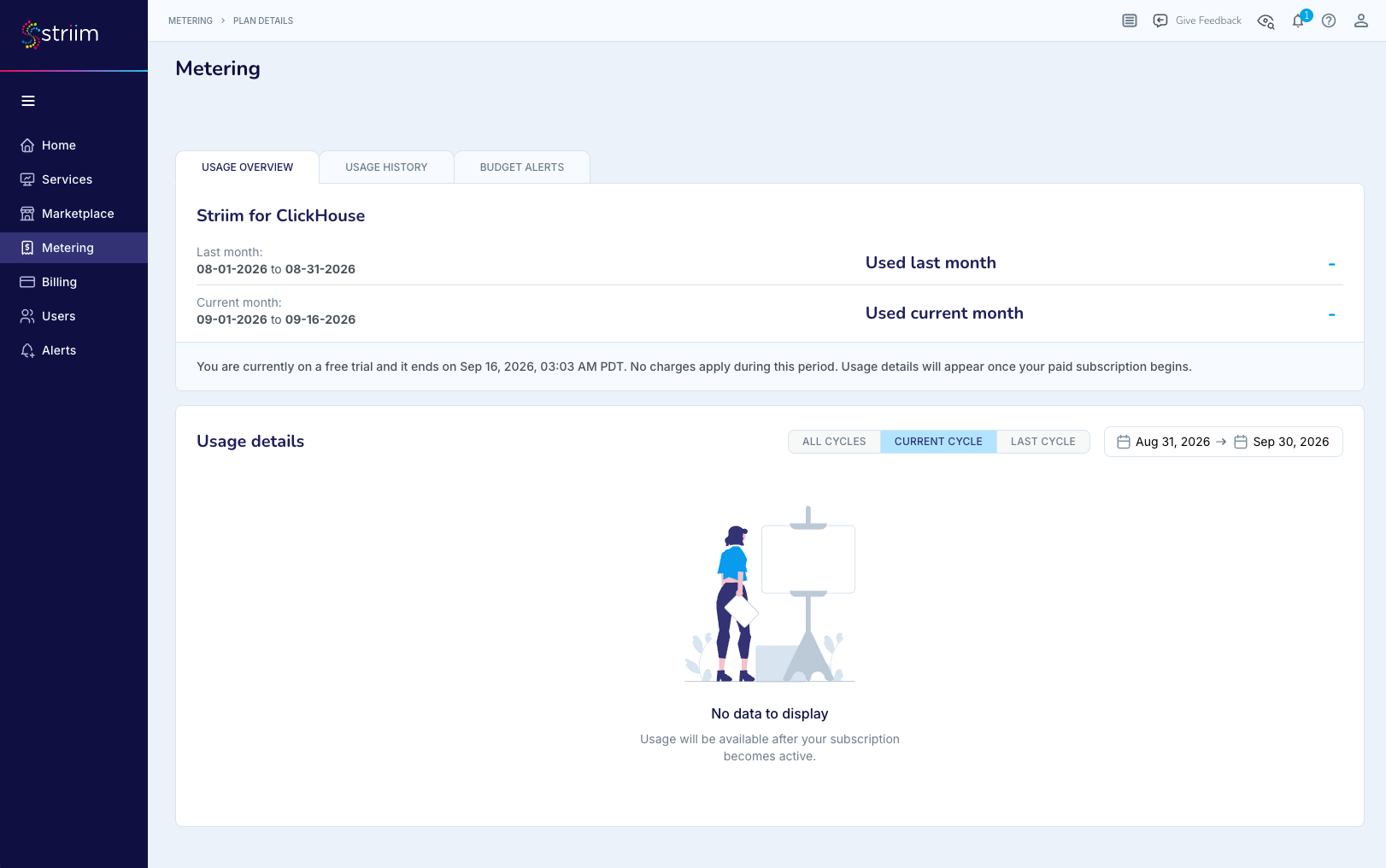
You need the Account Admin or Billing Admin role to access the Metering page. Other roles do not see the Metering navigation.
During the free trial, you can monitor usage on the Metering page. Trial usage is metered but not charged.