MongoDB Reader programmer's guide
MongoDB Reader properties
The MongoDB driver is bundled with Striim, so no installation is necessary.
The adapter properties are:
property | type | default value | notes |
|---|---|---|---|
Auth DB | String | admin | Specify the authentication database for the specified username. If not specified, uses the |
Auth Type | enum | Default | Specify the authentication mechanism used by your MongoDB instance (see MongoDB Manual > Authentication). The Default setting uses MongoDB's default authentication mechanism, SCRAM. Other supported choices are GSSAPI, MONGODBCR, MONGODBX509, PLAIN, SCRAMSHA1, and SCRAMSHA256. Set to NoAuth if authentication is not enabled. Set to GSSAPI if you are using Kerberos. |
Change Streams Capture Level | enum | Deployment | Appears in the Flow Designer only when Mode is Incremental. Setting is ignored when Mode is Initial Load.
See MongoDB initial setup for discussion of the permissions required for these settings. |
Collections | String | The fully-qualified name(s) of the MongoDB collection(s) to read from, for example, mydb.mycollection. Separate multiple collections by commas. Do not modify this property when recovery is enabled for the application. You may use the $ wildcard, for example, Note that data will be read only from collections that exist when the Striim application starts, additional collections added later will be ignored until the application is restarted. | |
Connection Retry Policy | String | retryInterval=30, maxRetries=3 | With the default setting, if a connection attempt is unsuccessful, the adapter will try again in 30 seconds ( |
Connection URL | String | To use an Azure private endpoint to connect to MongoDB Atlas, see Specifying Azure private endpoints in sources and targets. NoteWhen connecting through an SSH tunnel (see Using an SSH tunnel to connect to a source or target), specify the IP address of the tunnel, not the IP address of the MongoDB instance.. With MongoDB 4.2 or higher or with earlier versions when Mode is InitialLoad
With MongoDB 4.1 or earlier when Mode is Incremental
| |
Exclude Collections | String | If | |
Fetch Size | 1000 | Specifies the number of documents that will be fetched in each operation. Fewer documents may be fetched if the total batch size is reached. See MongoCursor::batchSize for more information.
| |
Full Document Update Lookup | Boolean | False | Visible in Flow Designer only when Mode is Incremental. When Mode is InitialLoad, this setting is ignored. With the default setting of False, for UPDATE events the JSONNodeEvent data field will contain only the _id and modified values. Set to True to include the entire document. Note that the document will be the current version, and depending on other write operations that may have occurred between the update and the lookup, the returned document may differ significantly from the document at the time of the update. Enabling this option setting may affect performance, since MongoDB Reader will have to call the database to fetch more data. |
Mode | String | InitialLoad | With the default setting, will load all existing data using Set to |
MongoDB Config | String | Optionally specify a JSON string to define a subset of documents to be selected in InitialLoad mode and for inserts in Incremental mode. See Selecting documents using MongoDB Config. When Mode is Incremental, insert operations are sent only for the defined subset of documents, but updates and deletes are sent for all documents. If Cosmos DB Writer, Mongo Cosmos DB Writer, or MongoDB Writer receive an update or delete for a document not in the subset, the application will halt. To avoid this, set Ignorable Exception Code to RESOURCE_NOT_FOUND for Cosmos DB Writer or KEY_NOT_FOUND for Mongo Cosmos DB Writer or MongoDB Writer. Note that in this case you will have to check the exception store to see if there were any ignored exceptions for documents in the subset. | |
Password | encrypted password | The password for the specified Username. | |
Quiesce on IL Completion | Boolean | False | Visible in Flow Designer only when Mode is Initial Load. |
Read Preference | String | primaryPreferred | See Read Preference Modes. Supported values are primary, primaryPreferred, secondary, secondaryPreferred, and nearest. |
Security Config | String | See Using SSL or Kerberos or X.509 authentication with MongoDB. | |
SSL Enabled | Boolean | False | If MongoDB requires SSL or individual MongoDB Atlas nodes are specified in the Connection URL, set to True (see Configure mongod and mongos for TLS/SSL). If you have an on-premise MongoDB deployment with your own certificate authority, see Using SSL or Kerberos or X.509 authentication with MongoDB. |
Start Timestamp | String | Visible in Flow Designer only when Mode is Incremental. When Mode is InitialLoad, this setting is ignored. Leave blank to read only new data. Specify a UTC DateTime value (for example, 2018-07-18T04:56:10) to read all data from that time forward or to wait to start reading until a time in the future. If the MongoDB and Striim servers are in different time zones, adjust the value to match the Striim time zone. If the oplog no longer contains data back to the specified time, reading will start from the beginning of the oplog. If milliseconds are specified (for example, 2017-07-18T04:56:10.999), they will be interpreted as the incrementing ordinal for the MongoDB timestamp (see Timestamps). | |
Username | String | A MongoDB user with access as described in MongoDB initial setup. |
Selecting documents using MongoDB Config
You can use the MongoDB Config property to define a subset of documents to be selected.
The subset is defined by a query in JSON format.
Documents may be selected from multiple collections.
Specify the wildcard
$at the end of a collection name to match multiple collections using a single QueryClause.All collections referenced in the query must be specified in the Collections property.
Multiple queries may be specified.
Operators
The logical operators AND and OR are supported for nested expressions
The following comparison operators are supported:
=: equals!=: does not equal<: is less than<=: is less than or equal to>: is greater than>=: is greater than or equal to
The data types supported for comparison using FieldValue are Boolean, String and Numeric.
JSON fields
The filter criteria for all the collections should be provided as an object inside the QueryClause field.
QueryClause can contain multiple JSON objects with the fully qualified name (or pattern) of the collection and its filter criteria as key and value respectively.
If a collection matches more than one pattern, the filter criteria provided with the first pattern will be considered.
The Filter object contains the filter criteria of the query clause. Simple expressions and nested expressions are supported for Filter.
The leaf fields of the MongoDBConfig JSON object are FilterField and FilterValue. The field names in a document and their filter values can be provided here. These are combined by a comparison operator field called Operator.
A simple expression involves directly providing the Operator, FieldName and FieldValue to the Filter field as an object.
Multiple nested expressions are created by combining individual Filter JSON objects using logical operators.
FieldName is the JSON path of the field. Dot notation can be used to provide the FieldName of a nested field.
MongoDB Config syntax and examples
Basic syntax:
{
  "QueryClause": {
    "<database name>.<collection name>": {
      "Filter": {
        "<field name>": "<field value>"
      }
    }
  }
}
For example, to select documents with the city value Bangalore from the collection MyCollection in the database MyDB:
{
  "QueryClause": {
    "MyDB.MyCollection": {
      "Filter": {
        "city": "Bangalore"
      }
    }
  }
}
An example using the logical operator OR to select documents matching multiple cities:
{
  "QueryClause": {
    "MyDB.MyCollection": {
      "Filter": {
        "OR": [
          {
            "operator": {
              "city": "Bangalore"
            }
          },
          {
            "operator": {
              "city": "Bangalore"
            }
          }
        ]
      }
    }
  }
}
Complex MongoDB Config example
Specifying the JSON query below in MogoDB Config will select the documents that match the following criteria:
Collection | Criteria |
|---|---|
mongodb.employee | Documents that have a field named City with Chennai as the value. |
Collections whose name start with mongodb.dep | Documents that match both the following conditions
|
mongodb.payroll | Documents that have either of the following conditions
|
{
  "QueryClause": {
    "mongodb.employee": {
      "Filter": {
        "City": "Chennai"
      }
    },
    "mongodb.dep$": {
      "Filter": {
        "and": [
          {
            "!=": {
              "Name": "Accounts"
            }
          },
          {
            "State": "Tamil Nadu"
          }
        ]
      }
    },
    "mongodb.payroll": {
      "Filter": {
        "or": [
          {
            "!=": {
              "Source": "F"
            }
          },
          {
            "and": [
              {
                ">": {
                  "Age": 30
                }
              },
              {
                "City": "Bangalore"
              }
            ]
          }
        ]
      }
    }
  }
}
MongoDBReader JSONNodeEvent fields
The output type for MongoDBReader is JSONNodeEvent. The fields are:
data: contains the field names and values of a document, for example:
data: {"_id":2441,"company":"Striim","city":"Palo Alto"}Updates include only the modified values. Deletes include only the document ID.
removedfields: contains the names of any fields deleted by the $unset function. If no fields were deleted, the value of removedfields is null. For example:
removedfields: {"myField":true}Or if no fields have been removed:
removedfields: null
metadata: contains the following elements:
CollectionName: the collection from which the document was read
DatabaseName: the database of the collection
DocumentKey: the document ID (same as the
_idvalue in data)FullDocumentReceived: value is True if data includes the entire image of the document, False if it does not
Lsid (for MongoDB 4.2 or later only, for operations that are part of a multi-document transaction): the logical session identifier of the transaction session
Namespace:
<database name>.<collection name>OperationName: in InitialLoad mode, SELECT; in Incremental mode, INSERT, UPDATE, or DELETE (with MongoDB 4.1 or earlier, operations within a transaction are not included; see Oplog does not record operations within a transaction)
Partitioned: value is True if the operation was on a sharded collection
PartitionKeys: a JsonNode object containing the shard keys and their values
Timestamp: in InitialLoad mode, the current time of the Striim server when the document was read; in Incremental mode, the MongoDB timestamp when the operation was performed
TxnNumber (for MongoDB 4.2 or later only, for operations that are part of a multi-document transaction): the transaction number
For example:
metadata: {"CollectionName":"employee","OperationName":"SELECT","DatabaseName":"test",
  "DocumentKey":1.0,"NameSpace":"test.employee","TimeStamp":1537433999609}
MongoDBReader example application and output
The following Striim application will write change data for the specified collection to SysOut. To run this yourself, replace striim and ****** with the user name and password for the MongoDB user account discussed in MongoDB initial setup, specify the correct connection URL for your instance, and replace mydb with the name of your database.
CREATE APPLICATION MongoDBTest;

CREATE SOURCE MongoDBIn USING MongoDBReader (
  Username:'striim',
  Password:'******',
  ConnectionURL:'192.168.1.10:27107',
  Collections:'mydb.employee'
)
OUTPUT TO MongoDBStream;

CREATE TARGET MongoDBCOut
USING SysOut(name:MongoDB)
INPUT FROM MongoDBStream;

END APPLICATION MongoDBTest;
With the above application running, the following MongoDB shell commands:
use mydb;
db.employee.insertOne({_id:1,"firstname":"Larry","lastname":"Talbot","age":10,"comment":"new record"});
db.employee.updateOne({_id:1},{$set:{ "age":40, "comment":"partial update"}});
db.employee.deleteOne({_id:1});
would produce output similar to the following:
data: {"_id":1,"firstname":"Larry","lastname":"Talbot","age":10,"comment":"new record"}
metadata: {"CollectionName":"employee","OperationName":"INSERT","DatabaseName":"mydb","DocumentKey":1,
"NameSpace":"mydb.employee","TimeStamp":1537250474, "Partitioned":false,"FullDocumentReceived":true,
"PartitionKeys":{}}
...
data: {"_id":1.0,"age":40,"comment":"partial update"}
metadata: {"CollectionName":"employee","OperationName":"UPDATE","DatabaseName":"mydb","DocumentKey":1,"
NameSpace":"mydb.employee","TimeStamp":1537250474, "Partitioned":false,"FullDocumentReceived":false,
"PartitionKeys":{}}
...
data: {"_id":1}
metadata: {"CollectionName":"employee","OperationName":"DELETE","DatabaseName":"mydb","DocumentKey":1,
"NameSpace":"mydb.employee","TimeStamp":1537250477, "Partitioned":false,"FullDocumentReceived":false,
"PartitionKeys":{}}
Note that output for the "partial" update and delete operations includes only the fields specified in the shell commands. See Replicating MongoDB data to Azure CosmosDB for discussion of the issues this can cause when writing to targets and how to work around those issues.
Replicating MongoDB data to Azure CosmosDB
To replicate one or many MongoDB collections to Cosmos DB, specify multiple collections in the Collections properties of MongoDBReader and CosmosDBWriter. You may use wildcards ($ for MongoDB, % for Cosmos DB) to replicate all collections in a database, as in the example below, or specify multiple collections manually, as described in the notes for Cosmos DB Writer's Collections property.
You must create the target collections in Cosmos DB manually. The partition key names must match one of the fields in the MongoDB documents.
Data will be read only from collections that exist when the source starts. Additional collections added later will be ignored until the source is restarted. When the target collection is in a fixed container (see Partition and scale in Azure Cosmos DB), inserts, updates, and deletes are handled automatically. When the target collection is in an unlimited container, updates require special handling and deletes must be done manually, as discussed below.
If you wish to run the examples, adjust the MongoDB Reader properties and Cosmos DB Writer properties to reflect your own environment.
When the target collection is in a fixed container
Note
Writing to a target collection in a fixed container will not be possible until Microsoft fixes the bug discussed in this Azure forum discussion.
In Cosmos DB, create database mydb containing the collection employee with partition key /name (note that the collection and partition names are case-sensitive).
In MongoDB, create the collection employee and populate it as follows:
use mydb;
db.employee.insertMany([
{_id:1,"name":"employee1","company":"Striim","city":"Madras"},
{_id:2,"name":"employee2","company":"Striim","city":"Seattle"},
{_id:3,"name":"employee3","company":"Striim","city":"California"}
]);
In Striim, run the following application to perform the initial load of the existing data:
CREATE APPLICATION Mongo2CosmosInitialLoad;

CREATE MongoDBIn USING MongoDBReader (
  Username:'striim',
  Password:'******',
  ConnectionURL:'<MongoDB connection string>',
  Collections:'mydb.$'
 )
OUTPUT TO MongoDBStream;

CREATE TARGET WriteToCosmos USING CosmosDBWriter (
  ServiceEndpoint: '<Cosmos DB connection string>',
  AccessKey: '<Cosmos DB account read-write key>',
  Collections: 'mydb.$,mydb.%'
)
INPUT FROM MongoDBStream;

END APPLICATION Mongo2CosmosInitialLoad;
After the application is finished, the Cosmos DB employee collection should contain the following:
{
    "_id": 1,
    "name": "employee1",
    "company": "striim",
    "city": "madras",
    "id": "1.0",
    "_rid": "HnpSALVXpu4BAAAAAAAACA==",
    "_self": "dbs/HnpSAA==/colls/HnpSALVXpu4=/docs/HnpSALVXpu4BAAAAAAAACA==/",
    "_etag": "\"0800b33d-0000-0000-0000-5bb5aafa0000\"",
    "_attachments": "attachments/",
    "_ts": 1538632442
}
{
    "_id": 2,
    "name": "employee2",
    "company": "striim",
    "city": "seattle",
    "id": "2.0",
    "_rid": "HnpSALVXpu4BAAAAAAAADA==",
    "_self": "dbs/HnpSAA==/colls/HnpSALVXpu4=/docs/HnpSALVXpu4BAAAAAAAADA==/",
    "_etag": "\"2b00f87b-0000-0000-0000-5bb5aafb0000\"",
    "_attachments": "attachments/",
    "_ts": 1538632443
}
{
    "_id": 3,
    "name": "employee3",
    "company": "striim",
    "city": "california",
    "id": "3.0",
    "_rid": "HnpSALVXpu4BAAAAAAAAAA==",
    "_self": "dbs/HnpSAA==/colls/HnpSALVXpu4=/docs/HnpSALVXpu4BAAAAAAAAAA==/",
    "_etag": "\"2700ad2a-0000-0000-0000-5bb5aafb0000\"",
    "_attachments": "attachments/",
    "_ts": 1538632443
}
In Striim, run the following application to continuously replicate new data from MongoDB to Cosmos DB:
CREATE APPLICATION Mongo2CosmosIncrementalFixedContainer;

CREATE MongoDBIn USING MongoDBReader (
  Username:'striim',
  Password:'******',
  ConnectionURL:'<MongoDB connection string>',
  authType: 'NoAuth',
  Mode:'Incremental',
  FullDocumentUpdateLookup:'true',
  startTimestamp: '<timestamp>'
  Collections:'mydb.$'
 )
OUTPUT TO MongoDBStream;

CREATE TARGET WriteToCosmos USING CosmosDBWriter (
  ServiceEndpoint:'<Cosmos DB connection string>',
  AccessKey:'<Cosmos DB account read-write key>',
  Collections:'mydb.$,mydb.%'
)
INPUT FROM MongoDBStream ;

CREATE CQ SelectDeleteOperations
INSERT INTO DeleteOpsStream
SELECT META(MongoDBStream,"DatabaseName"),
  META(MongoDBStream,"CollectionName"),
  META(MongoDBStream,"DocumentKey")
FROM MongoDBStream
WHERE META(MongoDBStream,"OperationName").toString() = "DELETE";

CREATE TARGET WriteIgnoredDeleteOps USING FileWriter (
  filename:'DeleteOperations.json'
)
FORMAT USING JSONFormatter()
INPUT FROM DeleteOpsStream;

END APPLICATION Mongo2CosmosIncrementalFixedContainer;
In MongoDB, modify the employees collection as follows to add employee4:
use mydb;
db.employee.save({_id:4,"name":"employee4","company":"Striim","city":"Palo Alto"});
db.employee.save({_id:1,"name":"employee1","company":"Striim","city":"Seattle"});
db.employee.update({_id:2},{$set : {"city":"Palo Alto"}});
db.employee.remove({_id:3});
Within 30 seconds, those changes should be replicated to the corresponding Cosmos DB collection with results similar to the following:
{
    "_id": 1,
    "name": "employee1",
    "company": "striim",
    "city": “Seattle”,
    "id": "1.0",
    "_rid": "HnpSALVXpu4BAAAAAAAACA==",
    "_self": "dbs/HnpSAA==/colls/HnpSALVXpu4=/docs/HnpSALVXpu4BAAAAAAAACA==/",
    "_etag": ""0800b33d-0000-0000-0000-5bb5aafa0000"",
    "_attachments": "attachments/",
    "_ts": 1538632442
}
{
    "_id": 2,
    "name": "employee2",
    "company": "striim",
    "city": “Palo Alto”,
    "id": "2.0",
    "_rid": "HnpSALVXpu4BAAAAAAAADA==",
    "_self": "dbs/HnpSAA==/colls/HnpSALVXpu4=/docs/HnpSALVXpu4BAAAAAAAADA==/",
    "_etag": ""2b00f87b-0000-0000-0000-5bb5aafb0000"",
    "_attachments": "attachments/",
    "_ts": 1538632443
}
{
    "_id": 3,
    "name": "employee3",
    "company": "striim",
    "city": "california",
    "id": "3.0",
    "_rid": "HnpSALVXpu4BAAAAAAAAAA==",
    "_self": "dbs/HnpSAA==/colls/HnpSALVXpu4=/docs/HnpSALVXpu4BAAAAAAAAAA==/",
    "_etag": ""2700ad2a-0000-0000-0000-5bb5aafb0000"",
    "_attachments": "attachments/",
    "_ts": 1538632443
}
{
    "_id": 4,
    "name": "employee4”,
    "company": "striim",
    "city": “Palo Alto”,
    "id": “4.0”,
    "_rid": "HnpSALVXpu4BAAAAAAAAAE==",
    "_self": "dbs/HnpSAA==/colls/HnpSALVXpu4=/docs/HnpSALVXpu4BAAAAAAAAAE==/",
    "_etag": ""2700ad2a-0000-0000-0000-5bb5aafb0000"",
    "_attachments": "attachments/",
    "_ts": 1538632443
}
When the target collection is in an unlimited container
When a Cosmos DB collection is in an unlimited container, it must have a partition key, which must be specified when you create the collection.
When MongoDB save operations create new documents, all fields are included in MongoDBReader's output, so CosmosDBWriter can write to the correct partition.
When MongoDB save operations update existing documents, all fields are included in MongoDBReader's output, so CosmosDBWriter can use the partition key and document ID to update the correct target document.
MongoDB update operations do not include all fields, so the partition key may be missing from MongoDBReader's output. In those cases, the PartialRecordPolicy open processor retrieves the missing fields from MongoDB and adds them before passing the data to CosmosDBWriter.
MongoDB remove operations include only the document ID, so the partition key is missing from MongoDBReader's output. Since CosmosDBWriter would be unable to determine the correct partition, the application writes the database name, collection name, and document key to a DeleteOps collection in CosmosDB.
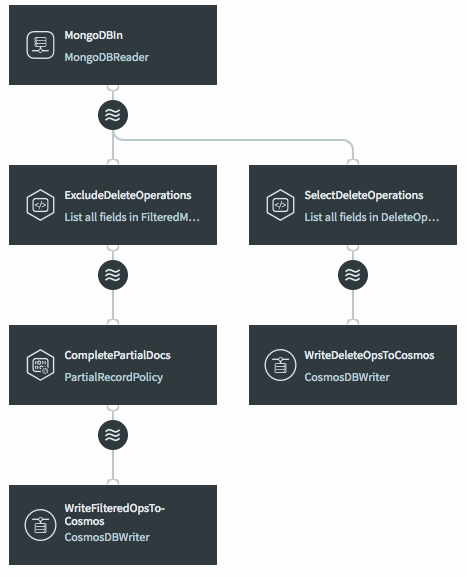
CREATE APPLICATION Mongo2CosmosIncrementalUnlimitedContainer;

CREATE SOURCE MongoDBIn USING MongoDBReader (
  Username:'striim',
  Password:'******',
  ConnectionURL:'<MongoDB connection string>',
  authType: 'NoAuth',
  Mode:'Incremental',
  startTimestamp: '<timestamp>',
  Collections:'mydb.$'
 )
OUTPUT TO MongoDBStream;

CREATE STREAM FilteredMongoDBStream OF Global.JsonNodeEvent;

CREATE CQ ExcludeDeleteOperations
INSERT INTO FilteredMongoDBStream
SELECT META(MongoDBStream,"DatabaseName"),
  META(MongoDBStream,"CollectionName"),
  META(MongoDBStream,"DocumentKey")
FROM MongoDBStream
WHERE META(MongoDBStream,"OperationName").toString() != "DELETE";

CREATE STREAM FullDocstream OF Global.JsonNodeEvent;

CREATE OPEN PROCESSOR CompletePartialDocs USING MongoPartialRecordPolicy (
  ConnectionURL:'<MongoDB connection string>',
  authType:'NoAuth',
  OnMissingDocument: 'Process'
)
INSERT INTO FullDocstream
FROM FilteredMongoDBStream;

CREATE TARGET WriteToCosmos USING CosmosDBWriter (
  ServiceEndpoint:'<Cosmos DB connection string>',
  AccessKey:'<Cosmos DB account read-write key>',
  Collections:'mydb.$,mydb.%',
  IgnorableExceptionCode:'PARTITION_KEY_NOT_FOUND'
)
INPUT FROM FullDocstream;

CREATE CQ SelectDeleteOperations
INSERT INTO DeleteOpsStream
SELECT TO_STRING(META(MongoDBStream,"DatabaseName")) AS DatabaseName,
  TO_STRING(META(MongoDBStream,"CollectionName")) AS CollectionName,
  TO_STRING(META(MongoDBStream,"DocumentKey")) AS DocumentKey
FROM MongoDBStream
WHERE META(MongoDBStream,"OperationName").toString() = "DELETE";

CREATE TARGET WriteDeleteOpsToCosmos USING CosmosDBWriter (
  ServiceEndpoint:'<Cosmos DB connection string>',
  AccessKey:'<Cosmos DB account read-write key>',
  Collections:'mydb.DeleteOps'
)
INPUT FROM DeleteOpsStream;

END APPLICATION Mongo2CosmosIncrementalUnlimitedContainer;