Automating the AWS PrivateLink integration
Striim provides a Terraform automation package that provisions the AWS resources required to connect Striim Cloud on AWS to self-managed databases through AWS PrivateLink. The automation is available in the GitHub repository at https://github.com/striim/aws-privatelink-resource-setup-terraform. This automation is intended for customer-managed data services hosted in AWS, on-premises data centers, or other cloud providers that are reachable from the customer AWS VPC.
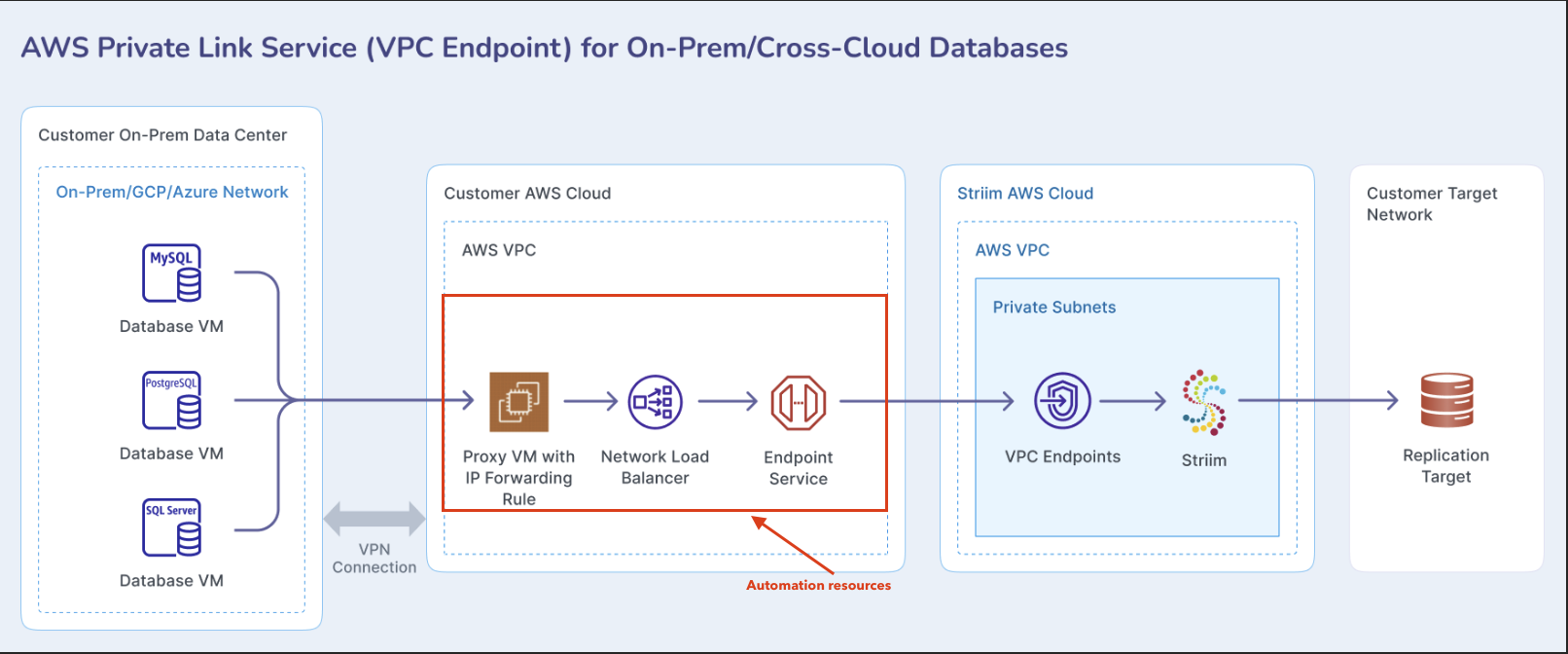
The Terraform package provisions an EC2 forwarder instance with port forwarding rules, an internal Network Load Balancer, one TCP listener and target group per forwarded database port, security groups, and a VPC Endpoint Service with allowed AWS principals for the Striim service account.
Important
This Terraform script creates AWS resources such as EC2 instances, Elastic IP addresses, Network Load Balancers, target groups, VPC Endpoint Services, security groups, IAM roles, and EBS volumes. These resources may incur charges in your AWS account. Review the Terraform plan and AWS pricing before applying the configuration.
Prerequisites
Before using this Terraform package, ensure the following:
You have an existing AWS VPC where the PrivateLink integration resources will be deployed.
You have subnets available for the internal Network Load Balancer. For high availability, use subnets across multiple Availability Zones. To match the standard Striim AWS PrivateLink guidance, use four subnets in four Availability Zones when available.
You have one subnet for the EC2 forwarder instance. Use a public subnet only if you need direct SSH or RDP access through a public IP. Otherwise, use a private subnet with AWS Systems Manager Session Manager, a bastion host, or another approved administrative access path.
Your self-managed database must be reachable from the EC2 forwarder instance. If the database is on-premises or in another cloud provider, establish connectivity from the AWS VPC using VPN, AWS Direct Connect, transit routing, or an equivalent private network path before deploying this package.
You have the AWS account ID that hosts the Striim service. Contact your Striim team to obtain this account ID. The Terraform package uses this value to configure the VPC Endpoint Service allowed principal.
You have IAM permissions to create and manage EC2, Elastic Load Balancing, VPC Endpoint Service, security group, IAM, key pair, and related networking resources.
You have Terraform installed and configured with credentials for the AWS account where the resources will be created.
Fill out all required fields in the
pass_values.tfvarsfile before deployment.
Architecture
The automation creates the following AWS resource path:
Striim Cloud service
        |
        | AWS PrivateLink endpoint connection
        v
Customer-owned VPC Endpoint Service
        |
        v
Internal Network Load Balancer
        |
        v
EC2 forwarder instance
        |
        | iptables or netsh port forwarding
        v
Self-managed database endpoint
For Linux forwarders, the script configures iptables DNAT and SNAT rules. For Windows forwarders, the script configures netsh interface portproxy forwarding rules.
Deploying with Terraform
Deploying the integration requires downloading or cloning the Terraform package, initializing Terraform, planning the deployment, and applying the changes.
To deploy the integration:
Clone or download the Terraform repository.
git clone <aws-privatelink-resource-setup-terraform-repository-url>
cd aws-privatelink-resource-setup-terraform
Copy the example values file.
cp pass_values.tfvars.example pass_values.tfvars
Edit
pass_values.tfvarsand provide values for your AWS account, VPC, subnets, Striim AWS account ID, administrative access CIDRs, and database forwarding targets.Initialize Terraform.
terraform init
Plan the deployment.
terraform plan -var-file="pass_values.tfvars"
Apply the changes to deploy the resources.
terraform apply -var-file="pass_values.tfvars"
Verifying the deployment
After terraform apply completes successfully, Terraform returns outputs that you can use to verify and configure the integration.
VPC Endpoint Service
The most important output is the VPC Endpoint Service name:
terraform output -raw vpc_endpoint_service_name
Provide this service name to Striim when creating the PrivateLink endpoint in the Striim service portal.
Terraform also returns the endpoint service ID and ARN. Use the service ID when reviewing or accepting endpoint connection requests in the AWS console or AWS CLI.
EC2 forwarder instance
Terraform returns the EC2 forwarder instance ID, private IP, and public IP if public access is enabled.
For Linux deployments, Terraform may also generate an SSH private key if you did not provide an existing SSH public key. Save the key securely:
terraform output -raw ssh_private_key_pem > ~/.ssh/striim-integration-key.pem
chmod 600 ~/.ssh/striim-integration-key.pem
To connect to the Linux forwarder when a public IP or reachable bastion path exists:
ssh -i ~/.ssh/striim-integration-key.pem ubuntu@<forwarder-public-ip-or-private-ip>
For Windows deployments, use the generated or configured Windows Administrator credentials and connect with RDP through your approved administrative access path.
Port forwarding rules
For Linux forwarders, verify the NAT rules:
sudo iptables -t nat -nvL
You should see DNAT rules mapping each listener/source port to the configured database IP and destination port. You should also see SNAT rules that rewrite the source address to the forwarder instance private IP.
For Windows forwarders, verify the port proxy rules:
netsh interface portproxy show all
The output should list each listener port and the corresponding database destination address and port.
Internal Network Load Balancer
Terraform creates an internal Network Load Balancer and one listener per forwarding rule. Each listener forwards traffic to a target group that contains the EC2 forwarder instance.
Verify the following in the AWS console:
The Network Load Balancer scheme is
internal.A TCP listener exists for each database port.
Each target group has the EC2 forwarder instance registered.
Each target group reports the forwarder instance as healthy.
Allowed principals
Terraform configures the Striim AWS account ID as an allowed principal on the VPC Endpoint Service. The output allowed_principal_arns shows the AWS principal ARNs allowed to discover and connect to the service.
terraform output allowed_principal_arns
The expected format is:
arn:aws:iam::<striim-aws-account-id>:root
Creating the VPC endpoint from the Striim service portal
After the AWS resources are created, create the endpoint connection from the Striim service portal.
Log in to your Striim account.
Open the Striim service that needs private connectivity.
Go to the secure connection or PrivateLink configuration section.
Create a new PrivateLink endpoint.
Enter a concise endpoint name.
In the service name field, enter the value from:
terraform output -raw vpc_endpoint_service_name
Leave the target type field blank unless your Striim team provides a specific value.
Create the endpoint request.
The endpoint connection initially appears as Pending because the VPC Endpoint Service is configured to require manual acceptance.
Accepting the VPC endpoint connection request
After Striim creates the endpoint request, accept it in AWS.
To accept the connection in the AWS console:
Open the Amazon VPC console.
Navigate to Endpoint services.
Select the endpoint service created by Terraform.
Open the Endpoint connections tab.
Select the pending endpoint connection.
Choose Actions > Accept endpoint connection request.
Wait for the connection status to change to
Available.
You can also review endpoint connection requests by using the AWS CLI:
aws ec2 describe-vpc-endpoint-connections \
  --filters Name=service-id,Values=<vpc-endpoint-service-id>
After identifying the pending endpoint ID, accept it:
aws ec2 accept-vpc-endpoint-connections \
  --service-id <vpc-endpoint-service-id> \
  --vpc-endpoint-ids <vpc-endpoint-id>
Using the endpoint connection for the data source
After the endpoint connection status becomes Available, use the endpoint FQDN shown in the Striim service portal when configuring your source or target connection.
Use the same database port configured in ip_forwarding_targets. By default, this automation uses the same source/listener port and destination database port, matching the standard Striim PrivateLink forwarding model.
Terraform variables
Populate the following required and commonly used variables in pass_values.tfvars.
Variable name | Description | Example |
|---|---|---|
| AWS Region where the forwarder, NLB, and endpoint service are created. | "us-east-1" |
| Optional local AWS CLI profile. Leave empty when using default AWS credentials. | "default" |
| Prefix used for AWS resource names. Use lowercase letters, numbers, and hyphens. | "striim-int" |
| Existing VPC ID where the resources are deployed. | "vpc-0123456789abcdef0" |
| Subnet ID for the EC2 forwarder instance. | "subnet-0123456789abcdef0" |
| Subnet IDs for the internal Network Load Balancer. Use multiple AZs for high availability. | ["subnet-111...", "subnet-222..."] |
| AWS account IDs allowed to connect to the endpoint service. Include the Striim AWS account ID. | ["123456789012"] |
| CIDR blocks allowed to SSH or RDP to the forwarder. Use your public IP with | ["203.0.113.10/32"] |
| Forwarder OS type. Linux is recommended. Supported values are | "linux" |
| EC2 instance type for the forwarder. Use | "m6a.large" |
| Optional AMI override. Leave empty to use the default Ubuntu or Windows AMI lookup. | "" |
| Optional existing SSH public key. Leave empty to let Terraform generate a key pair. | "" |
| Whether to attach a static Elastic IP for direct admin access. | true |
| Whether to attach an IAM role for AWS Systems Manager Session Manager. | true |
| Whether to enable NLB cross-zone load balancing. | true |
| Whether the NLB security group inbound rules are evaluated for PrivateLink traffic. Default is | "off" |
| CIDRs allowed to test the internal NLB directly. If empty, the selected VPC CIDR is used. | [] |
| List of database forwarding rules. | See example below. |
| Additional tags applied to taggable resources. | { Environment = "dev" } |
Example forwarding rules:
ip_forwarding_targets = [
  { name = "sqlserver-primary", ip = "192.168.10.10", port = 1433 },
  { name = "postgres-primary", ip = "192.168.10.20", port = 5432 },
  { name = "mysql-primary",    ip = "192.168.10.30", port = 3306 }
]
The optional listener_port field can be used only when you intentionally need the NLB listener/source port to differ from the database destination port:
ip_forwarding_targets = [
  { name = "custom-listener", ip = "192.168.10.40", port = 5432, listener_port = 15432 }
]
For most Striim PrivateLink deployments, omit listener_port so the source port and destination port remain the same.
Troubleshooting the integration
The following are common issues:
Issue | Possible cause | Resolution |
|---|---|---|
Endpoint connection remains | The AWS endpoint connection request has not been accepted. | Accept the request from the VPC Endpoint Service Endpoint connections tab or use |
Striim cannot create the endpoint | The Striim AWS account ID is missing or incorrect in the allowed principals list. | Verify |
NLB target is unhealthy | The forwarder security group, target group port, or forwarder service is misconfigured. | Confirm the target group port matches the forwarding listener port. Verify the forwarder security group allows traffic from the NLB security group. |
Database connection times out | The forwarder cannot reach the database network, database firewall blocks the connection, or routing is missing. | SSH/SSM into the forwarder and test connectivity with |
Linux forwarding rules are missing | User data did not complete or was overwritten. | Check |
Windows port proxy rules are missing | User data did not complete or Windows firewall blocks the listener. | Run |
Traffic reaches the forwarder but not the database | IP forwarding or SNAT is not active. | On Linux, verify |
Direct NLB testing works but PrivateLink traffic fails | NLB security group enforcement may be blocking PrivateLink traffic. | Keep |
Terraform reports duplicate listener ports | Multiple forwarding rules use the same source/listener port. | Make each port or |
SSH or RDP fails | Admin CIDR, route path, public IP setting, or subnet type is incorrect. | Verify |
Security considerations
Observe the following security practices when using this automation:
Do not store long-lived secrets, passwords, or private keys in source control.
Restrict SSH or RDP access with
admin_cidr_blocks. Use/32for a single trusted public IP whenever possible.Prefer AWS Systems Manager Session Manager or a hardened bastion host for administrative access instead of exposing public SSH or RDP.
Keep the VPC Endpoint Service restricted to the Striim AWS account ID or other explicitly approved AWS principals.
Keep endpoint acceptance required so that each connection request must be reviewed before activation.
Ensure the database firewall allows connections from the EC2 forwarder private IP, because the Linux SNAT rule rewrites database-bound traffic to the forwarder instance address.
Keep root EBS volume encryption enabled.
Review security group rules, route tables, and NACLs before production use.
Apply the Terraform package in a non-production environment first and validate end-to-end connectivity before production rollout.
Monitor the EC2 forwarder, NLB target health, VPC Endpoint Service connection status, and database connection logs.
Disclaimers
By using this Terraform package, you agree that:
You are responsible for creating, reviewing, securing, operating, and deleting the AWS resources created in your account.
Striim is not responsible for costs incurred in your AWS account.
You must review and approve the Terraform plan before deploying resources.
Your network team must ensure that the AWS VPC can reach the target database network.
Your security team must review administrative access, IAM permissions, security groups, endpoint service principals, and database access rules.
No public inbound connectivity to your database is required when the private network path and forwarding rules are configured correctly.
Cleaning up resources:
To remove all resources created by the Terraform package, run:
terraform destroy -var-file="pass_values.tfvars"
Review the destroy plan carefully before approving. Deleting the endpoint service and NLB disconnects Striim PrivateLink connectivity for any data sources that depend on this integration.