About change data capture (CDC)
What is change data capture?
Change data capture retrieves changed data from a DBMS or other data store. See the Change data capture Wikipedia article for an overview.
Change data capture using logs
Relational database management systems use write-ahead logs, also called redo or transaction logs, that represent DML and DDL changes. Traditionally, RDBMS systems use these logs to guarantee ACID properties and support rollback and roll-forward recovery operations. As DBMS technology has evolved, these logs have been augmented to record additional types of changes. Today they may track virtually every redoable and undoable action in the system, including transaction start and commit boundaries, table and index changes, data definition changes, rollback operations, indicators of non-logged changes, and more.
DBMS vendors and third parties have found additional uses for these logs. Striim, for example, can extract change data from logs in real time in order to make information available before the DBMS has finished processing it, at the same time minimizing the performance load on the RBMS by eliminating additional queries. There are many potential uses for this information, such raising alerts about error conditions sooner and double-checking DBMS operations in order to identify lost data.
All of the readers discussed in this Change Data Capture Guide capture change data by reading logs.
Change data capture using JDBC
You can use Striim's Incremental Batch Reader to capture change data using JDBC based on timestamps or incrementing values.
Working with SQL CDC readers
This section discusses the common characteristics of Striim's SQL-based change data capture readers. See also Using source and target adapters in applications.
WAEvent contents for change data
The output data type for sources that use change data capture readers is WAEvent. The fields and valid values vary among the readers, but they all include the following:
metadata: a map including the elements:
OperationName: INSERT, UPDATE, or DELETE
TxnID: transaction ID
TimeStamp: timestamp from the CDC log
TableName: fully qualified name of the table on which the operation was performed
To retrieve the values for these fields, use the META() function. See Parsing the fields of WAEvent for CDC readers.
data: an array of fields, numbered from 0, containing:
for an INSERT or DELETE operation, the values that were inserted or deleted
for an UPDATE, the values after the operation was completed
To retrieve the values for these fields, use SELECT ... (DATA[]). See Parsing the fields of WAEvent for CDC readers.
before (for UPDATE operations only): the same format as data, but containing the values as they were prior to the UPDATE operation
dataPresenceBitMap, beforePresenceBitMap , and typeUUID are reserved and should be ignored.
For information on additional fields and detailed discussion of values, see:
Sample TQL application using change data
The following sample application uses OracleReader but the approach is the same for all CDC readers.
CREATE APPLICATION SampleCDCApp;
CREATE SOURCE OracleCDCIn USING OracleReader (
  Username:'striim',
  Password:'passwd',
  ConnectionURL:'203.0.113.49:1521:orcl',
  Tables:'MYSCHEMA.POSAUTHORIZATIONS',
  FetchSize:1
)
OUTPUT TO OracleCDCStream;

CREATE TYPE PosMeta(
 tableName String,
 operationName String,
 txnID String,
 timestamp String
);
CREATE STREAM PosMetaStream OF PosMeta;
CREATE TYPE PosData(
  businessName String,
  accountName String,
  pos String,
  code String
);
CREATE STREAM PosDataStream OF PosData;
-- extract the metadata values
CREATE CQ OracleToPosMeta
INSERT INTO PosMetaStream
SELECT
    META(m,"TableName").toString(),
    META(m,"OperationName").toString(),
    META(m,"TxnID").toString(),
    META(m,"TimeStamp").toString()
       FROM OracleCDCStream m;
-- write the metadata values to SysOut
CREATE TARGET Metadump USING SysOut(name:meta) INPUT FROM PosMetaStream;

-- extract the data values
CREATE CQ OracleToPosData
INSERT INTO PosDataStream
SELECT
    CASE WHEN IS_PRESENT(x,data,0)==true THEN data[0].toString()
        ELSE "NOT_PRESENT"
    END,
    CASE WHEN IS_PRESENT(x,data,1)==true THEN data[1].toString()
        ELSE "NOT_PRESENT"
    END,
    CASE WHEN IS_PRESENT(x,data,2)==true THEN data[2].toString()
        ELSE "NOT_PRESENT"
    END,
    CASE WHEN IS_PRESENT(x,data,3)==true THEN data[3].toString()
        ELSE "NOT_PRESENT"
    END
FROM OracleCDCStream x;
-- write dump the data values to SysOut
CREATE TARGET  Datadump USING SysOut(name:data) INPUT FROM PosDataStream;
END APPLICATION SampleCDCApp;
The output for the three operations described in OracleReader example output would be similar to:
meta: PosMeta_1_0{
  tableName: "SCOTT.POSAUTHORIZATIONS"
  operationName: "INSERT"
  txnID: "4.0.1742"
  timestamp: "2015-12-11T16:31:30.000-08:00"
};
data: PosData_1_0{
  businessName: "COMPANY 1"
  accountName: "D6RJPwyuLXoLqQRQcOcouJ26KGxJSf6hgbu"
  pos: "6705362103919221351"
  code: "0"
};
meta: PosMeta_1_0{
  tableName: "SCOTT.POSAUTHORIZATIONS"
  operationName: "UPDATE"
  txnID: "4.0.1742"
  timestamp: "2015-12-11T16:31:30.000-08:00"
};
data: PosData_1_0{
  businessName: "COMPANY 5A"
  accountName: "D6RJPwyuLXoLqQRQcOcouJ26KGxJSf6hgbu"
  pos: "6705362103919221351"
  code: "0"
};
meta: PosMeta_1_0{
  tableName: "SCOTT.POSAUTHORIZATIONS"
  operationName: "DELETE"
  txnID: "4.0.1742"
  timestamp: "2015-12-11T16:31:30.000-08:00"
};
data: PosData_1_0{
  businessName: "COMPANY 5A"
  accountName: "D6RJPwyuLXoLqQRQcOcouJ26KGxJSf6hgbu"
  pos: "6705362103919221351"
  code: "0"
};
Validating table mapping
In this release, table mapping is validated only for applications with a single MariaDB, MySQL, Oracle, PostgreSQL, or SQL Server source (DatabaseReader, IncrementalBatchReader, MySQLReader, OracleReader, PostgreSQLReader, or MSSQLReader) and a single MariaDB, MySQL, Oracle, PostgreSQL, or SQL Server DatabaseWriter target.
When an application is deployed, Striim will compare the source and target columns and pop up a Validation errors dialog if it finds any of the following:
A source table is not mapped to a target table.
A target table does not exist.
The number of columns in a source table exceeds the number of columns in its target.
A source column is not mapped to any target column, or a target column is not mapped to any source column.
A column specified in a ColumnMap expression does not exist.
A column name is a reserved keyword (see List of reserved keywords or contains an unsupported character.
A source or target data type is not supported by Striim. Supported data types are detailed in Data type support & mapping for schema conversion & evolution.
A source column is mapped to a target column with an incompatible data type: for example, a VARCHAR2 column is mapped to an integer column. Supported data types mappings are detailed in Data type support & mapping for schema conversion & evolution.
A source column is mapped to a target column with a data type that is not optimal: for example, an integer column is mapped to a text column.
The size of a source column's data type exceeds that of its target: for example, a varchar(20) column is mapped to a varchar(10) column.
A target column's data type's precision or length is greater than that of the source column.
The source column allows nulls but the target column does not.
For example:
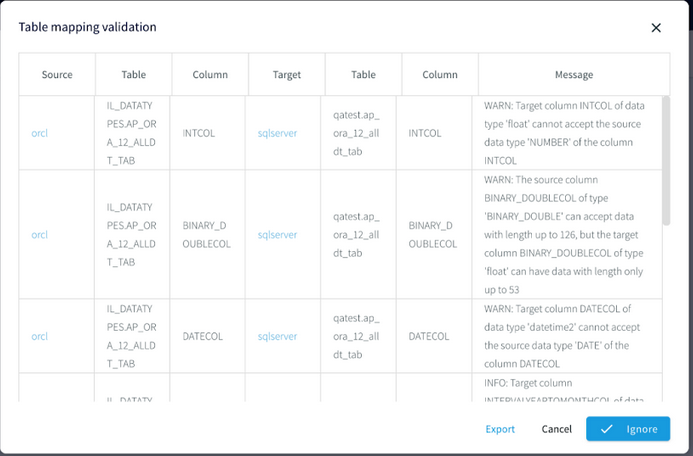
When you see this dialog, you may:
Click any of the source or target links to open the component.
Click X to close the dialog and fix problems in the source or target DBMS.
Click Ignore to run the application as is. This may be appropriate if the issues in the dialog are non-fatal: for example, when you know that there are no nulls in a source column mapped to a target column that does not allow nulls, or you deliberately mapped an integer source column to a text target column.
Click Export to save the report to a file.
After you have made corrections, choose Validation Errors from the Created menu and click Validate Again.
Reading from multiple tables
HP NonStop readers, MSSQLReader, and OracleReader can all read data from multiple tables using a single source. The MAP function allows data from each table to be output to a different stream.
Note
When you use wildcards to specify multiple tables, only the tables that exist when the application is started will be read. Any new tables added afterwards will be ignored.
The following reads all tables from the schema SCOTT.TEST.
CREATE SOURCE OraSource USING OracleReader (
  ... Tables:'SCOTT.%' ...
The following reads from all tables with names that start with SCOTT.TEST, such as SCOTT.TEST1, SCOTT.TESTCASE, and so on.
CREATE SOURCE OraSource USING OracleReader (
  ... Tables:'SCOTT.TEST%' ...
The following reads all tables with names that start with S and end with .TEST. Again, any tables added after the application starts will be ignored.
CREATE SOURCE OraSource USING OracleReader (
  ... Tables:='S%.TEST' ...
The following shows how to query data from one table when a stream contains data from multiple tables.
CREATE SOURCE OraSource USING OracleReader (
  ... Tables:'SCOTT.POSDATA;SCOTT.STUDENT' ...
)
OUTPUT TO Orders;
...
CREATE CQ renderOracleControlLogEvent
INSERT INTO oracleControlLogStream
    META(x,"OperationName"),
    META(x,"TxnID"),
    META(x,"TimeStamp").toString(),
    META(x,"TxnUserID”),
   data[0]
FROM Orders x
WHERE META(x,”TableName").toString() = "SCOTT.POSDATA";
The following takes input from two tables and sends output for each to a separate stream using the MAP function. Note that a regular output stream (in this case Orders) must also be specified, even if it is not used by the application.
CREATE SOURCE OraSource USING OracleReader (
  ... Tables:'SCOTT.POSDATA;SCOTT.STUDENT' ...
)
OUTPUT TO OrderStream,
  PosDataStream MAP (table:'SCOTT.POSDATA'),
  StudentStream MAP (table:'SCOTT.STUDENT');
In some cases, creating a separate source for each table may improve performance.
Using OUTPUT TO ... MAP
When a SQL CDC source reads from multiple tables, you may use OUTPUT TO <stream name> MAP (Table:'<table name>') to route events from each table to a different output stream. Striim will create a type for each stream using the column names and data types of the source table. Date and time data types are mapped to DateTime. All other types are mapped to String.
In this release, OUTPUT TO ... MAP is not supported for PostgreSQLReader.
The following takes input from two tables and sends output for each to a separate stream using the MAP function. Note that a regular, unmapped output stream (in this case OrderStream) must also be specified, even if all tables are mapped.
CREATE SOURCE OraSource USING OracleReader (
  ... Tables:'SCOTT.POSDATA;SCOTT.STUDENT' ...
)
OUTPUT TO OrderStream,
OUTPUT TO PosDataStream MAP (Table:'SCOTT.POSDATA'),
OUTPUT TO StudentStream MAP (Table:'SCOTT.STUDENT');
Warning
MAP is case-sensitive and the names specified must exactly match those specified in the Tables property, except when the source uses an HP NonStop reader, in which case the names specified must match the fully-qualified names of the tables in upper case, unless TrimGuardianNames is True, in which case they must match the full shortened names in upper case.
MAP is not displayed in or editable in the Flow Designer. Use DESCRIBE to view MAP settings and ALTER and RECOMPILE to modify them.
In some cases, creating a separate source for each table may improve performance over using OUTPUT TO ... MAP.
Adding user-defined data to WAEvent streams
Use the PutUserData function in a CQ to add an element to the WAEvent USERDATA map. Elements in USERDATA may, for example, be inserted into DatabaseWriter output as described in Modifying output using ColumnMap or used to partition KafkaWriter output among multiple partitions (see discussion of the Partition Key property in Kafka Writer).
The following example would add the sixth element (counting from zero) in the WAEvent data array to USERDATA as the field "city":
CREATE CQ AddUserData
INSERT INTO OracleSourceWithPartitionKey
SELECT putUserData(x, 'city',data[5])
FROM OracleSourcre_ChangeDataStream x;
You may add multiple fields, separated by commas:
SELECT putUserData(x, 'city',data[5], 'state',data[6])
For examples of how to use Userdata elements in TQL, see Modifying output using ColumnMap and the discussions of PartitionKey in Kafka Writer and S3 Writer.
To remove an element from USERDATA, use the removeUserData function (you may specify multiple elements, separated by commas):
CREATE CQ RemoveUserData
INSERT INTO OracleSourceWithPartitionKey
SELECT removeUserData(x, 'city')
FROM OracleSourcre_ChangeDataStream x;
To remove all elements from the USERDATA map, use the clearUserData function:
CREATE CQ ClearUserData
INSERT INTO OracleSourceWithPartitionKey
SELECT clearUserData(x)
FROM OracleSourcre_ChangeDataStream x;
Modifying the WAEvent data array using replace functions
When a CDC reader's output is the input of a writer, you may insert a CQ between the two to modify the WAEvent's data array using the following functions. This provides more flexibility when replicating data.
Note
When you specify a table or column name that contains special characters, use double quotes instead of single quotes and escape special characters as detailed in Using non-default case and special characters in table identifiers.
replaceData()
replaceData(WAEvent s, String 'columnName', Object o)
For input stream s, replaces the data array value for a specified column with an object. The object must be of the same type as the column.
For example, the following would replace the value of the DESCRIPTION column with the string redacted:
CREATE CQ replaceDataCQ
INSERT INTO opStream
SELECT replaceData(s,'DESCRIPTION','redacted')
FROM OracleReaderOutput s;
Optionally, you may restrict the replacement to a specific column:
replaceData(WAEvent s, String 'tableName', String 'columnName', Object o)
replaceString()
replaceString(WAEvent s, String 'findString', String 'newString')
For input stream s, replaces all occurrences of findString in the data array with newString. For example, the following would replace all occurrences of MyCompany with PartnerCompany:
CREATE CQ replaceDataCQ
INSERT INTO opStream
SELECT replaceString(s,'MyCompany','PartnerCompany')
FROM OracleReaderOutput s;
replaceStringRegex()
replaceStringRegex(WAEvent s, String 'regex', String 'newString')
For input stream s, replaces all strings in the data array that match the regex expression with newString. For example, the following would remove all whitespace:
CREATE CQ replaceDataCQ
INSERT INTO opStream
SELECT replaceStringRegex(s,’\\\\s’,’’)
FROM OracleReaderOutput s;
The following would replace all numerals with x:
CREATE CQ replaceDataCQ
INSERT INTO opStream
SELECT replaceStringRegex(s,’\\\\d’,’x’)
FROM OracleReaderOutput s;
Modifying and masking values in the WAEvent data array using MODIFY
When a CDC reader's output is the input of a writer, you may insert a CQ between the two to modify the values in the WAEvent's data array. This provides more flexibility when replicating data.
In this context, the syntax for the SELECT statement is:
SELECT <alias> FROM <stream name> <alias> MODIFY (<alias>.data[<field number>] = <expression>,...)
Precede the
CREATE CQstatement with aCREATE STREAM <name> OF TYPE Global.WAEventstatement that creates the output stream for the CQ.Start the SELECT statement with
SELECT <alias> FROM <stream name> <alias>.<alias>.data[<field number>]specifies the field of the array to be modified. Fields are numbered starting with 0.The expression can use the same operators and functions as SELECT.
The MODIFY clause may include multiple field name-expression pairs (
MODIFY (<field name 1> = <expression 1>, <field name 2> = <expression 2>, ...)).The MODIFY clause may include CASE statements.
The following simple example would convert a monetary amount in the data[4] field using an exchange rate of 1.09:
CREATE STREAM ConvertedStream OF TYPE Global.WAEvent;
CREATE CQ ConvertAmount
INSERT INTO ConvertedStream
SELECT r FROM RawStream r
MODIFY(r.data[4] = TO_FLOAT(r.data[4]) * 1.09);
The next example illustrates the use of masking functions and CASE statements. It uses the maskPhoneNumber function (see Masking functions) to mask individually identifiable information from US and India telephone numbers (as dialed from the US) while preserving the country and area codes. The US numbers have the format ###-###-####, where the first three digits are the area code. India numbers have the format 91-###-###-####, where 91 is the country code and the third through fifth digits are the subscriber trunk dialing (STD) code. The telephone numbers are in data[4] and the country codes are in data[5].
CREATE STREAM MaskedStream OF Global.WAEvent;
CREATE CQ maskData
INSERT INTO maskedDataStream
SELECT r FROM RawStream r
MODIFY(
r.data[4] = CASE
    WHEN TO_STRING(r.data[5]) == "US" THEN maskPhoneNumber(TO_STRING(r.data[4]), "###-xxx-xxx")
    ELSE maskPhoneNumber(TO_STRING(r.data[4]), "#####x#xxx#xxxx")
  END
);
This could be extended with additional WHEN statements to mask numbers from additional countries, or with additional masking functions to mask individually identifiable information such as credit card, Social Security, and national identification numbers.
See Masking functions for additional examples.
Using the DATA(), DATAORDERED(), BEFORE(), and BEFOREORDERED() functions
The DATA() and BEFORE() functions return the WAEvent data and before arrays. The following example shows how you could use these functions to write change data event details to a JSON file with the associated Oracle column names. (You could do the same thing with AVROFormatter.) This is supported only for 11g using LogMiner.
DATAORDERED(x) and BEFOREORDERED() return the column values in the same order as in the source table. When using DATA(x) and BEFORE(x), the order is not guaranteed.
CREATE SOURCE OracleCDCIn USING OracleReader (
  Username:'walm',
  Password:'passwd',
  ConnectionURL:'192.168.1.49:1521:orcl',
  Tables:'myschema.%',
  FetchSize:1
)
OUTPUT TO OracleRawStream;CREATE TYPE OpTableDataType(
  OperationName String,
  TableName String,
  data java.util.HashMap,
  before java.util.HashMap
);

CREATE STREAM OracleTypedStream OF OpTableDataType;
CREATE CQ ParseOracleRawStream
  INSERT INTO OracleTypedStream
  SELECT META(OracleRawStream, "OperationName").toString(),
    META(OracleRawStream, "TableName").toString(),
    DATA(OracleRawStream),
    BEFORE(OracleRawStream)
  FROM OracleRawStream;

CREATE TARGET OracleCDCFFileOut USING FileWriter(
  filename:'Oracle2JSON_withFFW.json'
)
FORMAT USING JSONFormatter ()
INPUT FROM OracleTypedStream;
The CQ will be easier to read if you use an alias for the stream name. For example:
CREATE CQ ParseOracleRawStream
  INSERT INTO OracleTypedStream
  SELECT META(x, "OperationName").toString(),
    META(x, "TableName").toString(),
    DATA(x),
    BEFORE(x)
  FROM OracleRawStream x;
Using this application, the output for the INSERT operation described in OracleReader example output would look like this:
 {
  "OperationName":"UPDATE",
  "TableName":"ROBERT.POSAUTHORIZATIONS",
  "data":{"AUTH_AMOUNT":"2.2", "BUSINESS_NAME":"COMPANY 5A", "ZIP":"41363", "EXP":"0916",
"POS":"0", "CITY":"Quicksand", "CURRENCY_CODE":"USD", "PRIMARY_ACCOUNT":"6705362103919221351",
"MERCHANT_ID":"D6RJPwyuLXoLqQRQcOcouJ26KGxJSf6hgbu", "TERMINAL_ID":"5150279519809946",
"CODE":"20130309113025"},
  "before":{"AUTH_AMOUNT":"2.2", "BUSINESS_NAME":"COMPANY 1", "ZIP":"41363", "EXP":"0916",
"POS":"0", "CITY":"Quicksand", "CURRENCY_CODE":"USD", "PRIMARY_ACCOUNT":"6705362103919221351",
"MERCHANT_ID":"D6RJPwyuLXoLqQRQcOcouJ26KGxJSf6hgbu", "TERMINAL_ID":"5150279519809946",
"CODE":"20130309113025"}
 }
Collecting discarded events in an exception store
When replicating CDC source data with Azure Synapse Writer, BigQuery Writer, Cosmos DB Writer, Database Writer, Databricks Writer, Fabric Data Warehouse Writer, MongoDB Cosmos DB Writer, MongoDB Writer, or Spanner Writer, attempted updates to and deletes from the target database may sometimes fail due to missing tables, duplicate or missing primary keys, or other issues. See CREATE EXCEPTIONSTORE for discussion of how to ignore these errors and capture the unwritten events.
Handling DDL changes in CDC reader source tables
Type lifecycle for SQL CDC sources
Striim creates a type (see Type) for each table to be read by a SQL CDC source. The lifecycle of these types is as follows:
When the application containing the source is first started, the types are created.
These types are reused when the application is restarted or recovered.
All types are dropped when the application is dropped.
If CDDL Capture is enabled for the source, types will be updated automatically to reflect supported DDL changes.
If CDDL is not enabled for the source, if there are DDL changes, the source will halt with a message that table metadata has changed.
SQL CDC replication examples
To replicate CDC data, the CDC reader's output must be the input stream of the target.
Optionally, you may insert a CQ between the source and the target, but that CQ must be limited to adding user-defined fields and modifying values.
Striim includes wizards for creating applications for SQL CDC sources and many targets (see Creating apps using wizards).
These examples use OracleReader, but may be used as a guide for replicating data from other SQL CDC readers.
Replicating Oracle data to another Oracle database
The first step in Oracle-to-Oracle replication is the initial load.
Use
select min(start_scn) from gv$transactionto get the SCN number of the oldest open or pending transaction.Use
select current_scn from V$DATABASE;to get the SCN of the export.Use Oracle's
exporexpdputility, providing the SCN from step 2, to export the appropriate tables and data from the source database to a data file.Use Oracle's
imporimpdpto import the exported data into the target database.
Once initial load is complete, the following sample application would continuously replicate changes to the tables SOURCE1 and SOURCE2 in database DB1 to tables TARGET1 and TARGET2 in database DB2 using Database Writer. The StartSCN value is the SCN number from step 1. In the WHERE clause, replace ######### with the SCN from step 2. Start the application with recovery enabled (see Recovering applications) so that on restart it will resume from the latest transaction rather than the StartSCN point.
CREATE SOURCE OracleCDC USING OracleReader (
  Username:'striim',
  Password:'******',
  ConnectionURL:'10.211.55.3:1521:orcl1',
  Tables:'DB1.SOURCE1;DB1.SOURCE2',
  Compression:true
  StartSCN:'...'
)
OUTPUT TO OracleCDCStream;

CREATE CQ FilterCDC
INSERT INTO FilteredCDCStream
SELECT x
FROM OracleCDCStream x
WHERE TO_LONG(META(x,'COMMITSCN')) > #########;

CREATE TARGET WriteToOracle USING DatabaseWriter (
  ConnectionURL:'jdbc:oracle:thin:@10.211.55.3:1521:orcl1',
  Username:'striim',
  Password:'******',
  Tables:'DB1.SOURCE1,DB2.TARGET1;DB1.SOURCE2,DB2.TARGET2'
)
INPUT FROM FilteredCDCStream;
The FilterCDC CQ filters out all transactions that were replicated during initial load.
The following Oracle column types are supported:
BINARY DOUBLE
BINARY FLOAT
BLOB
CHAR
CLOB
DATE
FLOAT
INTERVAL DAY TO SECOND
INTERVAL YEAR TO MONTH
LONG
NCHAR
NUMBER
NVARCHAR
RAW
TIMESTAMP
TIMESTAMP WITH TIME ZONE
TIMESTAMP WITH LOCAL TIME ZONE
VARCHAR2
Limitations:
The primary key for a target table cannot be BLOB or CLOB.
TRUNCATE TABLE is not supported for tables containing BLOB or CLOB columns.
Replicating Oracle data to Amazon Redshift
Striim provides a wizard for creating applications that read from Oracle and write to Redshift. See Creating an application using a wizard for details.
RedshiftWriter can continuously replicate one or many Oracle tables to an Amazon Redshift store. First, create a table in Redshift corresponding to each Oracle table to be replicated. Then load the existing data using DatabaseReader, for example:
CREATE SOURCE OracleJDBCSource USING DatabaseReader (
  Username:'Striim',
  Password:'****',
  ConnectionURL:'jdbc:oracle:thin:@192.168.123.14:1521/XE',
  Tables:'TPCH.H_CUSTOMER;TPCH.H_PART;TPCH.H_SUPPLIER'
)
OUTPUT TO DataStream;

CREATE TARGET TPCHInitialLoad USING RedshiftWriter (
  ConnectionURL: 'jdbc:redshift://mys3bucket.c1ffd5l3urjx.us-west-2.redshift.amazonaws.com:5439/dev',
  Username:'mys3user',
  Password:'******',
  bucketname:'mys3bucket',
/* for striimuser */
  accesskeyid:'********************',
  secretaccesskey:'****************************************',
  Tables:'TPCH.H_CUSTOMER,customer;TPCH.H_PART,part;TPCH.H_SUPPLIER,supplier'
)
INPUT FROM DataStream;
Theœ Tables property maps each specified Oracle table to a Redshift table, for example, TPCH.H_CUSTOMER to customer.
Once the initial load is complete, the following application will read new data using LogMiner and continuously replicate it to Redshift:
CREATE SOURCE OracleCDCSource USING OracleReader (
  Username:'miner',
  Password:'miner',
  ConnectionURL:'192.168.123.26:1521:XE',
  Tables:'TPCH.H_CUSTOMER;TPCH.H_PART;TPCH.H_SUPPLIER'
)
Output To LCRStream;

CREATE TARGET RedshiftTarget USING RedshiftWriter (
  ConnectionURL: 'jdbc:redshift://mys3bucket.c1ffd5l3urjx.us-west-2.redshift.amazonaws.com:5439/dev',
  Username:'mys3user',
  Password:'******',
  bucketname:'mys3bucket',
/* for striimuser */
  accesskeyid:'********************',
  secretaccesskey:'****************************************',
  Tables:'TPCH.H_CUSTOMER,customer;TPCH.H_PART,part;TPCH.H_SUPPLIER,supplier',
  Mode:'IncrementalLoad' )
INPUT FROM LCRStream;
Note that Redshift does not enforce unique primary key constraints. Use OracleReader's StartSCN or StartTimestamp property to ensure that you do not have duplicate or missing events in Redshift.
For more information, see Redshift Writer.
Replicating Oracle data to Azure Cosmos DB
CosmosDBWriter can continuously replicate one or many Oracle tables to Cosmos DB collections.
You must create the target collections in Cosmos DB manually. Each partition key name must match one of the column names in the Oracle source table.
Striim provides a wizard for creating applications that read from Oracle and write to Cosmos DB. See Creating an application using a wizard for details.
If you wish to run the following examples, adjust the Oracle Reader properties and Cosmos DB Writer properties to reflect your own environment.
In Cosmos DB, create database MyDB containing the following collections (note that the collection and partition names are case-sensitive, so when replicating Oracle data they must be uppercase):
SUPPLIERS with partition key /LOCATION
CUSTOMERS with partition key /COUNTRY
In Oracle, create tables and populate them as follows:
CREATE TABLE SUPPLIERS(ID INT, NAME VARCHAR2(40), LOCATION VARCHAR2(200), PRIMARY KEY(ID));
CREATE TABLE CUSTOMERS(ID INT, NAME VARCHAR2(40), EMAIL VARCHAR2(55), COUNTRY VARCHAR2(75),
  PRIMARY KEY(ID));
COMMIT;
INSERT INTO SUPPLIERS VALUES(100036492, 'Michelle', 'michelle@example.com', 'West Virginia');
INSERT INTO CUSTOMERS VALUES(23004389, 'Manuel', 'manuel@example.com', 'Austria');
COMMIT;
In Striim, run the following application to perform the initial load of the existing data using DatabaseReader:
CREATE APPLICATION Oracle2CosmosInitialLoad;

CREATE SOURCE OracleJDBCSource USING DatabaseReader (
  Username: '<Oracle user>',
  Password: '<Oracle user password>',
  ConnectionURL: '<Oracle connection URL>',
  Tables: 'MYSCHEMA.%'
)
OUTPUT TO OracleStream;

CREATE  TARGET CosmosTarget USING CosmosDBWriter  (
  ServiceEndpoint: '<Cosmos DB connection string>',
  AccessKey: '<Cosmos DB account read-write key>',
  Collections: 'MYSCHEMA.%,MyDB.%',
  ConnectionPoolSize: 3
 )
INPUT FROM OracleStream;
After the application is finished, the Cosmos DB collections should contain documents similar to the following.
MyDB.SUPPLIERS:
{
    "LOCATION": "West Virginia",
    "ID": "100036492",
    "NAME": "Example Inc.",
    "id": "100036492",
    "_rid": "CBcfAKX3xWACAAAAAAAACA==",
    "_self": "dbs/CBcfAA==/colls/CBcfAKX3xWA=/docs/CBcfAKX3xWACAAAAAAAACA==/",
    "_etag": "\"00008000-0000-0000-0000-5bacc99b0000\"",
    "_attachments": "attachments/",
    "_ts": 1538050459
}
MyDB.CUSTOMERS:
{
    "COUNTRY": "Austria",
    "ID": "23004389",
    "EMAIL": "manuel@example.com",
    "NAME": "Manuel",
    "id": "23004389",
    "_rid": "CBcfAJgI4eYEAAAAAAAACA==",
    "_self": "dbs/CBcfAA==/colls/CBcfAJgI4eY=/docs/CBcfAJgI4eYEAAAAAAAACA==/",
    "_etag": "\"d600b243-0000-0000-0000-5bacc99c0000\"",
    "_attachments": "attachments/",
    "_ts": 1538050460
}
{
    "COUNTRY": "Austria",
    "ID": "23908876",
    "EMAIL": "michelle@example.com",
    "NAME": "Michelle",
    "id": "23908876",
    "_rid": "CBcfAJgI4eYFAAAAAAAACA==",
    "_self": "dbs/CBcfAA==/colls/CBcfAJgI4eY=/docs/CBcfAJgI4eYFAAAAAAAACA==/",
    "_etag": "\"d600b443-0000-0000-0000-5bacc99c0000\"",
    "_attachments": "attachments/",
    "_ts": 1538050460
}
In Striim, run the following application to continuously replicate new data from Oracle to Cosmos DB using OracleReader:
CREATE APPLICATION Oracle2CosmosIncremental;

CREATE SOURCE OracleCDCSource USING OracleReader (
  Username: '<Oracle user>',
  Password: '<Oracle user password>',
  ConnectionURL: '<Oracle connection URL>',
  Tables: 'DB.ORDERS;DB.SUPPLIERS;DB.CUSTOMERS'
)
OUTPUT TO OracleStream;

CREATE  TARGET CosmosTarget USING CosmosDBWriter  (
  ServiceEndpoint: '<Cosmos DB connection string>',
  AccessKey: '<Cosmos DB account read-write key>',
  Collections: 'DB.%,MyDB.%',
  ConnectionPoolSize: 3
 )
INPUT FROM OracleStream;

END APPLICATION Oracle2CosmosIncremental;
In Oracle, enter the following:
INSERT INTO SUPPLIERS VALUES(100099786, 'Example LLC', 'Ecuador');
UPDATE CUSTOMERS SET EMAIL='msanchez@example.com' WHERE ID='23004389';
DELETE FROM CUSTOMERS WHERE ID='23908876';
COMMIT;
Within 30 seconds, those changes in Oracle should be replicated to the corresponding Cosmos DB collections with results similar to the following.
MyDB.SUPPLIERS:
{
    "LOCATION": "West Virginia",
    "ID": "100036492",
    "NAME": "Example Inc.",
    "id": "100036492",
    "_rid": "CBcfAKX3xWACAAAAAAAACA==",
    "_self": "dbs/CBcfAA==/colls/CBcfAKX3xWA=/docs/CBcfAKX3xWACAAAAAAAACA==/",
    "_etag": "\"00008000-0000-0000-0000-5bacc99b0000\"",
    "_attachments": "attachments/",
    "_ts": 1538050459
}
{
    "LOCATION": "Ecuador",
    "ID": "100099786",
    "NAME": "Example LLC",
    "id": "100099786",
    "_rid": "CBcfAKX3xWADAAAAAAAADA==",
    "_self": "dbs/CBcfAA==/colls/CBcfAKX3xWA=/docs/CBcfAKX3xWADAAAAAAAADA==/",
    "_etag": "\"0000e901-0000-0000-0000-5bacc99b0000\"",
    "_attachments": "attachments/",
    "_ts": 1538050559
}
MyDB.CUSTOMERS:
{
    "COUNTRY": "Austria",
    "ID": "23004389",
    "EMAIL": "msanchez@example.com",
    "NAME": "Manuel",
    "id": "23004389"
    "_rid": "CBcfAJgI4eYEAAAAAAAACA==",
    "_self": "dbs/CBcfAA==/colls/CBcfAJgI4eY=/docs/CBcfAJgI4eYEAAAAAAAACA==/",
    "_etag": "\"d600b243-0000-0000-0000-5bacc99c0000\"",
    "_attachments": "attachments/",
    "_ts": 1538050460
}
Replicating Oracle data to Cassandra
Cassandra Writer can continuously replicate one or many Oracle tables to a Cassandra or DataStax keyspace. First, create a table in Cassandra corresponding to each Oracle table to be replicated. Then load the existing data using DatabaseReader, for example:
CREATE SOURCE OracleJDBCSource USING DatabaseReader (
  Username:'Striim',
  Password:'****',
  ConnectionURL:'jdbc:oracle:thin:@192.168.123.14:1521/XE',
  Tables:'TPCH.H_CUSTOMER;TPCH.H_PART;TPCH.H_SUPPLIER'
)
OUTPUT TO DataStream;

CREATE TARGET TPCHInitialLoad USING CassandraWriter (
  ConnectionURL:'jdbc:cassandra://203.0.113.50:9042/mykeyspace',
  Username:'striim',
  Password:'******',
  Tables:'TPCH.H_CUSTOMER,customer;TPCH.H_PART,part;TPCH.H_SUPPLIER,supplier'
)
INPUT FROM DataStream;
DatabaseWriter's Tables property maps each specified Oracle table to a Cassandra table, for example, TPCH.H_CUSTOMER to customer. Oracle table names must be uppercase and Cassandra table names must be lowercase. Since columns in Cassandra tables are not created in the same order they are specified in the CREATE TABLE statement, the ColumnMap option is required (see Mapping columns) and wildcards are not supported. See Database Reader and Cassandra Writer for more information about the properties.
Once the initial load is complete, the following application will read new data using LogMiner and continuously replicate it to Cassandra:
CREATE SOURCE OracleCDCSource USING OracleReader (
  Username: 'Striim',
  Password: '******',
  ConnectionURL: '203.0.113.49:1521:orcl',
  Compression:'True',
  Tables: 'TPCH.H_CUSTOMER;TPCH.H_PART;TPCH.H_SUPPLIER'
 )
OUTPUT TO DataStream;

CREATE TARGET CassandraTarget USING CassandraWriter(
  ConnectionURL:'jdbc:cassandra://203.0.113.50:9042/mykeyspace',
  Username:'striim',
  Password:'******',
  Tables: 'TPCH.H_CUSTOMER,customer;TPCH.H_PART,part;TPCH.H_SUPPLIER,supplier'
INPUT FROM DataStream;
OracleReader's Compression property must be True. Cassandra does not allow primary key updates. See Oracle Reader properties and Cassandra Writer for more information about the properties.
When the input stream of a Cassandra Writer target is the output of an Oracle source (DatabaseReader or OracleReader), the following types are supported:
Oracle type | Cassandra CQL type |
|---|---|
BINARY_DOUBLE | double |
BINARY_FLOAT | float |
BLOB | blob |
CHAR | text, varchar |
CHAR(1) | bool |
CLOB | ascii, text |
DATE | timestamp |
DECIMAL | double, float |
FLOAT | float |
INT | int |
INTEGER | int |
NCHAR | text, varchar |
NUMBER | int |
NUMBER(1,0) | int |
NUMBER(10) | int |
NUMBER(19,0) | int |
NUMERIC | int |
NVARCHAR2 | varchar |
SMALLINT | int |
TIMESTAMP | timestamp |
TIMESTAMP WITH LOCAL TIME ZONE | timestamp |
TIMESTAMP WITH TIME ZONE | timestamp |
VARCHAR2 | varchar |
Replicating Oracle data to Google BigQuery
Striim provides a wizard for creating applications that read from Oracle and write to BigQuery. See Creating an application using a wizard for details.
The following application will replicate data from all tables in MYSCHEMA in Oracle to the corresponding tables in mydataset in BIgQuery. The tables in BigQuery must exist when the application is started. All source and target tables must all have a UUID column. In the source tables, the UUID values must be unique identifiers. See the notes for the Mode property in BigQuery Writer) for additional details.
CREATE SOURCE OracleCDCSource USING OracleReader (
  CommittedTransactions: false,
  Username: 'myuser',
  Password: 'mypass',
  ConnectionURL: '192.168.33.10:1521/XE',
  Tables: 'MYSCHEMA.%'
 )
OUTPUT TO DataStream;

CREATE TARGET BigQueryTarget USING BigQueryWriter(
  ServiceAccountKey: '<path>/<configuration file>.json',
  ProjectId: '<project ID>',
  Mode: 'MERGE',
  Tables: "MYSCHEMA.%,mydataset.% keycolumns(UUID)"
INPUT FROM DataStream;
See BigQuery Writer for details of the property values.
Replicating Oracle data to Google Cloud PostgreSQL
See Migrating an Oracle database to Cloud SQL for PostgreSQL using Striim.
Replicating MySQL data to Google Cloud Spanner
See Continuous data replication to Cloud Spanner using Striim.
Replicating Oracle data to a Hazelcast "hot cache"
Striim provides a wizard for creating applications that read from Oracle and write to Hazelcast. See Creating an application using a wizard for details.
See Hazelcast Writer for information on the adapter properties.
To replicate Oracle data to Hazelcast:
Write a Java class defining the Plain Old Java Objects (POJOs) corresponding to the Oracle table(s) to be replicated (see http://stackoverflow.com/questions/3527264/how-to-create-a-pojo for more information on POJOs), compile the Java class to a .jar file, copy it to the
Striim/libdirectory of each Striim server that will run the HazelcastWriter target, and restart the server.Write an XML file defining the object-relational mapping to be used to map Oracle table columns to Hazelcast maps (the "ORM file") and save it in a location accessible to the Striim cluster. Data types are converted as specified in the ORM file. Supported Java types on the Hazelcast side are:
binary (byte[])
Character, char
Double, double
Float, float
int, Integer
java.util.Date
Long, long
Short, short
String
Odd mappings may throw invalid data errors, for example, when an Oracle VARCHAR2 column mapped to a long contains a value that is not a number. Oracle BLOB and CLOB types are not supported.
Write a Striim application using DatabaseReader and HazelcastWriter to perform the initial load from Oracle to Hazelcast .
Write a second Striim application using OracleReader and HazelcastWriter to perform continuous replication.
This example assumes the following Oracle table definition:
CREATE TABLE INV (
  SKU INT PRIMARY KEY NOT NULL,
  STOCK NUMBER(*,4),
  NAME varchar2(20),
  LAST_UPDATED date
);
The following Java class defines a POJO corresponding to the table:
package com.customer.vo;
import java.io.Serializable;
import java.util.Date;
public class ProductInvObject  implements Serializable {

   public long sku = 0;
   public double stock = 0;
   public String name = null;
   public Date lastUpdated = null;

   public ProductInvObject ( ) {    }

   @Override
   public String toString() {
       return "sku : " + sku + ", STOCK:" + stock + ", NAME:" + name + ", LAST_UPDATED:" + lastUpdated  ;
   }
}
The following ORM file maps the Oracle table columns to Hazelcast maps:
<?xml version="1.0" encoding="UTF-8"?>
<entity-mappings xmlns="http://www.eclipse.org/eclipselink/xsds/persistence/orm" version="2.4">

    <entity name="prodcInv" class="com.customer.vo.ProductInvObject" >
        <table name="MYSCHEMA.INV"/>
        <attributes>
            <id name ="sku" attribute-type="long"  >
                <column nullable="false" name="SKU" />
            </id>
            <basic name="stock" attribute-type="double" >
                <column nullable="false" name="STOCK"  />
            </basic>
            <basic name="name" attribute-type="String" >
                <column  name="NAME" />
            </basic>
            <basic name="lastUpdated"  attribute-type="java.util.Date" >
                <column name="LAST_UPDATED" />
            </basic>
        </attributes>
    </entity>

</entity-mappings>
Assuming that the ORM file has been saved to Striim/Samples/Ora2HCast/invObject_orm.xml, the following Striim application will perform the initial load:
CREATE APPLICATION InitialLoadOra2HC;

CREATE SOURCE OracleJDBCSource USING DatabaseReader (
  Username:'striim',
  Password:'passwd',
  ConnectionURL:'203.0.113.49:1521:orcl',
  Tables:'MYSCHEMA.INV'
)
OUTPUT TO DataStream;

CREATE TARGET HazelOut USING HazelcastWriter (
  ConnectionURL: '203.0.1113.50:5702',
  ormFile:"Samples/Ora2HCast/invObject_orm.xml",
  mode: "initialLoad",
  maps: 'MYSCHEMA.INV,invCache'
)
INPUT FROM DataStream;

END APPLICATION InitialLoadOra2HC;
Once InitialLoadOra2HC has copied all the data, the following application will perform continuous replication of new data:
CREATE APPLICATION ReplicateOra2HC;

CREATE SOURCE OracleCDCSource USING OracleReader (
  Username:'striim',
  Password:'passwd',
  ConnectionURL:'203.0.113.49:1521:orcl',
  Tables:'MYSCHEMA.INVmyschema.ATM'
)
OUTPUT TO DataStream;

CREATE TARGET HazelOut USING HazelcastWriter (
  ConnectionURL: '203.0.1113.50:5702',
  ormFile:"Samples/Ora2HCast/invObject_orm.xml",
  mode: "incremental",
  maps: 'MYSCHEMA.INV,invCache'
)
INPUT FROM DataStream ;

END APPLICATION ReplicateOra2HCInitialLoadOra2HC;
Note
If the Hazelcast cluster goes down, the data in the map will be lost. To restore it, stop the replication application, do the initial load again, then restart replication.
Replicating Oracle data to HBase
Striim provides a wizard for creating applications that read from Oracle and write to HBase. See Creating an application using a wizard for details.
The following sample application will continuously replicate changes to MYSCHEMA.MYTABLE to the HBase Writer table mytable in the column family oracle_data:
CREATE SOURCE OracleCDCSource USING OracleReader (
  Username:'striim',
  Password:'passwd',
  ConnectionURL:'203.0.113.49:1521:orcl',
  Tables:'MYSCHEMA.MYTABLE',
  ReaderType: 'LogMiner',
  CommittedTransactions: false
)
INSERT INTO DataStream;

CREATE TARGET HBaseTarget USING HBaseWriter(
  HBaseConfigurationPath:"/usr/local/HBase/conf/hbase-site.xml",
  Tables: 'MYSCHEMA.MYTABLE,mytable.oracle_data'
INPUT FROM DataStream;
Notes:
INSERT, UPDATE, and DELETE are supported.
UPDATE does not support changing a row's primary key.
If the Oracle table has one primary key, the value of that column is treated as the HBase rowkey. If the Oracle table has multiple primary keys, their values are concatenated and treated as the HBase rowkey.
Inserting a row with the same primary key as an existing row is treated as an update.
The
Tablesproperty values are case-sensitive.
The Tables value may map Oracle tables to HBase tables and column families in various ways:
one to one:
Tables: "MYSCHEMA.MYTABLE,mytable.oracle_data"many Oracle tables to one HBase table:
"MYSCHEMA.MYTABLE1,mytable.oracle_data;MYSCHEMA.MYTABLE2,mytable.oracle_data"many Oracle tables to one HBase table in different column families:
"MYSCHEMA.MYTABLE1,mytable.family1;MYSCHEMA.MYTABLE2,mytable.family2"many Oracle tables to many HBase tables:
"MYSCHEMA.MYTABLE1,mytable1.oracle_data;MYSCHEMA.MYTABLE2,mytable2.oracle_data "
Writing raw CDC data to Hive
The following sample application uses data from OracleReader, but you can do the same thing with any of the other CDC readers.
Oracle table
In Oracle, create the following table:
CREATE TABLE POSAUTHORIZATIONS (
  BUSINESS_NAME varchar2(30),
  MERCHANT_ID varchar2(100),
  PRIMARY_ACCOUNT NUMBER,
  POS NUMBER,CODE varchar2(20),
  EXP char(4),
  CURRENCY_CODE char(3),
  AUTH_AMOUNT number(10,3),
  TERMINAL_ID NUMBER,
  ZIP number,
  CITY varchar2(20),
  PRIMARY KEY (MERCHANT_ID));
COMMIT;
TQL application
Create the following TQL application, substituting the appropriate connection URL and table name:
CREATE SOURCE OracleCDCSource USING OracleReader (
  StartTimestamp:'07-OCT-2015 18:37:55',
  Username:'qatest',
  Password:'qatest',
  ConnectionURL:'192.0.2.0:1521:orcl',
  Tables:'QATEST.POSAUTHORIZATIONS',
  OnlineCatalog:true,
  FetchSize:1,
  Compression:true
)
OUTPUT TO DataStream;

CREATE TARGET HiveTarget USING HDFSWriter(
	filename:'ora_hive_pos.bin',
	hadoopurl:'hdfs://localhost:9000/output/’,
)
FORMAT USING AvroFormatter (
	schemaFileName: ’ora_hive_pos.avsc'
)
INPUT FROM DataStream;
Avro schema file
See AVROFormatter for instructions on using the TQL application to generate ora_hive_pos.avsc, an Avro schema file based on WAEvent. The generated file's contents should be:
{
  "namespace": "waevent.avro",
  "type" : "record",
  "name": "WAEvent_Record",
  "fields": [
    {
    "name" : "data",
    "type" : { "type": "map","values":"string" }
     },
    {
    "name" : "before",
    "type" : ["null",{"type": "map","values":"string" }]
    },
    {
     "name" : "metadata",
     "type" : { "type": "map","values":"string" }
    }
  ]
}
WAEvent's data, before, and metadata fields are represented in Avro as Avro map types.
Hive table
Copy ora_hive_pos.avsc to In Hive, create a table using the generated Avro schema file. Modify the TBLPROPERTIES string to point to the correct location.
CREATE TABLE OracleHive
ROW FORMAT SERDE'org.apache.hadoop.hive.serde2.avro.AvroSerDe'
STORED AS INPUTFORMAT'org.apache.hadoop.hive.ql.io.avro.AvroContainerInputFormat'
OUTPUTFORMAT'org.apache.hadoop.hive.ql.io.avro.AvroContainerOutputFormat'
TBLPROPERTIES ('avro.schema.url'='hdfs://localhost:9000/avro/ora_hive_pos.avsc');
The new table should look like this:
hive> describe formatted oraclehive;
OK
# col_name            	data_type           	comment

data                	map<string,string>
before              	map<string,string>
metadata            	map<string,string>

….
Time taken: 0.481 seconds, Fetched: 34 row(s)
hive>
Configure the above to table to read from generated avro data
hive>LOAD DATA INPATH '/output/ora_hive_pos.bin' OVERWRITE INTO TABLE OracleHive;
Generate sample CDC data in Oracle
In Oracle, enter the following to generate CDC data:
INSERT INTO POSAUTHORIZATIONS VALUES('COMPANY 1',
'D6RJPwyuLXoLqQRQcOcouJ26KGxJSf6hgbu',6705362103919221351,0,'20130309113025','0916',
'USD',2.20,5150279519809946,41363,'Quicksand');
INSERT INTO POSAUTHORIZATIONS VALUES('COMPANY 2',
'OFp6pKTMg26n1iiFY00M9uSqh9ZfMxMBRf1',4710011837121304048,4,'20130309113025','0815',
'USD',22.78,5985180438915120,16950,'Westfield');
INSERT INTO POSAUTHORIZATIONS VALUES('COMPANY 3',
'ljh71ujKshzWNfXMdQyN8O7vaNHlmPCCnAx',2553303262790204445,6,'20130309113025','0316',
'USD',218.57,0663011190577329,18224,'Freeland');
INSERT INTO POSAUTHORIZATIONS VALUES('COMPANY 4',
'FZXC0wg0LvaJ6atJJx2a9vnfSFj4QhlOgbU',2345502971501633006,3,'20130309113025','0813',
'USD',18.31,4959093407575064,55470,'Minneapolis');
INSERT INTO POSAUTHORIZATIONS VALUES('COMPANY 5',
'ljh71ujKshzWNfXMdQyN8O7vaNHlmPCCnAx',6388500771470313223,2,'20130309113025','0415',
'USD',314.94,7116826188355220,39194,'Yazoo City');
UPDATE POSAUTHORIZATIONS SET BUSINESS_NAME = 'COMPANY 1A' where pos= 0;
UPDATE POSAUTHORIZATIONS SET BUSINESS_NAME = 'COMPANY 5A' where pos= 2;
UPDATE POSAUTHORIZATIONS SET BUSINESS_NAME = 'COMPANY 4A' where pos= 3;
UPDATE POSAUTHORIZATIONS SET BUSINESS_NAME = 'COMPANY 2A' where pos= 4;
UPDATE POSAUTHORIZATIONS SET BUSINESS_NAME = 'COMPANY 3A' where pos= 6;
DELETE from POSAUTHORIZATIONS where pos=6;
COMMIT;
Query the Hive table
Query the Hive table to verify that the CDC data is being captured:
hive> select * from oraclehive;
OK
{"3":"0","2":"6705362103919221351","1":"D6RJPwyuLXoLqQRQcOcouJ26KGxJSf6hgbu",
"10":"Quicksand","0":"COMPANY 1","6":"USD","5":"0916","4":"20130309113025","9":"41363",
"8":"5150279519809946"} NULL    {"TxnID":"10.23.1524","RbaSqn":"209",
"TableSpace":"USERS","CURRENTSCN":"1939875","OperationName":"INSERT",
"ParentTxnID":"10.23.1524","SegmentType":"TABLE","SessionInfo":"UNKNOWN",
"ParentTxn":"QATEST","Session":"143","BytesProcessed":"760",
"TransactionName":"","STARTSCN":"","SegmentName":"POSAUTHORIZATIONS","COMMITSCN":"",
"SEQUENCE":"1","RbaBlk":"57439","ThreadID":"1","SCN":"193987500000588282738968494240000",
"AuditSessionId":"73401","ROWID":"AAAXlEAAEAAAALGAAA",
"TimeStamp":"2015-10-08T14:58:55.000-07:00","Serial":"685",
"RecordSetID":" 0x0000d1.0000e05f.0010 ","TableName":"QATEST.POSAUTHORIZATIONS",
"SQLRedoLength":"325","Rollback":"0"}
{"3":"4","2":"4710011837121304048","1":"OFp6pKTMg26n1iiFY00M9uSqh9ZfMxMBRf1",
"10":"Westfield","0":"COMPANY 2","6":"USD","5":"0815","4":"20130309113025","9":"16950",
"8":"5985180438915120"} NULL    {"TxnID":"10.23.1524","RbaSqn":"209",
"TableSpace":"USERS","CURRENTSCN":"1939876","OperationName":"INSERT",
"ParentTxnID":"10.23.1524","SegmentType":"TABLE","SessionInfo":"UNKNOWN",
"ParentTxn":"QATEST","Session":"143","BytesProcessed":"762",
"TransactionName":"","STARTSCN":"","SegmentName":"POSAUTHORIZATIONS","COMMITSCN":"",
"SEQUENCE":"1","RbaBlk":"57441","ThreadID":"1","SCN":"193987600000588282738969804960001",
"AuditSessionId":"73401","ROWID":"AAAXlEAAEAAAALGAAB",
"TimeStamp":"2015-10-08T14:58:56.000-07:00","Serial":"685",
"RecordSetID":" 0x0000d1.0000e061.0010 ","TableName":"QATEST.POSAUTHORIZATIONS",
"SQLRedoLength":"327","Rollback":"0"}
...
Time taken: 0.238 seconds, Fetched: 11 row(s)
To select a subset of the data, use syntax similar to the following:
hive> select metadata["TimeStamp"], metadata["TxnID"], metadata["TableName"],
data from orclehive where metadata["OperationName"]="UPDATE";
2015-10-08T14:58:56.000-07:00	5.26.1740	QATEST.POSAUTHORIZATIONS
	{"0":"COMPANY 1A","1":"D6RJPwyuLXoLqQRQcOcouJ26KGxJSf6hgbu"}
2015-10-08T14:58:56.000-07:00	5.26.1740	QATEST.POSAUTHORIZATIONS
	{"0":"COMPANY 2A","1":"OFp6pKTMg26n1iiFY00M9uSqh9ZfMxMBRf1"}
...
Time taken: 0.088 seconds, Fetched: 5 row(s)
Replicating Oracle data to Hive
See Hive Writer for information on storage types supported and limitations.
The following example assumes the following Oracle source table:
create table employee (Employee_name varchar2(30),
Employeed_id number,
CONSTRAINT employee_pk PRIMARY KEY (Employeed_id));
and the following Hive target table:
CREATE TABLE employee (emp_name string, emp_id int)
CLUSTERED BY (emp_id) into 2 buckets
STORED AS ORC TBLPROPERTIES ('transactional'='true');
The following application will load existing data from Oracle to Hive:
CREATE SOURCE OracleJDBCSource USING DatabaseReader (
  Username:'oracleuser',
  Password:'********',
  ConnectionURL:'192.0.2.75:1521:orcl',
  Tables:'DEMO.EMPLOYEE',
  FetchSize:1
)
OUTPUT TO DataStream;

CREATE TARGET HiveTarget USING HiveWriter (
  ConnectionURL:’jdbc:hive2://localhost:10000’,
  Username:’hiveuser’,
  Password:’********’,
  hadoopurl:'hdfs://18.144.17.75:9000/',
  Mode:’initiaload’,
  Tables:’DEMO.EMPLOYEE,employee’
)
INPUT FROM DataStream;
Once initial load is complete, the following application will read new data and continuously replicate it to Hive:
CREATE SOURCE OracleCDCSource USING OracleReader (
  Username:'oracleuser',
  Password:'********',
  ConnectionURL:'192.0.2.75:1521:orcl',
  Tables:'DEMO.EMPLOYEE',
  FetchSize:1
)
OUTPUT TO DataStream;

CREATE TARGET HiveTarget USING HiveWriter (
  ConnectionURL:’jdbc:hive2://192.0.2.76:10000’,
  Username:’hiveuser’,
  Password:’********’,
  hadoopurl:'hdfs://192.0.2.76:9000/',
  Mode:’incrementalload’,
  Tables:’DEMO.EMPLOYEE,employee keycolumns(emp_id)’’
)
INPUT FROM DataStream;
Replicating Oracle data to Kafka
Before following these instructions:
Complete the tasks in Configuring Oracle to use Oracle Reader.
Create the target topic in Kafka.
Striim must be running.
If you are using a Forwarding Agent in Oracle, it must be connected to Striim.
You will need the following information to complete the wizard:
Striim
VM user name
VM user password
Striim cluster name
Striim admin password
DNS name (displayed on the Essentials tab for the Striim VM)
Oracle (source)
connection URL in the format
<IP address>:<port>:<SID>, for example,198.51.100.0:1521:orcllogin name and password
source table names
Kafka (target)
topic name
broker address
optionally, any Kafka producer properties required by your environment (see "KafkaWriter" in the "Adapters reference" section of the Striim Programmer's Guide)
Log into the Striim web UI at
<DNS name>:9080usingadminas the user name and the Striim admin password.Select the Oracle CDC to Kafka wizard that matches your target Kafka broker version.
Enter names for your application (for example, Oracle2Kafka) and new namespace (do not create applications in the admin namespace) and click Save.
Enter the name for the Oracle source component in the Striim application (for example, OracleSource), the connection URL, user name, and password.
Select LogMiner as the log reader.
Optionally, specify a wildcard string to select the Oracle tables to be read (see the discussion of the Tables property in Oracle Reader properties).
Set Deploy source on Agent on (if the Forwarding Agent is not connected to Striim, this property does not appear) and click Next.
If Striim's checks show that all properties are valid (this may take a few minutes), click Next.
If you specified a wildcard in the Oracle properties, click Next. Otherwise, select the tables to be read and click Next.
Enter the name for the Kafka target component in the Striim application (for example, KafkaTarget), the topic name and the broker address.
For Input From, select the only choice. (This is OracleReader's output stream, and its name is <application name>_ChangeDataStream.)
Enter the topic name, and the broker address.
Optionally, click Show optional properties and specify any Kafka producer properties required by your environment. Leave Mode set to
sync.Select AvroFormatter and specify its schema file name. This file will be created when the application is deployed (see Avro Formatter).
Click Save, then click Next. (Click Create Target only if you specified maps or filters and want to create more than one target.)
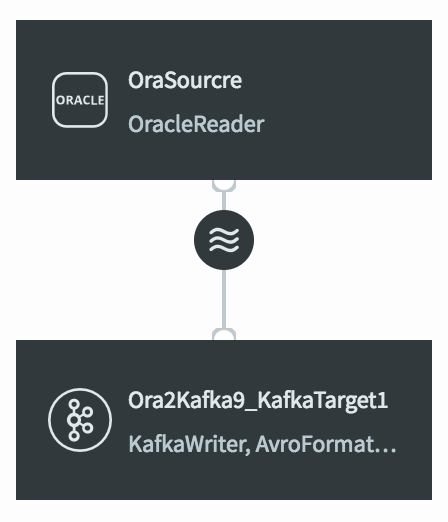
Striim will create your application and open it in the Flow Designer. It should look something like this:
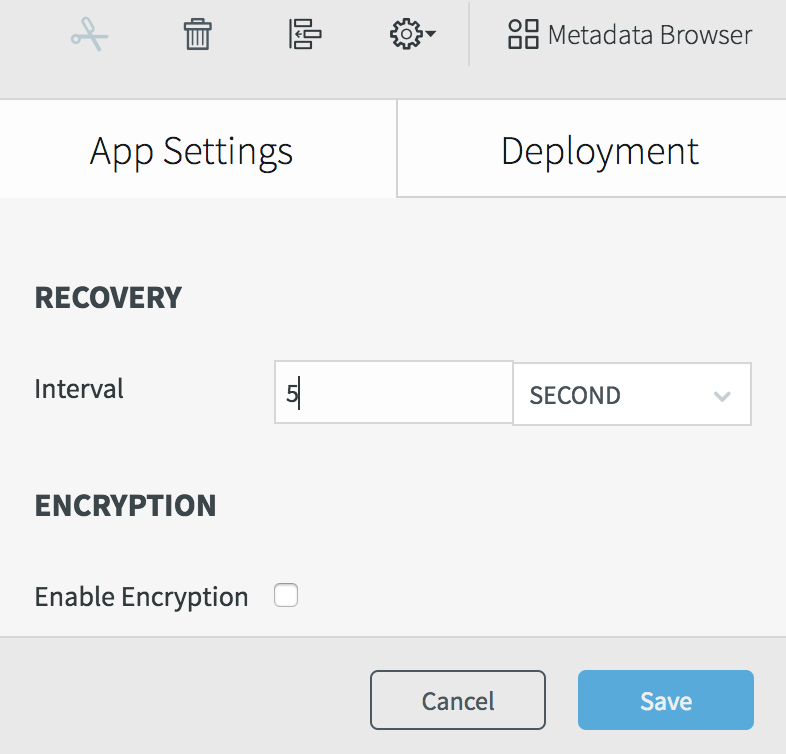
Select Configuration > App settings, set the recovery interval to 5 seconds, and click Save.
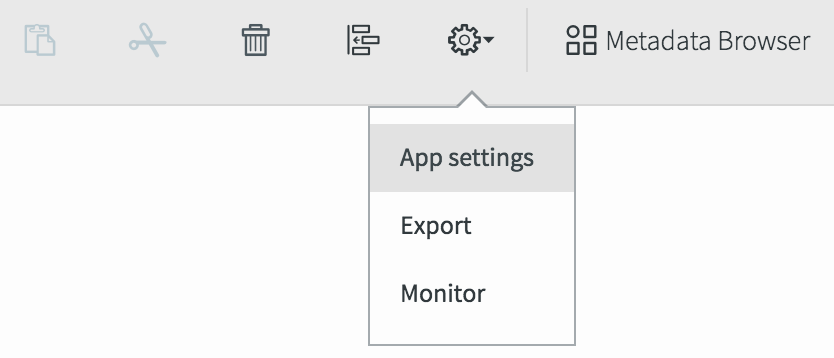
Select Configuration > Export to generate a TQL file. It should contain something like this (the password is encrypted):
CREATE APPLICATION Oracle2Kafka RECOVERY 5 SECOND INTERVAL;

CREATE SOURCE OracleSource USING OracleReader (
  FetchSize: 1,
  Compression: false,
  Username: 'myname',
  Password: '7ip2lhUSP0o=',
  ConnectionURL: '198.51.100.15:1521:orcl',
  DictionaryMode: 'OnlineCatalog',
  ReaderType: 'LogMiner',
  Tables: 'MYSCHEMA.%'
 )
OUTPUT TO OracleSourcre_ChangeDataStream;

CREATE TARGET KafkaTarget USING KafkaWriter (
  Mode: 'Sync',
  Topic: 'MyTopic',
  brokerAddress: '198.51.100.55:9092'
)
FORMAT USING AvroFormatter ( schemaFileName: 'MySchema.avro' )
INPUT FROM OracleSourcre_ChangeDataStream;

END APPLICATION Oracle2Kafka;
Note that FetchSize: 1 is appropriate for development, but should be increased in a production environment. See Oracle Reader properties for more information.
Replicating Oracle data to SAP HANA
DatabaseWriter can continuously replicate one or many Oracle tables to a SAP HANA database. First, create a table in SAP HANA corresponding to each Oracle table to be replicated. Then load the existing data using DatabaseReader. For example, to replcate all tables in MYORADB to MYSAPDB:
CREATE SOURCE OracleJDBCSource USING DatabaseReader ( Username:'Striim', Password:'****', ConnectionURL:'jdbc:oracle:thin:@203.0.113.49:1521:orcl', Tables:'MYORADB.%' ) OUTPUT TO DataStream; CREATE TARGET SAPHANAInitialLoad USING DatabaseWriter ( ConnectionURL:'jdbc:sap://203.0.113.50:39013/?databaseName=MYASPDB¤tSchema=striim', Username:'striim', Password:'******', Tables:'MYORADB.%,MYSAPDB.%' ) INPUT FROM DataStream;
See Database Reader and Database Writer for more information about the properties.
Once the initial load is complete, the following application will continuously replicate new data from Oracle to SAP HANA:
CREATE SOURCE OracleCDCSource USING OracleReader (
  Username: 'Striim',
  Password: '******',
  ConnectionURL: '203.0.113.49:1521:orcl',
  Compression:'True',
  Tables: 'MYORADB.%'
 )
OUTPUT TO DataStream;

CREATE TARGET SAPHANAContinuous USING DatabaseWriter(
  ConnectionURL:'jdbc:cassandra://203.0.113.50:9042/mykeyspace',
  Username:'striim',
  Password:'******',
  Tables: 'MYORADB.%,MYSAPDB.% '
INPUT FROM DataStream;
When the input stream of a SAP HANA DatabaseWriter target is the output of an Oracle source (Database Reader, Incremental Batch Reader, or Oracle Reader), the following types are supported:
Oracle type | SAP HANA type |
|---|---|
BINARY_DOUBLE | DOUBLE |
BINARY_FLOAT | REAL |
BLOB | BLOB, VARBINARY |
CHAR | ALPHANUM, TEXT, VARCHAR |
CHAR(1) | BOOLEAN |
CLOB | CLOB, VARCHAR |
DATE | DATE |
DECIMAL | DECIMAL |
FLOAT | FLOAT |
INT | INTEGER |
INTEGER | INTEGER |
NCHAR | NVARCHAR |
NUMBER | INTEGER |
NUMBER(1,0) | INTEGER |
NUMBER(10) | INTEGER |
NUMBER(19,0) | INTEGER |
NUMERIC | BIGINTEGER, DECIMAL, DOUBLE, FLOAT, INTEGER |
NVARCHAR2 | NVARCHAR |
SMALLINT | SMALLINT |
TIMESTAMP | TIMESTAMP |
TIMESTAMP WITH LOCAL TIME ZONE | TIMESTAMP |
TIMESTAMP WITH TIME ZONE | TIMESTAMP |
VARCHAR2 | VARCHAR |
Replicating Oracle data to Snowflake
Striim provides a wizard for creating applications that read from Oracle and write to Snowflake. See Creating an application using a wizard for details.
SnowflakeWriter can continuously replicate one or many Oracle tables to Snowflake. First, create a table in Snowflake corresponding to each Oracle table to be replicated. Then load the existing data using DatabaseReader, for example:
CREATE SOURCE OracleJDBCSource USING DatabaseReader (
  Username: 'striim',
  Password: '******',
  ConnectionURL: 'jdbc:oracle:thin:@//127.0.0.1:1521/xe',
  Tables: 'QATEST.%'
OUTPUT TO DataStream;

CREATE TARGET SnowflakeInitialLoad USING SnowflakeWriter (
  ConnectionURL: 'jdbc:snowflake://hx75070.snowflakecomputing.com/?db=DEMO_DB&schema=public',
  username: 'striim',
  password: '******',
  Tables: 'QATEST.%,DEMO_DB.PUBLIC.%',
  appendOnly: true
)
INPUT FROM DataStream;
Once the initial load is complete, the following application will read new data using LogMiner and continuously replicate it to Snowflake:
CREATE SOURCE OracleCDCSource USING OracleReader (
  Username: 'striim',
  Password: '******',
  ConnectionURL: 'jdbc:oracle:thin:@//127.0.0.1:1521/xe',
  Tables: 'QATEST.%'
OUTPUT TO DataStream;

CREATE TARGET SnowflakeCDC USING SnowflakeWriter (
  ConnectionURL: 'jdbc:snowflake://hx75070.snowflakecomputing.com/?db=DEMO_DB&schema=public',
  username: 'striim',
  password: '******',
  Tables: 'QATEST.%,DEMO_DB.PUBLIC.%'
)
INPUT FROM DataStream;
For more information, see Snowflake Writer.
Bidirectional replication
Bidirectional replication allows synchronization of two databases, with inserts, updates, and deletes in each replicated in the other. The columns in the replicated tables must have compatible data types.
If your Striim cluster is licensed for bidirectional replication, this will be indicated on the user-name menu at the top right corner of the web UI.
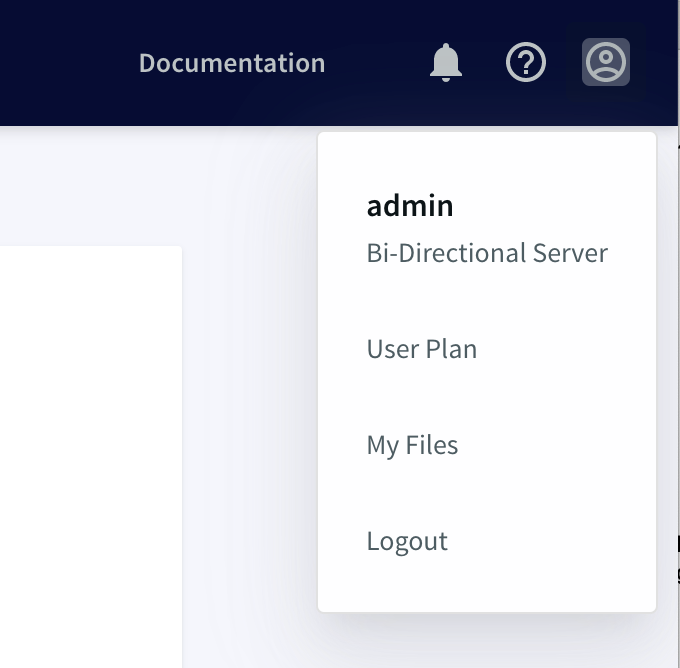
In this release, bidirectional replication is supported for Oracle, MariaDB, MySQL, PostgreSQL, and SQL Server. It uses two data flows, one from a source in database A to a target in database B, the other the reverse.
Note
When doing bidirectional replication:
Schema evolution is not supported.
MS SQL Reader's Support Transaction property must be True.
Oracle Reader's Committed Transaction property must be True.
Contact Striim support to determine whether your databases are compatible with bidirectional replication.
The following example application would perform bidirectional replication between MySQL and SQL Server:
CREATE APPLICATION BidirectionalDemo RECOVERY 1 SECOND INTERVAL;
CREATE SOURCE ReadFromMySQL USING MySQLReader (
 Username: 'striim',
  Password: '*******',
  ConnectionURL: 'mysql://192.0.2.0:3306',
  Tables: 'mydb.*',
  BidirectionalMarkerTable: 'mydb.mysqlmarker'
)
OUTPUT TO MySQLStream;

CREATE TARGET WriteToSQLServer USING DatabaseWriter (
  ConnectionURL:'jdbc:sqlserver://192.0.2.1:1433;databaseName=mydb',
  Username:'striim',
  PassWord:'********',
  Tables: 'mydb.*,dbo.*',
  CheckPointTable: 'mydb.CHKPOINT',
  BidirectionalMarkerTable: 'mydb.sqlservermarker'
)
INPUT FROM MySQLStream;

CREATE SOURCE ReadFromSQLServer USING MSSQLReader (
  ConnectionURL:'192.0.2.1:1433',
  DatabaseName: 'mydb',
  Username: 'striim',
  Password: '*******',
  Tables: 'dbo.*',
  BidirectionalMarkerTable: 'mydb.sqlservermarker'
)
OUTPUT TO SQLServerStream;

CREATE TARGET WriteToMySQL USING DatabaseWriter (
  Username:'striim',
  PassWord:'********',
  ConnectionURL: 'mysql://192.0.2.0:3306',
  Tables: 'dbo.*,mydb.*',
  CheckPointTable: 'mydb.CHKPOINT',
  BidirectionalMarkerTable: 'mydb.mysqlmarker'
)
INPUT FROM SQLServerStream;
END APPLICATION BidirectionalDemo;
Striim requires a "marker table" in each database. It uses the information recorded in this table to detect and discard events that would create an infinite loop. To create the table, use the following DDL:
for MariaDB, MySQL, or PostgreSQL:
CREATE TABLE <name>
(componentId varchar(100) PRIMARY KEY, lastupdatedtime timestamp(6));
for Oracle (table name must be uppercase):
CREATE TABLE <NAME>
(componentId varchar2(100) PRIMARY KEY, lastupdatedtime timestamp(6));
for SQL Server:
CREATE TABLE <name>
(componentId varchar(100) PRIMARY KEY, lastupdatedtime datetime2(6));
Adapter property data types
Adapter properties use the same Supported data types as TQL, plus Encrypted passwords.
Some property data types are enumerated: that is, only documented values are allowed. If setting properties in TQL, be careful not to use other values for these properties.