Understanding the Comparison Process
During a Validation Run, Validata follows a multi-step process to compare records between the Source and Target tables in each Validation Pair. This process includes:
Filtering out records with null values in the comparison key columns,
Excluding duplicate records, and
Evaluating the remaining unique records
This section offers a conceptual view of the comparison process and explains how Validata computes comparison metrics.
Forming Validation Pairs
The comparison process begins by forming Validation Pairs, where each Pair consists of a table from the Source dataset and its corresponding table from the Target dataset. Validata intelligently auto-maps Source tables to Target tables and maps Source and Target columns within each Pair to one another. You may modify or override any of these mappings and select which mapped tables and columns Validata should evaluate.
Validata will only compare the data in the mapped columns that you have selected for comparison. If the Source and Target tables contain mapped columns that you have not selected for comparison, Validata will not process and evaluate the data in those columns.
A few additional points:
If a column in the Source or Target table contains a data type unsupported by the current Validata edition, that column cannot be selected for comparison
If a column in one table of the Validation Pair is not mapped to a column in the other table in the Pair, that column cannot be selected for comparison.
All Validation types require you to specify comparison key(s), except for Custom Validation where the comparison key is optional but recommended.
Selecting Comparison Keys
The next step is identifying the column or set of columns that serve as Comparison Keys. These keys determine how Validata matches records in the Source table to records in the Target table.
We recommend that you choose a column that contains unique values as the comparison key column to ensure that the comparison does not result in unexpected comparison results.
If the data system requires a primary key, we strongly recommend that you choose the primary key as the comparison key. Depending on your use case, you may also choose a column other than the primary key as your comparison key, or you may choose multiple columns to act as a composite comparison key. Validata filters out records that have null values in any of the comparison key columns and does not compare records that contain duplicate values in the comparison key columns; therefore, you should choose your comparison keys appropriately.
In this section, we present two scenarios to illustrate the comparison process:
Comparison using 1 column as the comparison key
Comparison using 2 columns to form a composite comparison key
We will use fictional point-of-sale data that is replicated from a relational database (Source) to a data warehouse (Target). We assume that the data warehouse is configured in APPEND mode; therefore it supports duplicate records, i.e. records that share the same primary key.
Scenario-1: Using 1 column as the Comparison Key
In this scenario, we map Source.TxnID to Target.TxnID to form the Comparison Key. Validata uses this comparison key to match records in the Source table to corresponding records in the Target table. We also map semantically equivalent data in both tables to ensure accurate comparison (e.g., Source.MerchName is mapped to Target.MerchName).
Filtering null records
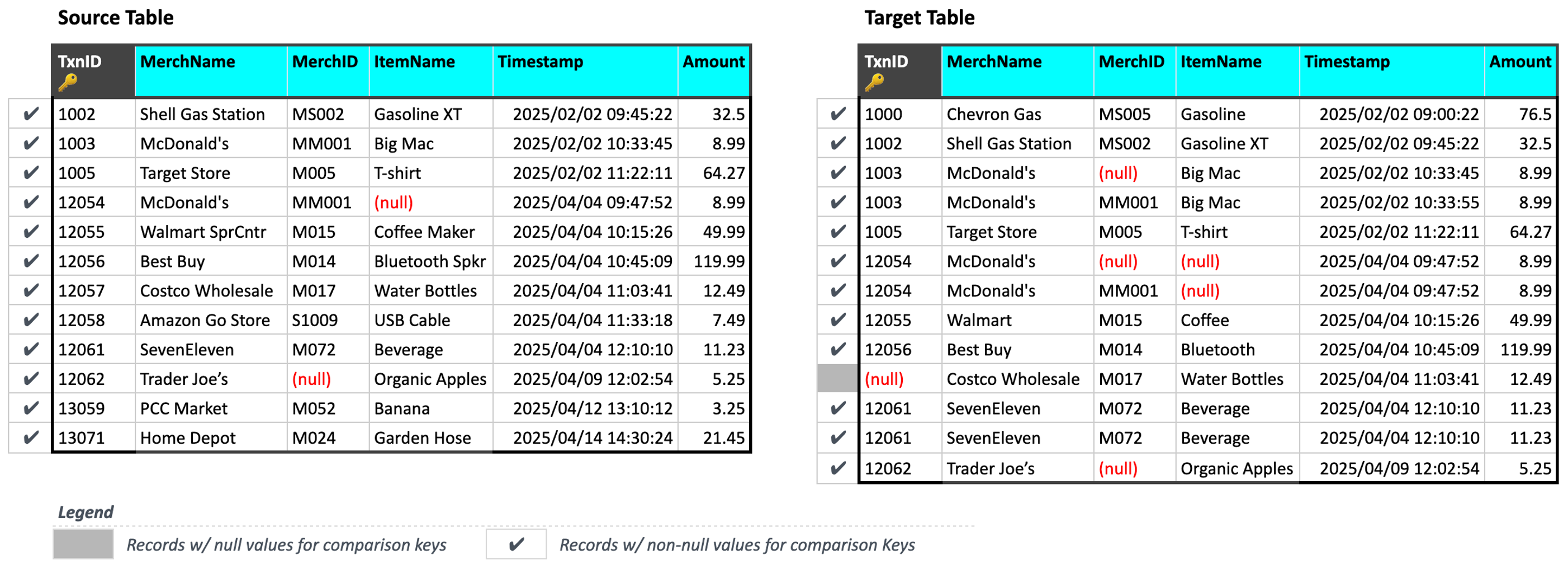
When ingesting data, Validata automatically filters out records that have null values in the comparison key column (i.e., TxnID). These null records are not processed, compared, or included in the validation metrics or reconciliation scripts.
Identifying and excluding duplicate records
Next, Validata identifies and excludes duplicate keys and their associated duplicate records from the comparison.
As defined previously, a duplicate key is a comparison key value that appears in two or more records within either the Source or the Target table after null records have been filtered. In the current example, Validata has identified 3 duplicate keys: TxnID = 1003, TxnID = 12054, and TxnID = 12061.
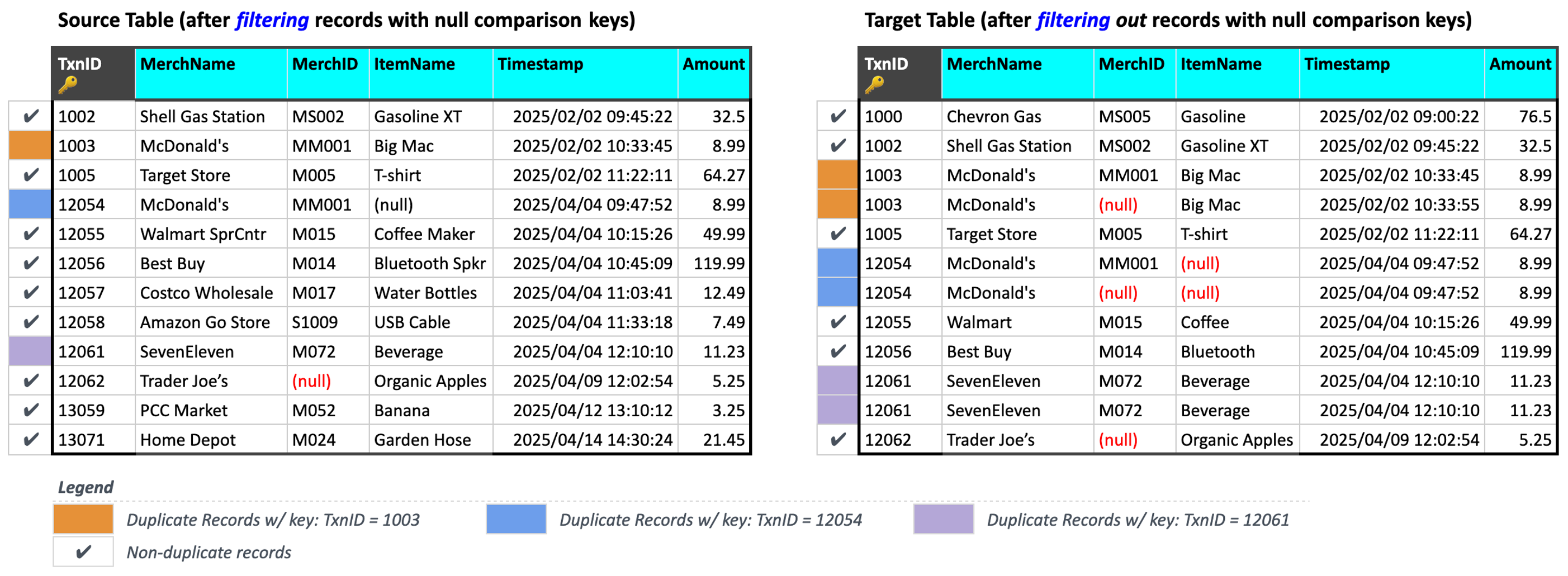
Any record in the Source or Target table of a Validation Pair whose TxnID matches any of the duplicate keys is classified as a duplicate record and excluded from further comparison.
As shown in the figure above, Validata has flagged 3 Source records and 6 Target records as duplicate records:
TxnID = 1003: 1 record in the Source table, and 2 records in the Target tableTxnID = 12054: 1 record in the Source table, and 2 records in the Target tableTxnID = 11061: 1 record in the Source table, and 2 records in the Target table
Comparing the remaining unique records
After filtering null records and excluding duplicate records, the remaining records in both tables have unique values in the comparison key columns. Validata compares these unique records based on the comparison key:
If a Source record and a Target record share the same comparison key value and all corresponding column values match , they are classified as
In-Sync.If the comparison key matches but one or more non-key columns differ, Validata marks the records as
Out-of-Sync: Content mismatch.Validata marks any remaining unmatched records—those appearing in only the Source table or only the Target table—as
Out-of-Sync, eitherExtra in SourceorExtra in Targetrespectively.
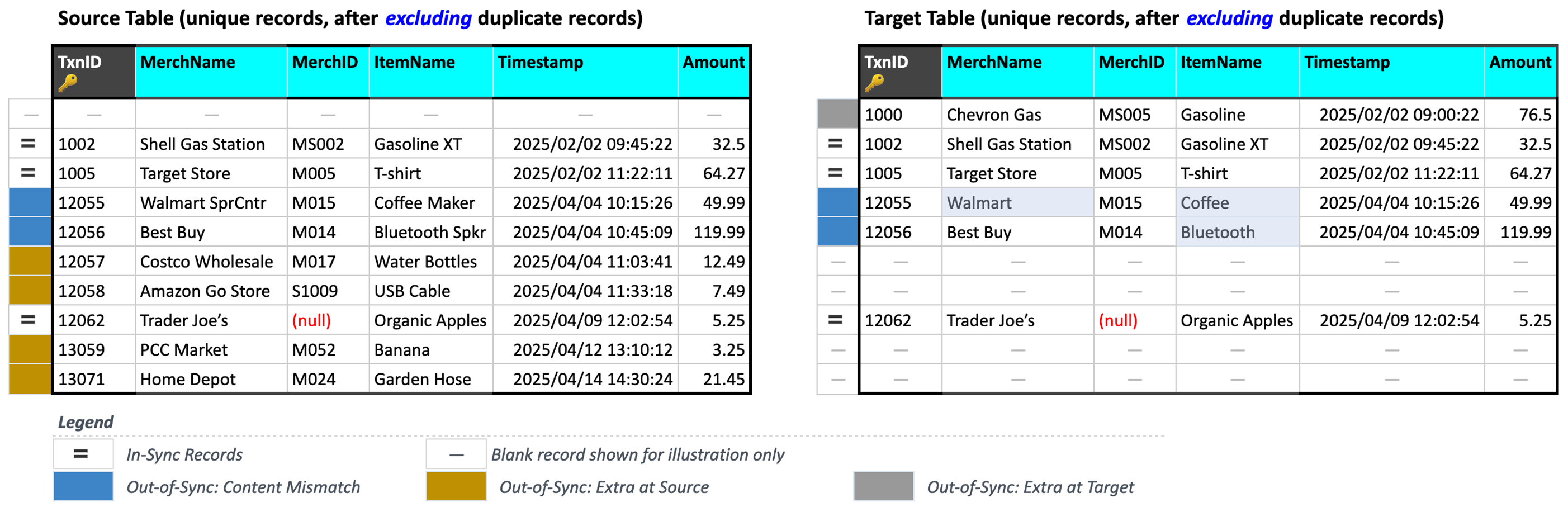
We consider 4 comparisons in the figure above to illustrate In-Sync and Out-of-Sync concepts:
Validata has marked the record with
TxnID = 1005asIn-Syncbecause its contents are identical for all corresponding columns.Validata has marked the record with
TxnID = 12056asOut-of-Sync: Content mismatchbecauseItemName = "Bluetooth Spkr"in the Source record has been truncated toItemName = "Bluetooth"in the Target record.Validata has marked the record with
TxnID = 13059asOut-of-Sync: Extra in Sourcebecause it is an unmatched record that appears only in the Source table.Validata has marked the record with
TxnID = 1000asOut-of-Sync: Extra in Targetbecause it is an unmatched record that appears only in the Target table.
Computing the Metrics for the Validation Pair
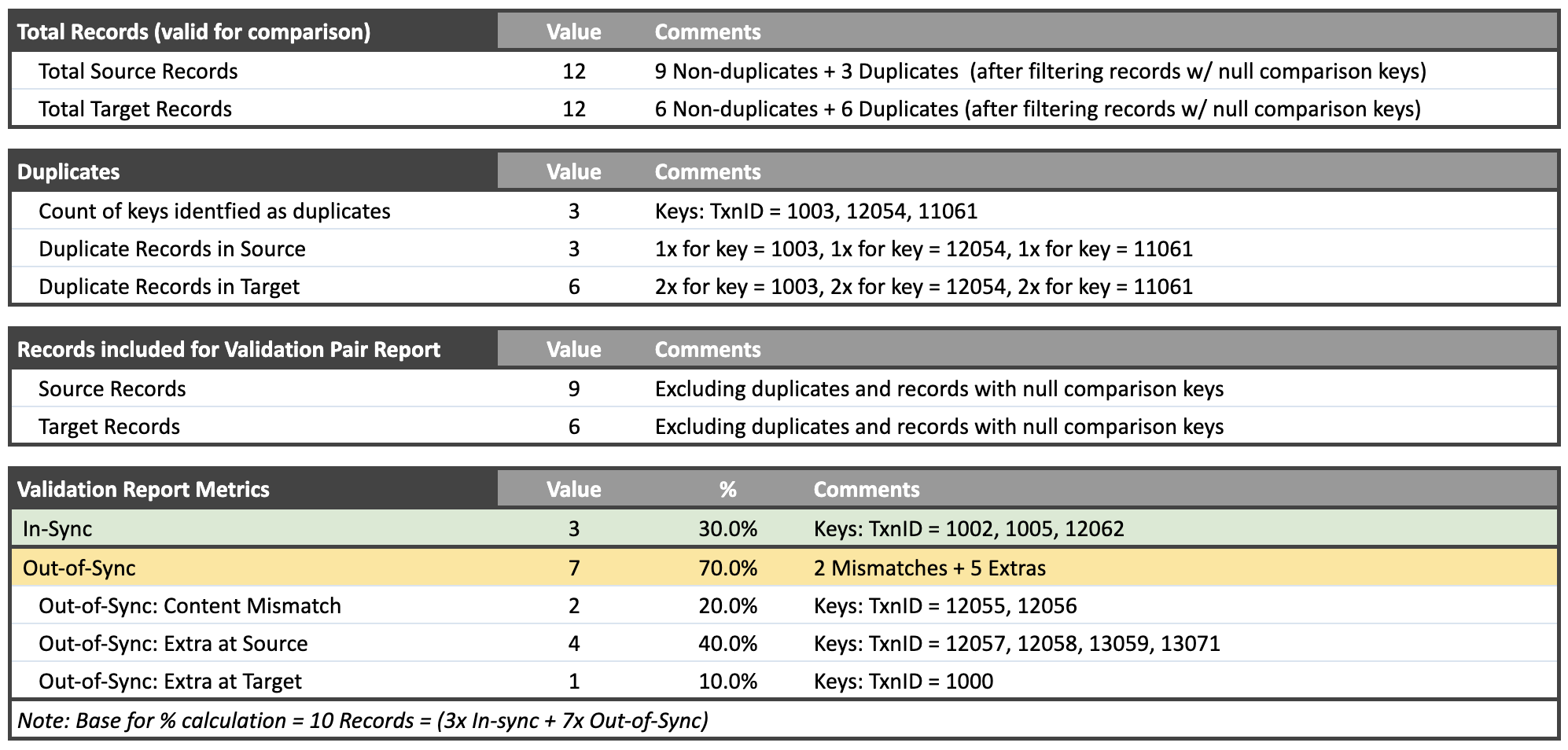
After completing the comparison for a Validation Pair, Validata generates a Validation Pair Report summarizing the comparison metrics. The report includes essential information such as the list of Duplicate Keys, details on Out-of-Sync Records, and a reconciliation script. You can download the script and execute it on the external data systems to resolve the detected discrepancies.
Note
Validation results depend on the columns selected for comparison. In the above example, if you compare only TxnID, MerchName, and MerchID, Validata marks the record with TxnID = 12056 (Best Buy) as In-Sync because the values in those three columns are identical in the source and target. The difference in ItemName is not detected because that column was not selected for comparison.
Scenario-2: Using 2 columns to form a composite Comparison Key
You may choose to use multiple columns to form a composite comparison key for granular analysis.
In this scenario, we map Source.TxnID to Target.TxnID and Source.MerchID to Target.MerchID to form a composite Comparison Key. Validata uses this composite comparison key to match records in the Source and Target tables. We also map semantically equivalent data in both tables to ensure accurate comparison (e.g., Source.ItemName is mapped to Target.ItemName).
Filtering null records
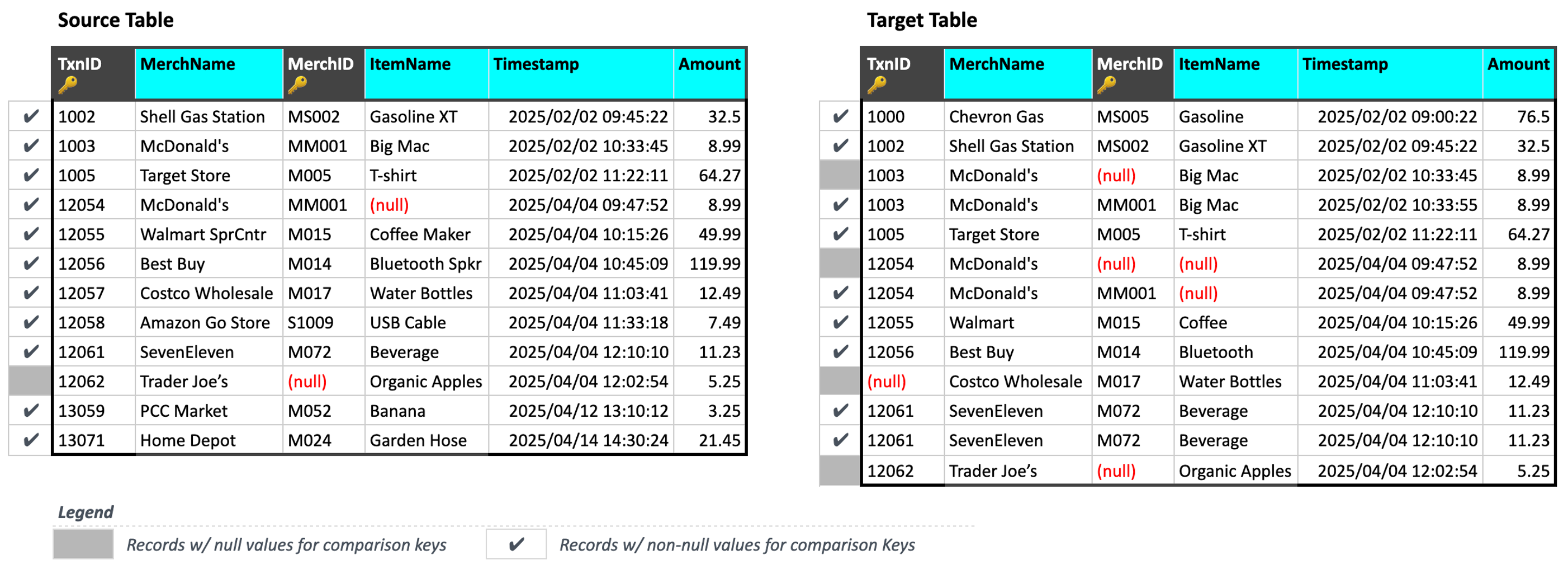
When ingesting data, Validata automatically filters out records that have null values in any of the comparison key columns, i.e. either TxnID or MerchID.
In this example, Validata has identified 5 records as null records as shown in the figure above:
Source table:
(TxnID, MerchID) = (12063, null)Target table:
(TxnID, MerchID) = (1003, null), (12054, null), (12054, null), (12062, null)
Note that the addition of MerchID to form a composite comparison key has resulted in 4 extra null records—1 in the Source and 3 in the Target—due to null values in the MerchID column.
Identifying and excluding duplicate records
Next, Validata identifies and excludes duplicate keys and their associated duplicate records from the comparison.
In the current example, a duplicate key is a composite comparison key value that appears in two or more records within either the Source or the Target table after null records have been filtered. Here, Validata has identified 1 duplicate key: (TxnID, MerchID) = (12061, M072), and classified 3 records—2 in the Source and 1 in the Target—as duplicate records.
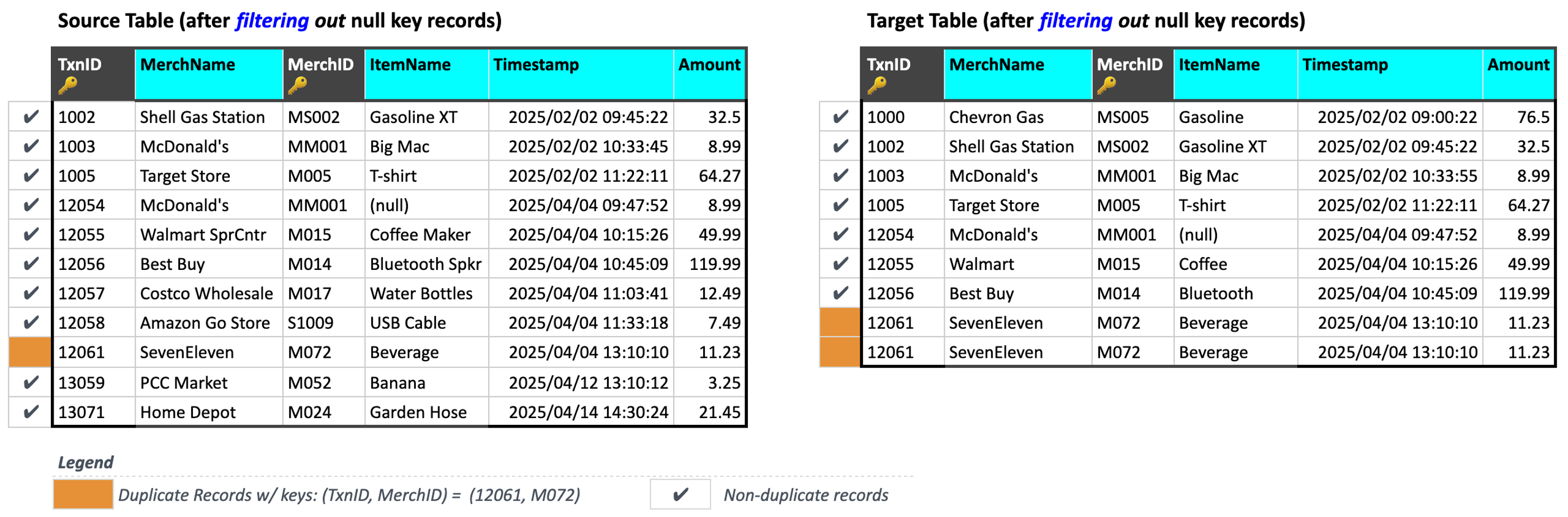
Thus, the addition of MerchID to form a composite comparison key has altered the number of keys and records that Validata classifies as duplicates.
Comparing the remaining unique records
After filtering null records and excluding duplicate records, the remaining records in both tables have unique values in the comparison key columns, as shown below.
As discussed previously, Validata compares these unique records based on the comparison key:
If a Source record and a Target record share the same composite comparison key value and all corresponding column values match, they are classified as
In-Sync.If the composite comparison key value matches but one or more non-key columns differ, Validata marks the records as
Out-of-Sync: Content mismatch.Validata marks any remaining unmatched records—those appearing in only the Source table or only the Target table—as
Out-of-Sync, eitherExtra in SourceorExtra in Targetrespectively.
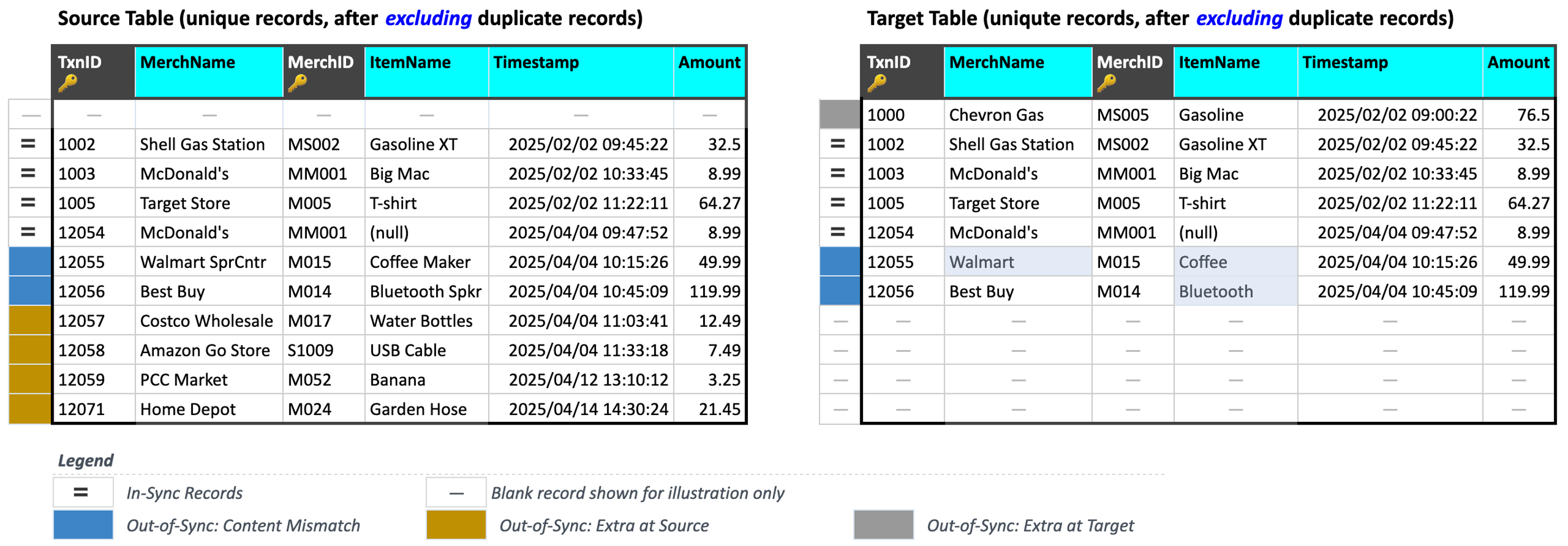
We consider 4 comparisons in the figure above to illustrate In-Sync and Out-of-Sync concepts:
Validata has marked the record with
(TxnID, MerchID) = (1003, MS002)asIn-Syncbecause its contents are identical for all corresponding columns.Validata has marked the record with
(TxnID, MerchID) = (12056, M014)asOut-of-Sync: Content mismatchbecauseItemName = "Bluetooth Spkr"in the Source record has been truncated toItemName = "Bluetooth"in the Target record.Validata has marked the record with
(TxnID, MerchID) = (12058, S1009)asOut-of-Sync: Extra in Sourcebecause it is an unmatched record that appears only in the Source table.Validata has marked the record with
(TxnID, MerchID) = (1000, MS005)asOut-of-Sync: Extra in Targetbecause it is an unmatched record that appears only in the Target table.
Computing the Metrics for the Validation Pair
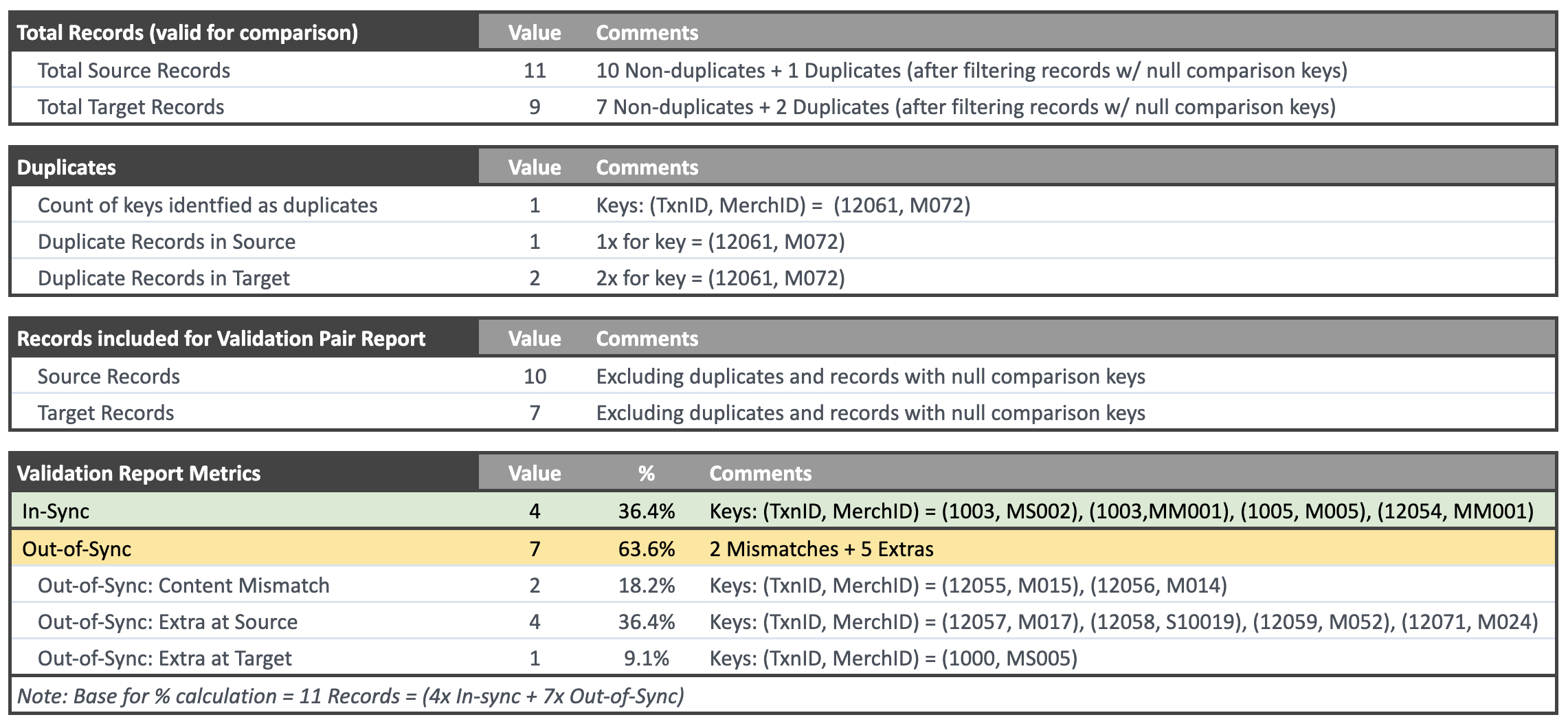
After completing the comparison for a Validation Pair, Validata generates a Validation Pair Report summarizing the comparison metrics. The report includes essential information such as the list of Duplicate Keys, details on Out-of-Sync Records, and a reconciliation script. You can download the script and execute it on the external data systems to resolve the detected discrepancies.