About change data capture (CDC)
What is change data capture?
Change data capture retrieves changed data from a DBMS or other data store. See the Change data capture Wikipedia article for an overview.
Change data capture using logs
Relational database management systems use write-ahead logs, also called redo or transaction logs, that represent DML and DDL changes. Traditionally, RDBMS systems use these logs to guarantee ACID properties and support rollback and roll-forward recovery operations. As DBMS technology has evolved, these logs have been augmented to record additional types of changes. Today they may track virtually every redoable and undoable action in the system, including transaction start and commit boundaries, table and index changes, data definition changes, rollback operations, indicators of non-logged changes, and more.
DBMS vendors and third parties have found additional uses for these logs. Striim, for example, can extract change data from logs in real time in order to make information available before the DBMS has finished processing it, at the same time minimizing the performance load on the RBMS by eliminating additional queries. There are many potential uses for this information, such raising alerts about error conditions sooner and double-checking DBMS operations in order to identify lost data.
All of the readers discussed in this Change Data Capture Guide capture change data by reading logs.
Change data capture using JDBC
You can use Striim's Incremental Batch Reader to capture change data using JDBC based on timestamps or incrementing values.
Working with SQL CDC readers
This section discusses the common characteristics of Striim's SQL-based change data capture readers. See also Using source and target adapters in applications.
WAEvent contents for change data
The output data type for sources that use change data capture readers is WAEvent. The fields and valid values vary among the readers, but they all include the following:
metadata: a map including the elements:
OperationName: INSERT, UPDATE, or DELETE
TxnID: transaction ID
TimeStamp: timestamp from the CDC log
TableName: fully qualified name of the table on which the operation was performed
To retrieve the values for these fields, use the META() function. See Parsing the fields of WAEvent for CDC readers.
data: an array of fields, numbered from 0, containing:
for an INSERT or DELETE operation, the values that were inserted or deleted
for an UPDATE, the values after the operation was completed
To retrieve the values for these fields, use SELECT ... (DATA[]). See Parsing the fields of WAEvent for CDC readers.
before (for UPDATE operations only): the same format as data, but containing the values as they were prior to the UPDATE operation
dataPresenceBitMap, beforePresenceBitMap , and typeUUID are reserved and should be ignored.
For information on additional fields and detailed discussion of values, see:
Sample TQL application using change data
The following sample application uses OracleReader but the approach is the same for all CDC readers.
CREATE APPLICATION SampleCDCApp;
CREATE SOURCE OracleCDCIn USING OracleReader (
  Username:'striim',
  Password:'passwd',
  ConnectionURL:'203.0.113.49:1521:orcl',
  Tables:'MYSCHEMA.POSAUTHORIZATIONS',
  FetchSize:1
)
OUTPUT TO OracleCDCStream;

CREATE TYPE PosMeta(
 tableName String,
 operationName String,
 txnID String,
 timestamp String
);
CREATE STREAM PosMetaStream OF PosMeta;
CREATE TYPE PosData(
  businessName String,
  accountName String,
  pos String,
  code String
);
CREATE STREAM PosDataStream OF PosData;
-- extract the metadata values
CREATE CQ OracleToPosMeta
INSERT INTO PosMetaStream
SELECT
    META(m,"TableName").toString(),
    META(m,"OperationName").toString(),
    META(m,"TxnID").toString(),
    META(m,"TimeStamp").toString()
       FROM OracleCDCStream m;
-- write the metadata values to SysOut
CREATE TARGET Metadump USING SysOut(name:meta) INPUT FROM PosMetaStream;

-- extract the data values
CREATE CQ OracleToPosData
INSERT INTO PosDataStream
SELECT
    CASE WHEN IS_PRESENT(x,data,0)==true THEN data[0].toString()
        ELSE "NOT_PRESENT"
    END,
    CASE WHEN IS_PRESENT(x,data,1)==true THEN data[1].toString()
        ELSE "NOT_PRESENT"
    END,
    CASE WHEN IS_PRESENT(x,data,2)==true THEN data[2].toString()
        ELSE "NOT_PRESENT"
    END,
    CASE WHEN IS_PRESENT(x,data,3)==true THEN data[3].toString()
        ELSE "NOT_PRESENT"
    END
FROM OracleCDCStream x;
-- write dump the data values to SysOut
CREATE TARGET  Datadump USING SysOut(name:data) INPUT FROM PosDataStream;
END APPLICATION SampleCDCApp;
The output for the three operations described in OracleReader example output would be similar to:
meta: PosMeta_1_0{
  tableName: "SCOTT.POSAUTHORIZATIONS"
  operationName: "INSERT"
  txnID: "4.0.1742"
  timestamp: "2015-12-11T16:31:30.000-08:00"
};
data: PosData_1_0{
  businessName: "COMPANY 1"
  accountName: "D6RJPwyuLXoLqQRQcOcouJ26KGxJSf6hgbu"
  pos: "6705362103919221351"
  code: "0"
};
meta: PosMeta_1_0{
  tableName: "SCOTT.POSAUTHORIZATIONS"
  operationName: "UPDATE"
  txnID: "4.0.1742"
  timestamp: "2015-12-11T16:31:30.000-08:00"
};
data: PosData_1_0{
  businessName: "COMPANY 5A"
  accountName: "D6RJPwyuLXoLqQRQcOcouJ26KGxJSf6hgbu"
  pos: "6705362103919221351"
  code: "0"
};
meta: PosMeta_1_0{
  tableName: "SCOTT.POSAUTHORIZATIONS"
  operationName: "DELETE"
  txnID: "4.0.1742"
  timestamp: "2015-12-11T16:31:30.000-08:00"
};
data: PosData_1_0{
  businessName: "COMPANY 5A"
  accountName: "D6RJPwyuLXoLqQRQcOcouJ26KGxJSf6hgbu"
  pos: "6705362103919221351"
  code: "0"
};
Validating table mapping
In this release, table mapping is validated only for applications with a single MariaDB, MySQL, Oracle, PostgreSQL, or SQL Server source (DatabaseReader, IncrementalBatchReader, MySQLReader, OracleReader, PostgreSQLReader, or MSSQLReader) and a single MariaDB, MySQL, Oracle, PostgreSQL, or SQL Server DatabaseWriter target.
When an application is deployed, Striim will compare the source and target columns and pop up a Validation errors dialog if it finds any of the following:
A source table is not mapped to a target table.
A target table does not exist.
The number of columns in a source table exceeds the number of columns in its target.
A source column is not mapped to any target column, or a target column is not mapped to any source column.
A column specified in a ColumnMap expression does not exist.
A column name is a reserved keyword (see List of reserved keywords or contains an unsupported character.
A source or target data type is not supported by Striim. Supported data types are detailed in Data type support & mapping for schema conversion & evolution.
A source column is mapped to a target column with an incompatible data type: for example, a VARCHAR2 column is mapped to an integer column. Supported data types mappings are detailed in Data type support & mapping for schema conversion & evolution.
A source column is mapped to a target column with a data type that is not optimal: for example, an integer column is mapped to a text column.
The size of a source column's data type exceeds that of its target: for example, a varchar(20) column is mapped to a varchar(10) column.
A target column's data type's precision or length is greater than that of the source column.
The source column allows nulls but the target column does not.
For example:
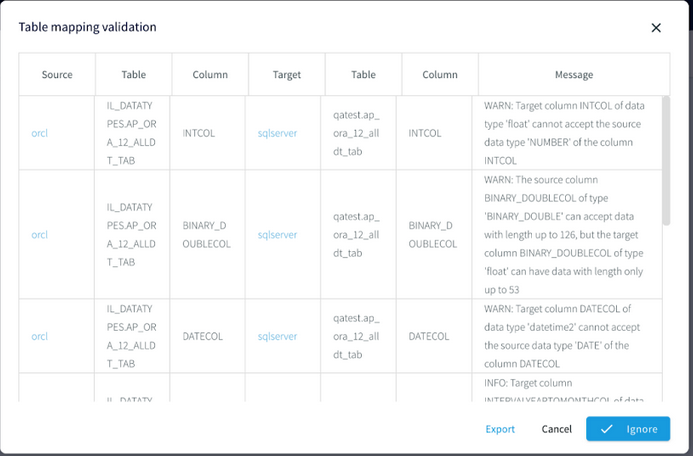
When you see this dialog, you may:
Click any of the source or target links to open the component.
Click X to close the dialog and fix problems in the source or target DBMS.
Click Ignore to run the application as is. This may be appropriate if the issues in the dialog are non-fatal: for example, when you know that there are no nulls in a source column mapped to a target column that does not allow nulls, or you deliberately mapped an integer source column to a text target column.
Click Export to save the report to a file.
After you have made corrections, choose Validation Errors from the Created menu and click Validate Again.
Reading from multiple tables
MSSQLReader, and OracleReader can all read data from multiple tables using a single source. The MAP function allows data from each table to be output to a different stream.
Note
When you use wildcards to specify multiple tables, only the tables that exist when the application is started will be read. Any new tables added afterwards will be ignored.
The following reads all tables from the schema SCOTT.TEST.
CREATE SOURCE OraSource USING OracleReader (
  ... Tables:'SCOTT.%' ...
The following reads from all tables with names that start with SCOTT.TEST, such as SCOTT.TEST1, SCOTT.TESTCASE, and so on.
CREATE SOURCE OraSource USING OracleReader (
  ... Tables:'SCOTT.TEST%' ...
The following reads all tables with names that start with S and end with .TEST. Again, any tables added after the application starts will be ignored.
CREATE SOURCE OraSource USING OracleReader (
  ... Tables:='S%.TEST' ...
The following shows how to query data from one table when a stream contains data from multiple tables.
CREATE SOURCE OraSource USING OracleReader (
  ... Tables:'SCOTT.POSDATA;SCOTT.STUDENT' ...
)
OUTPUT TO Orders;
...
CREATE CQ renderOracleControlLogEvent
INSERT INTO oracleControlLogStream
    META(x,"OperationName"),
    META(x,"TxnID"),
    META(x,"TimeStamp").toString(),
    META(x,"TxnUserID”),
   data[0]
FROM Orders x
WHERE META(x,”TableName").toString() = "SCOTT.POSDATA";
The following takes input from two tables and sends output for each to a separate stream using the MAP function. Note that a regular output stream (in this case Orders) must also be specified, even if it is not used by the application.
CREATE SOURCE OraSource USING OracleReader (
  ... Tables:'SCOTT.POSDATA;SCOTT.STUDENT' ...
)
OUTPUT TO OrderStream,
  PosDataStream MAP (table:'SCOTT.POSDATA'),
  StudentStream MAP (table:'SCOTT.STUDENT');
In some cases, creating a separate source for each table may improve performance.
Using OUTPUT TO ... MAP
When a SQL CDC source reads from multiple tables, you may use OUTPUT TO <stream name> MAP (Table:'<table name>') to route events from each table to a different output stream. Striim will create a type for each stream using the column names and data types of the source table. Date and time data types are mapped to DateTime. All other types are mapped to String.
In this release, OUTPUT TO ... MAP is not supported for PostgreSQLReader.
The following takes input from two tables and sends output for each to a separate stream using the MAP function. Note that a regular, unmapped output stream (in this case OrderStream) must also be specified, even if all tables are mapped.
CREATE SOURCE OraSource USING OracleReader (
  ... Tables:'SCOTT.POSDATA;SCOTT.STUDENT' ...
)
OUTPUT TO OrderStream,
OUTPUT TO PosDataStream MAP (Table:'SCOTT.POSDATA'),
OUTPUT TO StudentStream MAP (Table:'SCOTT.STUDENT');
Warning
MAP is case-sensitive and the names specified must exactly match those specified in the Tables property.
MAP is not displayed in or editable in the Flow Designer. Use DESCRIBE to view MAP settings and ALTER and RECOMPILE to modify them.
In some cases, creating a separate source for each table may improve performance over using OUTPUT TO ... MAP.
Adding user-defined data to WAEvent streams
Use the PutUserData function in a CQ to add an element to the WAEvent USERDATA map.
The following example would add the sixth element (counting from zero) in the WAEvent data array to USERDATA as the field "city":
CREATE CQ AddUserData
INSERT INTO OracleSourceWithPartitionKey
SELECT putUserData(x, 'city',data[5])
FROM OracleSourcre_ChangeDataStream x;
You may add multiple fields, separated by commas:
SELECT putUserData(x, 'city',data[5], 'state',data[6])
For examples of how to use Userdata elements in TQL, see Modifying output using ColumnMap.
To remove an element from USERDATA, use the removeUserData function (you may specify multiple elements, separated by commas):
CREATE CQ RemoveUserData
INSERT INTO OracleSourceWithPartitionKey
SELECT removeUserData(x, 'city')
FROM OracleSourcre_ChangeDataStream x;
To remove all elements from the USERDATA map, use the clearUserData function:
CREATE CQ ClearUserData
INSERT INTO OracleSourceWithPartitionKey
SELECT clearUserData(x)
FROM OracleSourcre_ChangeDataStream x;
Modifying the WAEvent data array using replace functions
When a CDC reader's output is the input of a writer, you may insert a CQ between the two to modify the WAEvent's data array using the following functions. This provides more flexibility when replicating data.
Note
When you specify a table or column name that contains special characters, use double quotes instead of single quotes and escape special characters as detailed in Using non-default case and special characters in table identifiers.
replaceData()
replaceData(WAEvent s, String 'columnName', Object o)
For input stream s, replaces the data array value for a specified column with an object. The object must be of the same type as the column.
For example, the following would replace the value of the DESCRIPTION column with the string redacted:
CREATE CQ replaceDataCQ
INSERT INTO opStream
SELECT replaceData(s,'DESCRIPTION','redacted')
FROM OracleReaderOutput s;
Optionally, you may restrict the replacement to a specific column:
replaceData(WAEvent s, String 'tableName', String 'columnName', Object o)
replaceString()
replaceString(WAEvent s, String 'findString', String 'newString')
For input stream s, replaces all occurrences of findString in the data array with newString. For example, the following would replace all occurrences of MyCompany with PartnerCompany:
CREATE CQ replaceDataCQ
INSERT INTO opStream
SELECT replaceString(s,'MyCompany','PartnerCompany')
FROM OracleReaderOutput s;
replaceStringRegex()
replaceStringRegex(WAEvent s, String 'regex', String 'newString')
For input stream s, replaces all strings in the data array that match the regex expression with newString. For example, the following would remove all whitespace:
CREATE CQ replaceDataCQ
INSERT INTO opStream
SELECT replaceStringRegex(s,’\\\\s’,’’)
FROM OracleReaderOutput s;
The following would replace all numerals with x:
CREATE CQ replaceDataCQ
INSERT INTO opStream
SELECT replaceStringRegex(s,’\\\\d’,’x’)
FROM OracleReaderOutput s;
Modifying and masking values in the WAEvent data array using MODIFY
When a CDC reader's output is the input of a writer, you may insert a CQ between the two to modify the values in the WAEvent's data array. This provides more flexibility when replicating data.
In this context, the syntax for the SELECT statement is:
SELECT <alias> FROM <stream name> <alias> MODIFY (<alias>.data[<field number>] = <expression>,...)
Precede the
CREATE CQstatement with aCREATE STREAM <name> OF TYPE Global.WAEventstatement that creates the output stream for the CQ.Start the SELECT statement with
SELECT <alias> FROM <stream name> <alias>.<alias>.data[<field number>]specifies the field of the array to be modified. Fields are numbered starting with 0.The expression can use the same operators and functions as SELECT.
The MODIFY clause may include multiple field name-expression pairs (
MODIFY (<field name 1> = <expression 1>, <field name 2> = <expression 2>, ...)).The MODIFY clause may include CASE statements.
The following simple example would convert a monetary amount in the data[4] field using an exchange rate of 1.09:
CREATE STREAM ConvertedStream OF TYPE Global.WAEvent;
CREATE CQ ConvertAmount
INSERT INTO ConvertedStream
SELECT r FROM RawStream r
MODIFY(r.data[4] = TO_FLOAT(r.data[4]) * 1.09);
The next example illustrates the use of masking functions and CASE statements. It uses the maskPhoneNumber function (see Masking functions) to mask individually identifiable information from US and India telephone numbers (as dialed from the US) while preserving the country and area codes. The US numbers have the format ###-###-####, where the first three digits are the area code. India numbers have the format 91-###-###-####, where 91 is the country code and the third through fifth digits are the subscriber trunk dialing (STD) code. The telephone numbers are in data[4] and the country codes are in data[5].
CREATE STREAM MaskedStream OF Global.WAEvent;
CREATE CQ maskData
INSERT INTO maskedDataStream
SELECT r FROM RawStream r
MODIFY(
r.data[4] = CASE
    WHEN TO_STRING(r.data[5]) == "US" THEN maskPhoneNumber(TO_STRING(r.data[4]), "###-xxx-xxx")
    ELSE maskPhoneNumber(TO_STRING(r.data[4]), "#####x#xxx#xxxx")
  END
);
This could be extended with additional WHEN statements to mask numbers from additional countries, or with additional masking functions to mask individually identifiable information such as credit card, Social Security, and national identification numbers.
See Masking functions for additional examples.
Using the DATA(), DATAORDERED(), BEFORE(), and BEFOREORDERED() functions
The DATA() and BEFORE() functions return the WAEvent data and before arrays. The following example shows how you could use these functions to write change data event details to a JSON file with the associated Oracle column names. (You could do the same thing with AVROFormatter.) This is supported only for 11g using LogMiner.
DATAORDERED(x) and BEFOREORDERED() return the column values in the same order as in the source table. When using DATA(x) and BEFORE(x), the order is not guaranteed.
CREATE SOURCE OracleCDCIn USING OracleReader (
  Username:'walm',
  Password:'passwd',
  ConnectionURL:'192.168.1.49:1521:orcl',
  Tables:'myschema.%',
  FetchSize:1
)
OUTPUT TO OracleRawStream;CREATE TYPE OpTableDataType(
  OperationName String,
  TableName String,
  data java.util.HashMap,
  before java.util.HashMap
);

CREATE STREAM OracleTypedStream OF OpTableDataType;
CREATE CQ ParseOracleRawStream
  INSERT INTO OracleTypedStream
  SELECT META(OracleRawStream, "OperationName").toString(),
    META(OracleRawStream, "TableName").toString(),
    DATA(OracleRawStream),
    BEFORE(OracleRawStream)
  FROM OracleRawStream;

CREATE TARGET OracleCDCFFileOut USING FileWriter(
  filename:'Oracle2JSON_withFFW.json'
)
FORMAT USING JSONFormatter ()
INPUT FROM OracleTypedStream;
The CQ will be easier to read if you use an alias for the stream name. For example:
CREATE CQ ParseOracleRawStream
  INSERT INTO OracleTypedStream
  SELECT META(x, "OperationName").toString(),
    META(x, "TableName").toString(),
    DATA(x),
    BEFORE(x)
  FROM OracleRawStream x;
Using this application, the output for the INSERT operation described in OracleReader example output would look like this:
 {
  "OperationName":"UPDATE",
  "TableName":"ROBERT.POSAUTHORIZATIONS",
  "data":{"AUTH_AMOUNT":"2.2", "BUSINESS_NAME":"COMPANY 5A", "ZIP":"41363", "EXP":"0916",
"POS":"0", "CITY":"Quicksand", "CURRENCY_CODE":"USD", "PRIMARY_ACCOUNT":"6705362103919221351",
"MERCHANT_ID":"D6RJPwyuLXoLqQRQcOcouJ26KGxJSf6hgbu", "TERMINAL_ID":"5150279519809946",
"CODE":"20130309113025"},
  "before":{"AUTH_AMOUNT":"2.2", "BUSINESS_NAME":"COMPANY 1", "ZIP":"41363", "EXP":"0916",
"POS":"0", "CITY":"Quicksand", "CURRENCY_CODE":"USD", "PRIMARY_ACCOUNT":"6705362103919221351",
"MERCHANT_ID":"D6RJPwyuLXoLqQRQcOcouJ26KGxJSf6hgbu", "TERMINAL_ID":"5150279519809946",
"CODE":"20130309113025"}
 }
Collecting discarded events in an exception store
When replicating CDC source data with Azure Synapse Writer, BigQuery Writer, Cosmos DB Writer, Database Writer, Databricks Writer, Fabric Data Warehouse Writer, MongoDB Cosmos DB Writer, MongoDB Writer, or Spanner Writer, attempted updates to and deletes from the target database may sometimes fail due to missing tables, duplicate or missing primary keys, or other issues. See CREATE EXCEPTIONSTORE for discussion of how to ignore these errors and capture the unwritten events.
Handling DDL changes in CDC reader source tables
Type lifecycle for SQL CDC sources
Striim creates a type (see Type) for each table to be read by a SQL CDC source. The lifecycle of these types is as follows:
When the application containing the source is first started, the types are created.
These types are reused when the application is restarted or recovered.
All types are dropped when the application is dropped.
If CDDL Capture is enabled for the source, types will be updated automatically to reflect supported DDL changes.
If CDDL is not enabled for the source, if there are DDL changes, the source will halt with a message that table metadata has changed.
Adapter property data types
Adapter properties use the same Supported data types as TQL, plus Encrypted passwords.
Some property data types are enumerated: that is, only documented values are allowed. If setting properties in TQL, be careful not to use other values for these properties.