Support for JSON data types in Spanner targets
This topic explains how to write complete JSON values and apply partial JSON updates in Cloud Spanner targets. Partial JSON updates means, changes from the source in the form of DML operations would result in updating sub-sections of the existing JSON object. JSON support lets you retain variable or denormalized data in a JSON column while continuing to write relational source changes with Striim.
Common uses include retaining JSON request or response payloads from applications and APIs, accommodating data with variable attributes without frequent schema changes, and denormalizing related source rows into a document-shaped target record for application, search, analytics, or operational lookup workloads.
JSON support by writer
Writer | Support |
|---|---|
Spanner Writer (GoogleSQL Dialect) | Supports JSON data type - complete JSON replacement, partial JSON updates using JSON_OBJECT and JSON_ARRAY, nested path updates, JSON_PATH_KEYS, and multiple source to target table (N-to-1) JSON mappings. |
Spanner PG Dialect Writer (PostgreSQL Dialect ) | Supports the JSONB data type - supports complete JSONB replacement only. Partial JSON updates, JSON_PATH_KEYS, nested path updates, and multiple source to target table (N-to-1) JSON mappings are not supported. |
All existing writer capabilities, including upsert, KeyColumns, Ignorable Exception Code, and column mapping, remain available with JSON support.
Full JSON replacement vs partial JSON update
Aspect | Full JSON replacement | Partial JSON update |
|---|---|---|
Column mapping | 1:1: one source column maps straight to the JSON column. | JSON_OBJECT / JSON_ARRAY map to a sub-path via dot notation. |
Update behavior | Every UPDATE replaces the entire column value. | Only the mapped field / element is merged, appended, or removed. |
Dialect support | Spanner GoogleSQL Dialect and PG Dialect | Spanner GoogleSQL Dialect only |
Table mapping | typically 1:1 source table to target column | N source tables to 1 target column (denormalization) |
Best suited for | self-contained JSON payloads (for example, an API response) | patching one field deep inside a large doc, up to 80 nested levels |
JSON terminology
A JSON value can be an object, an array, or a primitive value. Understanding which structure is present at the target path is necessary when you configure partial JSON mapping.
Term | Description |
|---|---|
Object | A collection of named key-value pairs enclosed in braces, for example {"city":"San Jose","state":"CA"}. |
Array | An ordered list of values enclosed in brackets, for example ["admin","pro"]. An array can contain primitive values or JSON objects. |
Primitive value | A string, number, Boolean, or JSON null value. |
Nested path | An object or array contained in another JSON object or array. Spanner Writer can address a nested target path with dot notation. |
Before you begin
Create the target table and its JSON or JSONB columns before starting the application.
For partial updates, create the target row and the JSON object or array structure required by the mapping path before the update is processed.
Explicitly map target primary-key columns when source and target key names differ or when a key value is supplied through userdata or metadata.
Keep every source table that changes the same target JSON column in one Spanner Writer target. This ensures the writer processes related changes in the required order.
Handling a JSON column - Complete JSON replacement
When a single source column already holds a complete, valid JSON value and maps directly to one JSON target column, the writer's standard behavior applies: Insert operation(Insert/) writes that complete value from the source as-is, Update/PKUpdate operation replaces whatever was there before.
Both the GoogleSQL dialect and PostgreSQL dialect Spanner Writers support this.
Even Upsert configuration (ExecuteInsertAsUpdate or ExecuteUpdateAsInsert) is enabled then also complete JSON replacement is done.
Tables: 'src.customer,tgt.customer
ColumnMap (customer_id=customer_id, first_name=fname,
           last_name=lname, addresses=customeraddresses);'
For example, a source value such as [{"city":"San Jose","state":"CA"}] is written as the complete value of the addresses column. If a later UPDATE provides [{"city":"Los Angeles","state":"CA"}], the writer replaces the entire address's value. Every update must therefore contain the complete JSON value that you want stored in the target column.
Handling a JSON column - Denormalization Scenario
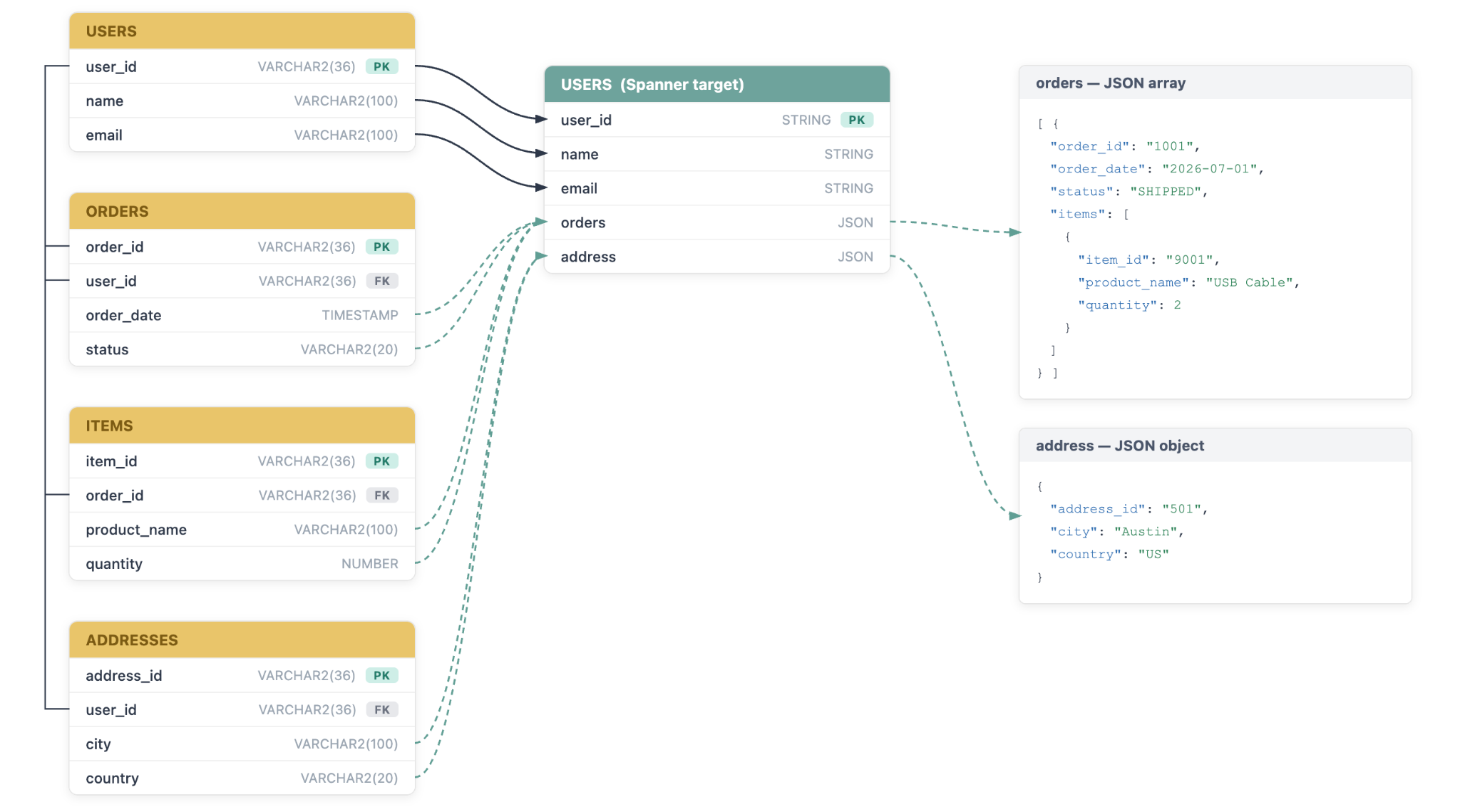
Use JSON partial updates when you need to denormalize multiple source tables into one target row and store related data in one or more JSON columns. A source event can update a scalar target column, a JSON object, or an element within a JSON array. This lets you keep the relational target key while representing one-to-many source relationships inside a JSON document.
For example, you can map USER table fields to scalar columns in a target USER row, map source ADDRESSES table to a ‘address’ JSON object, and map source ORDER and ITEMS table to nested arrays in a ‘order’ JSON array. A JSON column can hold nested objects and arrays up to 80 levels in the GoogleSQL dialect, subject to Spanner limits for a cell. ‘Tables’ property in the SpannerWriter would look like this.
src.USERS, tgt.USERS
         ColumnMap(user_id=user_id, name=name, email=email);
src.ORDERS, tgt.USERS
         ColumnMap(user_id=user_id, orders=JSON_ARRAY(@data));

src.ADDRESSES, tgt.USERS
         ColumnMap(user_id=user_id, address=JSON_OBJECT(@data));
src.ITEMS, tgt.USERS
         ColumnMap(user_id=user_id,
                   orders.items=JSON_ARRAY(@data)
                            JSON_PATH_KEYS(orders."order_id"=@USERDATA(order_id)));
When several source tables map to the same JSON column, each mapping must identify the target primary key. In the above example, it is ‘user_id’. The writer must be able to find the existing target row before it can update the JSON document. For a dependent child record, process its parent record first so the required parent object or array element already exists.
Column mapping for partial JSON updates
Partial updates are available only in Spanner Writer with the GoogleSQL dialect. Use JSON_OBJECT when the mapped target path is an object. Use JSON_ARRAY when the mapped target path is an array. The target-column expression identifies the JSON path; dot notation identifies nested objects or arrays. For a partial JSON mapping, use JSON_OBJECT or JSON_ARRAY rather than mapping the source value directly to the JSON path.
Construct | Behavior |
|---|---|
JSON_OBJECT(value) | Writes an object at the specified target path. |
JSON_ARRAY(value) | Writes one source row as one element of the array at the specified target path. |
JSON_PATH_KEYS(...) | Provides the key value or values needed to locate an intermediate array element in hierarchical target path . |
The value passed to JSON_OBJECT or JSON_ARRAY can be @data when the event data already represents the required JSON content, or a userdata field when a UDF or Open Processor has prepared a JSON value. Use @USERDATA(value) when multiple source columns must be assembled into one valid JSON object or one JSON-array element before the writer receives the event. The value portion of a JSON-column mapping must be quoted.
JSON_OBJECT
Use JSON_OBJECT for a specified target path that is a JSON object.
Syntax
Tables : ‘<src_schema>.<src_table>,<tgt_schema>.<tgt table>
ColumnMap (
<scaler_col_tgt>=<scaler_col_src>,
<json_column>=JSON_OBJECT( @data )
      );’
OR
Tables : ‘<src_schema>.<src_table>,<tgt_schema>.<tgt table>
ColumnMap (
<scaler_col_tgt>=<scaler_col_src>,
<json_column>=JSON_OBJECT( @metadata(key) )
      );’
OR
Tables : ‘<src_schema>.<src_table>,<tgt_schema>.<tgt table>
ColumnMap (
<scaler_col_tgt>=<scaler_col_src>,
<json_column>=JSON_OBJECT( @userdata(key) )
       );’
When @data is used as the input to JSON_OBJECT, the information from the incoming source event—like the CDC Data and the source table's primary key are used as-is to perform the JSON partial update operation.
When @metadata(key) / @userdata(key) is used as the input to JSON_OBJECT - the supplied value has to be in the JSON payload structure discussed in Payload Structure for JSON updates.
CDC Operation semantics
CDC Operation | Behaviour |
|---|---|
INSERT | Writes the input JSON value at the mapped path |
UPDATE / PK-UPDATE | Updates only supplied fields and leaves other fields unchanged |
DELETE | The mapped object is set to NULL; it does not delete the target row |
.
JSON_ARRAY
Use JSON_ARRAY for a specified target path that is a JSON array.
Syntax
ColumnMap (
<scaler_col_tgt>=<scaler_col_src>,
<json_column>=JSON_ARRAY( @data )
      );’
OR
Tables : ‘<src_schema>.<src_table>,<tgt_schema>.<tgt table>
ColumnMap (
<scaler_col_tgt>=<scaler_col_src>,
<json_column>=JSON_ARRAY( @metadata(key) )
      );’
OR
Tables : ‘<src_schema>.<src_table>,<tgt_schema>.<tgt table>
ColumnMap (
<scaler_col_tgt>=<scaler_col_src>,
<json_column>=JSON_ARRAY( @userdata(key) )
       );’
When @data is used as the input to JSON_ARRAY, the information from the incoming source event—like the CDC Data and the source table's primary key are used as-is to perform the JSON partial update operation.
When @metadata(key) / @userdata(key) is used as the input to JSON_ARRAY - the supplied value has to be in the payload structure discussed in Payload Structure for JSON updates.
CDC Operation semantics
CDC Operation | Behaviour |
|---|---|
INSERT |
|
UPDATE |
|
PK-UPDATE |
|
DELETE |
|
JSON_PATH_KEYS
Use JSON_PATH_KEYS only when the nested object path is mapped and it has intermediate levels as an array. A nested object path with no intermediate array does not need JSON_PATH_KEYS.
Syntax
Tables : ‘<src_schema>.<src_table>,<tgt_schema>.<tgt table>
ColumnMap (
<scaler_col_tgt>=<scaler_col_src>,
<json_column>.<seg_1>.<seg_2>...<seg_n>.<leaf> =JSON_OBJECT( @data )
JSON_PATH_KEYS(
  <seg_i>."<key_field_a>" = @userdata( <param> ),
  <seg_i>."<key_field_b>" = @<source_col>,
  <seg_j>."<key_field_c>" = @<source_col>
  )
);
OR
Tables : ‘<src_schema>.<src_table>,<tgt_schema>.<tgt table>
ColumnMap (
<scaler_col_tgt>=<scaler_col_src>,
<json_column>.<seg_1>.<seg_2>...<seg_n>.<leaf> =JSON_ARRAY( @data )
JSON_PATH_KEYS(
  <seg_i>."<key_field_a>" = @metadata( <param> ),
  <seg_i>."<key_field_b>" = @<source_col>,
  <seg_j>."<key_field_c>" = @<source_col>
  )
);
Values to the key_fields can be supplied via a named source table column or USERDATA/METADATA parameter.
Composite keys are supported for an specific intermediate array level and key ordering doesn’t matter - only the order of segment in the JSON path needs to be correct
Key_field for a segment in the JSON_PATH_KEYS needs to be quoted only if there are any special characters
Any JSON column mapped with JSON_OBJECT / JSON_ARRAY can have at most one JSON_PATH_KEYS clause only.
The number of intermediate arrays supported is 79, since the spanner allows only 80 levels of nested depth in total for a JSON column.
Hierarchical JSON column mapping
You can map a nested JSON object or array by specifying its complete dot-separated path in the ColumnMap expression. The first segment is the physical JSON column in Spanner (the root), the middle segments identify the path through the JSON document, and the final segment identifies the object or array to change (the leaf). Use JSON_PATH_KEYS only when an intermediate level is an array. A nested object path with no intermediate array does not need JSON_PATH_KEYS.
Target path | Mapping pattern |
|---|---|
address | JSON_OBJECT(...) |
orders | JSON_ARRAY(...) |
orders.items | JSON_ARRAY(...) JSON_PATH_KEYS(orders."order_id"=@USERDATA(order_id))) |
Map each JSON level that must be independently updated with JSON_OBJECT or JSON_ARRAY. The target JSON skeleton must contain the intermediate object and array structure. The writer cannot create an intermediate array or object that is missing from the target document during a partial update.
When JSON column value is null and the operations are directly mapped to the JSON column itself (root level) - null is successfully processed and data is written without any issues.If the JSON column is nested and if the JSON column value is NULL, then it is considered as Target path missing and JSON_PATCH_NO_OP exception is thrown.
Best practices for nested JSON updates
Create the parent target row before processing events for child tables that update JSON columns.
Initialize the required JSON object and array skeleton before processing updates to a nested path.
Process related parent and child tables through the same Spanner Writer target. This is especially important when an Item event depends on an Order element already being present in a nested array.
Map every target primary-key value explicitly when it is not available under the same source-column name.
Use JSON_PATH_KEYS for each intermediate array that the writer must traverse. Do not use it for an intermediate object path.
Use a UDF or Open Processor to prepare JSON values when multiple source columns must become one JSON object or array element.
A JSON skeleton declares every key on a path that will receive a partial update, using [] for an array and {} for an object. You can initialize it with a default JSON value in the target schema or with the source event that creates the parent row.
Payload Structure for JSON updates
The writer uses the source event payload to determine the requested partial update. When @data is used as the input to JSON_OBJECT / JSON_ARRAY, the information from the incoming source event—like the CDC Data and the source table's primary key are used as-is to perform the JSON partial update operation.
A custom JSON payload structure is required only when the user wants to modify the source event's Data or columns to be treated as KeyColumns before they are used for the JSON partial update.
The JSON payload structure can be provided through either metadata or userdata as input to JSON_OBJECT / JSON_ARRAY.
Payload field | How JSON partial updates use it |
|---|---|
data |
|
before |
|
keyColumns |
|
For a nested path, JSON_PATH_KEYS identifies each intermediate array element that the writer must traverse before it applies the keyColumns to the leaf array. When @data is used, the source table’s Primary Key is considered as keyColumns.
If the source payload does not contain the required fields, Striim cannot apply the requested patch. In this condition, the writer reports JSON_PATCH_INVALID_PAYLOAD / QUERY_PROCESSING_EXCEPTION and does not change the JSON value.
UPSERT Behaviour
ExecuteInsertAsUpdate and ExecuteUpdateAsInsert properties can be used with JSON partial update mapping.
Partial JSON update operations create/modify/remove only leaf array/leaf object when the JSON column has a combination of 1 or more JSON Array and Object in the JSON document.
If UPSERT configurations are enabled, then Partial JSON update operations
Will create the row (if it already doesn’t exist).
In case if the row wasn’t already present, the complete JSON hierarchical structure including the data for all intermediate array elements (with one or more keys mentioned in the JSON_PATH_KEYS) will be created and then the leaf object or leaf array.
However, UPSERT + Partial JSON update can’t add a custom JSON that was defined as a default column value.
Exception handling
Condition | Exception | Recommended Action |
|---|---|---|
When the provided JSON Payload structure via userdata/metdata is invalid or malformed | JSON_PATCH_INVALID_PAYLOAD exception is thrown and the app halts. This happens for JSON_OBJECT and JSON_ARRAY mapping modes. | Fix the JSON partial update payload based on the mapping used and the CDC operation |
When the target row does not exist, the specified JSON target path does not exist, or the target path resolves to a primitive value or an incompatible value type for the configured JSON_OBJECT or JSON_ARRAY mapping. | The partial update is a no-op. The writer reports JSON_PATCH_NO_OP and HALTS, but it does not change the JSON value. This happens for JSON_OBJECT and JSON_ARRAY mapping modes. Note: When Upsert is enabled and the target row does not exist, JSON_PATCH_NO_OP exception is not thrown. The target row is created along with the initial JSON value, and the operation completes successfully. | Make sure the row exists and the JSON hierarchy exists if nested path is used. |
When “keyColumns” is missing in the provided payload structure for JSON_ARRAY | QUERY_PROCESSING_EXCEPTION exception is thrown and the app halts. | Fix the JSON partial update payload based on the mapping used and the CDC operation |
When “before” is absent in the payload structure for PKUPDATE operation | QUERY_PROCESSING_EXCEPTION exception is thrown and the app halts | Fix the JSON partial update payload based on the mapping used and the CDC operation |
Only JSON_PATCH_NO_OP can be added as an Ignorable Exception Code and when it is listed in Ignorable Exception Code, the source event will still be checkpointed and then continue processing the next events.
N-to-1 table mapping
N-to-1 mapping lets you write multiple related source tables to one target table. You can map parent-table fields to scalar columns and child-table rows to a JSON object or array column. This pattern is useful when you want a denormalized target record for operational lookups, APIs, or analytics, but N->1 Mapping can be used in scenarios where JSON Partial Update is not in picture.
Ordering of source events is mandatory and needs to be handled by a single Spanner Writer, when the target JSON column requires a custom JSON structure (has a combination of 1 or more JSON Array and Object). This ensures the row will be created before the partial updates can happen to the JSON column. This will also ensure the hierarchical structures are created in the right order.
For example - In the mapping provided below, the parent mapping (USERS) establishes the target row; child mappings then update the JSON content for that row.
Source table | Target mapping |
|---|---|
USERS | USERS.user_id, USERS.name and USERS.email as scalar columns. |
ADDRESSES | USER.address as JSON_OBJECT, with preference fields merged at the mapped object path |
ORDERS | USER.orders as JSON_ARRAY, with one source ORDERS row becoming one array element. |
In case of JSON Partial Update, if the source events are sent in out of order,
Enabling the UPSERT will create simple place holders for hierarchical structure if the target row doesn’t exist. While custom JSON structures won’t be created for the newly inserted row.
JSON_PATCH_NO_OP will be thrown if the row already exists but the hierarchical structure is missing.
Disabling the Upsert may end up in JSON_PATCH_NOOP if any of the hierarchical level was missing.
Examples
The following examples illustrate complete JSON replacement, object updates, array updates, and a nested-array update. Replace the source and target object names with the names used in your application.
Example-1: N source tables mapped to 1 target table
-- Oracle Source tables
CREATE TABLE src.USERS(
  user_id varchar2(36) PRIMARY KEY,
  name varchar2(100),
  email varchar2(100)
) ;

CREATE TABLE src.ADDRESSES (
    address_id varchar2(36) PRIMARY KEY,
    user_id    varchar2(36) NOT NULL,
    city       varchar2(100),
    country    varchar2(20)
  );


-- Spanner GoogleSQL Target table

CREATE TABLE tgt.USERS (
    user_id STRING(MAX) NOT NULL,
    name    STRING(MAX),
    email   STRING(MAX),
    address_id STRING(MAX),
    city STRING(MAX),
    country     STRING(MAX)
  ) PRIMARY KEY (user_id);

-- Spanner Writer mapping
  ExecuteUpdateAsInsert : 'true',
ExecuteInsertAsUpdate : 'true',

Tables: 'src.USERS,tgt.USERS
              ColumnMap(user_id=user_id, name=name, email=email);
 src.ADDRESSES,tgt.USERS
	ColumnMap(user_id=user_id, city=city, country=country);'
For this scenario, enabling UPSERT configuration is very much needed, because the INSERT from the first source table will create the target row and the INSERT from the second source table should be treated only as an UPDATE.
 —- Insert in USERS Source Table
   INSERT INTO src.USERS (user_id, name, email)
 	VALUES ('101', 'Malar', 'malar@striim.com');
 —- Insert in ADDRESSES Source Table
   INSERT INTO src.ADDRESSES (user_id, address_id, city, country)
	VALUES (101, 55, 'San Jose', 'USA');

—- Row in Spanner after Inserts
user_id: 101,name: Malar , email: malar@striim.com, address_id: 55, city:'San Jose', country:'USA'


-- Update only city
UPDATE src.ADDRESSES SET city = 'Sunnyvale' WHERE user_id = 101 AND address_id = 55;
-- Update only email UPDATE src.USERS SET email = 'mv@striim.com' WHERE user_id = 101; —- Row in Spanner after Updates user_id: 101,name: Malar , email: mv@striim.com, address_id: 55, city:'Sunnyvale', country:'USA' .
-- Delete in source addresses
 DELETE FROM src.ADDRESSES WHERE user_id = 101 AND address_id = 55;
This deletes the row in the target table.
-- Delete in source USERS
 DELETE FROM src.USERS WHERE user_id = 101 ;
Treated as NO-OP and the app runs fine without any issues
Example-2: Replace a complete JSON value
Use complete replacement when the source provides the entire JSON value for one target column. This pattern is supported by Spanner Writer and Spanner PG Dialect Writer.
-- Oracle Source table
CREATE TABLE src.customer (
  customer_id   NUMBER(19,0)   PRIMARY KEY,
  profile_json  VARCHAR2(32767)
);


-- Spanner GoogleSQL target table
CREATE TABLE tgt.customer (
  customer_id INT64 NOT NULL,
  profile JSON
) PRIMARY KEY (customer_id);

-- Spanner Writer mapping
Tables: 'src.customer,tgt.customer
		ColumnMap(customer_id=customer_id, profile=profile_json);'

-- Source change
INSERT INTO src.customer (customer_id, profile_json)
VALUES (101, '{"name":"Ana","preferences":{"language":"en"}}');

-- Target row after the write
customer_id: 101
profile: {"name":"Ana","preferences":{"language":"en"}}
If a later source update supplies {"name":"Ana","preferences":{"language":"fr"}}, Striim replaces the entire profile value with the new JSON value. Include the complete JSON document in every update when you use this pattern.
Example-3: Update a JSON object from a source row
This example maps an ADDRESSES source row to an address JSON object in the target. It shows the result of an insert, an update that changes one field, and a delete.
-- Oracle Source tables
CREATE TABLE src.USERS(
  user_id varchar2(36) PRIMARY KEY,
  name varchar2(100),
  email varchar2(100)
) ;

CREATE TABLE src.ADDRESSES (
    address_id varchar2(36) PRIMARY KEY,
    user_id    varchar2(36) NOT NULL,
    city       varchar2(100),
    country    varchar2(20)
  );


-- Spanner GoogleSQL Target table

CREATE TABLE tgt.USERS (
    user_id STRING(MAX) NOT NULL,
    name    STRING(MAX),
    email   STRING(MAX),
    address JSON
  ) PRIMARY KEY (user_id);


-- Spanner Writer mapping
Tables: 'src.USERS,tgt.USERS
              ColumnMap(user_id=user_id, name=name, email=email);
 src.ADDRESSES,tgt.USERS
	ColumnMap(user_id=user_id, address=JSON_OBJECT(@data));'

 —- Insert in USERS Source Table
   INSERT INTO src.USERS (user_id, name, email)
 	VALUES ('101', 'Malar', 'malar@striim.com');
-- Insert in ADDRESSES Source Table
INSERT INTO src.ADDRESSES (user_id, address_id, city, country)
	VALUES (101, 55, 'San Jose', 'USA');

-- Target row after the write
user_id = 101, name = ‘Malar’, email = ‘malar@striim.com’, address = {"user_id":101,"address_id":55,"city":"San Jose","country":"USA"}


-- Update only city
UPDATE src.ADDRESSES SET city = 'Sunnyvale'
	WHERE user_id = 101 AND address_id = 55;

-- Target row after the update
user_id = 101, name = ‘Malar’, email = ‘malar@striim.com’, address = {"user_id":101,"address_id":55,"city":"Sunnyvale","country":"USA"}
The update changes city and preserves address_id and state.
-- Delete in source addresses
 DELETE FROM src.ADDRESSES WHERE address_id = '55';

-- Target row after the delete
user_id = 101, name = ‘Malar’, email = ‘malar@striim.com’, address = null
Deleting the source address sets the address to JSON null; it does not delete the USER row.
Example-4: Map one source row to a JSON array element
Use JSON_ARRAY when each row in one source table represents one element in a target JSON array. The source event keyColumns identify the element to update or remove.
-- Oracle Source tables
CREATE TABLE src.USERS(
  user_id varchar2(36) PRIMARY KEY,
  name varchar2(100),
  email varchar2(100)
) ;

CREATE TABLE src.ORDERS(
  orders_id varchar2(36) PRIMARY KEY,
  user_id varchar2(36) NOT NULL,
  order_date TIMESTAMP,
  status varchar2(20));

-- Spanner GoogleSQL Target table
   CREATE TABLE tgt.USERS (
    user_id STRING(MAX) NOT NULL,
    name    STRING(MAX),
    email   STRING(MAX),
    orders  JSON
  ) PRIMARY KEY (user_id);

  -- Spanner Writer mapping
Tables: 'src.USERS,tgt.USERS
              ColumnMap(user_id=user_id, name=name, email=email);
 src.ORDERS,tgt.USERS
		ColumnMap(user_id=user_id, orders=JSON_ARRAY(@data));'

  -- Insert in Source table USERS and ORDERS
  INSERT INTO src.USERS (user_id, name, email)
 	VALUES ('101', 'Malar', 'malar@striim.com');
   INSERT INTO src.ORDERS (orders_id, user_id, order_date, status)
VALUES ('1001', '101', TIMESTAMP '2026-07-01 00:00:00', 'SHIPPED');

 -- Spanner target table USERS after insert
  user_id = 101, name = ‘Malar’, email = ‘malar@striim.com’, orders = [{“order_id” : “1001”,
  “user_id” : “101”, “order_date” : “2026-07-01 00:00:00”, “ststus”:”SHIPPED”}]

-- Update the same element in Source ORDERS
  UPDATE src.ORDERS SET status = 'DELIVERED' WHERE orders_id = '1001';

-- Updated Row in Spanner Target Table USERS
  user_id = 101, name = ‘Malar’, email = ‘malar@striim.com’, orders = [{“order_id” : “1001”,
  “user_id” : “101”, “order_date” : “2026-07-01 00:00:00”, “ststus”:”DELIVERED”}]


-- Delete the same element in Source ORDERS
 DELETE FROM src.ORDERS WHERE orders_id = '1001;

-- Updated Row in Spanner Target Table USERS
user_id = 101, name = ‘Malar’, email = ‘malar@striim.com’, orders = []
For an INSERT, the writer appends a new element when the event keyColumns do not match an existing element. For an UPDATE, it patches only the fields supplied by the event. For a PKUPDATE, it changes the matching element keys and the other fields supplied by the event. For a DELETE, it removes only the matching array element.
Example-5: Map parent and child tables to a JSON array
This N-to-1 example stores USERS source table columns as scalars and other source tables mapped to a JSON column directly or to a nested path in the JSON column.
-- Oracle Source tables

CREATE TABLE src.USERS(
    user_id varchar2(36) PRIMARY KEY,
    name    varchar2(100),
    email   varchar2(100)
  );

CREATE TABLE src.ORDERS (
    orders_id varchar2(36) PRIMARY KEY,
    user_id varchar2(36) NOT NULL,
    order_date TIMESTAMP,
    status varchar2(20)
  );

CREATE TABLE src.ITEMS (
    item_id      varchar2(36) PRIMARY KEY,
    orders_id    varchar2(36) NOT NULL,
    product_name varchar2(100),
    quantity     NUMBER
  );

CREATE TABLE src.ADDRESSES (
    address_id varchar2(36) PRIMARY KEY,
    user_id    varchar2(36) NOT NULL,
    city       varchar2(100),
    country    varchar2(20)
  );

-- Spanner GoogleSQL Target table
 CREATE TABLE tgt.USERS (
    user_id STRING(MAX) NOT NULL,
    name    STRING(MAX),
    email   STRING(40),
    orders  JSON,
    address JSON
  ) PRIMARY KEY (user_id)

-- Spanner Writer mapping
  Tables: 'src.USERS,tgt.USERS
              ColumnMap(user_id=user_id, name=name, email=email);
          src.ORDERS,tgt.USERS
             ColumnMap(user_id=user_id, orders=JSON_ARRAY(@data));

          src.ITEMS,tgt.USERS
             ColumnMap(user_id=@USERDATA(user_id),
                       orders.items=JSON_ARRAY(@data)
                              JSON_PATH_KEYS(orders."orders_id"=@USERDATA(orders_id)));

          src.ADDRESSES,tgt.USERS
             ColumnMap(user_id=user_id, address=JSON_OBJECT(@data));'

 —- Insert in USERS, ORDERS , ITEMS , ADDRESS in Source Tables
 INSERT INTO src.USERS (user_id, name, email)
 VALUES ('101', 'Malar', 'malar@striim.com');

 INSERT INTO src.ORDERS (orders_id, user_id, order_date, status)
 VALUES ('1001', '101', TIMESTAMP '2026-07-01 00:00:00', 'SHIPPED');

 INSERT INTO src.ITEMS (item_id, orders_id, product_name, quantity)
 VALUES ('9001', '1001', 'USB Cable', 2)

 INSERT INTO src.ADDRESSES (address_id, user_id, city, country)
 VALUES ('501', '101', 'Austin', 'US');

—- Spanner target Table USERS after all inserts
  user_id: 101
  name: Malar
  email: malar@striim.com
  address: {"address_id":"501","city":"Austin","country":"US"}
  orders: [{
    "orders_id":"1001",
    "user_id":"101",
    "order_date":"2026-07-01 00:00:00",
    "status":"SHIPPED",
    "items":[{"item_id":"9001","product_name":"USB Cable","quantity":2}]
  }]
For the source change in ORDERS, ITEMS and ADDRESS tables, the associated USER row in target must be created before these changes are processed. For later ADDRESS and ITEMS table’s - updates and deletes, the event keyColumns identify the array element to change or remove.
 —- Update in ORDERS
 UPDATE src.ORDERS SET status = 'DELIVERED' WHERE orders_id = '1001';
 ORDERS after update — only status changes, order_date and the nested items are untouched:

—- Spanner target Table USERS
 user_id: 101
  name: Malar
  email: malar@striim.com
  address: {"address_id":"501","city":"Austin","country":"US"}
  orders: [{
    "orders_id":"1001",
    "user_id":"101",
    "order_date":"2026-07-01 00:00:00",
    "status":"DELIVERED",
    "items":[{"item_id":"9001","product_name":"USB Cable","quantity":2}]
  }]

 —- Update in ITEMS
 UPDATE src.ITEMS SET quantity = 5 WHERE item_id = '9001';
—- Spanner target Table USERS
  user_id: 101
  name: Malar
  email: malar@striim.com
  address: {"address_id":"501","city":"Austin","country":"US"}
  orders: [{
    "orders_id":"1001",
    "user_id":"101",
    "order_date":"2026-07-01 00:00:00",
    "status":"SHIPPED",
    "items":[{"item_id":"9001","product_name":"USB Cable","quantity":5}]
  }]
JSON_PATH_KEYS identifies the parent Order element. The event keyColumns identify the Item element for later updates, primary-key updates, or deletes. If the target row or parent Order element is missing, the partial update is a no-op. Initialize the items array before UPDATE, PKUPDATE, or DELETE; an INSERT can create a leaf Items array only after the parent Order element already exists.
 —- Update in ADDRESSES
 UPDATE src.ADDRESSES SET city = 'Dallas' WHERE address_id = '501';

—- Spanner target Table USERS
 user_id: 101
  name: Malar
  email: malar@striim.com
  address: {"address_id":"501","city":"Dallas","country":"US"}
  orders: [{
    "orders_id":"1001",
    "user_id":"101",
    "order_date":"2026-07-01 00:00:00",
    "status":"SHIPPED",
    "items":[{"item_id":"9001","product_name":"USB Cable","quantity":2}]
  }]

—- Delete in ITEMS
  DELETE FROM src.ITEMS WHERE item_id = '9001';

—- Spanner target Table USERS
  user_id: 101
  name: Malar
  email: malar@striim.com
  address: {"address_id":"501","city":"Austin","country":"US"}
  orders: [{
    "orders_id":"1001",
    "user_id":"101",
    "order_date":"2026-07-01 00:00:00",
    "status":"SHIPPED",
    "items":[]
}]

 —- Delete in ORDERS
  DELETE FROM src.ORDERS WHERE orders_id = '1001';

—- Spanner target Table USERS
  user_id: 101
  name: Malar
  email: malar@striim.com
  address: {"address_id":"501","city":"Austin","country":"US"}
  orders: []

 —- Delete in ADDRESSES
 DELETE FROM src.ADDRESSES WHERE address_id = '501';

 —- Spanner target Table USERS
  user_id: 101
  name: Malar
  email: malar@striim.com
  address: null
  orders: [{
    "orders_id":"1001",
    "user_id":"101",
    "order_date":"2026-07-01 00:00:00",
    "status":"SHIPPED",
    "items":[{"item_id":"9001","product_name":"USB Cable","quantity":2}]
  }]
Example-6: Map one source row - one target row + JSON column
This 1-to-1 example stores USERS source table columns as scalars and the entire row data in the JSON column directly.
—- Oracle Source tables
CREATE TABLE src.USERS(
    user_id varchar2(36) PRIMARY KEY,
    name    varchar2(100),
    email   varchar2(100)
  );

-- Spanner GoogleSQL Target table
CREATE TABLE tgt.USERS (
    user_id STRING(MAX) NOT NULL,
    name    STRING(MAX),
    email   STRING(40),
    user_profile JSON
  ) PRIMARY KEY (user_id)

-- Spanner Writer mapping
  ExecuteUpdateAsInsert : 'true',
  ExecuteInsertAsUpdate : 'true',
  Tables: 'src.USERS,tgt.USERS
              ColumnMap(user_id=user_id, name=name, email=email,user_profile=JSON_OBJECT(@data));'
Whenever `JSON_OBJECT` or `JSON_ARRAY` is used in a table mapping, all incoming operations are treated as UPDATE operations on the matching target row. With this behavior, one mapping is responsible for creating the target row, while another mapping is responsible for updating the JSON column and, if required, other scalar columns.
However, in a 1:1 mapping scenario, the same source mapping is responsible for creating the target row if it does not already exist and then performing partial updates to the JSON column. This behavior can be achieved by enabling the UPSERT config on the writer.
 —- Insert in USERS source table
 INSERT INTO src.USERS (user_id, name, email)
 VALUES ('101', 'Malar', 'malar@striim.com');

—- Spanner target Table USERS after the insert
  user_id: 101
  name: Malar
  email: malar@striim.com
  user_profile: {"user_id":101,"name":"Malar","email":"malar@striim.com"}

 —- Update in USERS source table
 UPDATE src.USERS SET email = 'mv@striim.com' WHERE user_id = '101';

—- Spanner target Table USERS
  user_id: 101
  name: Malar
  email: mv@striim.com
  user_profile: {"user_id":101,"name":"Malar","email":"mv@striim.com"}

—- Delete in USERS source table
 DELETE FROM src.USERS WHERE user_id = '101';

 —- Spanner target Table USERS
  user_id: 101
  name: Malar
  email: mv@striim.com
  user_profile: null
Note - In these scenarios, the DELETE from the source table will be applied to the JSON column only and the row will still remain as such and needed to be taken care separately
DDL handling
For CREATE TABLE, ADD COLUMN DDLs - if incoming JSON type from the source is supported in Striim - it is mapped as STRING in Google SQL dialect and JSONB in PG dialect.
For 1:1 source-to-target mapping where complete JSON replacement is required, all CREATE TABLE, ADD COLUMN, DROP COLUMN DDLs will work without any issues for both Google SQL and PG dialects.
For N-to-1 source-to-target mapping, multiple source tables can trigger CREATE TABLE, ADD COLUMN, COLUMN DDLs to the mapped single target table resulting in undesired target table schema structure or application may halt.
When CDDL Action is “Ignore” - the modified source table data received will be processed into the JSON columns without any issues
When CDDL Action is “HALT”, the application will halt on receiving a DDL. Users can take required actions and on restart they can filter the DDL using CQ to continue processing the data.
Limitations
For GoogleSQL JSON, Striim supports up to 80 levels of nested objects or arrays, in line with the maximum nesting depth supported by Spanner.
JSON values are also subject to the maximum data size (10 MB ) permitted for a Spanner cell.