Schema registry use cases and examples
In case of CSV, JSON, XML, there is no schema attached to the events produced as KafkaMessages. While in case of Avro formatter, an Avro record will be generated corresponding to the incoming event (based on the “formatAs” configuration) will have respective schemas registered into the schema registry.
Formatting WAEvent
There are three different types of formatting the avro record, this can be configured via the “formatAs” property.
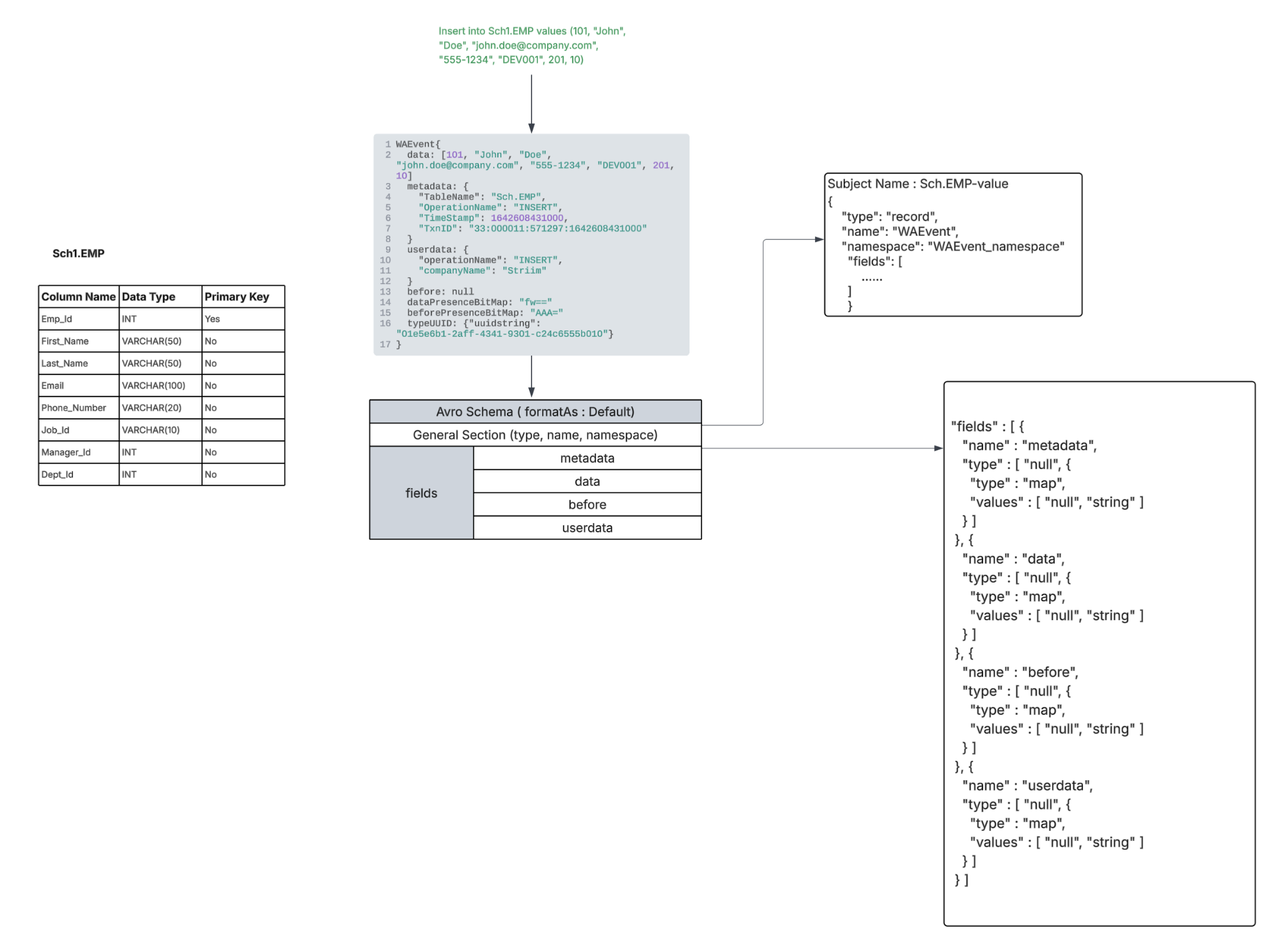
FormatAs - Default
This is the default setting where an Avro record is generated with “metadata, userdata, data, before” fields of WAEvent are converted into a Map of type String.
This is mostly the preferred format for all events originating from the sources except for OLTP, DWH. You can choose to use Default mode for OLTP, DWH sources too if preserving the source data type is not a requirement.
 |
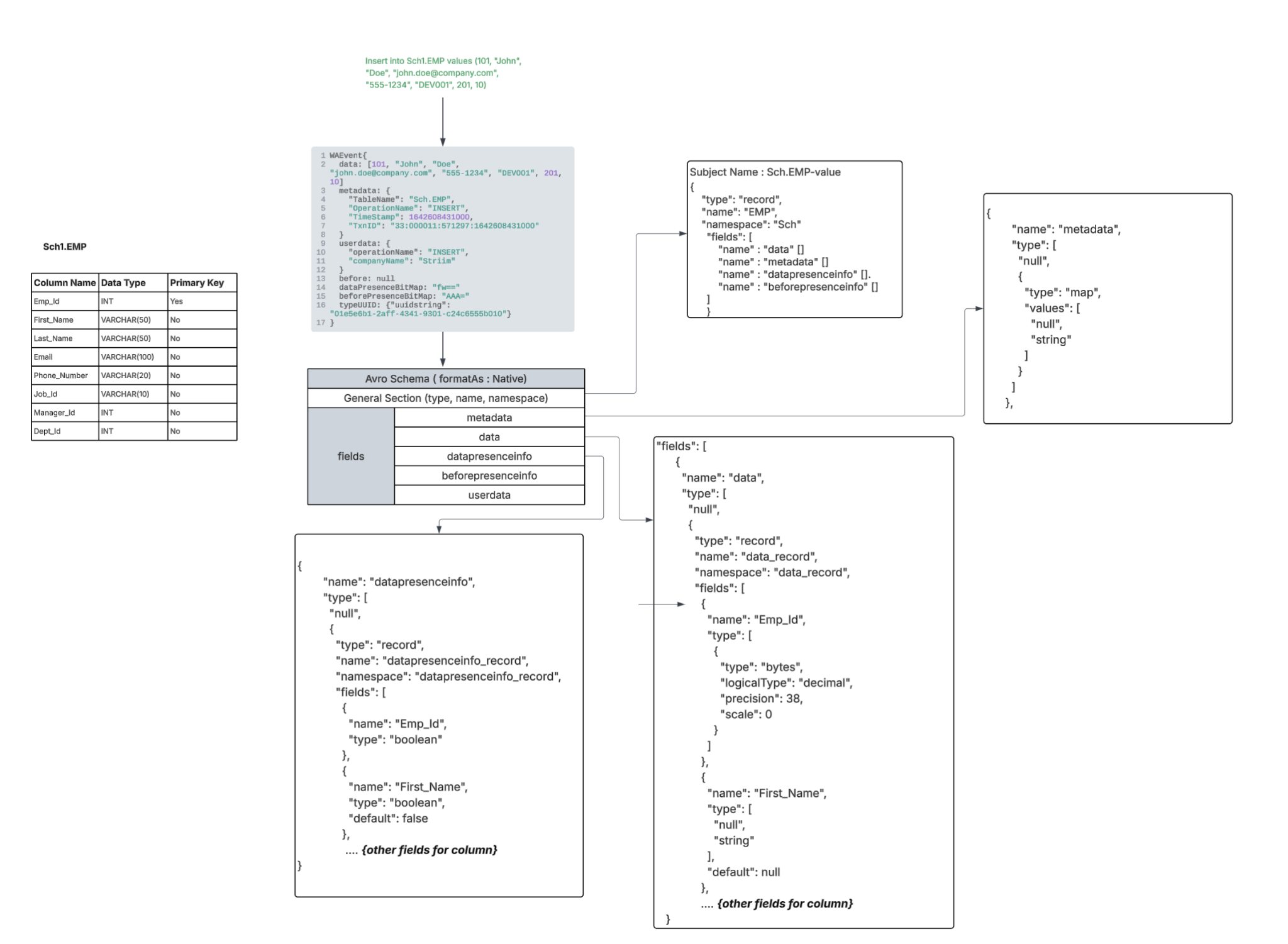
FormatAs - Native
In case of Native “metadata, userdata, data, before, data bit presence, before bit presence” fields of WAEvent considered for formatting.
Data, before, data bit presence, before bit presence fields will be nested Avro records each with exact number of fields respective to the schema of the incoming event. Name, type and alias of the fields in the “Data” / “before” nested records will be mapped from the incoming event’s Striim TYPE respective to the source table “typeUUID” only if the schema wasn’t migrated using a wizard, a Database Reader initial load application, or the schema conversion tool. if the first event processed is not a Create Table DDL event and if the schema wasn’t explicitly registered by you. In case of bit presence fields the type of the field will be boolean always.
Userdata, metadata will be fields of type Map (String).
 |
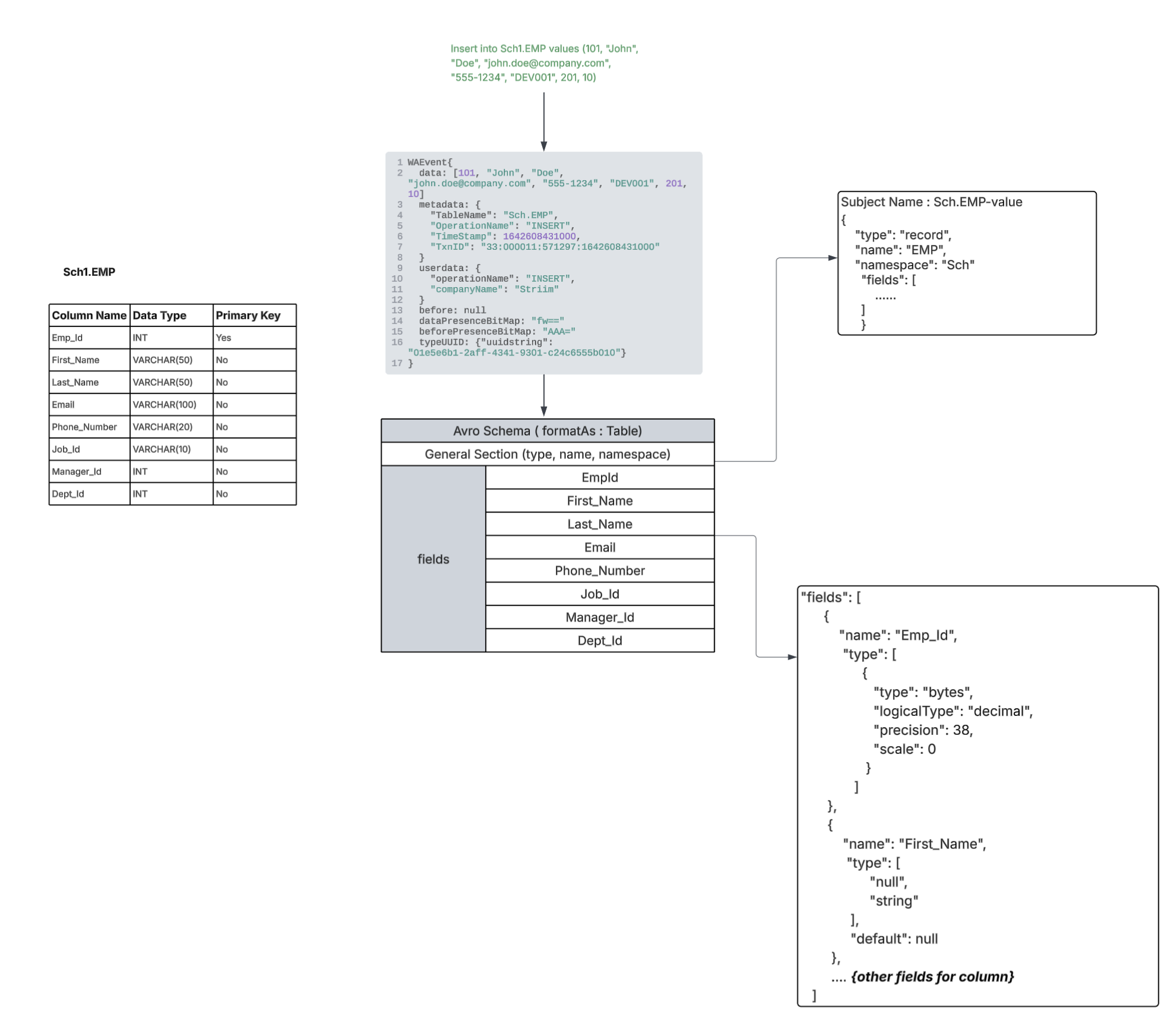
FormatAs - Table
The data field of the WAEvent will be considered for formatting with an exact number of fields respective to the schema of the incoming event. Name and type of the fields in the “Data” / “before” nested records will be mapped from the incoming event’s Striim TYPE respective to the source table “typeUUID” only if the schema wasn’t migrated using a wizard, a Database Reader initial load application, or the schema conversion tool, or if the first event processed is a Create Table DDL event or if the schema was explicitly registered by you.
 |
Note : Switching the FormatAs option from Table or Native to Default is supported while altering the application. But the vice versa of switching from FormatAs Default to Table or Native while altering the application is not recommended. However, to switch from FormatAs Default to Table or Native requires the application to be dropped and recreated and a different subject name has to be used. |
Handling Type Mapping
WAEvent can be generated from various sources like OLTP, DWH, File, App, Kafka based sources. If the WAEvents are generated from OLTP or DWH sources, each event will have a STRIIM Type attached to it (which is generated based on each source table schema). “typeUUID” field in WAEvent holds the value of UUID of the Striim type generated based on the schema of the source table. Striim type has the details about columns (name, the java data type, primary key detail).
But the major disadvantage of generating the avro schema based on the Striim type is that column type is not having exact information on the source data type, hence it is not possible to generate the logical Avro data type. In those cases the mapped data type will be “String”. And the case of the column names can’t be maintained.
For most of the NUMBER related datatypes in Source, the Striim Type has the column type information as “String”. So ultimately avro type conversion will result in String.
But in case of SCT being used, we will be having the exact column level information such as STRIIM equivalent type for the exact Source datatype (eg: STRIIM_NUMBER), precision, scale information which will help in mapping it to the closest avro data type with more details respective to the source data type
{"type":"bytes","logicalType": "decimal","precision": 10,"scale": 0}.
For Time, Timestamp related types from Source in case of Java 8 based data types,
Data types can support up to nanosecond precision. But the avro itself supports only up to microsecond precision. So if we know the source precision correctly for these time related types we will be able to map it to appropriate logical avro type in the target.
If the precision is <=6 we can map it to time-micros/timestamp-micros/local-timestamp-micros.
For precision >6 we can use the fallback mapping of String to preserve the original value.
When CDDLAction is not set to Process and if there is no schema matching the structure of incoming DML events is available for an incoming table in the schema registry, the type of the fields in case of “native” and “table” format are determined with the help of the Striim Type.
Schema conversion
Improved type mapping is now available when Avro formatter is used with KafkaWriter. It supports schema generation by using Striim’s schema conversion tool (a tool used to map source to target data type to its closest mapping). It is recommended to migrate schema via Striim application or create the schema via SCT before starting migration to preserve the data types, column name cases. You can also register the initial schema as described in Initial schema creation using Database Reader or Guidelines for externally creating and registering initial schemas.
Note: In the upcoming section,
|
Migrate source schema using the schema conversion tool
SCT has extensive information about the source column and helps to generate
The respective logical avro data type for DML schema. The section below shows the type mapping between the source data type vs Avro field type generated via type UUID vs Avro field type generated via SCT.
Also reflects the NOT NULL or PK constraint from the source schema by setting the avro field as non-nullable.
All nullable fields in the target Avro schema are assigned a default value, which is always set to null.
The original source column name with case will be preserved in the avro field name.
SCT helps generating an extensive DDL schema which contains information about each source column (like Primary key information, Column data types, Ordinal positions, Scale, Precision, Is column nullable)
The schema with closer type mapping can be generated by Striim when
When Schema Evolution is set to “Process” and there is DDL flowing through the KafkaWriter.
When the initial schema flows through a Database Reader initial load application or “Create Table” DDL is covered in the CDC pipeline.
CDC happened on the same set of tables for which initial schema migration was done and on top of which more DDL changes had to be applied.
Migrating the initial schema of all interested tables to the schema registry with the help of the schema conversion utility. “”
Create the initial schema by following the instructions in Guidelines for externally creating and registering initial schemas.
If the initial schema is not flowing through the pipeline, instead of generating the schema using the “TYPEUUID”, there is a major change done in KafkaWriter where it checks for a schema for a given table from the schema registry when the “formatAs” is set to "Native" or “Table”. The latest schema present in the schema registry should be compatible with the overall field structure of the respective incoming events.
It is recommended to generate and migrate the initial schema of all interested tables to the schema registry with the help of the schema conversion tool to have a closer native and logical Avro data type mapping. This becomes a mandatory step when the “Create Table DDL” is not going to flow through the CDC pipeline but Schema Evolution is set to “Process” or “ISC” is not set to true in the IL flow, to have closer type mapping.
Initial Schema Detection
On receiving a DML event as the first event for a mapped table in the IL or CDC pipeline, Kafka Writer will refer to the schema registry for a respective latest version of the schema (based on the subject name mapping).
If schema is present → Avro record is constructed using the schema retrieved from the schema registry, that will be used as the initial schema. In case of CDDLAction is Process, this will avoid any discrepancies between initial schema generated by typeUUID and CDDL change done using SCT.
The schemas will be already present in the registry only if the schema was migrated via Striim’s IL or CDC flow or if it was externally registered as described in Guidelines for externally creating and registering initial schemas.
If you migrate the schema externally without using Striim or SCT, then you must make sure to reflect the key fields in the value schema (by marking it as non nullable).
If schema is not present → typeUUID based mapping will be done and if the CDDLAction is “Process”, there can be mismatch in the way the fields are mapped to Avro type (since there is difference between typeUUID based and SCT based Avro type generation).
Note : The compatibility configuration will function correctly only when all schemas for the table are generated through SCT (via the Striim pipeline), the command-line utility, or any external process that accurately captures the logical data types and NOT NULL constraints. |
Initial schema creation
To have a closer type mapping, it is important to migrate schema first before starting the KafkaWriter. When the first DML event is received in the Kafka Writer without any prior DDL for the same table in the IL or CDC pipeline or first event is DDL event (to add/drop/modify column) in CDC pipeline, if a corresponding schema already exists (with the respective subject name), it will be used to construct the data. This will give the advantage of using SCT based type mapping even when the DDL event itself did not flow through the pipeline.
Initial schema creation using Database Reader
Here is a sample application to migrate schema from Oracle to Kafka. This application will quiesce itself after all the interested schema and IL is migrated.
Please set respective tables, connection information and the following properties in the DBReader.
CreateSchema: true,
QuiesceOnILCompletion : true
In case of Kafka Writer,
Set all the Kafka and Schema registry related connection information in the CP.
Configure all interested table in “Topics” property (1 table should be mapped to 1 topic only - can be done via direct or wildcard mapping)
TopicKey: ‘@metadata(TableName)‘,
Set “Message Key” as per the CDC pipeline requirements (None or Custom or Primary Key)
Do not set any “Partition key” and AutoCreateTopic to “False”.
Schema Evlution: Auto
Persist Schema: On
Select serializer of your choice
E1P can be “True” or “False”.
In AvroFormatter
formatAs: ‘Native’ (or ‘Table’ based on the CDC pipeline requirements)
SchemaRegistrySubjectName: ‘UseTopicName’
Select the subject naming strategy of your choice (must be matching to the CDC application)
CREATE OR REPLACE APPLICATION demo RECOVERY 5 SECOND INTERVAL;

CREATE SOURCE s1 USING Global.DatabaseReader (
  Password: 'KML5Im04+GV58LQq82HXJg==',
  DatabaseProviderType: 'Oracle',
  Password_encrypted: 'true',
  connectionProfileName: '',
  FetchSize: 100,
  ParallelThreads: 1,
  Username: 'qatest',
  RestartBehaviourOnILInterruption: 'keepTargetTableData',
  useConnectionProfile: false,
  QuiesceOnILCompletion: true,
  CreateSchema: true,
  Tables: 'QATEST.EMPLOYEES',
  ConnectionURL: 'jdbc:oracle:thin:@//localhost:1521/orcl' )
OUTPUT TO STRIIM1;

CREATE OR REPLACE TARGET t1 USING Global.KafkaWriter (
  CheckpointTopicConfig: '{\"PartitionCount\":1,\"ReplicationFactor\":3,\"CleanUp Policy\":\"compact\",\"Retention Time\":\"2592000000\",\"Retention Size\":\"1048576\"}',
  adapterName: 'KafkaMultiTopicWriter',
  AutoCreateTopic: true,
  ConnectionProfileName: 'admin.Kafka_Connection_Profile_2',
  SchemaEvolution: 'Auto',
  PersistDDL: true,
  E1P: true,
  ConnectionRetryPolicy: 'initialRetryDelay=10s, retryDelayMultiplier=2, maxRetryDelay=1m, maxAttempts=5, totalTimeout=10m',
  TopicKey: '@metadata(TableName)',
  Topics: '%,%',
  Serializer: 'StriimSerializer',
  CommitPolicy: 'EventCount=10000;Interval=15s',
  MessageKey: 'PrimaryKey')
FORMAT USING Global.AvroFormatter  (
  SchemaRegistryConnectionProfileName: 'admin.ConfluentSchemaRegistry_Connection_Profile_2',
  useSchemaRegistryConnectionProfile: 'true',
  handler: 'com.webaction.proc.AvroFormatter',
  formatterName: 'AvroFormatter',
  formatAs: 'Native',
  SchemaRegistrySubjectName: 'UseTopicName' )
INPUT FROM STRIIM1;

END APPLICATION demo;
Initial schema creation using the schema conversion tool
To generate the Initial Schema, use the schema converstion tool, providing the necessary source details (connection information, source table name) and target details (such as FormatAs configuration). The FormatAs value must align with what you will be configuring in the CDC application.
Usage Example
bin/schemaConversionUtilityDev.sh -s=oracle -d="jdbc:oracle:thin:@//10.45.18.106:1521/orcl" -u="qatest" -p="***" -b='Sch.EMP;' -t="kafkanative"
Parameter | Description |
-s | Source Database Type |
-d | JDBC URL to connect to the source database |
-u | Username to connect to the source database |
-p | Password to connect to the source database |
-b | Semicolon separated list of tables from the source database for which the avro schema has to be generated |
-t | Target Type : kafkanative or kafkatable, based on the formatAs requirement |
The Schema Conversion Tool stores the generated initial schemas in .json files. The generated schemas have to be registered in the schema registry for the CDC pipeline to consume.
Initial schema creation using external tools
If the schema is generated from an external tool (like manual generation and registration of schemas in the schema registry without using SCT), it must follow a set of rules as mentioned below.
Guidelines for externally creating and registering initial schemas
Schema generated externally must follow the required structure based on the FormatAs setting in AvroFormatter. Eg : For a DDL Employee table , the corresponding schema must be created and registered in the schema registry respective to Format As Native or Table.
The overall record and nested records type should remain the same while a specific fields logicalType, scale, and precision are optional. But we recommend to follow the exact format since they enable exact mapping between the source schema and the Avro schema format.
Field order in the Avro Schema must match the original source column ordinal order.
Field names must exactly match the original source schema column names, including case.
For example, the default case for Oracle / OJet is UPPERCASE while you can quote the column names to preserve the case of the column. The target schema should reflect the source schema. Ex: For the columns defined as:
col1, "Col2", COL3, "col4"
the resolved names are:
COL1, Col2, COL3, col4
In the case of MSJet / SQL Sever / MySQL, the source preserves the case in which you create the schema. Ex: For the columns defined as:
col1, "Col2", COL3, "col4"
the resolved names are:
col1, Col2 , COL3, col4
For PostgreSQL, unquoted identifiers are automatically converted to lowercase (default case), while quoted identifiers retain their exact case. For the column definitions:
col1, "Col2", COL3, "COL4"
the resolved names are:
col1, Col2, col3, COL4
If a source column name contains special characters that are not supported by Avro, in that case the avro field name for that column can be a different name but the alias must be preserving the original column name matching the source schema as mentioned in (3).
Sample schema: Format as Native and Table
FormatAs: Native | FormatAs: Table |
Subject Name : Sch.EMP-value { "type": "record", "name": "EMP", "namespace": "Sch", "fields": [ { "name": "data", "type": [ "null", { "type": "record", "name": "data_record", "namespace": "data_record", "fields": [ { "name": "EMP_ID", "type": [ { "type": "bytes", "logicalType": "decimal", "precision": 38, "scale": 0 } ] }, { "name": "FIRST_NAME", "type": [ "null", "string" ], "default": null }, { "name": "LAST_NAME", "type": [ "null", "string" ], "default": null }, { "name": "EMAIL", "type": [ "null", "string" ], "default": null }, { "name": "PHONE_NUMBER", "type": [ "null", "string" ], "default": null }, { "name": "JOB_ID", "type": [ "null", "string" ], "default": null }, { "name": "MANAGER_ID", "type": [ "null", { "type": "bytes", "logicalType": "decimal", "precision": 38, "scale": 0 } ], "default": null }, { "name": "DEPT_ID", "type": [ "null", { "type": "bytes", "logicalType": "decimal", "precision": 38, "scale": 0 } ], "default": null } ] } ] }, { "name": "before", "type": [ "null", { "type": "record", "name": "before_record", "namespace": "before_record", "fields": [ { "name": "EMP_ID", "type": [ { "type": "bytes", "logicalType": "decimal", "precision": 38, "scale": 0 } ] }, { "name": "FIRST_NAME", "type": [ "null", "string" ], "default": null }, { "name": "LAST_NAME", "type": [ "null", "string" ], "default": null }, { "name": "EMAIL", "type": [ "null", "string" ], "default": null }, { "name": "PHONE_NUMBER", "type": [ "null", "string" ], "default": null }, { "name": "JOB_ID", "type": [ "null", "string" ], "default": null }, { "name": "MANAGER_ID", "type": [ "null", { "type": "bytes", "logicalType": "decimal", "precision": 38, "scale": 0 } ], "default": null }, { "name": "DEPT_ID", "type": [ "null", { "type": "bytes", "logicalType": "decimal", "precision": 38, "scale": 0 } ], "default": null } ] } ] }, { "name": "metadata", "type": [ "null", { "type": "map", "values": [ "null", "string" ] } ] }, { "name": "userdata", "type": [ "null", { "type": "map", "values": [ "null", "string" ] } ] }, { "name": "datapresenceinfo", "type": [ "null", { "type": "record", "name": "datapresenceinfo_record", "namespace": "datapresenceinfo_record", "fields": [ { "name": "EMP_ID", "type": "boolean" }, { "name": "FIRST_NAME", "type": "boolean", "default": false }, { "name": "LAST_NAME", "type": "boolean", "default": false }, { "name": "EMAIL", "type": "boolean", "default": false }, { "name": "PHONE_NUMBER", "type": "boolean", "default": false }, { "name": "JOB_ID", "type": "boolean", "default": false }, { "name": "MANAGER_ID", "type": "boolean", "default": false }, { "name": "DEPT_ID", "type": "boolean", "default": false } ] } ] }, { "name": "beforepresenceinfo", "type": [ "null", { "type": "record", "name": "beforepresenceinfo_record", "namespace": "beforepresenceinfo_record", "fields": [ { "name": "EMP_ID", "type": "boolean" }, { "name": "FIRST_NAME", "type": "boolean", "default": false }, { "name": "LAST_NAME", "type": "boolean", "default": false }, { "name": "EMAIL", "type": "boolean", "default": false }, { "name": "PHONE_NUMBER", "type": "boolean", "default": false }, { "name": "JOB_ID", "type": "boolean", "default": false }, { "name": "MANAGER_ID", "type": "boolean", "default": false }, { "name": "DEPT_ID", "type": "boolean", "default": false } ] } ] } ] } | SubjectName : Sch.EMP-value { "type": "record", "name": "EMP", "namespace": "Sch", "fields": [ { "name": "EMP_ID", "type": [ { "type": "bytes", "logicalType": "decimal", "precision": 38, "scale": 0 } ] }, { "name": "FIRST_NAME", "type": [ "null", "string" ], "default": null }, { "name": "LAST_NAME", "type": [ "null", "string" ], "default": null }, { "name": "EMAIL", "type": [ "null", "string" ], "default": null }, { "name": "PHONE_NUMBER", "type": [ "null", "string" ], "default": null }, { "name": "JOB_ID", "type": [ "null", "string" ], "default": null }, { "name": "MANAGER_ID", "type": [ "null", { "type": "bytes", "logicalType": "decimal", "precision": 38, "scale": 0 } ], "default": null }, { "name": "DEPT_ID", "type": [ "null", { "type": "bytes", "logicalType": "decimal", "precision": 38, "scale": 0 } ], "default": null } ] } |
Steps to externally register the generated Avro schema
For the sample schema, the curl command will require
Connection details
Location of the json file that contains the generated schema
Subject name (this has to be respective to the "Subject Name strategy" of Kafka Writer.
Curl Command Templates for Schema Registration by Authentication Method
You can register schemas in the schema registry by using one of the following cURL command templates, chosen according to their authentication requirements.
Basic
curl -X POST \
-u <username>:<password> \
-H "Content-Type: application/vnd.schemaregistry.v1+json" \
--data "$(cat <jsonFilePath> | jq -c '.' | jq -Rs '{schema: .}')" \
https://<schemaRegistryHost>:<port>/subjects/<subjectName>/versions
ConfluentCloudAPI
curl -X POST \
-u <apiKey>:<apiSecret> \
-H "Content-Type: application/vnd.schemaregistry.v1+json" \
--data "$(cat <jsonFilePath> | jq -c '.' | jq -Rs '{schema: .}')" \
https://<confluentCloudSchemaRegistryEndpoint>/subjects/<subjectName>/versions
With MutualTLS
curl -X POST \
--cert <clientCertificatePath> \
--key <clientKeyPath>:<keyPassword> \
--cacert <caCertificatePath> \
-H "Content-Type: application/vnd.schemaregistry.v1+json" \
--data "$(cat <jsonFilePath> | jq -c '.' | jq -Rs '{schema: .}')" \
https://<schemaRegistryHost>:<port>/subjects/<subjectName>/versions
Note: “:<keyPassword>” is optional - include only if the key is encrypted.
None
curl -X POST \
-H "Content-Type: application/vnd.schemaregistry.v1+json" \
--data "$(cat <jsonFilePath> | jq -c '.' | jq -Rs '{schema: .}')" \
http://<schemaRegistryHost>:<port>/subjects/<subjectName>/versions
Initial Schema creation will be completed once all the generated schemas are registered in the schema registry.
Once the initial schema of each interested table is registered into the schema registry, it can be used by the KafkaWriter which is migrating the CDC data for the same table. To confirm that the CDC application is utilizing the correct registered schema, verify that the Kafka payload contains the schema ID of the initially registered schema. If Confluent Cloud is being used, the initial schema will be visible in the “DataContracts” section of the target Kafka topic.
 |
Data type mapping
MySQL To Avro data type mapping
MySQL data type | Java data type in type UUID | Avro native type mapping, UUID-based | Avro native type mapping with schema conversion tool | Avro logical type mapping, UUID-based | Avro logical type mapping with schema conversion tool |
|---|---|---|---|---|---|
INTEGER | java.lang.Integer | int | int | int | int |
TINYINT | java.lang.Byte | int | int | int | int |
SMALLINT | java.lang.Short | int | int | int | int |
MEDIUMINT | java.lang.Integer | int | int | int | int |
INTEGER | java.lang.Integer | int | int | int | int |
BIGINT | java.lang.Long | long | int | long | int |
FLOAT | java.lang.Float | float | float | float | float |
DOUBLE | java.lang.Double | double | double | double | double |
DECIMAL(65,30) | java.lang.String | string | string | string | string |
NUMERIC(10,2) | java.lang.String | string | bytes | string | decimal(precision=10, scale=2) |
CHAR(255) | java.lang.String | string | string | string | string |
VARCHAR(1000) | java.lang.String | string | string | string | string |
BINARY(255) | byte[] | string | bytes | bytes | bytes |
VARBINARY(16383) | byte[] | string | bytes | bytes | bytes |
TINYTEXT | java.lang.String | string | string | string | string |
TEXT | java.lang.String | string | string | string | string |
MEDIUMTEXT | java.lang.String | string | string | string | string |
LONGTEXT | java.lang.String | string | string | string | string |
TINYBLOB | byte[] | string | bytes | bytes | bytes |
BLOB | byte[] | string | bytes | bytes | bytes |
MEDIUMBLOB | byte[] | string | bytes | bytes | bytes |
LONGBLOB | byte[] | string | bytes | bytes | bytes |
DATE | org.joda.time.LocalDate | string | int | string | date |
DATETIME(0) | org.joda.time.DateTime | string | long | string | timestamp-micros |
DATETIME(3) | org.joda.time.DateTime | string | long | string | timestamp-micros |
DATETIME(6) | org.joda.time.DateTime | string | long | string | timestamp-micros |
DATETIME | org.joda.time.DateTime | string | long | string | timestamp-micros |
TIMESTAMP(0) | org.joda.time.DateTime | string | long | string | timestamp-micros |
TIMESTAMP(3) | org.joda.time.DateTime | string | long | string | timestamp-micros |
TIMESTAMP(6) | org.joda.time.DateTime | string | long | string | timestamp-micros |
TIMESTAMP | org.joda.time.DateTime | string | string | string | string |
TIME(0) | java.lang.String | string | int | string | time-micros |
TIME(3) | java.lang.String | string | int | string | time-micros |
TIME(6) | java.lang.String | string | int | string | time-micros |
TIME | java.lang.String | string | string | string | string |
YEAR | java.lang.Short | int | int | int | int |
ENUM('value1','value2','value3','value4') | java.lang.Integer | int | string | int | string |
SET('apple','orange','mango','guava') | java.lang.Long | long | string | long | string |
BOOLEAN | java.lang.Boolean | boolean | int | boolean | int |
JSON | java.lang.String | string | string | string | string |
BIT(64) | java.lang.String | string | bytes | string | bytes |
GEOMETRY | java.lang.String | string | string | string | string |
Oracle To Avro data type mapping
Oracle data type | Java data type in type UUID | Avro native type mapping, UUID-based | Avro native type mapping with schema conversion tool | Avro logical type mapping, UUID-based | Avro logical type mapping with schema conversion tool |
|---|---|---|---|---|---|
NUMBER(10) | java.lang.String | string | bytes | string | decimal(precision=10, scale=0) |
INTEGER | java.lang.String | string | bytes | string | decimal(precision=38, scale=0) |
NUMBER(38,19) | java.lang.String | string | bytes | string | decimal(precision=38, scale=19) |
NUMBER(10,2) | java.lang.String | string | bytes | string | decimal(precision=10, scale=2) |
NUMBER | java.lang.String | string | string | string | string |
BINARY_FLOAT | java.lang.Float | float | float | float | float |
BINARY_DOUBLE | java.lang.Double | double | bytes | double | bytes |
FLOAT(32) | java.lang.String | string | double | string | double |
CHAR(2000) | java.lang.String | string | string | string | string |
VARCHAR2(4000) | java.lang.String | string | string | string | string |
NCHAR(1000) | java.lang.String | string | string | string | string |
NVARCHAR2(2000) | java.lang.String | string | string | string | string |
DATE | org.joda.time.DateTime | string | int | string | date |
TIMESTAMP(0) | org.joda.time.DateTime | string | long | string | timestamp-micros |
TIMESTAMP(3) | org.joda.time.DateTime | string | long | string | timestamp-micros |
TIMESTAMP(6) | org.joda.time.DateTime | string | long | string | timestamp-micros |
TIMESTAMP(7) | org.joda.time.DateTime | string | string | string | string |
TIMESTAMP(9) | org.joda.time.DateTime | string | string | string | string |
TIMESTAMP(0) WITH TIME ZONE | org.joda.time.DateTime | string | long | string | timestamp-micros |
TIMESTAMP(6) WITH TIME ZONE | org.joda.time.DateTime | string | long | string | timestamp-micros |
TIMESTAMP(7) WITH TIME ZONE | org.joda.time.DateTime | string | string | string | string |
TIMESTAMP WITH TIME ZONE | org.joda.time.DateTime | string | long | string | timestamp-micros |
TIMESTAMP(0) WITH LOCAL TIME ZONE | org.joda.time.DateTime | string | long | string | local-timestamp-micros |
TIMESTAMP(6) WITH LOCAL TIME ZONE | org.joda.time.DateTime | string | long | string | local-timestamp-micros |
TIMESTAMP(7) WITH LOCAL TIME ZONE | org.joda.time.DateTime | string | string | string | string |
TIMESTAMP WITH LOCAL TIME ZONE | org.joda.time.DateTime | string | long | string | local-timestamp-micros |
INTERVAL YEAR TO MONTH | java.lang.String | string | fixed | string | duration |
INTERVAL DAY TO SECOND | java.lang.String | string | fixed | string | duration |
RAW(2000) | java.lang.String | string | bytes | string | bytes |
ROWID | java.lang.String | string | string | string | string |
VARCHAR2(1000) | java.lang.String | string | string | string | string |
CLOB | java.lang.String | string | string | string | string |
NCLOB | java.lang.String | string | string | string | string |
BLOB | java.lang.String | string | bytes | string | bytes |
PostgresSQL To Avro data type mapping
PostgreSQL data type | Java data type in type UUID | Avro native type mapping, UUID-based | Avro native type mapping with schema conversion tool | Avro logical type mapping, UUID-based | Avro logical type mapping with schema conversion tool |
|---|---|---|---|---|---|
BIGSERIAL | java.lang.Long | long | int | long | int |
SMALLINT | java.lang.Short | int | int | int | int |
INTEGER | java.lang.Integer | int | int | int | int |
BIGINT | java.lang.Long | long | int | long | int |
SERIAL | java.lang.Integer | int | int | int | int |
BIGSERIAL | java.lang.Long | long | int | long | int |
DECIMAL(18,6) | java.lang.String | string | bytes | string | decimal(precision=18, scale=6) |
NUMERIC(15,5) | java.lang.String | string | bytes | string | decimal(precision=15, scale=5) |
REAL | java.lang.Float | float | float | float | float |
DOUBLE PRECISION | java.lang.Double | double | double | double | double |
CHAR(100) | java.lang.String | string | string | string | string |
VARCHAR(1000) | java.lang.String | string | string | string | string |
TEXT | java.lang.String | string | string | string | string |
BOOLEAN | java.lang.Short | int | boolean | int | boolean |
DATE | org.joda.time.LocalDate | string | int | string | date |
TIME(0) | java.lang.String | string | int | string | time-micros |
TIME(3) | java.lang.String | string | int | string | time-micros |
TIME(6) | java.lang.String | string | int | string | time-micros |
TIME | java.lang.String | string | string | string | string |
timetz(0) | java.lang.String | string | string | string | string |
timetz(6) | java.lang.String | string | string | string | string |
timetz | java.lang.String | string | string | string | string |
TIMESTAMP(0) | org.joda.time.DateTime | string | long | string | timestamp-micros |
TIMESTAMP(3) | org.joda.time.DateTime | string | long | string | timestamp-micros |
TIMESTAMP(6) | org.joda.time.DateTime | string | long | string | timestamp-micros |
TIMESTAMP | org.joda.time.DateTime | string | long | string | timestamp-micros |
timestamptz(0) | org.joda.time.DateTime | string | long | string | timestamp-micros |
timestamptz(6) | org.joda.time.DateTime | string | long | string | timestamp-micros |
timestamptz | org.joda.time.DateTime | string | long | string | timestamp-micros |
INTERVAL | java.lang.String | string | fixed | string | duration |
BYTEA | java.lang.String | string | string | string | string |
INET | java.lang.String | string | string | string | string |
CIDR | java.lang.String | string | string | string | string |
MACADDR | java.lang.String | string | string | string | string |
MACADDR8 | java.lang.String | string | string | string | string |
POINT | java.lang.String | string | string | string | string |
LINE | java.lang.String | string | string | string | string |
LSEG | java.lang.String | string | string | string | string |
BOX | java.lang.String | string | string | string | string |
PATH | java.lang.String | string | string | string | string |
POLYGON | java.lang.String | string | string | string | string |
CIRCLE | java.lang.String | string | string | string | string |
BIT(8) | java.lang.String | string | bytes | string | bytes |
VARBIT(100) | java.lang.String | string | bytes | string | bytes |
UUID | java.lang.String | string | string | string | uuid |
JSON | java.lang.String | string | string | string | string |
JSONB | java.lang.String | string | string | string | string |
INT4RANGE | java.lang.String | string | string | string | string |
DATERANGE | java.lang.String | string | string | string | string |
TSRANGE | java.lang.String | string | string | string | string |
XML | java.lang.String | string | string | string | string |
MONEY | java.lang.String | string | string | string | string |
TXID_SNAPSHOT | java.lang.String | string | string | string | string |
SQLServer to Avro data type mapping
SQL Server data type | Java data type in type UUID | Avro native type mapping, UUID-based | Avro native type mapping with schema conversion tool | Avro logical type mapping, UUID-based | Avro logical type mapping with schema conversion tool |
|---|---|---|---|---|---|
INT IDENTITY(1,1) | java.lang.Integer | int | int | int | int |
TINYINT | java.lang.Short | int | int | int | int |
SMALLINT | java.lang.Short | int | int | int | int |
INT | java.lang.Integer | int | int | int | int |
BIGINT | java.lang.Long | long | int | long | int |
DECIMAL(38,19) | java.lang.String | string | bytes | string | decimal(precision=38, scale=19) |
NUMERIC(18,6) | java.lang.String | string | bytes | string | decimal(precision=18, scale=6) |
MONEY | java.lang.String | string | string | string | string |
SMALLMONEY | java.lang.String | string | string | string | string |
FLOAT(24) | java.lang.Double | double | double | double | double |
REAL | java.lang.Float | float | float | float | float |
CHAR(100) | java.lang.String | string | string | string | string |
VARCHAR(1000) | java.lang.String | string | string | string | string |
NCHAR(100) | java.lang.String | string | string | string | string |
NVARCHAR(1000) | java.lang.String | string | string | string | string |
TEXT | java.lang.String | string | string | string | string |
NTEXT | java.lang.String | string | string | string | string |
DATE | org.joda.time.LocalDate | string | int | string | date |
TIME(0) | java.lang.String | string | int | string | time-micros |
TIME(3) | java.lang.String | string | int | string | time-micros |
TIME(6) | java.lang.String | string | int | string | time-micros |
TIME(7) | java.lang.String | string | string | string | string |
TIME | java.lang.String | string | string | string | string |
DATETIME | org.joda.time.DateTime | string | long | string | timestamp-micros |
DATETIME2(0) | org.joda.time.DateTime | string | long | string | timestamp-micros |
DATETIME2(3) | org.joda.time.DateTime | string | long | string | timestamp-micros |
DATETIME2(6) | org.joda.time.DateTime | string | long | string | timestamp-micros |
DATETIME2(7) | org.joda.time.DateTime | string | string | string | string |
DATETIME2 | org.joda.time.DateTime | string | long | string | timestamp-micros |
SMALLDATETIME | org.joda.time.DateTime | string | string | string | string |
DATETIMEOFFSET(0) | java.lang.String | string | string | string | string |
DATETIMEOFFSET(7) | java.lang.String | string | string | string | string |
DATETIMEOFFSET | java.lang.String | string | string | string | string |
BINARY(100) | byte[] | string | bytes | bytes | bytes |
VARBINARY(1000) | byte[] | string | bytes | bytes | bytes |
BIT | java.lang.String | string | boolean | string | boolean |
UNIQUEIDENTIFIER | java.lang.String | string | string | string | uuid |
HIERARCHYID | java.lang.String | string | string | string | string |
SQL_VARIANT | java.lang.String | string | string | string | string |
XML | java.lang.String | string | string | string | string |
GEOMETRY | java.lang.String | string | string | string | string |
GEOGRAPHY | java.lang.String | string | string | string | string |
Using Schema Evolution
This property defines the action a Kafka Writer should take upon encountering a DDL event. It is relevant for all OLTP-based sources (Oracle, MySQL, SQLServer, and PG, for both IL and CDC) that can generate a DDL event.
Note : In case of AvroFormatter, the schema evolves only when a DDL event is processed. If the DDL event is not passed to the target adapter but subsequent DML events follow the updated structure, the AvroFormatter continues to format the incoming DML events based on the previous schema, which may cause the application to halt due to schema mismatch errors or potentially experience data loss. |
Schema Evolution: Auto
There is no concept of schema tracking or evolution in case of CSV, JSON, XML formatters. All incoming events (DML or DDL) irrespective of sources will be distributed based on the “Topics” and "Partition Key” setting.
Avro Schema Evolution
This setting makes sense only when the source is OLTP or DWH.
In the case of Avro, the initial schema for each table is retrieved from the schema registry. When the Kafka Writer receives a WAEvent with operation name “DDL”, the schema of the respective table is evolved and the new schema is registered in the schema registry. After the schema registration for the DDL event is complete, DML events (after the DDL) will have this latest evolved schema-id registered attached to the kafka message payload. DML Schema reflects the updated table structure after the DDL change.
If the DDL event is
Create DDL - a new schema is created using the SCT, will be registered to the schema registry and will serve as an Initial schema of the table.
ADD/DROP/MODIFY Column type - a new schema will be created on the top of the initial schema (fetched and cached) and will be registered to the schema registry. For any future restart check this section on how the initial schema is set.
Note : The schema registered by Striim's Kafka Writer will not be dropped when the respective application is dropped. You might have to clean up the respective schema based on the requirement. Once schema is deleted from the registry, the data from the kafka topic can't be deserialised by the consumer. |
In case of any formatter, DDL messages will be written to data topics if “Persist DDL” is set to TRUE.
Handling schema correlation during restart
When the application restarts, replaying past events may result in mismatches between the incoming event structure and the latest schema in the Schema Registry.
Example Scenario : When E1P is set to “False”, let us consider, Kafka target receives 100 events, where 70th, 80th, 90th events are DDL changes. At this point there will be 4 versions of the schema corresponding to the same source table registered in the schema registry.
Let's assume during restart, the target starts receiving from the 85th event, the latest version of schema from the schema registry won’t be the correct schema to process the incoming events.
Even in such cases, Kafka Writer ensures schema integrity is preserved. This is possible because schema lineage is also tracked in the Striim MDR.
Whenever a new DDL is received, a corresponding schema entry is recorded in this table.
Upon restart, when the old events are replayed, the appropriate DMLSchema associated with each incoming event is retrieved from this MDR table (InternalSchemaRegistry) based on the incoming event’s position thereby maintaining schema integrity.
These entries will be automatically cleaned up once the Kafka Writer is dropped.
DDL Persistance
DDL Message will be written to the Data Topic only if “Schema Evolution” is set to “Auto” and the “Persist Schema” option is True (default behaviour). The topic and partition to which the DDLMessage will be written to will depend on the “Topics” mapping and the “TopicKey” and “PartitionKey” configuration. If “PartitionKey” or the “TopicKey” is absent (for example, if the distribution was based on a userdata which was added only to DML events by a CQ) in the incoming DDL event, then the application will HALT.
When Schema Evolution is set to Auto and Persist Schema is False, we will still need the “TopicKey” to be present in the incoming event to decide if the incoming event is an interested event and have to evolve the schema of the respective entity (mostly the OLTP table) or not. In the absence of “TopicKey” the application will HALT.
When Schema Evolution is set to Manual, we will still need the “TopicKey” to be present in the incoming event to decide if it's an interesting event and then HALT the application if not present.
In case of DSV, JSON and XML formatters, the DDL event will be processed in the same way as the DML events very similar to existing KafkaWriter.
If the Kafka message is created via Avroformatter, the following will be Header, Key, Payload contents for a DDL Kafka Message. Avro Record Name will be the “Table Name” and Avro Record Namespace will be [catalog] and schema name of the table or customisable.
Header
If a custom header is configured and the respective field is present in the incoming WAEvent with operation name “DDL”, it will be added to the DDL message header. Otherwise, the DDL event header will be empty.
Key
The keys added to the DDL Kafka message will be based
Custom: If configured values (e.g. operation type or table name) are present in user data or metadata, it will be added as part of the message key.
PrimaryKey : Primary key column names will be used as keys, with their values set to NULL. If the DDL is updating the PK-Columns then the message keys will reflect the same.
Payload
DDL Schema with the detailed DDL Operations (e.g., Create, Alter, Drop), Source table information, Source DDLString with which the target schema can be generated with ease.
DDL Kafka message has correlation information about the schema registry ID (under the field name “DML Schema Id”) for any audit purpose.
Provides detailed column-level metadata such as
Primary key information
Column data types
Ordinal positions
Scale
Precision
Column Nullability
Tracking Schema for DDL
Writing the DDL event into the target topic will be based on the following configurations
When the “Persist Schema” property is enabled, the DDL schemas will be registered with the subject name “<Subject-Name>-DDLRecord” in the Schema Registry, and DDL events will be propagated to the Data topic.
DDL Message Key schema will be registered under “<subject naming>-DDLKey”
Sample DML schema, DDL schema, and DDL event
Avro record representing DML schema:
Subject Name : Sch.EMP-value
{
"type": "record",
"name": "EMP",
"namespace": "Sch",
"fields": [
{
"name": "data",
"type": [
"null",
{
"type": "record",
"name": "data_record",
"namespace": "data_record",
"fields": [
{
"name": "EMP_ID",
"type": [
{
"type": "bytes",
"logicalType": "decimal",
"precision": 38,
"scale": 0
}
]
},
{
"name": "FIRST_NAME",
"type": [
"null",
"string"
],
"default": null
},
{
"name": "LAST_NAME",
"type": [
"null",
"string"
],
"default": null
},
{
"name": "EMAIL",
"type": [
"null",
"string"
],
"default": null
},
{
"name": "PHONE_NUMBER",
"type": [
"null",
"string"
],
"default": null
},
{
"name": "JOB_ID",
"type": [
"null",
"string"
],
"default": null
},
{
"name": "MANAGER_ID",
"type": [
"null",
{
"type": "bytes",
"logicalType": "decimal",
"precision": 38,
"scale": 0
}
],
"default": null
},
{
"name": "DEPT_ID",
"type": [
"null",
{
"type": "bytes",
"logicalType": "decimal",
"precision": 38,
"scale": 0
}
],
"default": null
}
]
}
]
},
{
"name": "before",
"type": [
"null",
{
"type": "record",
"name": "before_record",
"namespace": "before_record",
"fields": [
{
"name": "EMP_ID",
"type": [
{
"type": "bytes",
"logicalType": "decimal",
"precision": 38,
"scale": 0
}
]
},
{
"name": "FIRST_NAME",
"type": [
"null",
"string"
],
"default": null
},
{
"name": "LAST_NAME",
"type": [
"null",
"string"
],
"default": null
},
{
"name": "EMAIL",
"type": [
"null",
"string"
],
"default": null
},
{
"name": "PHONE_NUMBER",
"type": [
"null",
"string"
],
"default": null
},
{
"name": "JOB_ID",
"type": [
"null",
"string"
],
"default": null
},
{
"name": "MANAGER_ID",
"type": [
"null",
{
"type": "bytes",
"logicalType": "decimal",
"precision": 38,
"scale": 0
}
],
"default": null
},
{
"name": "DEPT_ID",
"type": [
"null",
{
"type": "bytes",
"logicalType": "decimal",
"precision": 38,
"scale": 0
}
],
"default": null
}
]
}
]
},
{
"name": "metadata",
"type": [
"null",
{
"type": "map",
"values": [
"null",
"string"
]
}
]
},
{
"name": "userdata",
"type": [
"null",
{
"type": "map",
"values": [
"null",
"string"
]
}
]
},
{
"name": "datapresenceinfo",
"type": [
"null",
{
"type": "record",
"name": "datapresenceinfo_record",
"namespace": "datapresenceinfo_record",
"fields": [
{
"name": "EMP_ID",
"type": "boolean"
},
{
"name": "FIRST_NAME",
"type": "boolean",
"default": false
},
{
"name": "LAST_NAME",
"type": "boolean",
"default": false
},
{
"name": "EMAIL",
"type": "boolean",
"default": false
},
{
"name": "PHONE_NUMBER",
"type": "boolean",
"default": false
},
{
"name": "JOB_ID",
"type": "boolean",
"default": false
},
{
"name": "MANAGER_ID",
"type": "boolean",
"default": false
},
{
"name": "DEPT_ID",
"type": "boolean",
"default": false
}
]
}
]
},
{
"name": "beforepresenceinfo",
"type": [
"null",
{
"type": "record",
"name": "beforepresenceinfo_record",
"namespace": "beforepresenceinfo_record",
"fields": [
{
"name": "EMP_ID",
"type": "boolean"
},
{
"name": "FIRST_NAME",
"type": "boolean",
"default": false
},
{
"name": "LAST_NAME",
"type": "boolean",
"default": false
},
{
"name": "EMAIL",
"type": "boolean",
"default": false
},
{
"name": "PHONE_NUMBER",
"type": "boolean",
"default": false
},
{
"name": "JOB_ID",
"type": "boolean",
"default": false
},
{
"name": "MANAGER_ID",
"type": "boolean",
"default": false
},
{
"name": "DEPT_ID",
"type": "boolean",
"default": false
}
]
}
]
}
]
}Avro record representing DDL schema:
Subject Name : Sch.EMP-DDLRecord
{
"type": "record",
"name": "EMP",
"namespace": "Sch",
"fields": [
{
"name": "ddl_operation",
"type": "string"
},
{
"name": "table_name",
"type": "string"
},
{
"name": "ddl_sql",
"type": [
"string"
]
},
{
"name": "type_uuid",
"type": [
"null",
"string"
],
"default": null
},
{
"name": "timestamp",
"type": "long"
},
{
"name": "metadata",
"type": {
"type": "record",
"name": "Metadata",
"fields": [
{
"name": "table",
"type": "string"
},
{
"name": "dmlSchemaId",
"type": "int"
}
]
}
},
{
"name": "tableColumns",
"type": {
"type": "record",
"name": "TableColumns",
"fields": [
{
"name": "EMP_ID",
"type": {
"type": "record",
"name": "EMP_ID_ColumnInfo",
"fields": [
{
"name": "ordinal",
"type": "int"
},
{
"name": "type",
"type": "string"
},
{
"name": "length",
"type": [
"null",
"int"
]
},
{
"name": "scale",
"type": [
"null",
"int"
]
},
{
"name": "isPrimaryKey",
"type": "boolean"
},
{
"name": "nullable",
"type": "boolean"
}
]
}
},
{
"name": "FIRST_NAME",
"type": {
"type": "record",
"name": "FIRST_NAME_ColumnInfo",
"fields": [
{
"name": "ordinal",
"type": "int"
},
{
"name": "type",
"type": "string"
},
{
"name": "length",
"type": [
"null",
"int"
]
},
{
"name": "scale",
"type": [
"null",
"int"
]
},
{
"name": "isPrimaryKey",
"type": "boolean"
},
{
"name": "nullable",
"type": "boolean"
}
]
}
},
{
"name": "LAST_NAME",
"type": {
"type": "record",
"name": "LAST_NAME_ColumnInfo",
"fields": [
{
"name": "ordinal",
"type": "int"
},
{
"name": "type",
"type": "string"
},
{
"name": "length",
"type": [
"null",
"int"
]
},
{
"name": "scale",
"type": [
"null",
"int"
]
},
{
"name": "isPrimaryKey",
"type": "boolean"
},
{
"name": "nullable",
"type": "boolean"
}
]
}
},
{
"name": "EMAIL",
"type": {
"type": "record",
"name": "EMAIL_ColumnInfo",
"fields": [
{
"name": "ordinal",
"type": "int"
},
{
"name": "type",
"type": "string"
},
{
"name": "length",
"type": [
"null",
"int"
]
},
{
"name": "scale",
"type": [
"null",
"int"
]
},
{
"name": "isPrimaryKey",
"type": "boolean"
},
{
"name": "nullable",
"type": "boolean"
}
]
}
},
{
"name": "PHONE_NUMBER",
"type": {
"type": "record",
"name": "PHONE_NUMBER_ColumnInfo",
"fields": [
{
"name": "ordinal",
"type": "int"
},
{
"name": "type",
"type": "string"
},
{
"name": "length",
"type": [
"null",
"int"
]
},
{
"name": "scale",
"type": [
"null",
"int"
]
},
{
"name": "isPrimaryKey",
"type": "boolean"
},
{
"name": "nullable",
"type": "boolean"
}
]
}
},
{
"name": "JOB_ID",
"type": {
"type": "record",
"name": "JOB_ID_ColumnInfo",
"fields": [
{
"name": "ordinal",
"type": "int"
},
{
"name": "type",
"type": "string"
},
{
"name": "length",
"type": [
"null",
"int"
]
},
{
"name": "scale",
"type": [
"null",
"int"
]
},
{
"name": "isPrimaryKey",
"type": "boolean"
},
{
"name": "nullable",
"type": "boolean"
}
]
}
},
{
"name": "MANAGER_ID",
"type": {
"type": "record",
"name": "MANAGER_ID_ColumnInfo",
"fields": [
{
"name": "ordinal",
"type": "int"
},
{
"name": "type",
"type": "string"
},
{
"name": "length",
"type": [
"null",
"int"
]
},
{
"name": "scale",
"type": [
"null",
"int"
]
},
{
"name": "isPrimaryKey",
"type": "boolean"
},
{
"name": "nullable",
"type": "boolean"
}
]
}
},
{
"name": "DEPT_ID",
"type": {
"type": "record",
"name": "DEPT_ID_ColumnInfo",
"fields": [
{
"name": "ordinal",
"type": "int"
},
{
"name": "type",
"type": "string"
},
{
"name": "length",
"type": [
"null",
"int"
]
},
{
"name": "scale",
"type": [
"null",
"int"
]
},
{
"name": "isPrimaryKey",
"type": "boolean"
},
{
"name": "nullable",
"type": "boolean"
}
]
}
}
]
},
"doc": "Column information for 8 specific columns from cached target column definitions"
}
]
}Avro record representing DDL event:
{
    "ddl_operation": "CREATE",
    "table_name": "EMPLOYEES",
    "ddl_sql": "CREATE TABLE Sch.EMP (EMP_ID INT PRIMARY KEY, FIRST_NAME VARCHAR(50),
 LAST_NAME VARCHAR(50), EMAIL VARCHAR(100), PHONE_NUMBER VARCHAR(20), JOB_ID VARCHAR(10),
 MANAGER_ID INT, DEPT_ID INT)",
    "type_uuid": "550e8400-e29b-41d4-a716-446655440000",
    "timestamp": 1703875200000,
    "metadata": {
      "schema": "Sch",
      "table": "EMP",
      "DMLSchemaID": "145",
     },
    "tableColumns": {
      "EMP_ID": {
        "ordinal": 1,
        "type": "INT",
        "length": null,
        "precision": null,
        "scale": null,
        "isPrimaryKey": true,
        "nullable": false
      },
      "FIRST_NAME": {
        "ordinal": 2,
        "type": "VARCHAR",
        "length": 50,
        "precision": null,
        "scale": null,
        "isPrimaryKey": false,
        "nullable": true
      },
      "LAST_NAME": {
        "ordinal": 3,
        "type": "VARCHAR",
        "length": 50,
        "precision": null,
        "scale": null,
        "isPrimaryKey": false,
        "nullable": true
      },
      "EMAIL": {
        "ordinal": 4,
        "type": "VARCHAR",
        "length": 100,
        "precision": null,
        "scale": null,
        "isPrimaryKey": false,
        "nullable": true
      },
      "PHONE_NUMBER": {
        "ordinal": 5,
        "type": "VARCHAR",
        "length": 20,
        "precision": null,
        "scale": null,
        "isPrimaryKey": false,
        "nullable": true
      },
      "JOB_ID": {
        "ordinal": 6,
        "type": "VARCHAR",
        "length": 10,
        "precision": null,
        "scale": null,
        "isPrimaryKey": false,
        "nullable": true
      },
      "MANAGER_ID": {
        "ordinal": 7,
        "type": "INT",
        "length": null,
        "precision": null,
        "scale": null,
        "isPrimaryKey": false,
        "nullable": true
      },
      "DEPT_ID": {
        "ordinal": 8,
        "type": "INT",
        "length": null,
        "precision": null,
        "scale": null,
        "isPrimaryKey": false,
        "nullable": true
      }
    }
  }
Schema compatibility
In distributed systems, components upgrade independently at different times. Schema compatibility ensures that older consumers can read new data and new consumers can read older data without errors. When a Kafka message is sent with a Schema Registry ID, compatibility checks are still required. The ID is a reference that allows consumers to find the correct schema for deserialization, but it does not guarantee that the schema itself is compatible with older or newer versions. The Schema Registry is responsible for enforcing compatibility rules, which must be configured separately from simply using the ID.
In a system with multiple producers and consumers, schema evolution is a normal occurrence, but an incompatible schema change can cause serious problems:
Data corruption: A consumer may fail to deserialize a message, potentially causing it to crash or corrupt data in a downstream system.
Pipeline failure: If a consumer cannot process a message (often called a "poison pill"), it can get stuck in an error loop and HALT processing for the entire topic.
Uncoordinated deployments: Without compatibility rules, producers and consumers cannot be upgraded independently. This introduces tight coupling and risk, as a change by one team could break another's application.
Compatibility modes
Compatibility mode | Description | Use case |
|---|---|---|
None | No compatibility checks are enforced. Any schema change is allowed regardless of compatibility with previous or future schemas. | Can be used when all producers and consumers are always upgraded together and no safety guarantees are needed. Example: A tightly controlled internal system where all services are deployed at the same time. This setting is generally not recommended in a production environment. |
Forward | A new schema is forward compatible if data written with the new schema can be read using the previous schema. | Useful when older consumers may still read messages after producers change the schema. Example: An e-commerce order service adds an optional giftWrap field; old inventory services can still read orders without errors. |
Forward Transitive | The new schema must be forward compatible with all previous versions (not just the latest one). | Can be used when some consumers are multiple versions behind. Example: In a banking system, the schema for transaction records evolves over time as new fields are added or modified. Some consumers, like a legacy fraud detection service, are several versions behind the latest schema. Despite the schema changes, forward transitive compatibility ensures these older consumers can still read and process all historical transactions safely.This allows the system to evolve without breaking older analytics or monitoring services that rely on past data. |
Backward | A new schema is backward compatible if data written with the old schema can be read using the new schema. | Useful when consumers are upgraded first. Example: In Smart warehouse sensors, older temperature and humidity sensors in a warehouse send data with fields sensorId, temperature, and humidity. A new warehouse monitoring system is deployed that expects additional fields like battery level and signal strength. Backward compatibility ensures the new monitoring system can safely read the older sensor data without errors, even though the new fields are absent. |
Backward Transitive | The new schema must be backward compatible with all previous versions, not just the most recent one. | Useful in large systems where multiple producers might still send data in old formats, while new consumers are deployed. It ensures that all old producer data is readable by the new consumers safely. Example: In a retail e-commerce platform, the inventory service has been running for years with older product schemas. A new recommendation engine is deployed to provide personalized suggestions. Backward transitive compatibility ensures the recommendation engine can read product data from all past inventory service versions without errors, even if some fields are missing or different in older messages. |
Full | The new schema must be both backward and forward compatible with the previous schema. | Use when both producers and consumers may evolve independently, and you want to ensure that any schema change does not break either side. Example: A smart thermostat network produces temperature readings to a Kafka topic. New firmware adds optional fields like humidity and airQualityIndex. Existing analytics dashboards (older consumers) still process the older temperature and timestamp fields without errors, while new AI-driven services consume the enhanced schema for predictive analytics. |
Full Transitive | The new schema must be both backward and forward compatible with all previous versions. | Use in systems with multiple producers and consumers running different schema versions over a long period, where any service may produce or consume at any time. Example: A connected vehicle fleet sends telemetry data (speed, location, fuelLevel) to Kafka. Over time, new fields are added (engineTemp, tirePressure, batteryHealth). Some vehicles run older firmware, and historical data is also replayed for AI models. Full transitive compatibility ensures that all consumers—legacy dashboards, fleet management systems, and AI models—can read all historical and new events safely. |
Configuring Compatibility Mode in AvroFormatter
Compatibility Mode can be set in AvroFormatter via the “SchemaRegistryCompatibility” property.
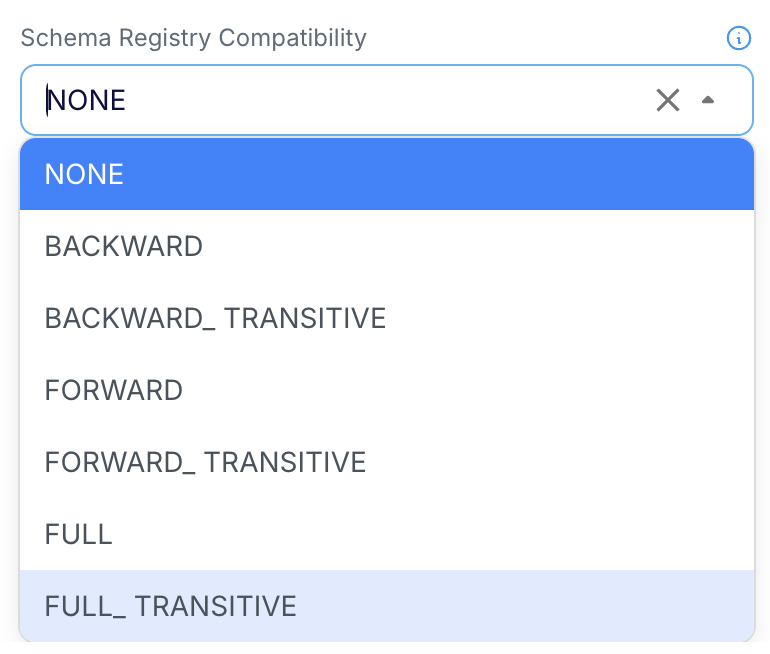 |
By default, the compatibility setting is “None”. All other compatibility modes are supported only with FormatAs: Table and Native. Configuring a compatibility mode through the “SchemaRegistryCompatibility” property will override any existing compatibility setting for the subject in the Schema Registry. The compatibility setting makes more sense when the schema is generated using a wizard, a Database Reader initial load application, the schema conversion tool, or an external tool reflecting all the requirements of schema conversion.
Note : The default compatibility setting in case of confluent schema registry is backward compatibility. Please make sure to change the setting as Striim default is NONE. |
Schema Registry Compatibility settings
DDL operations | NONE | FORWARD | FORWARD TRANSITIVE | BACKWARD | BACKWARD TRANSITIVE | FULL | FULL TRANSITIVE |
|---|---|---|---|---|---|---|---|
CREATE TABLE (Initial Schema) | ✓ | ✓ | ✓ | ✓ | ✓ | ✓ | ✓ |
ADD Nullable Column | ✓ | ✓ | ✓ | ✓ | ✓ | ✓ | ✓ |
ADD Non Nullable Column | ✓ | ✓ | ✓ | ||||
DROP Nullable Column | ✓ | ✓ | ✓ | ✓ | ✓ | ✓ | ✓ |
DROP Non Nullable Column | ✓ | ✓ | ✓ | ||||
MODIFY Datatype (Lower Type to Higher Type) of Nullable Column | ✓ | ✓ | ✓ | ||||
MODIFY Datatype (Higher Type to Lower Type) of Nullable Column | ✓ | ✓ | ✓ | ||||
MODIFY Datatype (Lower Type to Higher Type) of Non Nullable Column | ✓ | ✓ | ✓ | ||||
MODIFY Datatype (Higher Type to Lower Type) of Non Nullable Column | ✓ | ✓ | ✓ | ||||
MODIFY Column from Nullable -> Non Nullable | ✓ | ✓ | ✓ |
Schema Evolution: Manual
On receiving a DDL event the adapter flushes all pending events and then halts gracefully, stopping further processing.
Recovering after a halt due to Schema Evolution: Manual
When an application halts due to encountering a halt due to Schema Evolution being set to Manual, proceed with one of the following options to recover from it.
Process schema evolution automatically
You can allow Striim to handle the schema evolution automatically by changing the Schema Evolution setting to Auto and restarting the application.
Handle schema evolution externally
Alternatively, you can manually manage the schema evolution by registering the updated schema directly in the Schema Registry. In this case, it is your responsibility to ensure that the new schema is registered as the latest version in the schema registry. See Initial schema creation using external tools for more details on the rules to be followed while registering the schemas externally.
Since the DDL change has already been manually applied to the target, it should not be propagated through the target again. To achieve this, use controlled CQ to skip the corresponding DDL event. On restart make sure that the events matching to the latest schema version flows through the pipeline.
Example :
If the application halts due to Schema Evolution being set to Manual with the following exception message :
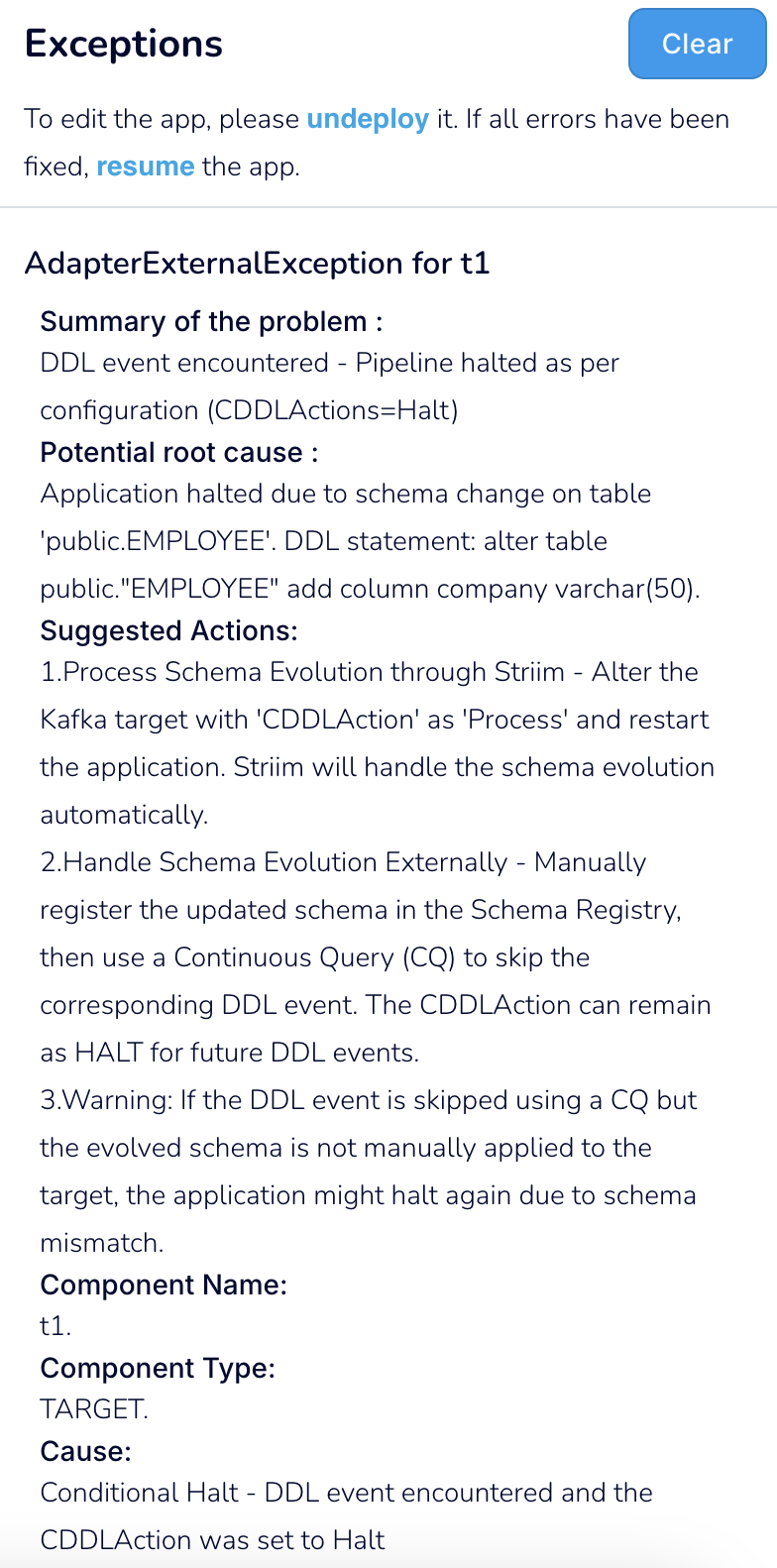 |
The following CQ template can be used to skip the specific DDL event :
SELECT i
FROM inputstream i
WHERE NOT (
  TO_STRING(META(i, 'OperationType')) = 'DDL' AND
  TO_STRING(META(i, 'TableName')) = 'public.EMPLOYEE' AND
  TO_JSON_NODE(META(i, 'CDDLMetadata')).get('sql').asText() = 'alter table public."EMPLOYEE" add column company varchar(50)'
);
The TableName and DDLStatement can be extracted from the Exception message.
Note : Schema Evolution can still be set to Manual. This ensures that any future DDL events requiring manual intervention will halt the application, providing controlled schema evolution. |
Upon restart, the CQ filters out the DDL event and the Kafka Writer picks up the latest version of schema from the schema registry and uses it for processing further DML events seamlessly.
Note : If the DDL event is skipped using a CQ but the evolved schema is not manually applied to the target, the application will halt with a Schema Mismatch Exception or potentially experience data loss. |