Administrative tasks supported in Striim Developer
Handling planned DDL changes
If your application supports Handling schema evolution, that may be a preferable approach to handling DDL changes.
Otherwise, if recovery was enabled for the application when it was started, follow these steps.
Stop the source database (or use some other method to ensure that nothing is written to the tables read by Striim).
QUIESCE the Striim application and wait until its status is Quiesced.
Perform the DDL changes in the source database.
If required by those DDL changes, ALTER and RECOMPILE the Striim application.
Start the source database.
Start the Striim application.
Understanding and managing backpressure
In Striim applications, the output of an "upstream" component is connected to the input of a "downstream" component by a stream. The two components may process data at different speeds: for example, a Database Reader source might be able to read data from an on-premise database faster than Database Writer can write it to a target database in the cloud.
The streams that connect these components can hold only a certain number of events. When a stream reaches its limit, it can not accept further events. This condition is known as backpressure. This inability to accept events from upstream components increases the risk of the upstream sources developing backpressure in turn.
Identifying backpressure
Backpressured streams are rendered in red in the Striim web GUI, as in this example image:
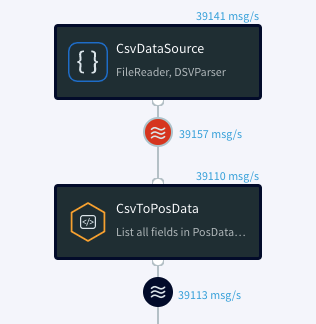
You can use the Latency report to identify the downstream component causing the backpressure. See Using the REPORT LATENCY command for details.
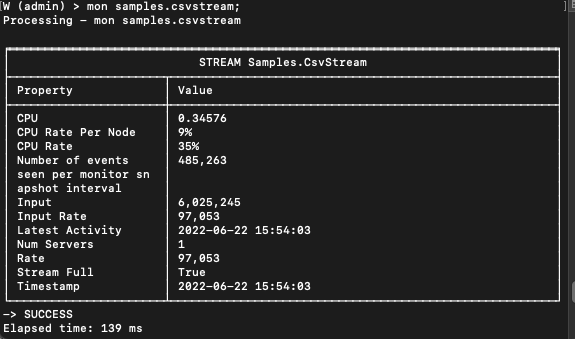
In the Tungsten console, use the mon <streamname> command to check the value of the Stream Full parameter. A stream in a backpressure condition has the value of Stream Full set to true.
Reducing backpressure
Backpressure reduction strategies depend on the particular structure of the flow in place and the nature of the sources, targets, other components, and streams connecting them. The event processing speed of the target can be increased by assigning more CPU resources. Alternately, the stream coming from the source can be divided among several identical targets working in parallel. See Creating multiple writer instances (parallel threads) for details.
For some targets, adjusting the batch, flush, or upload policies can help manage backpressure. See File Writer for details.
Query code inefficiencies in a CQ stream can slow processing, leading to backpressure. Examine the code of backpressured CQ streams to find optimizations, such as dropping fields that are not used by downstream operations.
Changing the size of a window can sometimes reduce backpressure.
Recovering applications
When an application is created with recovery enabled, it tracks the progress of processing so that it can restart near where it left off. Striim remembers the restart position if the app is stopped, quiesced, undeployed, or halts or terminates. Striim discards the restart position when an app is dropped, so it will not restart from that position if the app is recreated.
For recovery during initial load using Database Reader, see Fast Snapshot Recovery during initial load.
Subject to the following limitations, Striim applications can be recovered after planned downtime or most cluster failures with no loss of data:
Recovery must have been enabled when the application was created. See CREATE APPLICATION ... END APPLICATION or Creating and modifying apps using the Flow Designer.
Note
Enabling recovery will have a modest impact on memory and disk requirements and event processing rates, since additional information required by the recovery process is added to each event.
All sources and targets to be recovered, as well as any CQs, windows, and other components connecting them, must be in the same application. Alternatively, they may be divided among multiple applications provided the streams connecting those applications are persisted to Kafka (see Persisting a stream to Kafka and Using the Forwarding Agent).
Data from a CDC reader with a Tables property that maps a source table to multiple target tables (for example,
Tables:'DB1.SOURCE1,DB2.TARGET1;DB1.SOURCE1,DB2.TARGET2') cannot be recovered.Data from time-based windows that use system time rather the
ON <timestamp field name>option cannot be recovered.HTTPReader, MongoDB Reader when using transactions and reading from the oplog, MultiFileReader, TCPReader, and UDPReader are not recoverable. (MongoDB Reader is recoverable when reading from change streams or not using transactions.) You may work around this limitation by putting these readers in a separate application and making their output a Kafka stream (see Introducing Kafka streams), then reading from that stream in another application.
WActionStores are not recoverable unless persisted (see CREATE WACTIONSTORE).
Data from sources using an HP NonStop reader can be recovered provided that the AuditTrails property is set to its default value,
merged.Caches are reloaded from their sources. If the data in the source has changed in the meantime, the application's output may be different than it would have been.
Each Kinesis stream may be written to by only one instance of Kinesis Writer.
Recovery will fail when KinesisWriter target has 250 or more shards. The error will include "Timeout while waiting for a remote call on member ..."
If it is necessary to modify the Containers, Object Filter, Object Name Prefix, Tables, or Wildcard property in a source in an application with recovery enabled, export the application to TQL, drop it, make the necessary modifications to the exported TQL, and import the modified TQL to recreate the application.
Duplicate events after recovery; E1P vs. A1P
In some situations, after recovery there may be duplicate events.
Recovered flows that include WActionStores should have no duplicate events. Recovered flows that do not include WActionStores may have some duplicate events from around the time of failure ("at least once processing," also called A1P), except when a target guarantees no duplicate events ("exactly once processing," also called E1P). See Writers overview for details of A1P and E1P support.
ADLSWriterGen2, AzureBlobWriter, FileWriter, HDFSWriter, and S3Writer restart rollover from the beginning and depending on rollover settings (see Setting output names and rollover / upload policies) may overwrite existing files. For example, if prior to planned downtime there were file00, file01, and the current file was file02, after recovery writing would restart from file00, and eventually overwrite all three existing files. Thus you may wish to back up or move the existing files before initiating recovery. After recovery, the target files may include duplicate events; the number of possible duplicates is limited to the Rollover Policy eventcount value.
After recovery, Cosmos DB Writer, MongoDB Cosmos DB Writer, and RedshiftWriter targets may include some duplicate events.
When the input stream for a writer is the output stream from Salesforce Reader, there may be duplicate events after recovery.
Enabling recovery
To enable Striim applications to recover from system failures, specify the RECOVERY option in the CREATE APPLICATION statement. The syntax is:
CREATE APPLICATION <application name> RECOVERY <##> SECOND INTERVAL;
Note
With some targets, enabling recovery for an application disables parallel threads. See Creating multiple writer instances (parallel threads) for details.
For example:
CREATE APPLICATION PosApp RECOVERY 10 SECOND INTERVAL;
With this setting, Striim will record a recovery checkpoint every ten seconds, provided it has completed recording the previous checkpoint. When recording a checkpoint takes more than ten seconds, Striim will start recording the next checkpoint immediately.
When the PosApp application is restarted after a system failure, it will resume exactly where it left off.
While recovery is in progress, the application status will be RECOVERING SOURCES. The shorter the recovery interval, the less time it will take for Striim to recover from a failure. Longer recovery intervals require fewer disk writes during normal operation.
Automatically restarting an application
If known transient conditions such as network outages cause an application to terminate, you may configure it to restart automatically after a set period of time. The syntax is:
CREATE APPLICATION <name> AUTORESUME [ MAXRETRIES <integer> ] [ RETRYINTERVAL <interval in seconds> ];
The default values are two retries with a 60-second interval before each. Thus CREATE APPLICATION MyApp AUTORESUME; means that if MyApp terminates, Striim will wait one minute and restart it. If MyApp terminates a second time, Striim will again wait one minute and restart it, If MyApp terminates a third time, Striim will leave it in the TERMINATED state.
Caution
Be sure to set the RETRYINTERVAL high enough that the transient condition should have resolved itself and, if recovery is enabled, to also allow Striim enough time to recover the application (see Recovering applications).
To disable auto-resume, stop (or quiesce) and undeploy the application, then enter ALTER APPLICATION <name> DISABLE AUTORESUME;. To enable auto-resume again, undeploy the app and enter ALTER APPLICATION <name> ENABLE AUTORESUME, optionally including MAXRETRIES or RETRYINTERVAL.
You may also configure auto-resume settings in Flow Designer's App Settings.
Tip
If you enable auto-resume for an application, consider configuring a terminate alert for it as well (see System-level alerts).