
Validation Pair Comparison Lifecycle

When you launch a Validation Run, Validata will launch a comparison for every Validation Pair in the Validation configuration. A Validation Pair can transition through different states as part of its comparison lifecycle.
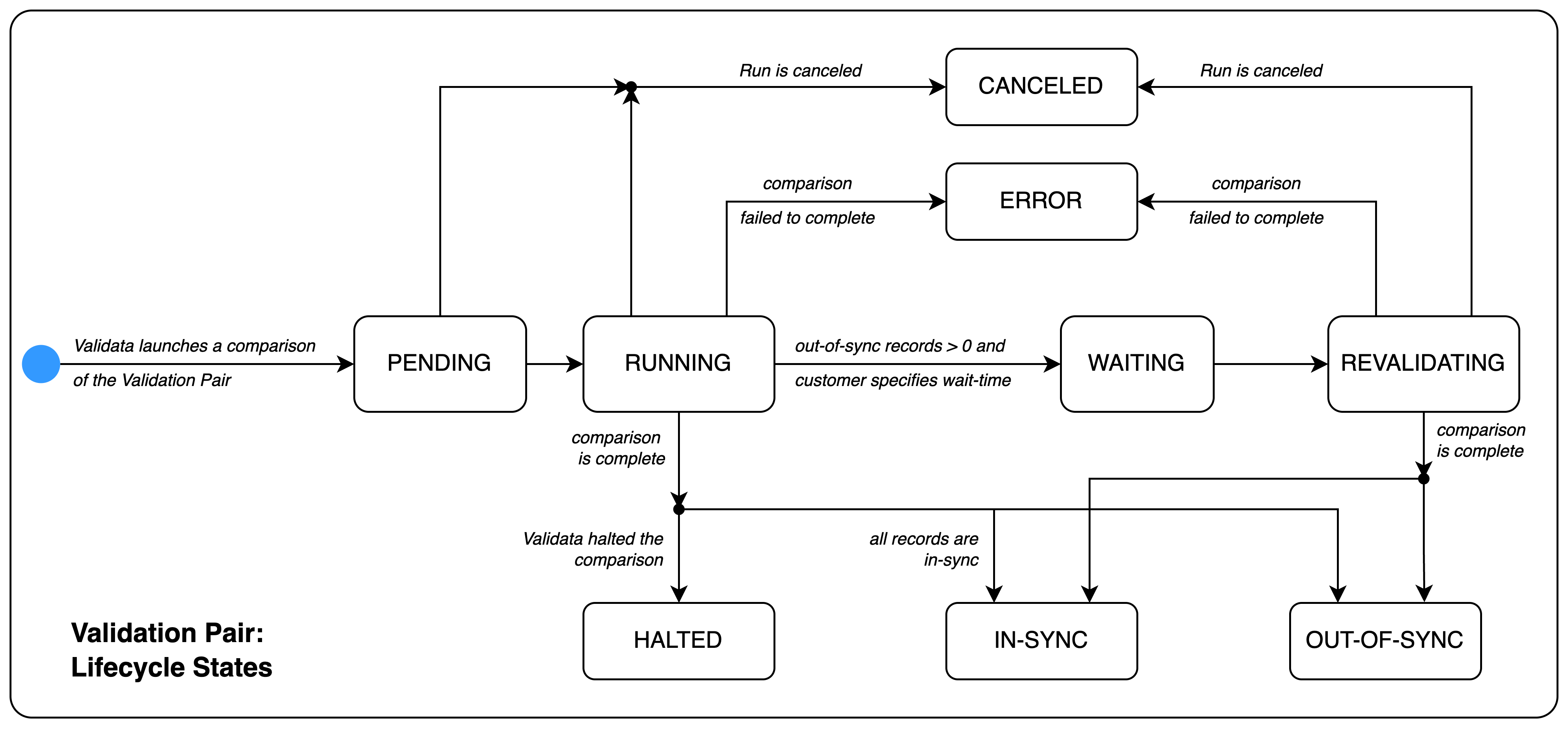
Validata_Concepts_ValidationPair_LifecycleStates.png

The states of a Validation Pair comparison are as follows:

Operational state

Description

PENDING

  • The Validation Pair is queued and waiting to be evaluated.

  • Transition:

    • The Validation Pair transitions to RUNNING when the comparison begins.

  • Interruption:

    • If the Validation Run is canceled, the Validation Pair transitions to CANCELED (terminal state).

RUNNING

  • Validata is comparing the Source and Target tables as defined in the Validation configuration.

  • Successful completion:

    • If the tables are identical, the Validation Pair transitions to IN-SYNC (terminal state).

    • If the tables are not identical:

      • If the out-of-sync rate meets the threshold for halting the Validation Pair comparisons, the Validation Pair transitions to HALTED (terminal state).

      • If revalidation is enabled, the Validation Pair transitions to WAITING.

      • If revalidation is disabled, the Validation Pair transitions to OUT-OF-SYNC (terminal state).

  • Interruption:

    • If the comparison is interrupted by external factors (e.g., network loss, resource lack), the Validation Pair transitions to ERROR (terminal state).

    • If the Validation Run is canceled, the Validation Pair transitions to CANCELED (terminal state).

WAITING

  • The initial comparison has completed, and the Validation Pair is waiting the configured Wait-time to Revalidation before starting the revalidation phase.

  • Transition:

    • Upon completion of the wait time, the Validation Pair transitions to REVALIDATING.

  • Interruption:

    • If the comparison is interrupted by external factors (e.g., network loss, resource lack), the Validation Pair transitions to ERROR (terminal state).

    • If the Validation Run is canceled, the Validation Pair transitions to CANCELED (terminal state).

    • Note: The transitions from WAITING to ERROR or CANCELED are not shown in the diagram above.

REVALIDATING

  • Validata is rechecking only those records that were Out-of-Sync after the initial validation (RUNNING) phase

  • Successful completion:

    • If the Source and Target tables are identical after revalidation, the Validation Pair transitions to IN-SYNC (terminal state).

    • If the tables are not identical, the Validation Pair transitions to OUT-OF-SYNC (terminal state).

  • Interruption:

    • If the comparison is interrupted by external factors, the Validation Pair transitions to ERROR (terminal state).

    • If the Validation Run is canceled, the Validation Pair transitions to CANCELED (terminal state).

Terminal (final) states

Description

IN-SYNC

  • Validata has completed the comparison and determined that the Source and Target tables are identical according to the Validation configuration.

OUT-OF-SYNC

  • Validata has completed the comparison and found differences between the Source and Target tables.

  • The final outcome of the Validation Pair is one of:

    • OUT-OF-SYNC: CONTENT MISMATCH

    • OUT-OF-SYNC: EXTRA IN SOURCE

    • OUT-OF-SYNC: EXTRA IN TARGET

HALTED

  • Validata has stopped the comparison early because the Out-of-Sync rate exceeded the configured halt threshold for the Validation Pair.

  • If Revalidation is enabled, the Validation Pair comparison will halt before the Revalidation phase.

ERROR

  • The comparison was interrupted due to an unrecoverable external factor, such as loss of network connectivity or insufficient server resources.

CANCELED

  • The Validation Run was canceled by the user before Validata could complete the comparison for this Validation Pair.

  • Note: A Validation Pair cannot be canceled directly—only the overall Validation Run can be canceled.